
Solved Phantom removable drives

jokdom

New member
Local time
10:45 PM
Messages
32
Location
Philippines
Running Win 7 x64 Ultimate, SP1 installed from this forum.

I hate asking stupid questions. It's embarrassing to get answers I should already know. So I tried to search first for this topic on this forum.

Out of 17 selections offered me only one was vaguely appropriate.

Is this a sad state of a search engine or a searcher?
I'm amazed that there is so little data. I could not be the only one with this issue. Oh well on to the problem.

It is a nuisance really.
I have phantom removable drives I:, J:, K: and L:
They show only in "My computer"

I do not have Office 2010 beta installed.

I have two esata drives connected with their power off. I disconnected their esasta cables just in case.
I have no floppy and removed it from the bios.

Rebooted and still have the phantoms.

Is it just me or have others experienced the same issue?

Any help will be appreciated.
 

My Computer

Computer Manufacturer/Model Number
My #3 Build
OS
WIN 7 Ultimate x64
CPU
i5 2500K Intel Sandy Bridge 3.3 Ghz
Motherboard
ASUS P8P67 ver. 1 B2 stepping
Memory
2 X 4 = 8gb COSAIR XMS3 CMX8GXMMA1600C9
Graphics Card(s)
RADEON HD 5550 SILENT
Sound Card
On board sound
Monitor(s) Displays
SAMSUNG SynchMaster 2493HM
Screen Resolution
1920 x 1200
Hard Drives
OCZ Vertex 2 60 GB Boot,
RAPTOR 150 GB, Data/Storage,
Seagate 1.5 TB in an Antec MX100 esata/usb2 case.
WD Caviar Black 2 TB in an Antec MX100 esata/usb2 case.
PSU
Thermaltake TP_675AH3CC
Case
Thermaltake V4 Black Addition Mid Tower
Cooling
Intel stock cooler
Keyboard
Plain Jane
Mouse
Logitech MX620
Internet Speed
.500 - 1.5 Mbps
Other Info
Added 4 port sata 3G card as workaround to Series 6 problem.
Hi,

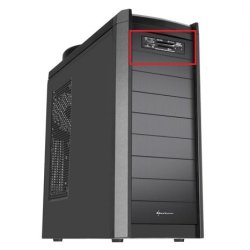
Does your machine have a multi SD card reader installed? If so then that'll be what the drives are, 1 for each reader.

It'll be similar to the image below...

Sharkoon-Bandit-Mid-Tower-PC-Case-Front.jpg


OS
 

My Computer

Computer Manufacturer/Model Number
Compaq Desktop
OS
Windows 7 Ultimate x64
CPU
AMD Sempron Dual Core
Memory
3GB
Graphics Card(s)
NVIDIA GeForce 6150SE nForce 430
Screen Resolution
1024x768
Hard Drives
150GB Sata
Right on Orbital Shark.

See I told you I should have known that!!!

On this new build I installed a 5.25" front panel multi duohicky device to get front panel USB and esata connections. It came with a multi-card reader that I ignored as this function was not needed. I thought I only hooked up the USB and sata ports.

As soon as you mentioned "card reader" the light bulb turned on. I slid in a sandisk and sure enough drive I: reads the label I have affixed to the sandisk.

That deserves a rep. How do I do that?


By the way-- can you help me with a punched tape bootstrap so I can light off this PDP8? Just kidding.
Computers have come a long way have they not?
And so much further to go!!

Thanks.

P.S. That multi front panel did not come with an esata
port but with a sata port. Got some sata to esata cables coming. Next I need to get front panel USB3 and sataIII.
 

My Computer

Computer Manufacturer/Model Number
My #3 Build
OS
WIN 7 Ultimate x64
CPU
i5 2500K Intel Sandy Bridge 3.3 Ghz
Motherboard
ASUS P8P67 ver. 1 B2 stepping
Memory
2 X 4 = 8gb COSAIR XMS3 CMX8GXMMA1600C9
Graphics Card(s)
RADEON HD 5550 SILENT
Sound Card
On board sound
Monitor(s) Displays
SAMSUNG SynchMaster 2493HM
Screen Resolution
1920 x 1200
Hard Drives
OCZ Vertex 2 60 GB Boot,
RAPTOR 150 GB, Data/Storage,
Seagate 1.5 TB in an Antec MX100 esata/usb2 case.
WD Caviar Black 2 TB in an Antec MX100 esata/usb2 case.
PSU
Thermaltake TP_675AH3CC
Case
Thermaltake V4 Black Addition Mid Tower
Cooling
Intel stock cooler
Keyboard
Plain Jane
Mouse
Logitech MX620
Internet Speed
.500 - 1.5 Mbps
Other Info
Added 4 port sata 3G card as workaround to Series 6 problem.
Yep, they're the card readers slot, I too have them:

Capture.JPG

That deserves a rep. How do I do that?

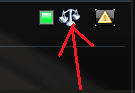
Click the scales icon besides his name:

Capture.PNG
 

My Computer

Computer Manufacturer/Model Number
HCL
OS
Winbdows 7 ultimate x64 | Ubuntu 12.04 x64 LTS
CPU
Core 2 Duo e7400 @ 2.90GHz
Motherboard
Gigabyte G31M-ES2L
Memory
3GB DDR2
Graphics Card(s)
Asus Nvidia GTX 560Ti 1GB
Sound Card
On-board
Monitor(s) Displays
HCL eZeeBee 18.5" LCD
Screen Resolution
1366x768 @ 60Hz
Hard Drives
Western Digital 320GB
PSU
Corsair CX500 V2 500W
Cooling
Stock
Keyboard
Stock
Mouse
Stock
Internet Speed
15-25kBps D/L | 10kBps U/L | Hey Don't laugh

My Computer

Computer type
PC/Desktop
Computer Manufacturer/Model Number
Self built custom
OS
64-bit Windows 11 Pro for Workstations
CPU
Intel i7-8700K OC'd to 5 GHz
Motherboard
ASUS ROG Maximus XI Formula Z390
Memory
64 GB (4x16GB) G.SKILL TridentZ RGB DDR4 3600 MHz
Graphics Card(s)
ASUS ROG-STRIX-GTX1080TI-O11G-GAMING
Sound Card
Integrated
Monitor(s) Displays
2 x Samsung Odyssey G7 27"
Screen Resolution
2560x1440
Hard Drives
1TB Samsung 990 PRO M.2,
4TB Samsung 990 PRO PRO M.2,
TerraMaster F8 SSD Plus NAS
PSU
Seasonic Prime Titanium 850W
Case
Thermaltake Core P3
Cooling
Corsair Hydro H115i
Keyboard
Logitech wireless K800
Mouse
Logitech MX Master 4
Internet Speed
2 Gb/s Download and 100 Mb/s Upload
Antivirus
Malwarebyte Anti-Malware Premium
Browser
Google Chrome
Other Info
Logitech Z625 speaker system,
Logitech BRIO 4K Pro webcam,
HP Color LaserJet Pro MFP M477fdn,
APC SMART-UPS RT 1000 XL - SURT1000XLI,
Galaxy S23 Plus phone
You're very welcome jokdom, and please enjoy the rest of the forums :)
 

My Computer

Computer Manufacturer/Model Number
Compaq Desktop
OS
Windows 7 Ultimate x64
CPU
AMD Sempron Dual Core
Memory
3GB
Graphics Card(s)
NVIDIA GeForce 6150SE nForce 430
Screen Resolution
1024x768
Hard Drives
150GB Sata
Hello Jokdom,

In addition, you set Windows 7 to hide these media card reader drives that are empty using the tutorial below. When you plug a card in, the drive will automatically appear again. It's just a feature to help keep down the clutter in the Computer window.

http://www.sevenforums.com/tutorials/6969-drives-hide-show-empty-drives-computer-folder.html

Hope this helps,
Shawn

Thanks Shawn, just what I needed and did not even have to ask for.
Next time I will just think about it and let you reply. That will save me some typing.
 

My Computer

Computer Manufacturer/Model Number
My #3 Build
OS
WIN 7 Ultimate x64
CPU
i5 2500K Intel Sandy Bridge 3.3 Ghz
Motherboard
ASUS P8P67 ver. 1 B2 stepping
Memory
2 X 4 = 8gb COSAIR XMS3 CMX8GXMMA1600C9
Graphics Card(s)
RADEON HD 5550 SILENT
Sound Card
On board sound
Monitor(s) Displays
SAMSUNG SynchMaster 2493HM
Screen Resolution
1920 x 1200
Hard Drives
OCZ Vertex 2 60 GB Boot,
RAPTOR 150 GB, Data/Storage,
Seagate 1.5 TB in an Antec MX100 esata/usb2 case.
WD Caviar Black 2 TB in an Antec MX100 esata/usb2 case.
PSU
Thermaltake TP_675AH3CC
Case
Thermaltake V4 Black Addition Mid Tower
Cooling
Intel stock cooler
Keyboard
Plain Jane
Mouse
Logitech MX620
Internet Speed
.500 - 1.5 Mbps
Other Info
Added 4 port sata 3G card as workaround to Series 6 problem.

LOL, you're most welcome.

Good to know that my alien ESP is still working every once in a while. ;)

I'm glad that we were able to help.
 

My Computer

Computer type
PC/Desktop
Computer Manufacturer/Model Number
Self built custom
OS
64-bit Windows 11 Pro for Workstations
CPU
Intel i7-8700K OC'd to 5 GHz
Motherboard
ASUS ROG Maximus XI Formula Z390
Memory
64 GB (4x16GB) G.SKILL TridentZ RGB DDR4 3600 MHz
Graphics Card(s)
ASUS ROG-STRIX-GTX1080TI-O11G-GAMING
Sound Card
Integrated
Monitor(s) Displays
2 x Samsung Odyssey G7 27"
Screen Resolution
2560x1440
Hard Drives
1TB Samsung 990 PRO M.2,
4TB Samsung 990 PRO PRO M.2,
TerraMaster F8 SSD Plus NAS
PSU
Seasonic Prime Titanium 850W
Case
Thermaltake Core P3
Cooling
Corsair Hydro H115i
Keyboard
Logitech wireless K800
Mouse
Logitech MX Master 4
Internet Speed
2 Gb/s Download and 100 Mb/s Upload
Antivirus
Malwarebyte Anti-Malware Premium
Browser
Google Chrome
Other Info
Logitech Z625 speaker system,
Logitech BRIO 4K Pro webcam,
HP Color LaserJet Pro MFP M477fdn,
APC SMART-UPS RT 1000 XL - SURT1000XLI,
Galaxy S23 Plus phone
LOL, you're most welcome.

Good to know that my alien ESP is still working every once in a while. ;)

I'm glad that we were able to help.


OOOps!!!

Shawn I can not hide the empty removable drives by the methods you pointed me to.

Method (1) will work if I turn off "Show all files and folders". Looks like this button trumps the tick in the
"hide empty removable drives" box. ( I want all hidden files visible)

Method (2) the download program to change register seems to do nothing even though it declares it does.

Method (3) Actual regedit modify HideDrivesWithNoMedia to 0. Log out, Log in, Reboot,
Cold boot. Verified 0 is in that parameter. (It was 1 originally)

Those empty drives still show in the computer folder.

What does your Alien sense tell you about that?

Jim
 

My Computer

Computer Manufacturer/Model Number
My #3 Build
OS
WIN 7 Ultimate x64
CPU
i5 2500K Intel Sandy Bridge 3.3 Ghz
Motherboard
ASUS P8P67 ver. 1 B2 stepping
Memory
2 X 4 = 8gb COSAIR XMS3 CMX8GXMMA1600C9
Graphics Card(s)
RADEON HD 5550 SILENT
Sound Card
On board sound
Monitor(s) Displays
SAMSUNG SynchMaster 2493HM
Screen Resolution
1920 x 1200
Hard Drives
OCZ Vertex 2 60 GB Boot,
RAPTOR 150 GB, Data/Storage,
Seagate 1.5 TB in an Antec MX100 esata/usb2 case.
WD Caviar Black 2 TB in an Antec MX100 esata/usb2 case.
PSU
Thermaltake TP_675AH3CC
Case
Thermaltake V4 Black Addition Mid Tower
Cooling
Intel stock cooler
Keyboard
Plain Jane
Mouse
Logitech MX620
Internet Speed
.500 - 1.5 Mbps
Other Info
Added 4 port sata 3G card as workaround to Series 6 problem.
My Computer

Computer type
PC/Desktop
Computer Manufacturer/Model Number
Self built custom
OS
64-bit Windows 11 Pro for Workstations
CPU
Intel i7-8700K OC'd to 5 GHz
Motherboard
ASUS ROG Maximus XI Formula Z390
Memory
64 GB (4x16GB) G.SKILL TridentZ RGB DDR4 3600 MHz
Graphics Card(s)
ASUS ROG-STRIX-GTX1080TI-O11G-GAMING
Sound Card
Integrated
Monitor(s) Displays
2 x Samsung Odyssey G7 27"
Screen Resolution
2560x1440
Hard Drives
1TB Samsung 990 PRO M.2,
4TB Samsung 990 PRO PRO M.2,
TerraMaster F8 SSD Plus NAS
PSU
Seasonic Prime Titanium 850W
Case
Thermaltake Core P3
Cooling
Corsair Hydro H115i
Keyboard
Logitech wireless K800
Mouse
Logitech MX Master 4
Internet Speed
2 Gb/s Download and 100 Mb/s Upload
Antivirus
Malwarebyte Anti-Malware Premium
Browser
Google Chrome
Other Info
Logitech Z625 speaker system,
Logitech BRIO 4K Pro webcam,
HP Color LaserJet Pro MFP M477fdn,
APC SMART-UPS RT 1000 XL - SURT1000XLI,
Galaxy S23 Plus phone
Jim,

My alien senses tell me you are in a catch 22.

Unfortunately if you want to keep the empty drives hidden, Don't Show hidden files, folders, and drives has to be selected (dotted) as well. :(


That's what I was afraid of. Ive got my choice. Show all files, folders and drives, or hide them.

Back to square one where I started. Cause I chose showing all.

This is where I came in. Maybe wait for SP2.

Thanks again. I learned something.

Learning makes me more stupid. I now know more but realize
more things are there I don't know. Hence -- more stupid!!
 

My Computer

Computer Manufacturer/Model Number
My #3 Build
OS
WIN 7 Ultimate x64
CPU
i5 2500K Intel Sandy Bridge 3.3 Ghz
Motherboard
ASUS P8P67 ver. 1 B2 stepping
Memory
2 X 4 = 8gb COSAIR XMS3 CMX8GXMMA1600C9
Graphics Card(s)
RADEON HD 5550 SILENT
Sound Card
On board sound
Monitor(s) Displays
SAMSUNG SynchMaster 2493HM
Screen Resolution
1920 x 1200
Hard Drives
OCZ Vertex 2 60 GB Boot,
RAPTOR 150 GB, Data/Storage,
Seagate 1.5 TB in an Antec MX100 esata/usb2 case.
WD Caviar Black 2 TB in an Antec MX100 esata/usb2 case.
PSU
Thermaltake TP_675AH3CC
Case
Thermaltake V4 Black Addition Mid Tower
Cooling
Intel stock cooler
Keyboard
Plain Jane
Mouse
Logitech MX620
Internet Speed
.500 - 1.5 Mbps
Other Info
Added 4 port sata 3G card as workaround to Series 6 problem.
LOL, I hear you.
 

My Computer

Computer type
PC/Desktop
Computer Manufacturer/Model Number
Self built custom
OS
64-bit Windows 11 Pro for Workstations
CPU
Intel i7-8700K OC'd to 5 GHz
Motherboard
ASUS ROG Maximus XI Formula Z390
Memory
64 GB (4x16GB) G.SKILL TridentZ RGB DDR4 3600 MHz
Graphics Card(s)
ASUS ROG-STRIX-GTX1080TI-O11G-GAMING
Sound Card
Integrated
Monitor(s) Displays
2 x Samsung Odyssey G7 27"
Screen Resolution
2560x1440
Hard Drives
1TB Samsung 990 PRO M.2,
4TB Samsung 990 PRO PRO M.2,
TerraMaster F8 SSD Plus NAS
PSU
Seasonic Prime Titanium 850W
Case
Thermaltake Core P3
Cooling
Corsair Hydro H115i
Keyboard
Logitech wireless K800
Mouse
Logitech MX Master 4
Internet Speed
2 Gb/s Download and 100 Mb/s Upload
Antivirus
Malwarebyte Anti-Malware Premium
Browser
Google Chrome
Other Info
Logitech Z625 speaker system,
Logitech BRIO 4K Pro webcam,
HP Color LaserJet Pro MFP M477fdn,
APC SMART-UPS RT 1000 XL - SURT1000XLI,
Galaxy S23 Plus phone

My Computer

Computer Manufacturer/Model Number
Home Built
OS
Windows 7 Pro x64 sp1
CPU
AMD Phenom II X6 1090T Black Edition Thuban, OC'd 3.98GHz
Motherboard
MSI 890FXA-GD70
Memory
G.SKILL Ripjaws Series (4 x 4GB) 240-Pin DDR3 1600 SDRAM
Graphics Card(s)
2 - 1GB ATI Radeon HD 5770 Hawks, Crossfired
Sound Card
Built in
Monitor(s) Displays
SamSung SyncMaster 2333HD
Screen Resolution
1680 X 1050
Hard Drives
INTEL SSDSA2M080G2GC
2- WDC WD1002FAEX-00Z3A0
PSU
CORSAIR CMPSU-850TX 850W
Case
LIAN LI PC-7B plus II Black Aluminum ATX Mid Tower
Cooling
Stock AMD
Keyboard
Logitech
Mouse
Logitech
Internet Speed
DSL ~9Mbps
Ahhhh!!! Thought that was too good to be true. Well, at least I can still show files' extensions, which is the main thing I need everyday. Might not be so bad to have to uncheck "Don't show hidden" on those occasions when system maintenance is required.
 

My Computer

Computer Manufacturer/Model Number
Custom
OS
Win7Pro 64bit
CPU
Intel Core 2 Duo E8400, OC'd to 3GHz
Motherboard
Gigabyte GA-EP45T-UD3P
Memory
2G x2 CORSAIR DDR3
Graphics Card(s)
SAPPHIRE 100248L HD3850 512M RT
Monitor(s) Displays
Hannspree
Screen Resolution
1920X1200
Hard Drives
Seagate Barracuda, 465G X2, RAID 0
PSU
PCP - WRCLS61EPS RT
Case
XCLIO Windtunnel ATX full tower, black, 1.0mm SECC
Keyboard
Logitech illuminated
Mouse
Logitech mouseman wheel
Internet Speed
broadband
Back
Top