Phantom SATA drive

jeh

New member
Member
Local time
6:17 AM
Messages
35
Location
Hobart, Tasmania
My Win 7 64-bit system has started reporting that it has a non-existent external device ST31000528ASASA attached. "Devices and Printers" displays the icon for an external HDD. The "device" reports that it's in use and cannot be ejected.

This occurred after my iPhone failed to find a driver when it was first connected to this PC. Reconnection of the iPhone found the correct driver and I've since performed a correct sync. The "device" survives a complete shutdown and subsequent restart. It would be nice to get rid of it. Any ideas anyone? John
 

My Computer

OS
Win 7 Pro
Exactly where is Windows "reporting" this phantom HDD? Device Manager? If so, try uninstalling it from there and see what happens.

The drive model you posted should be a SeaGate HDD, but that model doesn't exist according to a search querie.
 

My Computer

Computer Manufacturer/Model Number
NVIDIA
OS
Windows 7 Enterprise x64
CPU
AMD Athlon 64X2 Dual Core 3800+
Motherboard
GeForce 6100-M9
Memory
OCZ Platinum Dual Channel - 4x1Gb
Graphics Card(s)
NVIDIA GeForce 8800 GT PCI Express x16
Sound Card
Creative Audigy Sound Blaster Extreme PCI
Monitor(s) Displays
Compaq 7500
Screen Resolution
1024x768
Hard Drives
C: Seagate ST3250318AS SataII - 250Gb

D: Seagate ST3500418AS SataII - 500Gb
PSU
OCZ 600w Dual 12v Rails
Case
Thermaltake
Cooling
OCZ Heatsinks, Fans, and Thermal Paste on CPU & Chipsets
Keyboard
Logitech
Mouse
Radio Shack PS2
Internet Speed
Cable
Other Info
Dual Pioneer DVD/RW optical drives. LG CD/RW optical drive.
Thanks MadMaxData. First, I'd mistype thedevice id. It should have been ST31000528ASATA, a 1TB Seagate drive. Device Manager says that's my main HDD, and asks if I want to unistall it. No Way!

The drive is showing up as an ejectable device when I click "Safely Remove Hardware and Eject Media" , one of the normally hidden icons in the Notification Area (aka System Tray). I'm wondering whether something has got mis-set in the registry. I'm reluctant to do a System Restore simply because I've just been through shifting my iPhone sync, via iTunes, from the old computer to this one. Howeevr, Restore may be the only option. I use "Safely Remove Hardware and Eject Media: every day for USB sticks and an external HDD, so having the bad entry there is a pest.
 

My Computer

OS
Win 7 Pro
The removability (if there is such a word) of your harddisk is caused by a storage controller driver update. I can remove every harddisk in my computer if need be, all because I update to the latest NVIDIA storage controller driver... To me, it's not a "pest", but a minor convenience, if I suddenly ejected a system disk, then there would be trouble... But so far so good... :)

zzz2496

P.s: In Nvidia, it's called "Media Shield" or something....
 

My Computer

Computer Manufacturer/Model Number
Self Built
OS
Windows7 Ultimate 64bit
CPU
Intel Core 2 Quad Q6600
Motherboard
Abit IN9-32X-MMAX
Memory
DDR2 Adata 4GB
Graphics Card(s)
Nvidia GeForce GTX 285 1024 and Nvidia GeForce 8800GT 512
Sound Card
Asus Xonar HDAV 1.3
Monitor(s) Displays
Dell 2407WFP and BenQ 2400v and Philips 150v3
Screen Resolution
3840x1200 and 1024x768
Hard Drives
2 WDC 1TB
1 WDC 1.5TB
1 WDC 640GB
1 WDC 320GB
1 Seagate 200GB
PSU
Corsair TX 850W
Case
Cooler Master HAF932
Cooling
Arctic Cooling Freezer Extreme and plenty of fans...
Keyboard
MicrosoftNaturalKeyboard 4000/Apple Alu keyboard/Dinovo mini
Mouse
Logitech G5/MarbleMouseTrackball/PerformanceMX/SpacePilotPRO
Internet Speed
1.5Mbps down/384Kbps up
Other Info
APC SURT 1000XL
Logitech Z-560
Wiimote
Mikrotik Router
Linksys (now Cisco) SD2008 8 port Gigabit switch
Linksys WRT54G (acting as AP)
Apple wireless Aluminium keyboard
Apple Magic Mouse
Xbox360 wired controller
Thanks MadMaxData. First, I'd mistype thedevice id. It should have been ST31000528ASATA, a 1TB Seagate drive. Device Manager says that's my main HDD, and asks if I want to unistall it. No Way!

The drive is showing up as an ejectable device when I click "Safely Remove Hardware and Eject Media" , one of the normally hidden icons in the Notification Area (aka System Tray). I'm wondering whether something has got mis-set in the registry. I'm reluctant to do a System Restore simply because I've just been through shifting my iPhone sync, via iTunes, from the old computer to this one. Howeevr, Restore may be the only option. I use "Safely Remove Hardware and Eject Media: every day for USB sticks and an external HDD, so having the bad entry there is a pest.
Okay, well, I'm going to need some more information from you before we preceed any further. You haven't filled out your system specs, so I'm working blind here. Please list all the HDD's you have installed on this machine, and any removeable media you have installed. Is the ST31000528ASATA SeaGate drive an external drive, or an internal drive, and what is the interface type [SATA, or USB]. Is it your main operating system drive [C:\] or a storage drive? Do you see where I'm going with this? I need to know everything you can tell me about your hardware environment. Perhaps you can provide a screenshot of Device Manager with all the dropdowns expanded? And if you could add a screenshot of the Disk Management section of Computer Management, it sure would be helpful.

You were smart not to mess with anything if Device Manager is telling you it's your main operating system drive. Please give me as much info as you can, and we'll get this figured out no problem, Bro. ;)


*EDIT*
Found that drive model, but the last three letters [ATA] shouldn't be there in Device Manager [unless there's a space between the last three letters]. This sounds like a driver issue at first glance, but I still need the info I asked for. Make sure ALL connections on the HDD are nice and tight first [check with machine powered off].

Max
 

My Computer

Computer Manufacturer/Model Number
NVIDIA
OS
Windows 7 Enterprise x64
CPU
AMD Athlon 64X2 Dual Core 3800+
Motherboard
GeForce 6100-M9
Memory
OCZ Platinum Dual Channel - 4x1Gb
Graphics Card(s)
NVIDIA GeForce 8800 GT PCI Express x16
Sound Card
Creative Audigy Sound Blaster Extreme PCI
Monitor(s) Displays
Compaq 7500
Screen Resolution
1024x768
Hard Drives
C: Seagate ST3250318AS SataII - 250Gb

D: Seagate ST3500418AS SataII - 500Gb
PSU
OCZ 600w Dual 12v Rails
Case
Thermaltake
Cooling
OCZ Heatsinks, Fans, and Thermal Paste on CPU & Chipsets
Keyboard
Logitech
Mouse
Radio Shack PS2
Internet Speed
Cable
Other Info
Dual Pioneer DVD/RW optical drives. LG CD/RW optical drive.
Thanks MadMaxData. Apologies for the slow reply - time zone, plus being out last night and this morning.

My computer is a little over 3 months old. Win 7 Pro installed by the supplier. A single internal 1 TB HDD, which Device Manager lists as ST31000528AS ATA (you're right about the space). It hosts the C: drive.
There's also the usual internal CD-DVD drive. No floppies. Two front USB ports, which I use for an external IOMEGA drive (several years old), USB sticks and to sync my iPhone. (Obviously, only two of these at any one time). All three of these devices have been used in the past three days. None of the devices are attached at present.

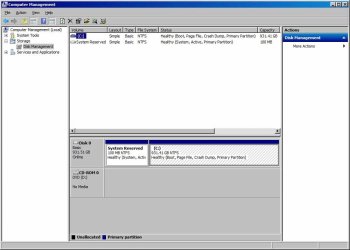
I'm attaching a screen shot of Device Manager, with all boxes expanded except system devices (do you need those too?) and of the Disk Management section of Computer Management (which doesn't seem to tell me much)
Cheers John
 

Attachments

  • SS1.jpg
    SS1.jpg
    53.8 KB · Views: 15
  • SS2.jpg
    SS2.jpg
    69.3 KB · Views: 11

My Computer

OS
Win 7 Pro
Everything looks fine in the screenshots. You said in the opening post...

My Win 7 64-bit system has started reporting that it has a non-existent external device ST31000528ASASA attached. "Devices and Printers" displays the icon for an external HDD. The "device" reports that it's in use and cannot be ejected.
It appears that your system has recognized your internal HDD with a different model number than it actually should have [ST31000528AS ASA instead of ST31000528AS ATA]. Many times this is caused by a bad connection with the IDE cable. Did you power down the machine and try to reseat the cable like I asked you to? If that doesn't fix it, then go into "Devices and Printers" and remove the device. It will be safe to do so, and won't mess with your main OS drive at all.

Let me know if these steps work, and if not, we'll go from there. This problem doesn't appear to be serious, so don't sweat it.
 

My Computer

Computer Manufacturer/Model Number
NVIDIA
OS
Windows 7 Enterprise x64
CPU
AMD Athlon 64X2 Dual Core 3800+
Motherboard
GeForce 6100-M9
Memory
OCZ Platinum Dual Channel - 4x1Gb
Graphics Card(s)
NVIDIA GeForce 8800 GT PCI Express x16
Sound Card
Creative Audigy Sound Blaster Extreme PCI
Monitor(s) Displays
Compaq 7500
Screen Resolution
1024x768
Hard Drives
C: Seagate ST3250318AS SataII - 250Gb

D: Seagate ST3500418AS SataII - 500Gb
PSU
OCZ 600w Dual 12v Rails
Case
Thermaltake
Cooling
OCZ Heatsinks, Fans, and Thermal Paste on CPU & Chipsets
Keyboard
Logitech
Mouse
Radio Shack PS2
Internet Speed
Cable
Other Info
Dual Pioneer DVD/RW optical drives. LG CD/RW optical drive.
Thanks again. I've done as you suggested; completely powered down the computer and then unplugged both cables from the internal HDD. Plugged the cables back in, powered the computer back up - no change.
For your second suggestion, "Devices and Printers" (under Control Panel) offers to Eject (not Remove) the device, but then says that the device is in use and cannot be ejected. Did you mean the entry under "Device Manager > Disk Drives"? That offers me the option to Uninstall (not remove). That sounds very unsafe and I've not done so, pending further advice.
As you say, it's not a serious problem - just an annoying one.
John
 

My Computer

OS
Win 7 Pro
Back
Top