
phantom system restore points?

jchap1590

New member
Member
Local time
9:39 AM
Messages
56
I have 2 drives setup in my System Protection; C: (OS - Windows 7 Pro, 64bit) and F: (file storage)

the scheduled task to create restore points is set with the following triggers: on connection to (any) user session, on idle, and on startup. now, I don't restart this machine often and as I'm the only user I also don't log out/in often either. but the machine DOES idle at the very least once a day.

the task history suggests it has been (successfully) triggered and completed 4 times in the last 24 hours alone, but my most recent available restore point is from 3 days ago.. where are my restore points going?

I'll attach my exported SR scheduled task, but the only attributes I altered were the triggers and uncheck "only run on AC power" and "only start if idle for". I assume setting that last one will trigger the task immediately after the PC becomes idle, unless I've missed something and that's my issue.

I would appreciate any insight, I've never encountered this before
 

Attachments

Last edited:

My Computer

Computer type
PC/Desktop
Computer Manufacturer/Model Number
Custom Build
OS
Windows 7 Professional, 64-bit
CPU
Intel Pentuim G3258
Motherboard
EVGA Z97 Stinger Core 3D LGA1150 mITX
Memory
Crucial Ballistix Elite DDR3 2x4GB 1866MHz C9
Graphics Card(s)
MSI Radeon R9 270X Gaming 2G ITX
Hard Drives
Samsung 840 EVO, 250GB
PSU
EVGA SuperNOVA 650 G1
Case
Bitfenix Prodigy ITX, Orange
Cooling
EVGA ACX mITX CPU Cooler
Other Info
https://drive.google.com/file/d/0B8di0b5mIKEYYVMtTVNNQ0cyd1E/view?usp=sharing

My Computer

Computer type
PC/Desktop
Computer Manufacturer/Model Number
Own build (new) Desk1 / Asus ROG Win 7 / Desk2 1st build
OS
Desk1 7 Home Prem / Desk2 10 Pro / Main lap Asus ROG 10 Pro 2 laptop Toshiba 7 Pro Asus P2520 7 & 10
CPU
Desk1 i5 3750K / Laptop i7 GTX 860M / Desk2 i5 2500
Motherboard
Desk1 Asus P877-V / Desk2 Gigabyte H67 UD3H / Laptop ?
Memory
Desk1 8GB (1866) / Desk2 16GB (1333) / Laptop 8Gb DDR3
Graphics Card(s)
Desk 1& 2NVidia GTX 650 & Laptops on board Intel
Sound Card
Desk 1 & 2 -XONAR DG Realtek High Def audio Laptop
Monitor(s) Displays
Desk 1 Benq HD 2450 / Desk2 Philips 24" / Laptop 17.5"
Screen Resolution
1920x1080 D1 & D2 & Laptop 1
Hard Drives
Desk1 Samsung 120GB 830 SSD
Asus ROG 256GB 850 Pro SSD
Desk2 Samsung 840 256 SSD
Toshiba 120GB EVO
PSU
Desk 1 Corsair HX 1050/ Laptop ? / Desk 2 Corsair HX 650
Case
Desk 1 Cooler HAF XM ? Toshiba laptop / Desk2 Coolermaster
Cooling
Fans on all Desk1 -2 Desk2 - all Coolermasters 5 Laptop ?
Keyboard
Desk 1 MS Sidewinder X6 Desk 2 MS Sidewinder X 4
Mouse
Desk 1&2 - Gigabyte MS 900 gamer - laptop - Logitec wireless
Internet Speed
ADSL2+
Other Info
One other Desktop (tester) and spare Toshba laptop both with SSD's
Running Kaspersky 2016 ISS on all machines config'd identically
Logitec audio stereo systems on each machine (x3)
Canon MG5250MFC
Router/modem TP-Link running WPA2SK
jchap mate I am just curious as to why the restore points are being triggered so often is it just that you want it set that way?

Anyway have you tried the sfc and chkdsk yet? if not then try running them as a starting point at least

check disk and SFC both came back empty handed

I have them set to be triggered so much because I'm playing around with robocopy and need frequent points I can restore from

EDIT: it seems like restore points ARE being created before installing Windows updates and/or applications and when creating a system image for scheduled backups. I can manually create a system restore point under the system protection settings, but I cannot force a restore point to be created by manually running the scheduled task even though it says it completes successfully.
 

My Computer

Computer type
PC/Desktop
Computer Manufacturer/Model Number
Custom Build
OS
Windows 7 Professional, 64-bit
CPU
Intel Pentuim G3258
Motherboard
EVGA Z97 Stinger Core 3D LGA1150 mITX
Memory
Crucial Ballistix Elite DDR3 2x4GB 1866MHz C9
Graphics Card(s)
MSI Radeon R9 270X Gaming 2G ITX
Hard Drives
Samsung 840 EVO, 250GB
PSU
EVGA SuperNOVA 650 G1
Case
Bitfenix Prodigy ITX, Orange
Cooling
EVGA ACX mITX CPU Cooler
Other Info
https://drive.google.com/file/d/0B8di0b5mIKEYYVMtTVNNQ0cyd1E/view?usp=sharing
Sorry for late reply mate but my partners has been to surgery today and have been caught up.
Now as this is very strange behaviour I don't think it would do any harm and certainly will not take a lot of time but run these even just to eliminate any obvious malware. They are not real heavy duty scans as such but I find they pick up stuff on my own machines that my trusted Kaspersky doesn't see.

http://www.superantispyware.com/

http://www.malwarebytes.org/products/malwarebytes_free/

http://www.bleepingcomputer.com/download/adwcleaner/

download from bleeping computer – delete any rubbishthese find.
 

My Computer

Computer type
PC/Desktop
Computer Manufacturer/Model Number
Own build (new) Desk1 / Asus ROG Win 7 / Desk2 1st build
OS
Desk1 7 Home Prem / Desk2 10 Pro / Main lap Asus ROG 10 Pro 2 laptop Toshiba 7 Pro Asus P2520 7 & 10
CPU
Desk1 i5 3750K / Laptop i7 GTX 860M / Desk2 i5 2500
Motherboard
Desk1 Asus P877-V / Desk2 Gigabyte H67 UD3H / Laptop ?
Memory
Desk1 8GB (1866) / Desk2 16GB (1333) / Laptop 8Gb DDR3
Graphics Card(s)
Desk 1& 2NVidia GTX 650 & Laptops on board Intel
Sound Card
Desk 1 & 2 -XONAR DG Realtek High Def audio Laptop
Monitor(s) Displays
Desk 1 Benq HD 2450 / Desk2 Philips 24" / Laptop 17.5"
Screen Resolution
1920x1080 D1 & D2 & Laptop 1
Hard Drives
Desk1 Samsung 120GB 830 SSD
Asus ROG 256GB 850 Pro SSD
Desk2 Samsung 840 256 SSD
Toshiba 120GB EVO
PSU
Desk 1 Corsair HX 1050/ Laptop ? / Desk 2 Corsair HX 650
Case
Desk 1 Cooler HAF XM ? Toshiba laptop / Desk2 Coolermaster
Cooling
Fans on all Desk1 -2 Desk2 - all Coolermasters 5 Laptop ?
Keyboard
Desk 1 MS Sidewinder X6 Desk 2 MS Sidewinder X 4
Mouse
Desk 1&2 - Gigabyte MS 900 gamer - laptop - Logitec wireless
Internet Speed
ADSL2+
Other Info
One other Desktop (tester) and spare Toshba laptop both with SSD's
Running Kaspersky 2016 ISS on all machines config'd identically
Logitec audio stereo systems on each machine (x3)
Canon MG5250MFC
Router/modem TP-Link running WPA2SK
Run this command:

vssadmin list shadows

it will show you all restore points
 

My Computer

Computer Manufacturer/Model Number
HP, Dell, Gateway, Toshiba - 4 laptops and 2 desktops
OS
Vista, Windows7, Mint Mate, Zorin, Windows 8
CPU
from 1.6GHz Duo to i7
Monitor(s) Displays
2x HP w2207
Hard Drives
5x HDD, 7x SSD, 12x Externals
Keyboard
with trackball - no mices
Mouse
Trackball mice
Internet Speed
DSL 6000
Sorry for late reply mate but my partners has been to surgery today and have been caught up.
Now as this is very strange behaviour I don't think it would do any harm and certainly will not take a lot of time but run these even just to eliminate any obvious malware. They are not real heavy duty scans as such but I find they pick up stuff on my own machines that my trusted Kaspersky doesn't see.

http://www.superantispyware.com/

http://www.malwarebytes.org/products/malwarebytes_free/

http://www.bleepingcomputer.com/download/adwcleaner/

download from bleeping computer – delete any rubbishthese find.

I'm going to try restoring the system drive back to the last point (5 days ago). I remember now that I was wiping out registry keys to get rid of pesky remnants, maybe I accidentally deleted something pertaining to system restore. I'll try the malware scans if that turns up fruitless.
 

My Computer

Computer type
PC/Desktop
Computer Manufacturer/Model Number
Custom Build
OS
Windows 7 Professional, 64-bit
CPU
Intel Pentuim G3258
Motherboard
EVGA Z97 Stinger Core 3D LGA1150 mITX
Memory
Crucial Ballistix Elite DDR3 2x4GB 1866MHz C9
Graphics Card(s)
MSI Radeon R9 270X Gaming 2G ITX
Hard Drives
Samsung 840 EVO, 250GB
PSU
EVGA SuperNOVA 650 G1
Case
Bitfenix Prodigy ITX, Orange
Cooling
EVGA ACX mITX CPU Cooler
Other Info
https://drive.google.com/file/d/0B8di0b5mIKEYYVMtTVNNQ0cyd1E/view?usp=sharing
Run this command:

vssadmin list shadows

it will show you all restore points

shouldn't that list be exactly the same as the one in the system restore wizard ("show more restore points")? is it possible for them to be out of sync?
 

My Computer

Computer type
PC/Desktop
Computer Manufacturer/Model Number
Custom Build
OS
Windows 7 Professional, 64-bit
CPU
Intel Pentuim G3258
Motherboard
EVGA Z97 Stinger Core 3D LGA1150 mITX
Memory
Crucial Ballistix Elite DDR3 2x4GB 1866MHz C9
Graphics Card(s)
MSI Radeon R9 270X Gaming 2G ITX
Hard Drives
Samsung 840 EVO, 250GB
PSU
EVGA SuperNOVA 650 G1
Case
Bitfenix Prodigy ITX, Orange
Cooling
EVGA ACX mITX CPU Cooler
Other Info
https://drive.google.com/file/d/0B8di0b5mIKEYYVMtTVNNQ0cyd1E/view?usp=sharing
This is the safest method to see all restore points. And yes, the wizard does not always show them all. Why don't you try it - takes only 2 minutes.
 

My Computer

Computer Manufacturer/Model Number
HP, Dell, Gateway, Toshiba - 4 laptops and 2 desktops
OS
Vista, Windows7, Mint Mate, Zorin, Windows 8
CPU
from 1.6GHz Duo to i7
Monitor(s) Displays
2x HP w2207
Hard Drives
5x HDD, 7x SSD, 12x Externals
Keyboard
with trackball - no mices
Mouse
Trackball mice
Internet Speed
DSL 6000
This is the safest method to see all restore points. And yes, the wizard does not always show them all. Why don't you try it - takes only 2 minutes.

it's the same list as in the wizard
 

My Computer

Computer type
PC/Desktop
Computer Manufacturer/Model Number
Custom Build
OS
Windows 7 Professional, 64-bit
CPU
Intel Pentuim G3258
Motherboard
EVGA Z97 Stinger Core 3D LGA1150 mITX
Memory
Crucial Ballistix Elite DDR3 2x4GB 1866MHz C9
Graphics Card(s)
MSI Radeon R9 270X Gaming 2G ITX
Hard Drives
Samsung 840 EVO, 250GB
PSU
EVGA SuperNOVA 650 G1
Case
Bitfenix Prodigy ITX, Orange
Cooling
EVGA ACX mITX CPU Cooler
Other Info
https://drive.google.com/file/d/0B8di0b5mIKEYYVMtTVNNQ0cyd1E/view?usp=sharing
looking at my event log, there are some errors corresponding at roughly the same time the SR is set to run. I had removed all the triggers from the task and added daily schedules so I can tell when a restore point should have been created.

I've attached the event logs for those instances (VDS Basic Provider) but I'm not sure if they pertain to my issue discussed here. the KB article on VDS Basic Provider suggests the error only occurs under a "guest operating system". I'm not even sure what a guest operating system is.

There are other events for 'source: volsnap' which says "the oldest shadow copy was deleted to keep disk usage.. on C: below the user defined limit". I can confirm that the current usage on C: is encroaching upon the limit, but that still doesn't explain why newer restore points are not showing up.

are restore points prioritized at all? maybe it's keeping the restore points created for backups/critical updates and deleting the oldest scheduled restore point? I don't know, I'm taking shots in the dark
 

Attachments

My Computer

Computer type
PC/Desktop
Computer Manufacturer/Model Number
Custom Build
OS
Windows 7 Professional, 64-bit
CPU
Intel Pentuim G3258
Motherboard
EVGA Z97 Stinger Core 3D LGA1150 mITX
Memory
Crucial Ballistix Elite DDR3 2x4GB 1866MHz C9
Graphics Card(s)
MSI Radeon R9 270X Gaming 2G ITX
Hard Drives
Samsung 840 EVO, 250GB
PSU
EVGA SuperNOVA 650 G1
Case
Bitfenix Prodigy ITX, Orange
Cooling
EVGA ACX mITX CPU Cooler
Other Info
https://drive.google.com/file/d/0B8di0b5mIKEYYVMtTVNNQ0cyd1E/view?usp=sharing
This is the safest method to see all restore points. And yes, the wizard does not always show them all. Why don't you try it - takes only 2 minutes.

it's the same list as in the wizard
Good, at least you know now that the data is correct.
 

My Computer

Computer Manufacturer/Model Number
HP, Dell, Gateway, Toshiba - 4 laptops and 2 desktops
OS
Vista, Windows7, Mint Mate, Zorin, Windows 8
CPU
from 1.6GHz Duo to i7
Monitor(s) Displays
2x HP w2207
Hard Drives
5x HDD, 7x SSD, 12x Externals
Keyboard
with trackball - no mices
Mouse
Trackball mice
Internet Speed
DSL 6000
Hmm just on that registry key point mate I always do a back up of the registry directly after a clean install of an OS and before I do ANY changes because there is always the chance you may delete the wrong key/s - so easily done if you are not paying attention or get distracted.
http://www.sevenforums.com/tutorials/4230-registry-backup-restore.html takes about a minute to do - is it worth the risk??
 

My Computer

Computer type
PC/Desktop
Computer Manufacturer/Model Number
Own build (new) Desk1 / Asus ROG Win 7 / Desk2 1st build
OS
Desk1 7 Home Prem / Desk2 10 Pro / Main lap Asus ROG 10 Pro 2 laptop Toshiba 7 Pro Asus P2520 7 & 10
CPU
Desk1 i5 3750K / Laptop i7 GTX 860M / Desk2 i5 2500
Motherboard
Desk1 Asus P877-V / Desk2 Gigabyte H67 UD3H / Laptop ?
Memory
Desk1 8GB (1866) / Desk2 16GB (1333) / Laptop 8Gb DDR3
Graphics Card(s)
Desk 1& 2NVidia GTX 650 & Laptops on board Intel
Sound Card
Desk 1 & 2 -XONAR DG Realtek High Def audio Laptop
Monitor(s) Displays
Desk 1 Benq HD 2450 / Desk2 Philips 24" / Laptop 17.5"
Screen Resolution
1920x1080 D1 & D2 & Laptop 1
Hard Drives
Desk1 Samsung 120GB 830 SSD
Asus ROG 256GB 850 Pro SSD
Desk2 Samsung 840 256 SSD
Toshiba 120GB EVO
PSU
Desk 1 Corsair HX 1050/ Laptop ? / Desk 2 Corsair HX 650
Case
Desk 1 Cooler HAF XM ? Toshiba laptop / Desk2 Coolermaster
Cooling
Fans on all Desk1 -2 Desk2 - all Coolermasters 5 Laptop ?
Keyboard
Desk 1 MS Sidewinder X6 Desk 2 MS Sidewinder X 4
Mouse
Desk 1&2 - Gigabyte MS 900 gamer - laptop - Logitec wireless
Internet Speed
ADSL2+
Other Info
One other Desktop (tester) and spare Toshba laptop both with SSD's
Running Kaspersky 2016 ISS on all machines config'd identically
Logitec audio stereo systems on each machine (x3)
Canon MG5250MFC
Router/modem TP-Link running WPA2SK
Hmm just on that registry key point mate I always do a back up of the registry directly after a clean install of an OS and before I do ANY changes because there is always the chance you may delete the wrong key/s - so easily done if you are not paying attention or get distracted.
http://www.sevenforums.com/tutorials/4230-registry-backup-restore.html takes about a minute to do - is it worth the risk??

I try not to make a habit of going into regedit but when I do, I manually create a restore point before altering anything.
 

My Computer

Computer type
PC/Desktop
Computer Manufacturer/Model Number
Custom Build
OS
Windows 7 Professional, 64-bit
CPU
Intel Pentuim G3258
Motherboard
EVGA Z97 Stinger Core 3D LGA1150 mITX
Memory
Crucial Ballistix Elite DDR3 2x4GB 1866MHz C9
Graphics Card(s)
MSI Radeon R9 270X Gaming 2G ITX
Hard Drives
Samsung 840 EVO, 250GB
PSU
EVGA SuperNOVA 650 G1
Case
Bitfenix Prodigy ITX, Orange
Cooling
EVGA ACX mITX CPU Cooler
Other Info
https://drive.google.com/file/d/0B8di0b5mIKEYYVMtTVNNQ0cyd1E/view?usp=sharing
all the restore points for my F: drive are now gone for some reason. there are 3 available points for the C: drive from today, 2 were created due to critical updates and the third was created in the process of doing a system restore.

is there anything I should be looking for in the event log that could give a hint as to why scheduled restore points are not being created?

EDIT: I'm going to try the following steps
  1. Clear all current restore points
  2. disable system protection on all drives
  3. reboot
  4. enable system protection
  5. manually create a restore point
  6. reboot
I'll see if the failure to create restore points persists after that and update the thread

Thanks for the help ICit2lol and whs, I really appreciate it
 

My Computer

Computer type
PC/Desktop
Computer Manufacturer/Model Number
Custom Build
OS
Windows 7 Professional, 64-bit
CPU
Intel Pentuim G3258
Motherboard
EVGA Z97 Stinger Core 3D LGA1150 mITX
Memory
Crucial Ballistix Elite DDR3 2x4GB 1866MHz C9
Graphics Card(s)
MSI Radeon R9 270X Gaming 2G ITX
Hard Drives
Samsung 840 EVO, 250GB
PSU
EVGA SuperNOVA 650 G1
Case
Bitfenix Prodigy ITX, Orange
Cooling
EVGA ACX mITX CPU Cooler
Other Info
https://drive.google.com/file/d/0B8di0b5mIKEYYVMtTVNNQ0cyd1E/view?usp=sharing
Ok mate but for the time taken backing up the registry is the best thing to do for it but just keep it in mind for future use:) I am not saying restore points are no good but if the registry has been part wrecked then no restore points anyone creates are going to get those back as you only restore to any given point and where the registry is not right.
I am not real sure but even recovery programs like Recuva will get those back. Just as a curiosity I wonder what Recuva would do for you - isn't going to cost anything and who knows what you might get back??
https://www.piriform.com/recuva < download from piriform
 

My Computer

Computer type
PC/Desktop
Computer Manufacturer/Model Number
Own build (new) Desk1 / Asus ROG Win 7 / Desk2 1st build
OS
Desk1 7 Home Prem / Desk2 10 Pro / Main lap Asus ROG 10 Pro 2 laptop Toshiba 7 Pro Asus P2520 7 & 10
CPU
Desk1 i5 3750K / Laptop i7 GTX 860M / Desk2 i5 2500
Motherboard
Desk1 Asus P877-V / Desk2 Gigabyte H67 UD3H / Laptop ?
Memory
Desk1 8GB (1866) / Desk2 16GB (1333) / Laptop 8Gb DDR3
Graphics Card(s)
Desk 1& 2NVidia GTX 650 & Laptops on board Intel
Sound Card
Desk 1 & 2 -XONAR DG Realtek High Def audio Laptop
Monitor(s) Displays
Desk 1 Benq HD 2450 / Desk2 Philips 24" / Laptop 17.5"
Screen Resolution
1920x1080 D1 & D2 & Laptop 1
Hard Drives
Desk1 Samsung 120GB 830 SSD
Asus ROG 256GB 850 Pro SSD
Desk2 Samsung 840 256 SSD
Toshiba 120GB EVO
PSU
Desk 1 Corsair HX 1050/ Laptop ? / Desk 2 Corsair HX 650
Case
Desk 1 Cooler HAF XM ? Toshiba laptop / Desk2 Coolermaster
Cooling
Fans on all Desk1 -2 Desk2 - all Coolermasters 5 Laptop ?
Keyboard
Desk 1 MS Sidewinder X6 Desk 2 MS Sidewinder X 4
Mouse
Desk 1&2 - Gigabyte MS 900 gamer - laptop - Logitec wireless
Internet Speed
ADSL2+
Other Info
One other Desktop (tester) and spare Toshba laptop both with SSD's
Running Kaspersky 2016 ISS on all machines config'd identically
Logitec audio stereo systems on each machine (x3)
Canon MG5250MFC
Router/modem TP-Link running WPA2SK
Ok mate but for the time taken backing up the registry is the best thing to do for it but just keep it in mind for future use:) I am not saying restore points are no good but if the registry has been part wrecked then no restore points anyone creates are going to get those back as you only restore to any given point and where the registry is not right.
I am not real sure but even recovery programs like Recuva will get those back. Just as a curiosity I wonder what Recuva would do for you - isn't going to cost anything and who knows what you might get back??
https://www.piriform.com/recuva < download from piriform

oh, I'm not missing any data that I "need" to use a restore point. I'm experimenting with robocopy and I need to be able to restore directories after they've been moved and I happened to noticed that the scheduled task was not creating points.
 

My Computer

Computer type
PC/Desktop
Computer Manufacturer/Model Number
Custom Build
OS
Windows 7 Professional, 64-bit
CPU
Intel Pentuim G3258
Motherboard
EVGA Z97 Stinger Core 3D LGA1150 mITX
Memory
Crucial Ballistix Elite DDR3 2x4GB 1866MHz C9
Graphics Card(s)
MSI Radeon R9 270X Gaming 2G ITX
Hard Drives
Samsung 840 EVO, 250GB
PSU
EVGA SuperNOVA 650 G1
Case
Bitfenix Prodigy ITX, Orange
Cooling
EVGA ACX mITX CPU Cooler
Other Info
https://drive.google.com/file/d/0B8di0b5mIKEYYVMtTVNNQ0cyd1E/view?usp=sharing
I was just thinking maybe it might just pick up those phantom restore points ot am I reading this wrong?
 

My Computer

Computer type
PC/Desktop
Computer Manufacturer/Model Number
Own build (new) Desk1 / Asus ROG Win 7 / Desk2 1st build
OS
Desk1 7 Home Prem / Desk2 10 Pro / Main lap Asus ROG 10 Pro 2 laptop Toshiba 7 Pro Asus P2520 7 & 10
CPU
Desk1 i5 3750K / Laptop i7 GTX 860M / Desk2 i5 2500
Motherboard
Desk1 Asus P877-V / Desk2 Gigabyte H67 UD3H / Laptop ?
Memory
Desk1 8GB (1866) / Desk2 16GB (1333) / Laptop 8Gb DDR3
Graphics Card(s)
Desk 1& 2NVidia GTX 650 & Laptops on board Intel
Sound Card
Desk 1 & 2 -XONAR DG Realtek High Def audio Laptop
Monitor(s) Displays
Desk 1 Benq HD 2450 / Desk2 Philips 24" / Laptop 17.5"
Screen Resolution
1920x1080 D1 & D2 & Laptop 1
Hard Drives
Desk1 Samsung 120GB 830 SSD
Asus ROG 256GB 850 Pro SSD
Desk2 Samsung 840 256 SSD
Toshiba 120GB EVO
PSU
Desk 1 Corsair HX 1050/ Laptop ? / Desk 2 Corsair HX 650
Case
Desk 1 Cooler HAF XM ? Toshiba laptop / Desk2 Coolermaster
Cooling
Fans on all Desk1 -2 Desk2 - all Coolermasters 5 Laptop ?
Keyboard
Desk 1 MS Sidewinder X6 Desk 2 MS Sidewinder X 4
Mouse
Desk 1&2 - Gigabyte MS 900 gamer - laptop - Logitec wireless
Internet Speed
ADSL2+
Other Info
One other Desktop (tester) and spare Toshba laptop both with SSD's
Running Kaspersky 2016 ISS on all machines config'd identically
Logitec audio stereo systems on each machine (x3)
Canon MG5250MFC
Router/modem TP-Link running WPA2SK
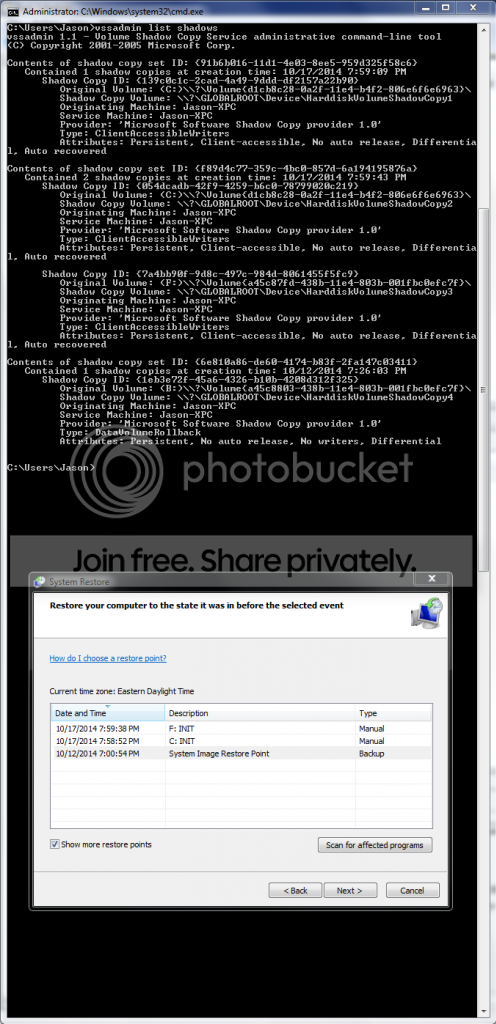
I'm a little confused by the results of performing the steps I listed above

why isn't there a creation time for ShadowCopy3? and I don't understand why my backup drive is mentioned in ShadowCopy4

Capture_zpsdc8e1f90.png
 

My Computer

Computer type
PC/Desktop
Computer Manufacturer/Model Number
Custom Build
OS
Windows 7 Professional, 64-bit
CPU
Intel Pentuim G3258
Motherboard
EVGA Z97 Stinger Core 3D LGA1150 mITX
Memory
Crucial Ballistix Elite DDR3 2x4GB 1866MHz C9
Graphics Card(s)
MSI Radeon R9 270X Gaming 2G ITX
Hard Drives
Samsung 840 EVO, 250GB
PSU
EVGA SuperNOVA 650 G1
Case
Bitfenix Prodigy ITX, Orange
Cooling
EVGA ACX mITX CPU Cooler
Other Info
https://drive.google.com/file/d/0B8di0b5mIKEYYVMtTVNNQ0cyd1E/view?usp=sharing
I was just thinking maybe it might just pick up those phantom restore points ot am I reading this wrong?

I guess I'm just under the assumption that the scheduled task is not executing properly, and not that the restore points are in fact being created but are being deleted/lost somehow.

I'm running a deep scan on 'all places' for 'all files'
 

My Computer

Computer type
PC/Desktop
Computer Manufacturer/Model Number
Custom Build
OS
Windows 7 Professional, 64-bit
CPU
Intel Pentuim G3258
Motherboard
EVGA Z97 Stinger Core 3D LGA1150 mITX
Memory
Crucial Ballistix Elite DDR3 2x4GB 1866MHz C9
Graphics Card(s)
MSI Radeon R9 270X Gaming 2G ITX
Hard Drives
Samsung 840 EVO, 250GB
PSU
EVGA SuperNOVA 650 G1
Case
Bitfenix Prodigy ITX, Orange
Cooling
EVGA ACX mITX CPU Cooler
Other Info
https://drive.google.com/file/d/0B8di0b5mIKEYYVMtTVNNQ0cyd1E/view?usp=sharing
Back
Top