Photo file permissions

bigpapanoodle

New member
Local time
4:58 PM
Messages
5
Copied all my photos over from my XP machine onto a Win 7 machine and now I cannot do anything with some of them! Apparently I do not have permission...now I find that strange as it was me that created them...me that copied them..and why are the rest of them OK? I know very little about file permissions and in the past have never had any problems moving, deleting or copying photos. How do I take back control? I have "taken ownership" of the files on the Win 7 computer but am still unable to do anything with them.:cry:
 

My Computer

OS
Windows 7 Ultimate 64 bit
CPU
Intel Core i7 920 2.66GHz
Motherboard
Gigabyte EX58-UD3R
Memory
8 GB (4x2GB) Crucial Ballistix DDR3
Graphics Card(s)
NVIDIA GTX260
Monitor(s) Displays
Samsung SyncMaster 24"
Copied all my photos over from my XP machine onto a Win 7 machine and now I cannot do anything with some of them! Apparently I do not have permission...now I find that strange as it was me that created them...me that copied them..and why are the rest of them OK? I know very little about file permissions and in the past have never had any problems moving, deleting or copying photos. How do I take back control? I have "taken ownership" of the files on the Win 7 computer but am still unable to do anything with them.:cry:
Did you take ownership with the downloadable file or by using elevated command promt?

When i try to use the downloadable file when i RT click and click take ownership i do not get ownership of said file.
 

My Computer

Computer Manufacturer/Model Number
Blue Shards 1.0
OS
Windows 7 Ultimate 64bit
CPU
AMD Phenom II 555 Black Edition Quad Core OC'd to 4.0GHz
Motherboard
ASUS M4A88T-M
Memory
G Skill RipJaw 1333MHz 4GB
Graphics Card(s)
ATI raideon 4250 HD/XFX ATI Radeon 1GB HD4650
Sound Card
Realteck HD Audio
Monitor(s) Displays
2x 22" Widescreen HD Monitors
Hard Drives
500GB Sata 7500RPM
80GB IDE
PSU
850W OCUK Modular
Case
Antec Dark Fleet DF-30
Cooling
Titan Fenrir Pro (CPU)
Keyboard
Logitech Wireless
Mouse
Logitech Wireless
Internet Speed
24Meg
Other Info
Getting soon-
2TB 7200RPM HDD
+8GB RAM
30GB SSD
HD6950/70
I took ownership by right-clicking on the file. Now when I try to copy the file to another location a message says "You'll need administrator permission to copy this file" I'm signed on as Owner-PC with administrator rights so am quite puzzled by it all.
 

My Computer

OS
Windows 7 Ultimate 64 bit
CPU
Intel Core i7 920 2.66GHz
Motherboard
Gigabyte EX58-UD3R
Memory
8 GB (4x2GB) Crucial Ballistix DDR3
Graphics Card(s)
NVIDIA GTX260
Monitor(s) Displays
Samsung SyncMaster 24"
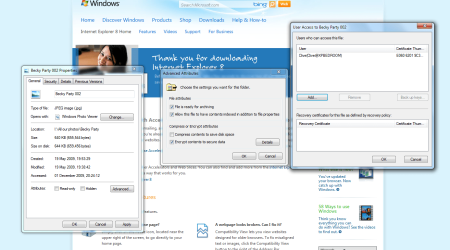
Further to my previous post, I have clicked on the properties of the file, clicked on advanced, then in advanced attributes, clicked on details (see attachment) The Users who can access this file... only shows Clive(Clive@XPBEDROOM) followed by a certificate thumbprint composed of 10 pairs of alphanumeric digits. Any attempts to add another user fall flat. XPBEDROOM was the PC that from which I copied all the photos from.
 

Attachments

  • Capture.PNG
    Capture.PNG
    95.2 KB · Views: 88

My Computer

OS
Windows 7 Ultimate 64 bit
CPU
Intel Core i7 920 2.66GHz
Motherboard
Gigabyte EX58-UD3R
Memory
8 GB (4x2GB) Crucial Ballistix DDR3
Graphics Card(s)
NVIDIA GTX260
Monitor(s) Displays
Samsung SyncMaster 24"
See Brinks tutorial on how to take ownership -=> here
 

My Computer

Computer type
PC/Desktop
Computer Manufacturer/Model Number
LENOVO K450 @3.0GHZ
OS
64-bit Windows 8.1 Pro
CPU
Core(TM) i5 CPU 4330 Haswell @ 3.20GHz
Motherboard
LENOVO
Memory
12.00 GB
Graphics Card(s)
Intel(R) HD Graphics
Sound Card
Intel HD integtrated
Monitor(s) Displays
HP 25' ISP Monitor
Screen Resolution
1900/1020
Hard Drives
(1) ST1000DM003-1CH162 (2) Generic STORAGE DEVICE USB Device (3) Generic STORAGE DEVICE USB Device
Internet Speed
100mb down/10mb up
Thanks Tews for your suggestion. Have tried that but no difference...still cannot access the file. Methinks that is just a shortcut way of doing the longwinded 'take ownership' thing. I am beginning to think that because the files were created on my previous PC and merely copied over, somehow the access permissions were locked in some way to that PC
 

My Computer

OS
Windows 7 Ultimate 64 bit
CPU
Intel Core i7 920 2.66GHz
Motherboard
Gigabyte EX58-UD3R
Memory
8 GB (4x2GB) Crucial Ballistix DDR3
Graphics Card(s)
NVIDIA GTX260
Monitor(s) Displays
Samsung SyncMaster 24"
Thinking I may have solved my own problem here...What we have here is a situation that has not a lot to do with ownership of a file, more do to with encryption of files. I post here again as I warning to others!!!!

Somehow, and don't ask me to explain why, the files in question had become encrypted whilst on the XP machine. I don't think I did it and why did all my other files in the same folder transfer without any problems?
However, they did and now I seem to be stuck with a bunch of files that I cannot open. What I appear to have omitted (because I didn't know) was to transfer the certificates along with files. From what I have read, if a file is encrypted and you don't have the certificate then the file is lost for good. As the HDD as now been reformatted I guess that is the case. Someone please prove me wrong, I would be eternally grateful.
 

My Computer

OS
Windows 7 Ultimate 64 bit
CPU
Intel Core i7 920 2.66GHz
Motherboard
Gigabyte EX58-UD3R
Memory
8 GB (4x2GB) Crucial Ballistix DDR3
Graphics Card(s)
NVIDIA GTX260
Monitor(s) Displays
Samsung SyncMaster 24"
Back
Top