Photos become permanently corrupted when viewed in Windows Explorer

mal1938

New member
Local time
1:06 AM
Messages
11
Hi there, Good day to you.

I have joined forum because after several months, I came across a thread which seems closes to my inquiry. (
http://www.sevenforums.com/music-pi...k-windows-explorer-windows-photo-gallery.html


I received a message that the thread was last open 97 days ago. I should consider a new thread. Hence this post for your help.

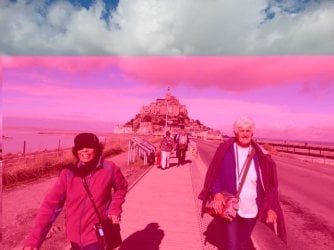
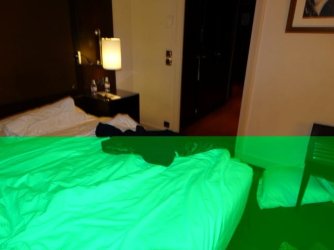
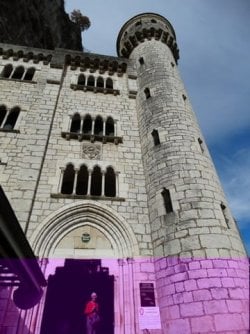
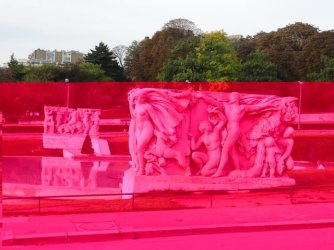
I attach some interesting photos. When I view photos in Explorer as "Large Icons", or "Extra Large Icons". the thumb nails change colour right in front of me. It is dramatic. If I click on a photo to see in full screen, the enlarged size is also corrupted. There is more. If I go back to the original folder, the corruption is permanent in the folder. Not all photos get corrupted. Not all photos get "attacked" by the same colour.

Photos on the SD Card in the Camera are perfect.

I have used Kaspersky paid version, Avast free version, Windows scanner (Microsoft Safety Scanner - Free Virus Scan with the Microsoft Safety Scanner), Norton, Bidefender on line virus checkers. There is no virus.

If I load the photos form the SD Card again, different photos get corrupted.

I have updated drivers. Made no difference. Memory is not faulty. Monitor is not faulty. The monitor only displays what gets corrupted.

This started happening in the last 6 months. Nothing was changed. I am unable to create travel videos.

I have changed disk and installed earlier version of Acronis image.

I have transferred some photos to DVDs. The images are safe on the DVD. Photos do not get "attacked" on the DVD.

I have not found anything remotely similar (yet) in the camera forums. I am hoping there is some experience in the Seven Forum community.


Computer details are

HP Compaq dc7900 Model Small Form Factor PC, Model KP721Av
Windows 7, 64 bit
Intel (R) Core (TM) 2 Duo CPU [email protected] GHZ
8 Gb GB of Ram
Intel (R) Q45/Q43 Express chipset (Microsoft Corporation-WDDM 1.1)
Motherboard Product Hewlett-Packard Motherboard 3031h
HP LE2201w LCD Monitor
Western Digital Black 1 TB hard Disk

mal1938
 

Attachments
  • DSC05626.JPG
    DSC05626.JPG
    95.2 KB · Views: 59
  • DSC05757.JPG
    DSC05757.JPG
    84.2 KB · Views: 59
  • DSC06642.JPG
    DSC06642.JPG
    71.4 KB · Views: 59
  • DSC06241.JPG
    DSC06241.JPG
    86 KB · Views: 59
  • DSC06035.JPG
    DSC06035.JPG
    82.3 KB · Views: 60

My Computer My Computer

At a glance

Windows 7 64 bitIntel (R) Core (TM) 2 Duo CPU [email protected] GHZ8 GBIntel (R) Q45/Q43 Express chipset (Microsoft ...
Computer type
PC/Desktop
Computer Manufacturer/Model Number
HP Compaq dc7900 Small Form Factor PC
OS
Windows 7 64 bit
CPU
Intel (R) Core (TM) 2 Duo CPU [email protected] GHZ
Motherboard
Motherboard Product Hewlett-Packard Motherboard 3031h
Memory
8 GB
Graphics Card(s)
Intel (R) Q45/Q43 Express chipset (Microsoft Corporation-WDD
Hard Drives
WD 1 TB, and 2 Tb Data Disk (External)
Antivirus
Kaspersky
Browser
Firefox and Chrome

My Computer My Computer

At a glance

Windows 7 Ultimate x64 SP1AMD Phenom 2 1090T2x8GB Kingston HyperX Fury Black 1600Mhz Unga...MSI GTX 970 Gaming 4G
Computer type
PC/Desktop
Computer Manufacturer/Model Number
Custom Build
OS
Windows 7 Ultimate x64 SP1
CPU
AMD Phenom 2 1090T
Motherboard
Gigabyte GA-890FXA-UD5
Memory
2x8GB Kingston HyperX Fury Black 1600Mhz Unganged
Graphics Card(s)
MSI GTX 970 Gaming 4G
Sound Card
Realtek On-Board HD 7.1 Audio / Logitech G35
Monitor(s) Displays
3xAcer GD245HQ
Screen Resolution
1920x1080
Hard Drives
Samsung 850 Pro 512GB SSD - OS /
WD Caviar Black SATA 3 - 1 TBx2 - Dynamic RAID 0 /
WD Caviar Green SATA 2 - 640GBx2 - Dynamic RAID 0 /
WD Caviar Green SATA 2 - 640GB - Internal Backup /
Seagate Barracude SATA 3 - 3TB - External Backup/ Sync
PSU
HighPower 1000W
Case
Cooler Master HAF 932
Cooling
Noctua NH-D14
Keyboard
Logitech G19
Mouse
Logitech G500
Internet Speed
100/4 Mbit Cable (100GB quota)
Antivirus
ZoneAlarm Extreme Security / MBAM Pro / MBAE Free / SAS Free
Browser
IE 11 - Firefox - Chrome
Other Info
Logitech F710/ G27/ G940/ Z5500 // TrackIR 5 // Nvidia 3D Surround Vision
Dear GokAy,

Thanks for your prompt response. You prompt response made me wish I had joined forum in October 15 when the problem began or joined several year ago. Thanks.

1 Antivirus. At present I am using Kaspersky. Box says Kaspersky Internet Security Multi-Device 2015. (I have tried Avast free version, Windows scanner (Microsoft Safety Scanner - Free Virus Scan with the Microsoft Safety Scanner), Norton, Bitdefender on line virus checkers).

I have tried Microsoft fix it.

I will try those you mentioned.

2 Clean Start Up.

2.1 I tried clean set up on an old 120 Gb Disk. As far I can recollect, same problem. The disk was too small to install my Video Editing software and other support software.

2.2 I carried out clean install of Windows 8-64. No improvement. I have bcome used to Windows 7 64 and hence did not download Windows 8.1 or download any updates.

2.3 I have Windows 7-64 installations on 2 disks at present. (Have licenses. So no breach there. Microsoft have been good at activating repeat installs on formatted disks/ or new disks very generously)

Is there a problem with any of the windows 7 updates?

3 I have tried looking at these sites. I may not have interpreted the content correctly. I could use help.

3.1 Tried this and found no problem. Troubleshoot monitor and video card problems

3.2 This site says "A major problem has been identified in the code used in many Microsoft applications, and those using Microsoft's software libraries in how it decodes JPEG images "
Problems in Microsoft's JPEG decoding

Did I miss anything in the above?

3.3 Windows Confidential: The Mystery of the Recalcitrant JPG https://technet.microsoft.com/en-us/magazine/gg981675.aspx

It is possible I am searching incorrectly.

4 Does it happen is Safe Mode?

A friend suggested this. Did not resolve the problem. Moreover I cannot use all my software in this mode.

5 Did you try with another account?

By this did you mean another install? See item 2 please and comment.

6 Extras

The SD Card is not faulty.
I have tried using different SD Cards
I have tried using a different SD Card Reader
I have downloaded images directly from the camera to the computers

7 XP Computer

I used old slow Windows XP computer. (Core 2 Duo). There is no corruption of images on that computer. (XP is not supported by Microsoft. My Video Editing softwares are not compatible with Windows XP.)

I look forward to your comments and any comments from other Forum users.


Regards
mal1938
 

My Computer My Computer

At a glance

Windows 7 64 bitIntel (R) Core (TM) 2 Duo CPU [email protected] GHZ8 GBIntel (R) Q45/Q43 Express chipset (Microsoft ...
Computer type
PC/Desktop
Computer Manufacturer/Model Number
HP Compaq dc7900 Small Form Factor PC
OS
Windows 7 64 bit
CPU
Intel (R) Core (TM) 2 Duo CPU [email protected] GHZ
Motherboard
Motherboard Product Hewlett-Packard Motherboard 3031h
Memory
8 GB
Graphics Card(s)
Intel (R) Q45/Q43 Express chipset (Microsoft Corporation-WDD
Hard Drives
WD 1 TB, and 2 Tb Data Disk (External)
Antivirus
Kaspersky
Browser
Firefox and Chrome
In the last post should have said October 2014
 

My Computer My Computer

At a glance

Windows 7 64 bitIntel (R) Core (TM) 2 Duo CPU [email protected] GHZ8 GBIntel (R) Q45/Q43 Express chipset (Microsoft ...
Computer type
PC/Desktop
Computer Manufacturer/Model Number
HP Compaq dc7900 Small Form Factor PC
OS
Windows 7 64 bit
CPU
Intel (R) Core (TM) 2 Duo CPU [email protected] GHZ
Motherboard
Motherboard Product Hewlett-Packard Motherboard 3031h
Memory
8 GB
Graphics Card(s)
Intel (R) Q45/Q43 Express chipset (Microsoft Corporation-WDD
Hard Drives
WD 1 TB, and 2 Tb Data Disk (External)
Antivirus
Kaspersky
Browser
Firefox and Chrome
To make sure, you only have 1 AV at the moment, right? Just Kaspersky?
Get Malwarebytes Anti-Malware free (https://www.malwarebytes.org/) regardless, it is a good product. It runs as a complimentary to your AV.

You didn't read the clean startup link! What you are telling me is a clean install of Windows. :p

Safe Mode is for diagnostic, only basic/generic drivers are loaded. So most programs won't run.

But having the same problem in several OS installations (it was not obvious in your first post) looks like a software you are installing. How many Video editing/image editing (and the sort) do you have installed?

Try:
- Uninstall your Video Editing software, restart and see if the issue continues.
- Uninstall any other similar program (anything that has to do with pictures/videos - you get the idea I hope) one by one, restarting after each and checking if the issue will correct.

- If the above fail, clean install Windows once again (on an unused drive for example) and see if it is correct without any software installed. Then one by one install your software, restart after each (and open the program after restart) and see if you can find the culprit.
 

My Computer My Computer

At a glance

Windows 7 Ultimate x64 SP1AMD Phenom 2 1090T2x8GB Kingston HyperX Fury Black 1600Mhz Unga...MSI GTX 970 Gaming 4G
Computer type
PC/Desktop
Computer Manufacturer/Model Number
Custom Build
OS
Windows 7 Ultimate x64 SP1
CPU
AMD Phenom 2 1090T
Motherboard
Gigabyte GA-890FXA-UD5
Memory
2x8GB Kingston HyperX Fury Black 1600Mhz Unganged
Graphics Card(s)
MSI GTX 970 Gaming 4G
Sound Card
Realtek On-Board HD 7.1 Audio / Logitech G35
Monitor(s) Displays
3xAcer GD245HQ
Screen Resolution
1920x1080
Hard Drives
Samsung 850 Pro 512GB SSD - OS /
WD Caviar Black SATA 3 - 1 TBx2 - Dynamic RAID 0 /
WD Caviar Green SATA 2 - 640GBx2 - Dynamic RAID 0 /
WD Caviar Green SATA 2 - 640GB - Internal Backup /
Seagate Barracude SATA 3 - 3TB - External Backup/ Sync
PSU
HighPower 1000W
Case
Cooler Master HAF 932
Cooling
Noctua NH-D14
Keyboard
Logitech G19
Mouse
Logitech G500
Internet Speed
100/4 Mbit Cable (100GB quota)
Antivirus
ZoneAlarm Extreme Security / MBAM Pro / MBAE Free / SAS Free
Browser
IE 11 - Firefox - Chrome
Other Info
Logitech F710/ G27/ G940/ Z5500 // TrackIR 5 // Nvidia 3D Surround Vision
Re: Photo turning black problem

Here is something I found that looks like it's working.
The problem is driver related but if the jpeg decoder is contained in the driver files (like AMD catalyst) you can simply remove/rename them so pictures are viewed using the embedded windows decoders and the graphics chip driver still works (it seems).
look in C/program files/common files/ATI technologies/multi media
rename all jpeg-decoders to .txt or something, example : amf-wic-jpeg-decoder64.odll
I disabled the R5 device before I did this and uninstalled AMD Catalyst control center, etc so it wouldn't because it kept re-enabling the R5 driver. Not sure if this was necessary, but it seems to work. I couldn't delete the file above because it was being used, so I renamed it. Pictures instantly started working again.
Time will tell about the crashes, but now I can play with the AMD drivers and (hopefully) keep the picture issues resolved
.
 

My Computer My Computer

At a glance

windows 7 Ultimate 64 bit
Computer type
PC/Desktop
Computer Manufacturer/Model Number
Acer
OS
windows 7 Ultimate 64 bit
Keyboard
Logitech
Mouse
Intex
Antivirus
microsoft essential
Browser
Chrome
Hi NatalieGreen,
Very thankful for your response. I attach a word document, "Windows 7 Forum response to Natalie Green.doc". I I have found ATI Technologies folder under Program Files and under Program Files (x486). The computer does not have the folder you mentioned. Could it be located under a different location? I have Intel (R) Core (TM) 2 Duo CPU on this computer. Thanks again for your time. mal1938
 

Attachments

My Computer My Computer

At a glance

Windows 7 64 bitIntel (R) Core (TM) 2 Duo CPU [email protected] GHZ8 GBIntel (R) Q45/Q43 Express chipset (Microsoft ...
Computer type
PC/Desktop
Computer Manufacturer/Model Number
HP Compaq dc7900 Small Form Factor PC
OS
Windows 7 64 bit
CPU
Intel (R) Core (TM) 2 Duo CPU [email protected] GHZ
Motherboard
Motherboard Product Hewlett-Packard Motherboard 3031h
Memory
8 GB
Graphics Card(s)
Intel (R) Q45/Q43 Express chipset (Microsoft Corporation-WDD
Hard Drives
WD 1 TB, and 2 Tb Data Disk (External)
Antivirus
Kaspersky
Browser
Firefox and Chrome
Eh, why is there an ATI folder in your PC? Did you have an ATI card at an earlier date?
I have the same folders but under AMD, however my motherboard is AMD. Yours are all Intel. Can you check in Programs and Features (Control Panel) for any ATI/AMD entries?

CCC is short for Catalyst Control Center.
 

My Computer My Computer

At a glance

Windows 7 Ultimate x64 SP1AMD Phenom 2 1090T2x8GB Kingston HyperX Fury Black 1600Mhz Unga...MSI GTX 970 Gaming 4G
Computer type
PC/Desktop
Computer Manufacturer/Model Number
Custom Build
OS
Windows 7 Ultimate x64 SP1
CPU
AMD Phenom 2 1090T
Motherboard
Gigabyte GA-890FXA-UD5
Memory
2x8GB Kingston HyperX Fury Black 1600Mhz Unganged
Graphics Card(s)
MSI GTX 970 Gaming 4G
Sound Card
Realtek On-Board HD 7.1 Audio / Logitech G35
Monitor(s) Displays
3xAcer GD245HQ
Screen Resolution
1920x1080
Hard Drives
Samsung 850 Pro 512GB SSD - OS /
WD Caviar Black SATA 3 - 1 TBx2 - Dynamic RAID 0 /
WD Caviar Green SATA 2 - 640GBx2 - Dynamic RAID 0 /
WD Caviar Green SATA 2 - 640GB - Internal Backup /
Seagate Barracude SATA 3 - 3TB - External Backup/ Sync
PSU
HighPower 1000W
Case
Cooler Master HAF 932
Cooling
Noctua NH-D14
Keyboard
Logitech G19
Mouse
Logitech G500
Internet Speed
100/4 Mbit Cable (100GB quota)
Antivirus
ZoneAlarm Extreme Security / MBAM Pro / MBAE Free / SAS Free
Browser
IE 11 - Firefox - Chrome
Other Info
Logitech F710/ G27/ G940/ Z5500 // TrackIR 5 // Nvidia 3D Surround Vision
Hi GokAy,

Thanks for your interest, zeal and energy to help in the forum

No idea why I have ATI folder/s. Should I consider removing it? I may consider writing to the HP forum

The compute is exactly as I bought it. (Not new) When I bought the computer, it had operating system only (Windows 7 64)

I have an Acronis image of the original instlltation. If I find an old SATa disk, I will examine the original installation.

I will reply to your previous post separately.

On a separate issue, please send me link to log in to the forum. At present I can reach the forum only from the link to your posts. Thanks

mal1938
 

My Computer My Computer

At a glance

Windows 7 64 bitIntel (R) Core (TM) 2 Duo CPU [email protected] GHZ8 GBIntel (R) Q45/Q43 Express chipset (Microsoft ...
Computer type
PC/Desktop
Computer Manufacturer/Model Number
HP Compaq dc7900 Small Form Factor PC
OS
Windows 7 64 bit
CPU
Intel (R) Core (TM) 2 Duo CPU [email protected] GHZ
Motherboard
Motherboard Product Hewlett-Packard Motherboard 3031h
Memory
8 GB
Graphics Card(s)
Intel (R) Q45/Q43 Express chipset (Microsoft Corporation-WDD
Hard Drives
WD 1 TB, and 2 Tb Data Disk (External)
Antivirus
Kaspersky
Browser
Firefox and Chrome
No, don't delete them on your own.
Scan with CCleaner Free and fix. Also scan the registry and fix. Then go into Tools - Uninstall (should be default) and Save to text file. Attach (install.txt) here.

You can start trying after we check the install.txt:
- Uninstall your Video Editing software, restart and see if the issue continues.
- Uninstall any other similar program (anything that has to do with pictures/videos - you get the idea I hope) one by one, restarting after each and checking if the issue will correct.
 

My Computer My Computer

At a glance

Windows 7 Ultimate x64 SP1AMD Phenom 2 1090T2x8GB Kingston HyperX Fury Black 1600Mhz Unga...MSI GTX 970 Gaming 4G
Computer type
PC/Desktop
Computer Manufacturer/Model Number
Custom Build
OS
Windows 7 Ultimate x64 SP1
CPU
AMD Phenom 2 1090T
Motherboard
Gigabyte GA-890FXA-UD5
Memory
2x8GB Kingston HyperX Fury Black 1600Mhz Unganged
Graphics Card(s)
MSI GTX 970 Gaming 4G
Sound Card
Realtek On-Board HD 7.1 Audio / Logitech G35
Monitor(s) Displays
3xAcer GD245HQ
Screen Resolution
1920x1080
Hard Drives
Samsung 850 Pro 512GB SSD - OS /
WD Caviar Black SATA 3 - 1 TBx2 - Dynamic RAID 0 /
WD Caviar Green SATA 2 - 640GBx2 - Dynamic RAID 0 /
WD Caviar Green SATA 2 - 640GB - Internal Backup /
Seagate Barracude SATA 3 - 3TB - External Backup/ Sync
PSU
HighPower 1000W
Case
Cooler Master HAF 932
Cooling
Noctua NH-D14
Keyboard
Logitech G19
Mouse
Logitech G500
Internet Speed
100/4 Mbit Cable (100GB quota)
Antivirus
ZoneAlarm Extreme Security / MBAM Pro / MBAE Free / SAS Free
Browser
IE 11 - Firefox - Chrome
Other Info
Logitech F710/ G27/ G940/ Z5500 // TrackIR 5 // Nvidia 3D Surround Vision

My Computer My Computer

At a glance

Windows 7 Ultimate x64 SP1AMD Phenom 2 1090T2x8GB Kingston HyperX Fury Black 1600Mhz Unga...MSI GTX 970 Gaming 4G
Computer type
PC/Desktop
Computer Manufacturer/Model Number
Custom Build
OS
Windows 7 Ultimate x64 SP1
CPU
AMD Phenom 2 1090T
Motherboard
Gigabyte GA-890FXA-UD5
Memory
2x8GB Kingston HyperX Fury Black 1600Mhz Unganged
Graphics Card(s)
MSI GTX 970 Gaming 4G
Sound Card
Realtek On-Board HD 7.1 Audio / Logitech G35
Monitor(s) Displays
3xAcer GD245HQ
Screen Resolution
1920x1080
Hard Drives
Samsung 850 Pro 512GB SSD - OS /
WD Caviar Black SATA 3 - 1 TBx2 - Dynamic RAID 0 /
WD Caviar Green SATA 2 - 640GBx2 - Dynamic RAID 0 /
WD Caviar Green SATA 2 - 640GB - Internal Backup /
Seagate Barracude SATA 3 - 3TB - External Backup/ Sync
PSU
HighPower 1000W
Case
Cooler Master HAF 932
Cooling
Noctua NH-D14
Keyboard
Logitech G19
Mouse
Logitech G500
Internet Speed
100/4 Mbit Cable (100GB quota)
Antivirus
ZoneAlarm Extreme Security / MBAM Pro / MBAE Free / SAS Free
Browser
IE 11 - Firefox - Chrome
Other Info
Logitech F710/ G27/ G940/ Z5500 // TrackIR 5 // Nvidia 3D Surround Vision
You could also see what results you get with a different viewer. FASTSTONE is an excellent free viewer and as a keen photographer I use it all the time. I use the portable version that involves no installation.
Download FastStone Image Viewer
It may help you narrow down the issue.
 

My Computer My Computer

At a glance

Windows 7x64 Home Premium SP1Intel i7 2600kG.Skill Ripjaws (DDR3-1600) 2x4GBNvidia GeForce GTS 450; Intel HD Graphics 300...
Computer type
PC/Desktop
Computer Manufacturer/Model Number
Own build
OS
Windows 7x64 Home Premium SP1
CPU
Intel i7 2600k
Motherboard
ASUS P8Z68 Deluxe
Memory
G.Skill Ripjaws (DDR3-1600) 2x4GB
Graphics Card(s)
Nvidia GeForce GTS 450; Intel HD Graphics 3000(GT2+)
Monitor(s) Displays
Dell Ultrasharp IPS panel U2311H, Samsung SyncMaster P2350
Screen Resolution
1920x1080
Hard Drives
Samsung 850 Pro SSD 256GB, Samsung SSD 840 120GB, Seagates 1TB Barracuda ST31000528AS x2
PSU
Seasonic M12II 520W
Case
Lian Li Lancool PC-K60
Cooling
Case: 1x120mm, 3x140mm CPU: Hyper 212+
Keyboard
Logitech MK520 (wireless)
Mouse
Logitech MK520
Internet Speed
6-7 Mbps
Antivirus
Norton Security Premium, Malwarebytes on 2 (MSE on 3rd PC)
Browser
FireFox
Other Info
Audio: Logitech Z523 2.1
I don't know about the OP but I will get that portable for sure :D
 

My Computer My Computer

At a glance

Windows 7 Ultimate x64 SP1AMD Phenom 2 1090T2x8GB Kingston HyperX Fury Black 1600Mhz Unga...MSI GTX 970 Gaming 4G
Computer type
PC/Desktop
Computer Manufacturer/Model Number
Custom Build
OS
Windows 7 Ultimate x64 SP1
CPU
AMD Phenom 2 1090T
Motherboard
Gigabyte GA-890FXA-UD5
Memory
2x8GB Kingston HyperX Fury Black 1600Mhz Unganged
Graphics Card(s)
MSI GTX 970 Gaming 4G
Sound Card
Realtek On-Board HD 7.1 Audio / Logitech G35
Monitor(s) Displays
3xAcer GD245HQ
Screen Resolution
1920x1080
Hard Drives
Samsung 850 Pro 512GB SSD - OS /
WD Caviar Black SATA 3 - 1 TBx2 - Dynamic RAID 0 /
WD Caviar Green SATA 2 - 640GBx2 - Dynamic RAID 0 /
WD Caviar Green SATA 2 - 640GB - Internal Backup /
Seagate Barracude SATA 3 - 3TB - External Backup/ Sync
PSU
HighPower 1000W
Case
Cooler Master HAF 932
Cooling
Noctua NH-D14
Keyboard
Logitech G19
Mouse
Logitech G500
Internet Speed
100/4 Mbit Cable (100GB quota)
Antivirus
ZoneAlarm Extreme Security / MBAM Pro / MBAE Free / SAS Free
Browser
IE 11 - Firefox - Chrome
Other Info
Logitech F710/ G27/ G940/ Z5500 // TrackIR 5 // Nvidia 3D Surround Vision
Hi mjf,

Thanks for your input.
I use Faststone software for resizing photos to send by email. For example images sent with my first post were resized to reduce size for uploading.. I have not used it for viewing photos. I have used PICASA to view and create collages. If the images are corrupted in the folder then PICASA reads them as colour corrupted. I feel that Fast stone might do the same. I will try.

I will carry out procedure mentioned by GokAy. Procedure suggested by GokAy has 2 prong attack.

(1) Is there any malware or virus.
(2) Is any software causing the problem. (That is how I see it).

My review of the problem suggests that colour corruption takes place when I copy images with Windows 7 Explorer.

1 Copied images from SD Card to a 80 Gb IDE Disk. (It was just there to be used I am not viewing image sform 80 Gb on main computer just to be safe. I only use if for storage of images and copy to the main disk)
2 Images are NOT colour corrupted on spare computer (So far so good)
3 Copied images to main computer with Windows 7 explorer.
4 When images show up on screen, colour corruption creeps in. (See my first post on what happens)


My current view is that
1 It will be good to check for any virus not picked so far (i.e. follow GokAy's procedure)
2 See if any program is interfering (See GokAy's input)
3 Hopefully there is way to determine if Windows 7 explorer is the culprit and if COPYING with explorer is the cause.

Your input is most appreciated

mal1938
 

My Computer My Computer

At a glance

Windows 7 64 bitIntel (R) Core (TM) 2 Duo CPU [email protected] GHZ8 GBIntel (R) Q45/Q43 Express chipset (Microsoft ...
Computer type
PC/Desktop
Computer Manufacturer/Model Number
HP Compaq dc7900 Small Form Factor PC
OS
Windows 7 64 bit
CPU
Intel (R) Core (TM) 2 Duo CPU [email protected] GHZ
Motherboard
Motherboard Product Hewlett-Packard Motherboard 3031h
Memory
8 GB
Graphics Card(s)
Intel (R) Q45/Q43 Express chipset (Microsoft Corporation-WDD
Hard Drives
WD 1 TB, and 2 Tb Data Disk (External)
Antivirus
Kaspersky
Browser
Firefox and Chrome
If it is windows explorer then still a 3rd party app should be responsible. One that has hooked to the process, maybe added to context menu. That's why we are uninstalling them one by one.
 

My Computer My Computer

At a glance

Windows 7 Ultimate x64 SP1AMD Phenom 2 1090T2x8GB Kingston HyperX Fury Black 1600Mhz Unga...MSI GTX 970 Gaming 4G
Computer type
PC/Desktop
Computer Manufacturer/Model Number
Custom Build
OS
Windows 7 Ultimate x64 SP1
CPU
AMD Phenom 2 1090T
Motherboard
Gigabyte GA-890FXA-UD5
Memory
2x8GB Kingston HyperX Fury Black 1600Mhz Unganged
Graphics Card(s)
MSI GTX 970 Gaming 4G
Sound Card
Realtek On-Board HD 7.1 Audio / Logitech G35
Monitor(s) Displays
3xAcer GD245HQ
Screen Resolution
1920x1080
Hard Drives
Samsung 850 Pro 512GB SSD - OS /
WD Caviar Black SATA 3 - 1 TBx2 - Dynamic RAID 0 /
WD Caviar Green SATA 2 - 640GBx2 - Dynamic RAID 0 /
WD Caviar Green SATA 2 - 640GB - Internal Backup /
Seagate Barracude SATA 3 - 3TB - External Backup/ Sync
PSU
HighPower 1000W
Case
Cooler Master HAF 932
Cooling
Noctua NH-D14
Keyboard
Logitech G19
Mouse
Logitech G500
Internet Speed
100/4 Mbit Cable (100GB quota)
Antivirus
ZoneAlarm Extreme Security / MBAM Pro / MBAE Free / SAS Free
Browser
IE 11 - Firefox - Chrome
Other Info
Logitech F710/ G27/ G940/ Z5500 // TrackIR 5 // Nvidia 3D Surround Vision
Hi GokAy, Got it thanks
 

My Computer My Computer

At a glance

Windows 7 64 bitIntel (R) Core (TM) 2 Duo CPU [email protected] GHZ8 GBIntel (R) Q45/Q43 Express chipset (Microsoft ...
Computer type
PC/Desktop
Computer Manufacturer/Model Number
HP Compaq dc7900 Small Form Factor PC
OS
Windows 7 64 bit
CPU
Intel (R) Core (TM) 2 Duo CPU [email protected] GHZ
Motherboard
Motherboard Product Hewlett-Packard Motherboard 3031h
Memory
8 GB
Graphics Card(s)
Intel (R) Q45/Q43 Express chipset (Microsoft Corporation-WDD
Hard Drives
WD 1 TB, and 2 Tb Data Disk (External)
Antivirus
Kaspersky
Browser
Firefox and Chrome
Hi GokAy,

I attach a document named, GokAy Procedures 2.doc". I used CCleaner, Malware Bytes and FARBER. I have included screenshots in the attached document. No Malware or Virus were found. I also attach FRST.txt and Addition.txt.

I hope I have followed the procedure correctly for Clean start up. I am prepared to rework, if I missed any step. On the [FONT=&quot]Services [/FONT]tab, clicked to select the [FONT=&quot]Hide all Microsoft services[/FONT] check box, and then clicked [FONT=&quot]Disable all[/FONT].


A 80 Gb Hard Disk has over 12 GB of images. Copied with explorer to the troublesome computer (named HP3). . Images show correct colours on XP computer. As before, Images show up colour corrupted on the troublesome computer (HP3). I again connected 80 Gb to the XP computer. All images are colour correct


Antivirus programs on the computer. I removed Kaspsersky. I only have Avast Free Antivirus.


I will re-examine your posts and try what I have not tried so far


Thanks and Regards


mal1938
 

Attachments

My Computer My Computer

At a glance

Windows 7 64 bitIntel (R) Core (TM) 2 Duo CPU [email protected] GHZ8 GBIntel (R) Q45/Q43 Express chipset (Microsoft ...
Computer type
PC/Desktop
Computer Manufacturer/Model Number
HP Compaq dc7900 Small Form Factor PC
OS
Windows 7 64 bit
CPU
Intel (R) Core (TM) 2 Duo CPU [email protected] GHZ
Motherboard
Motherboard Product Hewlett-Packard Motherboard 3031h
Memory
8 GB
Graphics Card(s)
Intel (R) Q45/Q43 Express chipset (Microsoft Corporation-WDD
Hard Drives
WD 1 TB, and 2 Tb Data Disk (External)
Antivirus
Kaspersky
Browser
Firefox and Chrome
Some consideration at first sight:
- You have both Avast and MSE running, please uninstall Avast for now.
- Update flash player (your version is 10, current is 18) https://get.adobe.com/flashplayer/
- You have AMD Catalyst listed, please run CCleaner and switch to Tools - uninstall any AMD entry, HydraVision should be AMD too. Also click the Save to text file (lower right) and attach here.
- Ask.com toolbar, did you install this on purpose?
 

My Computer My Computer

At a glance

Windows 7 Ultimate x64 SP1AMD Phenom 2 1090T2x8GB Kingston HyperX Fury Black 1600Mhz Unga...MSI GTX 970 Gaming 4G
Computer type
PC/Desktop
Computer Manufacturer/Model Number
Custom Build
OS
Windows 7 Ultimate x64 SP1
CPU
AMD Phenom 2 1090T
Motherboard
Gigabyte GA-890FXA-UD5
Memory
2x8GB Kingston HyperX Fury Black 1600Mhz Unganged
Graphics Card(s)
MSI GTX 970 Gaming 4G
Sound Card
Realtek On-Board HD 7.1 Audio / Logitech G35
Monitor(s) Displays
3xAcer GD245HQ
Screen Resolution
1920x1080
Hard Drives
Samsung 850 Pro 512GB SSD - OS /
WD Caviar Black SATA 3 - 1 TBx2 - Dynamic RAID 0 /
WD Caviar Green SATA 2 - 640GBx2 - Dynamic RAID 0 /
WD Caviar Green SATA 2 - 640GB - Internal Backup /
Seagate Barracude SATA 3 - 3TB - External Backup/ Sync
PSU
HighPower 1000W
Case
Cooler Master HAF 932
Cooling
Noctua NH-D14
Keyboard
Logitech G19
Mouse
Logitech G500
Internet Speed
100/4 Mbit Cable (100GB quota)
Antivirus
ZoneAlarm Extreme Security / MBAM Pro / MBAE Free / SAS Free
Browser
IE 11 - Firefox - Chrome
Other Info
Logitech F710/ G27/ G940/ Z5500 // TrackIR 5 // Nvidia 3D Surround Vision
Hi GokAy,
You are knowledgeable and thorough with detail. Very much appreciated. Lucky to have you helping. I did not install ask.com tool bar. I have disabled it many times or removed it. I have gone to Google, settings, mange search engines and removed it with many others. It keeps coming back. I used Avast to check for viruses again. We found Avast picks up what others miss. Will uninstall to test. I should have replied and said that I have Corel Video Editing software. None others. Removed Adobe and Sony Vegas in favour of Corel. Any extras are from Corel only. Hence all Corel products should be compatible. I have used Corel for several years and had no problem with corrupt of images before. 11.46 pm here. Will be back to the key board tomorrow. Thanks and regards. mal1938
 

My Computer My Computer

At a glance

Windows 7 64 bitIntel (R) Core (TM) 2 Duo CPU [email protected] GHZ8 GBIntel (R) Q45/Q43 Express chipset (Microsoft ...
Computer type
PC/Desktop
Computer Manufacturer/Model Number
HP Compaq dc7900 Small Form Factor PC
OS
Windows 7 64 bit
CPU
Intel (R) Core (TM) 2 Duo CPU [email protected] GHZ
Motherboard
Motherboard Product Hewlett-Packard Motherboard 3031h
Memory
8 GB
Graphics Card(s)
Intel (R) Q45/Q43 Express chipset (Microsoft Corporation-WDD
Hard Drives
WD 1 TB, and 2 Tb Data Disk (External)
Antivirus
Kaspersky
Browser
Firefox and Chrome
No worries, whenever you have the time.
 

My Computer My Computer

At a glance

Windows 7 Ultimate x64 SP1AMD Phenom 2 1090T2x8GB Kingston HyperX Fury Black 1600Mhz Unga...MSI GTX 970 Gaming 4G
Computer type
PC/Desktop
Computer Manufacturer/Model Number
Custom Build
OS
Windows 7 Ultimate x64 SP1
CPU
AMD Phenom 2 1090T
Motherboard
Gigabyte GA-890FXA-UD5
Memory
2x8GB Kingston HyperX Fury Black 1600Mhz Unganged
Graphics Card(s)
MSI GTX 970 Gaming 4G
Sound Card
Realtek On-Board HD 7.1 Audio / Logitech G35
Monitor(s) Displays
3xAcer GD245HQ
Screen Resolution
1920x1080
Hard Drives
Samsung 850 Pro 512GB SSD - OS /
WD Caviar Black SATA 3 - 1 TBx2 - Dynamic RAID 0 /
WD Caviar Green SATA 2 - 640GBx2 - Dynamic RAID 0 /
WD Caviar Green SATA 2 - 640GB - Internal Backup /
Seagate Barracude SATA 3 - 3TB - External Backup/ Sync
PSU
HighPower 1000W
Case
Cooler Master HAF 932
Cooling
Noctua NH-D14
Keyboard
Logitech G19
Mouse
Logitech G500
Internet Speed
100/4 Mbit Cable (100GB quota)
Antivirus
ZoneAlarm Extreme Security / MBAM Pro / MBAE Free / SAS Free
Browser
IE 11 - Firefox - Chrome
Other Info
Logitech F710/ G27/ G940/ Z5500 // TrackIR 5 // Nvidia 3D Surround Vision
Back
Top