Photoshop CS4 - Super Slow Redraw

markseven

New member
Local time
5:32 AM
Messages
5
Hello all,

I have searched this forum and have adjusted my OS and software settings per you advice:

Virtual memory: check (per Adobe's instructions)
Scratch Disk: check
'Enable Open GL Drawing': check (off)

System Info:
Dell Optiplex GX 620
Intel 3.00GHz
4.00GB RAM (3.5GB usable)
32-bit OS (Windows 7 Ultimate)

Photoshop settings:
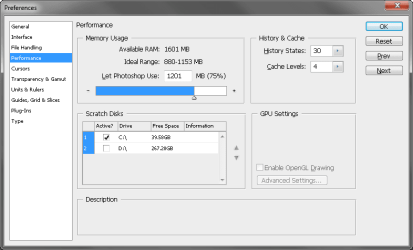
Photoshop is using 75% of my system's resources
'Available RAM' = 1603MB
'History States' = 30
'Cache Levels' = 4
Compatibility = Windows XP (Service Pack 2)

Photoshop is running very slowly, even with tiny files (50k). I haven't had the need to run large CMYK files, but I am guessing those will drastically slow the already molasses-like redraw.

I did not have any issues when installing Windows 7 or CS4. Neither crash or are glitchy in any other way... I spend 90% of my work day in PS, so it is mandatory, for my personal sanity and productivity that PS run as fast or faster than when installed on XP.

I am about an hour away from reinstalling XP. Please advise.

TIA,
Mark
 

My Computer My Computer

Computer Manufacturer/Model Number
Dell Optiplex
OS
Windows 7 Ultimate
CPU
Intel Pentium 4 - 3.00GHz
Memory
4.00 GB
Graphics Card(s)
ATI Radeon X600
Monitor(s) Displays
22" Sony CRT + 22" Viewsonic CRT
Screen Resolution
1280 x 1024
Strange result your having, your computer spec seems fine for PS CS4. I have it running on both my 32bit and 64bit set ups. One with a lower spec than yours! I have not adjusted any of the settings that were set as default during the install. Only I did a custom install and selected just Photoshop and bridge nothing else.

Why are you using XP compatibility?
Is your Win7 the final RTM or RC?
 

My Computer My Computer

OS
Win7 7600 x64
Memory
8gig
Graphics Card(s)
Nvidia
Monitor(s) Displays
dual wide screen 22inch each
Hard Drives
2x 500gig
Strange result your having, your computer spec seems fine for PS CS4. I have it running on both my 32bit and 64bit set ups. One with a lower spec than yours! I have not adjusted any of the settings that were set as default during the install. Only I did a custom install and selected just Photoshop and bridge nothing else.

Why are you using XP compatibility?
Is your Win7 the final RTM or RC?

Hi ilesal, yes it is strange. I am happy to know that PS is working well on other systems, so it must be a setting on my OS or PS itself... hopefully.

Google results suggested running CS4 in compatibility mode when installed on 7. PS is super slow when not in compatibility mode as well.
 

My Computer My Computer

Computer Manufacturer/Model Number
Dell Optiplex
OS
Windows 7 Ultimate
CPU
Intel Pentium 4 - 3.00GHz
Memory
4.00 GB
Graphics Card(s)
ATI Radeon X600
Monitor(s) Displays
22" Sony CRT + 22" Viewsonic CRT
Screen Resolution
1280 x 1024
Your available ram seems to be wrong see attached for my settings.
 
Last edited:

My Computer My Computer

Computer type
PC/Desktop
Computer Manufacturer/Model Number
Self Built Custom Computer.
OS
Windows 10 Pro x64
CPU
i7-4770K
Motherboard
Asus Z87 Sabertooth
Memory
16Gig DDR3-2400
Graphics Card(s)
Gigabyte GT740
Sound Card
Onboard
Monitor(s) Displays
Benq 27" - Dell 23' - Benq 22"
Screen Resolution
1680x1050
Hard Drives
Samsung 840 Pro 128g SSD
1xWestern Digital Caviar Green 1tb
2xWestern Digital Caviar Green 2 tb
PSU
Seasonic 760 watt Platinum
Case
Coolermaster Haf - X
Cooling
Noctua NH-C12P CPU Cooler
Keyboard
Logitech illuminated keyboard
Mouse
Logitech Perfomance MX
Internet Speed
Cable = speeds to 20Mbps downsteam and 512kbps upsteam
Antivirus
Avast Internet Security
Browser
Firefox
Your available ram seems to be wrong see attached for my settings.

Hi Kodi, is there a way to change that (maybe a OS reboot prompt)?

I've attached my Prefs/Performance capture in case there's something else I missed.
 

Attachments

  • PS_performance.png
    PS_performance.png
    11.7 KB · Views: 531

My Computer My Computer

Computer Manufacturer/Model Number
Dell Optiplex
OS
Windows 7 Ultimate
CPU
Intel Pentium 4 - 3.00GHz
Memory
4.00 GB
Graphics Card(s)
ATI Radeon X600
Monitor(s) Displays
22" Sony CRT + 22" Viewsonic CRT
Screen Resolution
1280 x 1024
Your system seems to have only 2gig of ram.
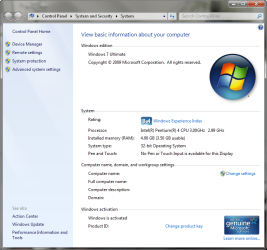
Go to Controlpanel/system and see what ram you have.
Why have you turned off open Gl you may as well use CS3 if you don't make use of that great improvement to Photoshop.
You have a lot more space on "D" drive why not make it your scratch disc instead of "C".
You need to fill in your system specs so it makes it easier for someone helping you.
If they were filled in i could have advised you on the ram and Open GL question a lot better but I am not going to spend 10 minutes on the web looking for your specs and not knowing if i got the right model.
 

My Computer My Computer

Computer type
PC/Desktop
Computer Manufacturer/Model Number
Self Built Custom Computer.
OS
Windows 10 Pro x64
CPU
i7-4770K
Motherboard
Asus Z87 Sabertooth
Memory
16Gig DDR3-2400
Graphics Card(s)
Gigabyte GT740
Sound Card
Onboard
Monitor(s) Displays
Benq 27" - Dell 23' - Benq 22"
Screen Resolution
1680x1050
Hard Drives
Samsung 840 Pro 128g SSD
1xWestern Digital Caviar Green 1tb
2xWestern Digital Caviar Green 2 tb
PSU
Seasonic 760 watt Platinum
Case
Coolermaster Haf - X
Cooling
Noctua NH-C12P CPU Cooler
Keyboard
Logitech illuminated keyboard
Mouse
Logitech Perfomance MX
Internet Speed
Cable = speeds to 20Mbps downsteam and 512kbps upsteam
Antivirus
Avast Internet Security
Browser
Firefox
Your system seems to have only 2gig of ram.
Go to Controlpanel/system and see what ram you have.
Why have you turned off open Gl you may as well use CS3 if you don't make use of that great improvement to Photoshop.
You have a lot more space on "D" drive why not make it your scratch disc instead of "C".
You need to fill in your system specs so it makes it easier for someone helping you.
If they were filled in i could have advised you on the ram and Open GL question a lot better but I am not going to spend 10 minutes on the web looking for your specs and not knowing if i got the right model.

Brian, I have updated my specs to the best of my ability and have attached a screen capture of the 'basic information' dialog box.

I set the scratch disk to C because that's the drive that CS4 is installed on, and because there is plenty of free space there. I am not opposed to changing that.

As for the Open GL, that option is disabled (grayed out). Should I download the optional plug-in?:

Adobe - Photoshop : For Windows : Adobe Photoshop CS4 GPU optional plug-ins

Thank you,
Mark
 

Attachments

  • W7_basic.png
    W7_basic.png
    53.4 KB · Views: 476

My Computer My Computer

Computer Manufacturer/Model Number
Dell Optiplex
OS
Windows 7 Ultimate
CPU
Intel Pentium 4 - 3.00GHz
Memory
4.00 GB
Graphics Card(s)
ATI Radeon X600
Monitor(s) Displays
22" Sony CRT + 22" Viewsonic CRT
Screen Resolution
1280 x 1024
Disable video card support.
 

My Computer My Computer

OS
7264x64/7260x86
The screenshot of your specs looks like you can enable OpenGL drawing Try clicking in the box.
Not sure what it is but you have a problem with Ram, Windows sees 4 gig but Adobe sees 2 gig
 

My Computer My Computer

Computer type
PC/Desktop
Computer Manufacturer/Model Number
Self Built Custom Computer.
OS
Windows 10 Pro x64
CPU
i7-4770K
Motherboard
Asus Z87 Sabertooth
Memory
16Gig DDR3-2400
Graphics Card(s)
Gigabyte GT740
Sound Card
Onboard
Monitor(s) Displays
Benq 27" - Dell 23' - Benq 22"
Screen Resolution
1680x1050
Hard Drives
Samsung 840 Pro 128g SSD
1xWestern Digital Caviar Green 1tb
2xWestern Digital Caviar Green 2 tb
PSU
Seasonic 760 watt Platinum
Case
Coolermaster Haf - X
Cooling
Noctua NH-C12P CPU Cooler
Keyboard
Logitech illuminated keyboard
Mouse
Logitech Perfomance MX
Internet Speed
Cable = speeds to 20Mbps downsteam and 512kbps upsteam
Antivirus
Avast Internet Security
Browser
Firefox
Disable video card support.

How? Where?

The screenshot of your specs looks like you can enable OpenGL drawing Try clicking in the box.
Not sure what it is but you have a problem with Ram, Windows sees 4 gig but Adobe sees 2 gig

I tried checking that box - it is indeed disabled. I suppose my video card does not support OpenGL 2.0.
 

My Computer My Computer

Computer Manufacturer/Model Number
Dell Optiplex
OS
Windows 7 Ultimate
CPU
Intel Pentium 4 - 3.00GHz
Memory
4.00 GB
Graphics Card(s)
ATI Radeon X600
Monitor(s) Displays
22" Sony CRT + 22" Viewsonic CRT
Screen Resolution
1280 x 1024
hey,

I'v got the same problem with windows 7 and cs4. My laptop has great specs to handle cs4 but everything is really slow. I checked al the possible items and the only thing it might be is the ammount of processes which are running in my tasks. Ive got a 64 bit windows 7 en cs4 64-bit but it isnt anything good about it in my opinion. Is there any solution for this problem?
 

My Computer My Computer

Computer Manufacturer/Model Number
Asus k50ij-sx099v
OS
Windows 7
CPU
Intel Core 2 Duo T5900 2200 MHz
Memory
3gb
Graphics Card(s)
Intel® GMA 4500M
After installation have you performed the CS4 update? This has some bug fixes for Win7. It's under help. You should now have version 11.1.
Also check here-
Code:
http://kb2.adobe.com/cps/404/kb404898.html
for update drivers
 

My Computer My Computer

OS
Win7 7600 x64
Memory
8gig
Graphics Card(s)
Nvidia
Monitor(s) Displays
dual wide screen 22inch each
Hard Drives
2x 500gig
Back
Top