You are using an out of date browser. It may not display this or other websites correctly.
You should upgrade or use an alternative browser.
You should upgrade or use an alternative browser.
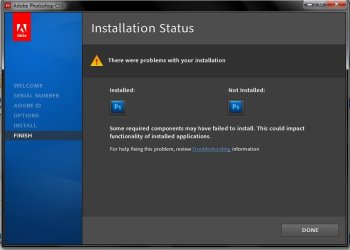
Photoshop didn't accept reinstalling in my deel 5050
- Thread starter mohaman
- Start date


- Local time
- 6:57 PM
- Messages
- 12,011
What version of Photoshop?
Is your Photoshop disc burned, borrowed, purchased from an Adobe retailer, or ??
Is your Photoshop disc burned, borrowed, purchased from an Adobe retailer, or ??
My Computer
At a glance
Windows 7 Home Premium SP1, 64-bitIntel Skylake i5-6600K, not overclocked8 GB HyperX DDR4-2666 (2 x 4 GB)none; graphics are integrated on CPU
- Computer type
- PC/Desktop
- Computer Manufacturer/Model Number
- Ignatz Special; 4 speed manual gearbox; factory air conditioning; one of one
- OS
- Windows 7 Home Premium SP1, 64-bit
- CPU
- Intel Skylake i5-6600K, not overclocked
- Motherboard
- AsRock Z170M Extreme 4, micro ATX
- Memory
- 8 GB HyperX DDR4-2666 (2 x 4 GB)
- Graphics Card(s)
- none; graphics are integrated on CPU
- Sound Card
- onboard: Realtek ALC1150; external: USB Behringer UF0-202
- Monitor(s) Displays
- Dell S2340M 23 inch IPS
- Screen Resolution
- 1600 x 900
- Hard Drives
- System: Crucial MX100 series SSD, 128 GB;
Data: Samsung Spinpoint 103SJ, 1 TB;
Backup: WD Caviar Green WD30EZRX-00D8PB0, 3 TB
- PSU
- Rosewill SilentNight 500 watt fanless, semi-modular
- Case
- Antec Solo II
- Cooling
- Noctua NH-U12S; Noctua F12 intake, Noctua S12A exhaust
- Keyboard
- Microsoft 200 6JH-00001 USB
- Mouse
- Dell or Microsoft optical wired; USB
- Antivirus
- Microsoft Security Essentials and Malwarebytes Premium
- Browser
- Pale Moon
- Other Info
- All fans PWM; speeds at idle: CPU circa 500 rpm; intake circa 600 rpm; exhaust circa 600 rpm; CPU temps 27 idle and 47 C load in a warm room (27 C/81 F) when running Intel Extreme Tuning Utility stress test.

ehm, how big is that setup exe? A lot of programs don't integrate the whole thing in the exe, but keep files separate. If you don't copy them as well in the same folder structure it won't work. If setup exe isn't more than 100 MB, it's the case.
Anyway, what's the error it gives you?
Anyway, what's the error it gives you?
My Computer
At a glance
Win 7 Pro 64-bit 7601AMD Phenom 9650 QuadCore, revision DR-B35 GB yes I run 2x 2GB and 1x 1GB, different b...NVIDIA GeForce 9800 GT 512 Mb, unknown manufa...
- Computer type
- PC/Desktop
- Computer Manufacturer/Model Number
- custom built
- OS
- Win 7 Pro 64-bit 7601
- CPU
- AMD Phenom 9650 QuadCore, revision DR-B3
- Motherboard
- ASUS M4A78
- Memory
- 5 GB yes I run 2x 2GB and 1x 1GB, different brand, spank me.
- Graphics Card(s)
- NVIDIA GeForce 9800 GT 512 Mb, unknown manufacturer.
- Sound Card
- Crappy Realtek Integrated Audio
- Monitor(s) Displays
- Fujitsu Siemens P19-3P
- Screen Resolution
- 1280 x 1024 x 32 bits @ 60 Hz Oh yeah, 4:3 rocks!
- Hard Drives
- (1) MAXTOR S TM3320613AS SATA Disk Device (2) STM35004 18AS SATA Disk Device (3) TOSHIBA USB 2.5"-HDD
- PSU
- whatever, around 450w
- Case
- Scavenged from old company PC, 10+ years old
- Cooling
- CPU fan, GPU fan, case fan, nothing fancy
- Keyboard
- Microsoft, PS/2, white.
- Mouse
- Optical, logitec.
- Internet Speed
- effective max speeds: 70-ish kB/s down 30-ish kB/s up
- Antivirus
- Avira, free edition.
- Browser
- Firefox with FXChrome to make it look like Google Chrome :P
- Other Info
- Was discarded by previous owner due to "horrible performance".
Was running Win Xp from a IDE drive. Yeah. Was a pain.
SATA II drive and Win7 and it zips away! Yay!