Solved Photoshop error

geniulmalefic

Push the limits!
Member
VIP
Local time
2:26 PM
Messages
186
Location
Look behind you...
Hey when I try to open a new project in Photoshop CS5,I get an error.I searched the internet,and far as I understood,it's a problem from windows.Here's a pic.
Tried to opende at 1024x1024 resolution,
 

Attachments

  • Untitled.jpg
    Untitled.jpg
    102 KB · Views: 226

My Computer

Computer Manufacturer/Model Number
AMD Athlon 64x2 dual core 4400+
OS
Windows 7 Enterprise x64
CPU
2,3GHz
Motherboard
ASUS
Memory
2GB DDR2
Graphics Card(s)
ATI Radeon HD 2400
Sound Card
Realtek
Monitor(s) Displays
Benq G900W
Screen Resolution
1440x900
Hard Drives
160 GB
Hi,


The Photoshop scratch disk is your hard drive. Photoshop uses your hard drive as temporary "swap" space, or virtual memory, when your system does not have enough RAM to perform an operation. If you only have one hard drive or partition in your computer, then the scratch disk will be the drive where your operating system is installed (the C drive on a Windows system).

Setting Up Scratch Disks

You can change the scratch disk location and add multiple scratch disks from Photoshop Preferences. Many power users like to create a dedicated hard drive partition for the Photoshop scratch disk. Although Photoshop will function with a single scratch disk on the system partition, you can improve performance by setting the scratch disk to be the fastest drive in your system. Other useful guidelines for setting scratch disks are to avoid using the same drive where your operating system is installed, avoid using a drive where the files you edit are stored, and don't use network or removable drives for a scratch disk.

Delete Photoshop Temp Files

If Photoshop is shut down improperly or crashes in the middle of an editing session, this can leave fairly large temporary files behind on your scratch disk. Photoshop's temp files are typically named ~PST####.tmp on Windows and Temp####, where #### is a series of numbers. These are safe to delete.

Clear Disk Space

If you're getting an error message that the scratch disk is full, it usually means you need to clear some space on whatever drive is defined as the scratch disk in Photoshop Preferences, or add additional drives for Photoshop to use as scratch space.

Defragment Your Hard Disk

It is also possible to get the "scratch disk is full" error, even if the scratch disk drive has free space. This is because Photoshop requires contiguous, unfragmented free space on the scratch disk drive. If you are getting the "scratch disk is full" error message and your scratch disk drive does show a good amount of free space, you may need to run a disk defragmentation utility. For more information, see How to Defragment Your Hard Drive for Windows.

 
Last edited:

My Computer

Computer Manufacturer/Model Number
Compaq Desktop
OS
Windows 7 Ultimate x64
CPU
AMD Sempron Dual Core
Memory
3GB
Graphics Card(s)
NVIDIA GeForce 6150SE nForce 430
Screen Resolution
1024x768
Hard Drives
150GB Sata
Hi,


The Photoshop scratch disk is your hard drive. Photoshop uses your hard drive as temporary "swap" space, or virtual memory, when your system does not have enough RAM to perform an operation. If you only have one hard drive or partition in your computer, then the scratch disk will be the drive where your operating system is installed (the C drive on a Windows system).Setting Up Scratch Disks

You can change the scratch disk location and add multiple scratch disks from Photoshop Preferences. Many power users like to create a dedicated hard drive partition for the Photoshop scratch disk. Although Photoshop will function with a single scratch disk on the system partition, you can improve performance by setting the scratch disk to be the fastest drive in your system. Other useful guidelines for setting scratch disks are to avoid using the same drive where your operating system is installed, avoid using a drive where the files you edit are stored, and don't use network or removable drives for a scratch disk.
Delete Photoshop Temp Files

If Photoshop is shut down improperly or crashes in the middle of an editing session, this can leave fairly large temporary files behind on your scratch disk. Photoshop's temp files are typically named ~PST####.tmp on Windows and Temp####, where #### is a series of numbers. These are safe to delete.
Clear Disk Space

If you're getting an error message that the scratch disk is full, it usually means you need to clear some space on whatever drive is defined as the scratch disk in Photoshop Preferences, or add additional drives for Photoshop to use as scratch space.
Defragment Your Hard Disk

It is also possible to get the "scratch disk is full" error, even if the scratch disk drive has free space. This is because Photoshop requires contiguous, unfragmented free space on the scratch disk drive. If you are getting the "scratch disk is full" error message and your scratch disk drive does show a good amount of free space, you may need to run a disk defragmentation utility. For more information, see How to Defragment Your Hard Drive for Windows.

Thank for the repply,but it didn't helped.
 

My Computer

Computer Manufacturer/Model Number
AMD Athlon 64x2 dual core 4400+
OS
Windows 7 Enterprise x64
CPU
2,3GHz
Motherboard
ASUS
Memory
2GB DDR2
Graphics Card(s)
ATI Radeon HD 2400
Sound Card
Realtek
Monitor(s) Displays
Benq G900W
Screen Resolution
1440x900
Hard Drives
160 GB
Can you post how much free space your HDD has?

CS5 requires a minimum of 1GB of memory and you have 2GB. You have to take into account what available memory you have remaining after your programs have their set allocation.
 

My Computer

Computer Manufacturer/Model Number
Compaq Desktop
OS
Windows 7 Ultimate x64
CPU
AMD Sempron Dual Core
Memory
3GB
Graphics Card(s)
NVIDIA GeForce 6150SE nForce 430
Screen Resolution
1024x768
Hard Drives
150GB Sata
Can you post how much free space your HDD has?

CS5 requires a minimum of 1GB of memory and you have 2GB. You have to take into account what available memory you have remaining after your programs have their set allocation.

I have more than 40% free after starting PS.
 

My Computer

Computer Manufacturer/Model Number
AMD Athlon 64x2 dual core 4400+
OS
Windows 7 Enterprise x64
CPU
2,3GHz
Motherboard
ASUS
Memory
2GB DDR2
Graphics Card(s)
ATI Radeon HD 2400
Sound Card
Realtek
Monitor(s) Displays
Benq G900W
Screen Resolution
1440x900
Hard Drives
160 GB
Is it a fresh install of CS5? It could be that an issue has arisen in the installation/registry and you may need to re-install it.
 

My Computer

Computer Manufacturer/Model Number
Compaq Desktop
OS
Windows 7 Ultimate x64
CPU
AMD Sempron Dual Core
Memory
3GB
Graphics Card(s)
NVIDIA GeForce 6150SE nForce 430
Screen Resolution
1024x768
Hard Drives
150GB Sata
Is it a fresh install of CS5? It could be that an issue has arisen in the installation/registry and you may need to re-install it.

I just reinstall eindows ,now I have win 7 enterprise sp1 64 bit. It runs great,and just installed PS.
 

My Computer

Computer Manufacturer/Model Number
AMD Athlon 64x2 dual core 4400+
OS
Windows 7 Enterprise x64
CPU
2,3GHz
Motherboard
ASUS
Memory
2GB DDR2
Graphics Card(s)
ATI Radeon HD 2400
Sound Card
Realtek
Monitor(s) Displays
Benq G900W
Screen Resolution
1440x900
Hard Drives
160 GB
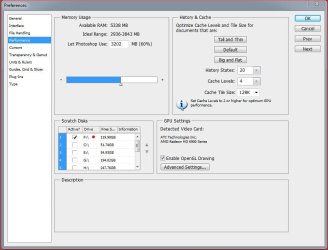
If you have the scratch disk on you "C" drive it's probably getting to a point where "C" drive is running out of space an thus limiting the space for other programs. If you have other drives/partitions in the system try moving the scratch disk to one of them. In this image you can see I moved my scratch disk to another drive (F drive)

CS5 Preferences.JPG

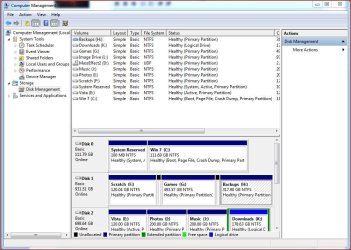
As Orbital Shark has sugested can you post a screenshot of your drives....

Capture.JPG
 

My Computer

Computer type
PC/Desktop
Computer Manufacturer/Model Number
Custom built by me.
OS
Windows 10 Pro
CPU
Intel Core i7-4770K (3.5Ghz)
Motherboard
Gigabyte G1 Sniper 5 (F10 Bios)
Memory
32 gig Corsair Dominator Platinum (4x8Gig)
Graphics Card(s)
Sapphire Tri-X R9 Fury
Sound Card
Soundblaster ZXR
Monitor(s) Displays
NEC PA242W 24" LCD Monitor
Screen Resolution
1920 x 1200
Hard Drives
Primary - Samsung 850 Pro (512gig), Samsung 840 Pro (256gig), 2TB WD Caviar Black.
PSU
EVGA Supernova 1000 G2
Case
Cooler Master HAF X
Cooling
Corsair H100i with Corsair Air Series SP120 Quiet Fans
Keyboard
Logitech Wireless Wave
Mouse
Logitech Performance MX
Internet Speed
High Speed Cable
Antivirus
Norton Security
Browser
IE11
Other Info
Memory Timings - 1866MHz @ 9-9-9-27-1T @ 1.5 volts
If you have the scratch disk on you "C" drive it's probably getting to a point where "C" drive is running out of space an thus limiting the space for other programs. If you have other drives/partitions in the system try moving the scratch disk to one of them. In this image you can see I moved my scratch disk to another drive (F drive)

View attachment 146515

My PS is installed in D ,I have 3 partitons.

How did you opened the preferences?
 

My Computer

Computer Manufacturer/Model Number
AMD Athlon 64x2 dual core 4400+
OS
Windows 7 Enterprise x64
CPU
2,3GHz
Motherboard
ASUS
Memory
2GB DDR2
Graphics Card(s)
ATI Radeon HD 2400
Sound Card
Realtek
Monitor(s) Displays
Benq G900W
Screen Resolution
1440x900
Hard Drives
160 GB
Open CS5, then Edit, Preferences, Performance
 

My Computer

Computer type
PC/Desktop
Computer Manufacturer/Model Number
Custom built by me.
OS
Windows 10 Pro
CPU
Intel Core i7-4770K (3.5Ghz)
Motherboard
Gigabyte G1 Sniper 5 (F10 Bios)
Memory
32 gig Corsair Dominator Platinum (4x8Gig)
Graphics Card(s)
Sapphire Tri-X R9 Fury
Sound Card
Soundblaster ZXR
Monitor(s) Displays
NEC PA242W 24" LCD Monitor
Screen Resolution
1920 x 1200
Hard Drives
Primary - Samsung 850 Pro (512gig), Samsung 840 Pro (256gig), 2TB WD Caviar Black.
PSU
EVGA Supernova 1000 G2
Case
Cooler Master HAF X
Cooling
Corsair H100i with Corsair Air Series SP120 Quiet Fans
Keyboard
Logitech Wireless Wave
Mouse
Logitech Performance MX
Internet Speed
High Speed Cable
Antivirus
Norton Security
Browser
IE11
Other Info
Memory Timings - 1866MHz @ 9-9-9-27-1T @ 1.5 volts

My Computer

Computer Manufacturer/Model Number
AMD Athlon 64x2 dual core 4400+
OS
Windows 7 Enterprise x64
CPU
2,3GHz
Motherboard
ASUS
Memory
2GB DDR2
Graphics Card(s)
ATI Radeon HD 2400
Sound Card
Realtek
Monitor(s) Displays
Benq G900W
Screen Resolution
1440x900
Hard Drives
160 GB
Good news :)
 

My Computer

Computer Manufacturer/Model Number
Compaq Desktop
OS
Windows 7 Ultimate x64
CPU
AMD Sempron Dual Core
Memory
3GB
Graphics Card(s)
NVIDIA GeForce 6150SE nForce 430
Screen Resolution
1024x768
Hard Drives
150GB Sata
Glad we were able to help.

BTW make sure you choose a drive that has lots of space, or else you can just delete files should the drive start filling up.

Enjoy :)
 

My Computer

Computer type
PC/Desktop
Computer Manufacturer/Model Number
Custom built by me.
OS
Windows 10 Pro
CPU
Intel Core i7-4770K (3.5Ghz)
Motherboard
Gigabyte G1 Sniper 5 (F10 Bios)
Memory
32 gig Corsair Dominator Platinum (4x8Gig)
Graphics Card(s)
Sapphire Tri-X R9 Fury
Sound Card
Soundblaster ZXR
Monitor(s) Displays
NEC PA242W 24" LCD Monitor
Screen Resolution
1920 x 1200
Hard Drives
Primary - Samsung 850 Pro (512gig), Samsung 840 Pro (256gig), 2TB WD Caviar Black.
PSU
EVGA Supernova 1000 G2
Case
Cooler Master HAF X
Cooling
Corsair H100i with Corsair Air Series SP120 Quiet Fans
Keyboard
Logitech Wireless Wave
Mouse
Logitech Performance MX
Internet Speed
High Speed Cable
Antivirus
Norton Security
Browser
IE11
Other Info
Memory Timings - 1866MHz @ 9-9-9-27-1T @ 1.5 volts
Glad we were able to help.

BTW make sure you choose a drive that has lots of space, or else you can just delete files should the drive start filling up.

Enjoy :)

Now I got another problem,the temp file,that PS creates it takes more than 30 GB.
What is wrong?
 

My Computer

Computer Manufacturer/Model Number
AMD Athlon 64x2 dual core 4400+
OS
Windows 7 Enterprise x64
CPU
2,3GHz
Motherboard
ASUS
Memory
2GB DDR2
Graphics Card(s)
ATI Radeon HD 2400
Sound Card
Realtek
Monitor(s) Displays
Benq G900W
Screen Resolution
1440x900
Hard Drives
160 GB
You need to make sure that in the preferences you have only 1 scratch disk selected/available.

Also, once you determine that you have 1 scratch disk you may want to access

%localappdata%\temp (type into the start menu box and press enter) and delete everything in that folder.
   Note
Make sure CS5 is not running or the temp file deletion may fail
 

My Computer

Computer Manufacturer/Model Number
Compaq Desktop
OS
Windows 7 Ultimate x64
CPU
AMD Sempron Dual Core
Memory
3GB
Graphics Card(s)
NVIDIA GeForce 6150SE nForce 430
Screen Resolution
1024x768
Hard Drives
150GB Sata
Glad we were able to help.

BTW make sure you choose a drive that has lots of space, or else you can just delete files should the drive start filling up.

Enjoy :)

Now I got another problem,the temp file,that PS creates it takes more than 30 GB.
What is wrong?

Hmmm..... that doesn't sound right. It actually shouldn't create any files unless you're working with a file :confused:

Can you do us a favor and post a screen shot of the file/error. Also a screen of your disk drives as asked for previously.

Thanks
 

My Computer

Computer type
PC/Desktop
Computer Manufacturer/Model Number
Custom built by me.
OS
Windows 10 Pro
CPU
Intel Core i7-4770K (3.5Ghz)
Motherboard
Gigabyte G1 Sniper 5 (F10 Bios)
Memory
32 gig Corsair Dominator Platinum (4x8Gig)
Graphics Card(s)
Sapphire Tri-X R9 Fury
Sound Card
Soundblaster ZXR
Monitor(s) Displays
NEC PA242W 24" LCD Monitor
Screen Resolution
1920 x 1200
Hard Drives
Primary - Samsung 850 Pro (512gig), Samsung 840 Pro (256gig), 2TB WD Caviar Black.
PSU
EVGA Supernova 1000 G2
Case
Cooler Master HAF X
Cooling
Corsair H100i with Corsair Air Series SP120 Quiet Fans
Keyboard
Logitech Wireless Wave
Mouse
Logitech Performance MX
Internet Speed
High Speed Cable
Antivirus
Norton Security
Browser
IE11
Other Info
Memory Timings - 1866MHz @ 9-9-9-27-1T @ 1.5 volts
It could be acumulated error temps and such.
 

My Computer

Computer Manufacturer/Model Number
Compaq Desktop
OS
Windows 7 Ultimate x64
CPU
AMD Sempron Dual Core
Memory
3GB
Graphics Card(s)
NVIDIA GeForce 6150SE nForce 430
Screen Resolution
1024x768
Hard Drives
150GB Sata
It could be acumulated error temps and such.

Not if he said he just installed both Win 7 and CS5. Also those files would not accumulate that fast with a drive change (scratch disk). Something strange is going on.
 

My Computer

Computer type
PC/Desktop
Computer Manufacturer/Model Number
Custom built by me.
OS
Windows 10 Pro
CPU
Intel Core i7-4770K (3.5Ghz)
Motherboard
Gigabyte G1 Sniper 5 (F10 Bios)
Memory
32 gig Corsair Dominator Platinum (4x8Gig)
Graphics Card(s)
Sapphire Tri-X R9 Fury
Sound Card
Soundblaster ZXR
Monitor(s) Displays
NEC PA242W 24" LCD Monitor
Screen Resolution
1920 x 1200
Hard Drives
Primary - Samsung 850 Pro (512gig), Samsung 840 Pro (256gig), 2TB WD Caviar Black.
PSU
EVGA Supernova 1000 G2
Case
Cooler Master HAF X
Cooling
Corsair H100i with Corsair Air Series SP120 Quiet Fans
Keyboard
Logitech Wireless Wave
Mouse
Logitech Performance MX
Internet Speed
High Speed Cable
Antivirus
Norton Security
Browser
IE11
Other Info
Memory Timings - 1866MHz @ 9-9-9-27-1T @ 1.5 volts
Glad we were able to help.

BTW make sure you choose a drive that has lots of space, or else you can just delete files should the drive start filling up.

Enjoy :)

Now I got another problem,the temp file,that PS creates it takes more than 30 GB.
What is wrong?

Hmmm..... that doesn't sound right. It actually shouldn't create any files unless you're working with a file :confused:

Can you do us a favor and post a screen shot of the file/error. Also a screen of your disk drives as asked for previously.

Thanks

There's the pic.
 

Attachments

  • Untitled.jpg
    Untitled.jpg
    178.6 KB · Views: 48

My Computer

Computer Manufacturer/Model Number
AMD Athlon 64x2 dual core 4400+
OS
Windows 7 Enterprise x64
CPU
2,3GHz
Motherboard
ASUS
Memory
2GB DDR2
Graphics Card(s)
ATI Radeon HD 2400
Sound Card
Realtek
Monitor(s) Displays
Benq G900W
Screen Resolution
1440x900
Hard Drives
160 GB
Can you delete the file? Does it come back as a similar size when you open then close CS5?

Also, as large as it is, it's not 30GB :confused:
 

My Computer

Computer Manufacturer/Model Number
Compaq Desktop
OS
Windows 7 Ultimate x64
CPU
AMD Sempron Dual Core
Memory
3GB
Graphics Card(s)
NVIDIA GeForce 6150SE nForce 430
Screen Resolution
1024x768
Hard Drives
150GB Sata
Back
Top