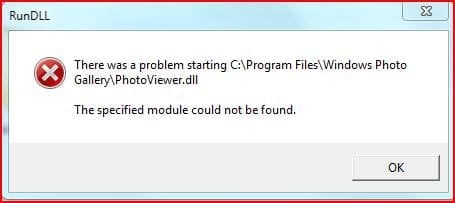
photoviewer.dll

michaelyahu

New member
Local time
9:33 AM
Messages
3
i did an upgrade install from vista, and it seems that c:\program files\windows photo gallery\photoviewer.dll (right click > edit on a picture) is missing? or gone.

Did they take this out of windows 7?
 

My Computer

Computer Manufacturer/Model Number
Asus M70Vm-x1
OS
Windows 7 Beta, Ubuntu Jaunty
CPU
Intel Core Two Duo @ 2.53
Memory
4 Gig (stock)
Graphics Card(s)
NVIDIA GeForce 9600M GS
Sound Card
Realtek with Dolby
Monitor(s) Displays
stock
Screen Resolution
1920x1200
Hard Drives
WesternDigital Scorpio Blue 320g and Mybook Essential 750g
PSU
stock
Case
stock
Cooling
stock fans
Keyboard
stock full qwerty keyboard with numeric pad
Mouse
Logitech wireless mouse for notebooks/and the touchpad
Internet Speed
comcast. need i say more?
Windows photo viewer/photoviewer.dll should be there but not windows photo gallery. You can DL Windows Live Photo Gallery.

Photo Gallery - Windows Live
 

My Computer

Computer type
PC/Desktop
Computer Manufacturer/Model Number
Airbot 2.0
OS
Windows 7 Ultimate x64 SP1
CPU
Core i7 920 (D0) @ 4Ghz, *26c idle *65c full load on air
Motherboard
Asus P6X58D Premium - Sata 6Gb/s - USB 3.0
Memory
12GB DDR3 Corsair Dominator -CMD12GX3M6A1600C8 at 1600MHz
Graphics Card(s)
Zotac Geforce GTX 770
Sound Card
ASUS Xonar D2X
Monitor(s) Displays
1 LG 24" Flatron W2453V-PF 1 Samsung 24" P2450H both 2ms RT
Screen Resolution
1920x1080@60hz
Hard Drives
1 Samsung 250GB 840 Evo SSD
1 OCZ Vertex2 180GB SSD
1 TB Samsung Spinpoint F1 7200RPM 32MB cache
2 500GB WD Caviar Blacks 7200RPM 32MB cache (WD5001AALS)

Pioneer DVD Burner DVR-S18M
PSU
Corsair HX1000W
Case
Cooler Master HAF 932
Cooling
Case Fans *3 230mm, *1 140mm/CPU - *Tuniq Tower 120 Extreme
Keyboard
Logitech Wireless MK700
Mouse
Logitech Wireless MK700
Internet Speed
DL 15 Mbps UL 0.98 Mbps
Antivirus
None
Browser
Firefox Nightly
Other Info
Processor-7.7 *RAM- 7.9 *Graphics-7.9 *Gaming Graphics- 7.9 *SSD- 7.8 W.E.I final score= 7.7
*Phone- LG Nexus 5
Well I installed the live extensions, and photoviewer is now in the directory. but i still get the error when i right click on a photo and choose edit.
 

Attachments

  • Capture.JPG
    Capture.JPG
    18.5 KB · Views: 421

My Computer

Computer Manufacturer/Model Number
Asus M70Vm-x1
OS
Windows 7 Beta, Ubuntu Jaunty
CPU
Intel Core Two Duo @ 2.53
Memory
4 Gig (stock)
Graphics Card(s)
NVIDIA GeForce 9600M GS
Sound Card
Realtek with Dolby
Monitor(s) Displays
stock
Screen Resolution
1920x1200
Hard Drives
WesternDigital Scorpio Blue 320g and Mybook Essential 750g
PSU
stock
Case
stock
Cooling
stock fans
Keyboard
stock full qwerty keyboard with numeric pad
Mouse
Logitech wireless mouse for notebooks/and the touchpad
Internet Speed
comcast. need i say more?
I don't know why you don't have the photoviewer.dll already, I have it. Maybe Brink will come along later and suggest an action, I wouldn't know if you could do this. :confused:
 

My Computer

Computer type
PC/Desktop
Computer Manufacturer/Model Number
Airbot 2.0
OS
Windows 7 Ultimate x64 SP1
CPU
Core i7 920 (D0) @ 4Ghz, *26c idle *65c full load on air
Motherboard
Asus P6X58D Premium - Sata 6Gb/s - USB 3.0
Memory
12GB DDR3 Corsair Dominator -CMD12GX3M6A1600C8 at 1600MHz
Graphics Card(s)
Zotac Geforce GTX 770
Sound Card
ASUS Xonar D2X
Monitor(s) Displays
1 LG 24" Flatron W2453V-PF 1 Samsung 24" P2450H both 2ms RT
Screen Resolution
1920x1080@60hz
Hard Drives
1 Samsung 250GB 840 Evo SSD
1 OCZ Vertex2 180GB SSD
1 TB Samsung Spinpoint F1 7200RPM 32MB cache
2 500GB WD Caviar Blacks 7200RPM 32MB cache (WD5001AALS)

Pioneer DVD Burner DVR-S18M
PSU
Corsair HX1000W
Case
Cooler Master HAF 932
Cooling
Case Fans *3 230mm, *1 140mm/CPU - *Tuniq Tower 120 Extreme
Keyboard
Logitech Wireless MK700
Mouse
Logitech Wireless MK700
Internet Speed
DL 15 Mbps UL 0.98 Mbps
Antivirus
None
Browser
Firefox Nightly
Other Info
Processor-7.7 *RAM- 7.9 *Graphics-7.9 *Gaming Graphics- 7.9 *SSD- 7.8 W.E.I final score= 7.7
*Phone- LG Nexus 5
start > control panel > default programs > paint > set this program as default.

fixed it.
 

My Computer

Computer Manufacturer/Model Number
Asus M70Vm-x1
OS
Windows 7 Beta, Ubuntu Jaunty
CPU
Intel Core Two Duo @ 2.53
Memory
4 Gig (stock)
Graphics Card(s)
NVIDIA GeForce 9600M GS
Sound Card
Realtek with Dolby
Monitor(s) Displays
stock
Screen Resolution
1920x1200
Hard Drives
WesternDigital Scorpio Blue 320g and Mybook Essential 750g
PSU
stock
Case
stock
Cooling
stock fans
Keyboard
stock full qwerty keyboard with numeric pad
Mouse
Logitech wireless mouse for notebooks/and the touchpad
Internet Speed
comcast. need i say more?
I am using FTP Filezilla and I am trying to open up a picture through it. Use to work fine but now it is giving me this error. I set the programs to default and still does it. Any suggestions?

-IMORIA
 

My Computer

Computer Manufacturer/Model Number
imoria
OS
imoria
CPU
imoria
Motherboard
imoria
Memory
imoria
Graphics Card(s)
imoria
Sound Card
imoria
Monitor(s) Displays
imoria
Hard Drives
imoria
PSU
imoria
Case
imoria
Cooling
imoria
This problem is NOT solved, it only is concealed.

The problem is caused by an illegal registry hack.
in
HKEY_LOCAL_MACHINE\Software\Microsoft\Windows\CurrentVersion\
Here the entry for
ProgrammFilesDir
is not allowed to modify. This must be set to default = C:\Programs ( could be different, related to language version)
(If this is set differently this will cause about 50 other errors/faults not only for jpg.)
Reboot
Now you can reset to default in
start > control panel > default programs > or see here
Annoyances.org - Edit File Types in Windows Vista
The missing icon for the photoviewer is now back again and can be used.

If you want to change your destination for program installation it is ONLY allowed to change
Filepath in
HKEY_LOCAL_MACHINE\Software\Microsoft\Windows\CurrentVersion\
This advise to change the installation destination - change BOTH - was valid only until version XP.
You can find this outdated and now wrong information everywhere in the internet.

Do not set- as one user proposed - to use here "explorer.exe" as THE hack to solve.
If you do, immediately jpg is disappeared.
You no more can correct this!!!!
With the next call of a jpg file this will start every 2 s a new explorer task.
After about 3 to 5 min your system is locked.
 
Last edited:

My Computer

OS
w7
Hello, I will try to be as clear as I can be, ... I run win.7 home premium...
1. First locate your folder--->"C:\Program Files\Windows Photo Gallery"
2. Second locate this folder--->"C:\Program Files\Windows Photo Viewer"
3. Third copy&paste from--->"C:\Program Files\Windows Photo Viewer" to--->"C:\Program Files\Windows Photo Gallery" as these files are in order (PhotoViewer.dll; PhotoBase.dll; PhotoAcq.dll; ImagingEngine.dll; ImagingDevices<---Type of file: Application (.exe); those five files go to--->"C:\Program Files\Windows Photo Gallery".
4. Fourth copy these files (PhotoViewer.dll.mui; PhotoAcq.dll.mui; ImagingDevices.exe.mui) from the folder--->"C:\Program Files\Windows Photo Viewer\en-US" to this folder--->"C:\Program Files\Windows Photo Gallery\en-US". Hope works for you.
 
Last edited:

My Computer

Computer Manufacturer/Model Number
NO
OS
Windows 7 Home Premium
CPU
NO
Motherboard
NO
Memory
NO
Graphics Card(s)
NO
Sound Card
NO
Monitor(s) Displays
NO
Hard Drives
NO
PSU
NO
Case
NO
Cooling
NO
Hello, I will try to be as clear as I can be, ... I run win.7 home premium...
1. First locate your folder--->"C:\Program Files\Windows Photo Gallery"
2. Second locate this folder--->"C:\Program Files\Windows Photo Viewer"
3. Third copy&paste from--->"C:\Program Files\Windows Photo Viewer" to--->"C:\Program Files\Windows Photo Gallery" as these files are in order (PhotoViewer.dll; PhotoBase.dll; PhotoAcq.dll; ImagingEngine.dll; ImagingDevices<---Type of file: Application (.exe); those five files go to--->"C:\Program Files\Windows Photo Gallery".
4. Fourth copy these files (PhotoViewer.dll.mui; PhotoAcq.dll.mui; ImagingDevices.exe.mui) from the folder--->"C:\Program Files\Windows Photo Viewer\en-US" to this folder--->"C:\Program Files\Windows Photo Gallery\en-US". Hope works for you.

I registered just to say this guy is a legend! :D
 

My Computer

Computer Manufacturer/Model Number
Custom by me
OS
Windows 7 Ultimate 64-bit
CPU
Intel i7 920 OC to 4Ghz (Survived 15 hour Prime95 test)
Motherboard
Gigabyte EX58-UD4P
Memory
G.Skill 6GB 2.6Mhz 8-8-8-22
Graphics Card(s)
HD 4890 920Mhz/1127Mhz
Sound Card
Creative X-Fi Xtreme Music 5.1
Monitor(s) Displays
LG 22" LED, 2ms
Hard Drives
1TB Western Digital 16mb Cache Green Power
PSU
520W Modular Corsair
Case
Coolermaster RC-690 w/ Side Window
Cooling
3x 120mm, 3x 80mm Case Fans, CoolerMaster V8 CPU Cooler
Hello, I will try to be as clear as I can be, ... I run win.7 home premium...
1. First locate your folder--->"C:\Program Files\Windows Photo Gallery"
2. Second locate this folder--->"C:\Program Files\Windows Photo Viewer"
3. Third copy&paste from--->"C:\Program Files\Windows Photo Viewer" to--->"C:\Program Files\Windows Photo Gallery" as these files are in order (PhotoViewer.dll; PhotoBase.dll; PhotoAcq.dll; ImagingEngine.dll; ImagingDevices<---Type of file: Application (.exe); those five files go to--->"C:\Program Files\Windows Photo Gallery".
4. Fourth copy these files (PhotoViewer.dll.mui; PhotoAcq.dll.mui; ImagingDevices.exe.mui) from the folder--->"C:\Program Files\Windows Photo Viewer\en-US" to this folder--->"C:\Program Files\Windows Photo Gallery\en-US". Hope works for you.

This works for me to. Thanks alot! :D
 

My Computer

OS
Windows 7
I also had to register just to say you are a legend. It fixed the problem even though I don't know how it happened.
 

My Computer

Computer Manufacturer/Model Number
Samsung RV511-A07AU
OS
Windows 7 Home Premium 64bit
CPU
Intel core i3 380M 253Ghz
Memory
8GB
Screen Resolution
1366 x 768
Hard Drives
Hitachi HTS545050B9A300 -500GB
Mouse
Logitech M305
Internet Speed
1000Mbs
Just a thank you!

This guy rocks! Followed the instructions and voila! It all works again!
Many thanks!:D:party:
 

My Computer

OS
Windows 7 Ultimate 32
Hi,

i checked that option but i can not find Windows Photo Gallery on my pc, but do have Windows Photo Viewer.
So in Viewer i have all .dll-s but don't know where to paste them.

Just for info, i had some pirate avast (looks like) so i uninstalled it and installed free version and now everything is wrong and my .dll-s missing.

Any ideas?

Thank you.
 

My Computer

Computer type
PC/Desktop
OS
Win 7
CPU
@ 3.40 GHz
Screen Resolution
LG IPS 234 digital
Hi,

just did it.
Photo gallery does not comes with installation anymore, but it is possible to download it.
Photo Gallery - Microsoft Windows

Note: you dont have to install all the programs in that set.

Greetz
 

My Computer

Computer type
PC/Desktop
OS
Win 7
CPU
@ 3.40 GHz
Screen Resolution
LG IPS 234 digital

My Computer

Computer type
Laptop
Computer Manufacturer/Model Number
ASUS ROG G55VW
OS
Windows 7 Ultimate x64
CPU
i7 3630QM Processor
Motherboard
HM77 Chipset
Memory
32GB 1600 MHz DDR3
Graphics Card(s)
GTX 660M
Hard Drives
Intel 520 480GB SSD
1TB in Caddy
Antivirus
ESET NOD32
Browser
FF
My pleasure dakwan ;)
 

My Computer

Computer type
PC/Desktop
OS
Win 7
CPU
@ 3.40 GHz
Screen Resolution
LG IPS 234 digital
Back
Top