Physical Memory at 50%

kelvinwgr

New member
Local time
4:26 AM
Messages
43
Hi Guys,

I have recently bought an Acer timeline 3820T with i3-350M, 2.26GHz, 2 GB Ram running on Windows 7 Home Premium.

I realised that when I boot my laptop and without any application running, the task manager shows 78 Processes and Physical memory is at 50% usage.

Just like to check if it deems normal for the physical memory to be at 50%. While my windows xp pro laptop memory is at around 30% with only 1 GB Ram.

Thanks.
 

My Computer

Computer Manufacturer/Model Number
Acer Timeline 3820T
OS
Windows 7 Home Premium 64-bits OS
Memory
2 GB Ram
Hard Drives
320 GB
Windows 7 does use more RAM. Not to mention when you first log in, the computer is still starting various services and programs. Are you using 32-bit or 64-bit. It sounds about right for 64-bit to me.
 

My Computer

Computer type
Laptop
Computer Manufacturer/Model Number
Toshiba P775-S7100
OS
Windows 7 Professional SP1 64-bit
CPU
Intel Core i5-2450M @2.5 GHz
Memory
6 GB DDR3 1333MHz
Graphics Card(s)
Intel HD 3000
Monitor(s) Displays
Built-in 17.3" LED; 22" Insignia NS-L22Q-10A
Screen Resolution
1600x900; 1360x768
Hard Drives
750 GB Hitachi
1TB Seagate FreeAgent External
Internet Speed
Verizon DSL Speed(Down/Up): 3360 Kbps / 800 Kbps
Antivirus
MSE and MBAM Pro
Browser
IE10
78 processes are wayyy to much. Click the start button and in the Search box, type msconfig and press Enter. Then in the System Configuration Utility, click Startup tab and then click Disable All to disable all the startup items. Then click Apply and OK and Restart.

Once the PC restarts, then check the task manager for improvements.
 

My Computer

Computer Manufacturer/Model Number
Samsung NP530U4B-S02IN
OS
Windows® 8 Pro (64-bit)
CPU
Intel® Core™ i5 Processor 2467M (1.60GHz, 3MB L3 Cache)
Motherboard
Samsung Electronics
Memory
6GB DDR3 System Memory at 1,333MHz (on BD 4GB + 2GB x 1)
Graphics Card(s)
AMD Radeon™ HD7550M 1GB DDR3 (Ext. Graphic)
Sound Card
Realtek High Definition Audio
Monitor(s) Displays
35.56cm (14.0) SuperBright 300nit HD LED Display
Screen Resolution
1366x768
Hard Drives
1TB S-ATA II Hard Drive (5400RPM) with ExpressCache 16GB SSD
Internet Speed
sucks
Antivirus
Microsoft Security Essentials
Browser
Google Chrome (Sync enabled)
I would say this is high. you should get some of the bloat from the OEM off of there. you can use PC Decrapify on a new comp to select which programs you want and don't want: Welcome | The PC Decrapifier

*Edit additional info: Read the How it works section to get an overview of what the program can do
 
Last edited:

My Computer

Computer type
Laptop
Computer Manufacturer/Model Number
ASUS G60-RBBX05
OS
Win7 Home Premium 64x
CPU
Intel Core 2 Duo P7450 / 2.13 GHz (2.29 with Extreme Turbo)
Memory
4 GB PC-6400 Hyundai (2X2) at 800Mhz
Graphics Card(s)
NVIDIA GeForce GTX 260M 1GB DDR3 VRAM
Monitor(s) Displays
16" LED Backlit
Screen Resolution
1366 x 768 on laptop 1600x1050 max res on 22" external mon
Hard Drives
OCZ Agility 3 60GB SSD / 320 GB - Serial ATA-150 - 7200 rpm
PSU
6-cell Lithium ion { lasts 1.5 hours }
Case
ASUS G60 Laptop
Keyboard
Chicklet type back-lit (white light) keyboard
Mouse
Logitech G9 Laser Mouse 3200dpi and 1000 reports per minute
Internet Speed
Comcast 8.60mb/s up - 3.11mb/s down
Antivirus
MSE
Browser
Firefox
Other Info
General mid-budget gaming Comp. Low batterylife - High FrameRates - currently overheating problems :(

2nd Rig: Case: Rosewill BLACKHAWK Gaming ATX Mid Tower Computer Case

Mobo: GIGABYTE GA-990FXA-UD3
CPU: AMD FX-6200 Zambezi 3.8GHz (4.1GHz Turbo)
Heatsink: COOLER MASTER V8 CPU Cooler
RAM: Patriot Viper 3 8GB (2 x 4GB) 240-Pin DDR3 SDRAM 1866 (PC3 15000)
GPU: SAPPHIRE Radeon HD 6850 1GB 2
also remember, win 7 and vista use ream as a cache, which IMO is better than it wasting power isn't it? Windows frees it up for usage when it's needed will be put in use. and yeah, 78 processes it WAAY too much!
 

My Computer

Computer Manufacturer/Model Number
Self Built
OS
Win/7 x64 Professional
CPU
AMD FX 6300 @ 6x3.5Ghz
Motherboard
Gigabyte GA-970A-DS3
Memory
12GB DDR31600
Graphics Card(s)
Nvidia Geforce GTX 650Ti
Sound Card
Realtek HD audio
Monitor(s) Displays
HannsG HH241HPBE 24"
Screen Resolution
1920x1080
Hard Drives
Hitachi Ultrastar 7200RPM Storage (500GB)
Samsung SSD 840 boot (120GB)
PSU
XFX Pro 450W
Case
Cooler Master Silencio 550
Keyboard
M/S Wireless Keyboard 3000
Mouse
Logitech Lx7
Internet Speed
2.77 Mb down(slow) 0.3 Mb up(slower)
Follow the advice Dinish gave you because the 78 processes stem most likely from too many startup programs. I would, however, leave the AV program enabled or stay off the web during the experiment. Once you know that this was the problem, you can enable the startups more selectively - the fewer, the better. That will not impact the operability of your system. The only one that is really needed (apart from the ones you want expressis verbis) is the AV.
 

My Computer

Computer Manufacturer/Model Number
HP, Dell, Gateway, Toshiba - 4 laptops and 2 desktops
OS
Vista, Windows7, Mint Mate, Zorin, Windows 8
CPU
from 1.6GHz Duo to i7
Monitor(s) Displays
2x HP w2207
Hard Drives
5x HDD, 7x SSD, 12x Externals
Keyboard
with trackball - no mices
Mouse
Trackball mice
Internet Speed
DSL 6000
Follow the advice Dinish gave you because the 78 processes stem most likely from too many startup programs. I would, however, leave the AV program enabled or stay off the web during the experiment. Once you know that this was the problem, you can enable the startups more selectively - the fewer, the better. That will not impact the operability of your system. The only one that is really needed (apart from the ones you want expressis verbis) is the AV.


Thanks for the advice. Yes in fact I did went to msconfig to disable not all, but same of the startup programs as I do not know which is critical for the system to operate. Therefore, I only disable those that I thought was unnecessary.

So the startup programs will actually contribute to the 78 processes, am I right to say that?
 

My Computer

Computer Manufacturer/Model Number
Acer Timeline 3820T
OS
Windows 7 Home Premium 64-bits OS
Memory
2 GB Ram
Hard Drives
320 GB
Yes. Definitely.
 

My Computer

Computer type
Laptop
Computer Manufacturer/Model Number
Toshiba P775-S7100
OS
Windows 7 Professional SP1 64-bit
CPU
Intel Core i5-2450M @2.5 GHz
Memory
6 GB DDR3 1333MHz
Graphics Card(s)
Intel HD 3000
Monitor(s) Displays
Built-in 17.3" LED; 22" Insignia NS-L22Q-10A
Screen Resolution
1600x900; 1360x768
Hard Drives
750 GB Hitachi
1TB Seagate FreeAgent External
Internet Speed
Verizon DSL Speed(Down/Up): 3360 Kbps / 800 Kbps
Antivirus
MSE and MBAM Pro
Browser
IE10
Windows 7 does use more RAM. Not to mention when you first log in, the computer is still starting various services and programs. Are you using 32-bit or 64-bit. It sounds about right for 64-bit to me.

Yes it is a 64-bit OS
 

My Computer

Computer Manufacturer/Model Number
Acer Timeline 3820T
OS
Windows 7 Home Premium 64-bits OS
Memory
2 GB Ram
Hard Drives
320 GB
With 64-bit and 2GB of RAM, I had about 40% used at idle. Maybe a little less a while after start-up. 50% still sounds a little high. I was able to upgrade to 4GB for ~$30 back when DDR2 was cheap as dirt. Then it said 30% at start up and 27% at idle the rest of the time.
 

My Computer

Computer type
Laptop
Computer Manufacturer/Model Number
Toshiba P775-S7100
OS
Windows 7 Professional SP1 64-bit
CPU
Intel Core i5-2450M @2.5 GHz
Memory
6 GB DDR3 1333MHz
Graphics Card(s)
Intel HD 3000
Monitor(s) Displays
Built-in 17.3" LED; 22" Insignia NS-L22Q-10A
Screen Resolution
1600x900; 1360x768
Hard Drives
750 GB Hitachi
1TB Seagate FreeAgent External
Internet Speed
Verizon DSL Speed(Down/Up): 3360 Kbps / 800 Kbps
Antivirus
MSE and MBAM Pro
Browser
IE10
I see. If that's the case, I should probably upgrade my Ram to additional 2GB. Anyway, for the 30 bucks, may I know which currency is that?
 

My Computer

Computer Manufacturer/Model Number
Acer Timeline 3820T
OS
Windows 7 Home Premium 64-bits OS
Memory
2 GB Ram
Hard Drives
320 GB
united States Dollars. But that was at a time that DDR2 RAM was literally cheaper than a bag of dirt. And that RAM was on sale at newegg. It's gotten more expensive sense then and DDR3 (which is what you have) is even more expensive. Looks like it would be ~$90 or more for the kind of upgrade I did (two new sticks). If you only have one stick of RAM currently installed, you can get another for ~$45. Sorry about that. I shouldn't have mentioned a price and got your hopes up. I think you should look around google and see how else to decrease you RAM usage for now.
 

My Computer

Computer type
Laptop
Computer Manufacturer/Model Number
Toshiba P775-S7100
OS
Windows 7 Professional SP1 64-bit
CPU
Intel Core i5-2450M @2.5 GHz
Memory
6 GB DDR3 1333MHz
Graphics Card(s)
Intel HD 3000
Monitor(s) Displays
Built-in 17.3" LED; 22" Insignia NS-L22Q-10A
Screen Resolution
1600x900; 1360x768
Hard Drives
750 GB Hitachi
1TB Seagate FreeAgent External
Internet Speed
Verizon DSL Speed(Down/Up): 3360 Kbps / 800 Kbps
Antivirus
MSE and MBAM Pro
Browser
IE10
No problem man. It's okay. Thanks for the advice. Basically, I guess there are many alternatives. Upgrading the ram is probably one of the more effective option but involves $. Lol.
 

My Computer

Computer Manufacturer/Model Number
Acer Timeline 3820T
OS
Windows 7 Home Premium 64-bits OS
Memory
2 GB Ram
Hard Drives
320 GB
Very true. Do you also live in the US? I can try to find out exactly what type of RAM you have and make recommendations from Newegg (the cheapest place around IMO).
 

My Computer

Computer type
Laptop
Computer Manufacturer/Model Number
Toshiba P775-S7100
OS
Windows 7 Professional SP1 64-bit
CPU
Intel Core i5-2450M @2.5 GHz
Memory
6 GB DDR3 1333MHz
Graphics Card(s)
Intel HD 3000
Monitor(s) Displays
Built-in 17.3" LED; 22" Insignia NS-L22Q-10A
Screen Resolution
1600x900; 1360x768
Hard Drives
750 GB Hitachi
1TB Seagate FreeAgent External
Internet Speed
Verizon DSL Speed(Down/Up): 3360 Kbps / 800 Kbps
Antivirus
MSE and MBAM Pro
Browser
IE10
How much RAM the system uses at idle depends largely on how much RAM you actually have.

Also remember, that what task manager is showing as RAM use is only whats currently active. In all reality, you likely have 0 RAM available, the rest is simply loaded and in standby mode.
Which is a good thing!

I agree with everone else. Cut out all the stuff at start up.

Stuff Like Adobe, Yahoo, etc is totally pointless to have start up w/Windows.

the only things I have start with Windows is:
Antivirus, ATI CCC, Sound Card, & Acronis. (This IMO are neccesities)
OH, and.. I leave the side bar as a start up item :)

Everything else has been disabled.
 

My Computer

Computer Manufacturer/Model Number
Custom (Self Build)
OS
Windows 7 Home Premium 64bit
CPU
Intel Core i7 2700k
Motherboard
eVGA P67 SLI
Memory
8GB Mushkin Redline Ridgebacks @1866
Graphics Card(s)
EVGA GTX570 SC
Sound Card
XiFi Titanium HD
Monitor(s) Displays
LG W2453V
Screen Resolution
1920x1080
Hard Drives
Intel 320 80GB -- Intel X25-V 40GB --WD Black 1TB x2 -- WD Blue 640GB
PSU
Seasonic x750
Case
Corsair 600T SE White
Cooling
eVGA Superclocked CPU Cooler
Keyboard
Saitek Cyborg
Antivirus
Kaspersky
Browser
IE
Other Info
LG BD/DVD
Thanks =) But unfortunately friend, we are many miles apart. I live in Singapore. Lol. Anyway, nice to know you here in this forum.
 

My Computer

Computer Manufacturer/Model Number
Acer Timeline 3820T
OS
Windows 7 Home Premium 64-bits OS
Memory
2 GB Ram
Hard Drives
320 GB
We can help with what is and isn't needed somewhat. Grab ccleaner (slim version),

CCleaner - Builds

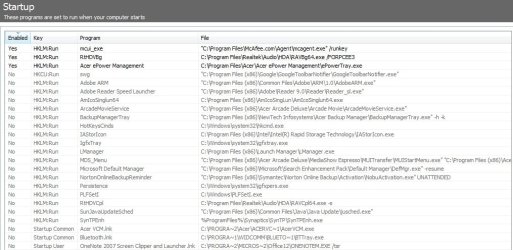
After installed run and click on Tools, then click on Startup. Next click on the Enabled column to sort them yes and no, and then post a screen shot of the list.

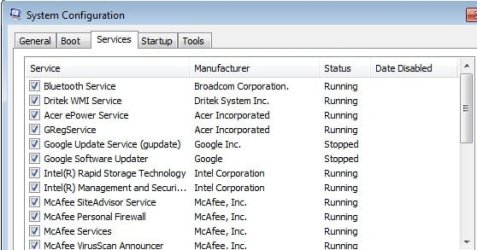
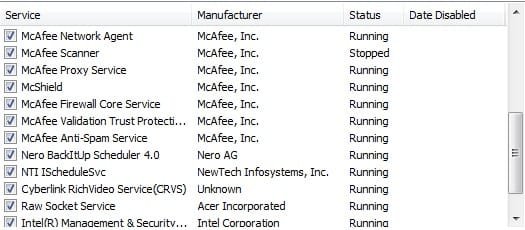
Also in msconfig click on the Service tab and then check "hide Microsoft services" and post a screen shot of that as well.
 

My Computer

Computer type
PC/Desktop
Computer Manufacturer/Model Number
Me
OS
Win 7 Ultimate x64
CPU
FX-8350 @ 4.6 GHz so far
Motherboard
Asus M5A97 EVO
Memory
ADATA XPG V1 Series Black 8GB DDR3 1600
Graphics Card(s)
Sapphire R9 270x Dual-X
Sound Card
Xonar DGX w/ Corsair Vengence 1300
Monitor(s) Displays
Acer S232HL Abid
Screen Resolution
1920x1080
Hard Drives
120 GB OCZ Vertex 3
500 GB Seagate 7200.12
PSU
Antec Earthwatts 650W Green
Case
Antec Three Hundred
Cooling
Cooler Master 212 EVO
Keyboard
Logitech G510
Mouse
Logitech G500s
Internet Speed
35000/3000
Follow the advice Dinish gave you because the 78 processes stem most likely from too many startup programs. I would, however, leave the AV program enabled or stay off the web during the experiment. Once you know that this was the problem, you can enable the startups more selectively - the fewer, the better. That will not impact the operability of your system. The only one that is really needed (apart from the ones you want expressis verbis) is the AV.


1. Thanks for the advice. Yes in fact I did went to msconfig to disable not all, but same of the startup programs as I do not know which is critical for the system to operate. Therefore, I only disable those that I thought was unnecessary.

2. So the startup programs will actually contribute to the 78 processes, am I right to say that?
1. None are "critical" for the system except the AV program. And that is critical for your protection. Even if a program is not in the startups, it will be started when it is called upon. So nothing is lost.

2. Of course they do. The more programs/processes you have started, the more will run. Sounds logical, doesn't it.
 

My Computer

Computer Manufacturer/Model Number
HP, Dell, Gateway, Toshiba - 4 laptops and 2 desktops
OS
Vista, Windows7, Mint Mate, Zorin, Windows 8
CPU
from 1.6GHz Duo to i7
Monitor(s) Displays
2x HP w2207
Hard Drives
5x HDD, 7x SSD, 12x Externals
Keyboard
with trackball - no mices
Mouse
Trackball mice
Internet Speed
DSL 6000
Hi whs, thanks for the specify answers.

Hi stormy13, I have captured and attached the screenshots.
 

Attachments

  • 1.jpg
    1.jpg
    32.5 KB · Views: 68
  • 2.jpg
    2.jpg
    24.8 KB · Views: 45
  • 3.jpg
    3.jpg
    83.7 KB · Views: 52

My Computer

Computer Manufacturer/Model Number
Acer Timeline 3820T
OS
Windows 7 Home Premium 64-bits OS
Memory
2 GB Ram
Hard Drives
320 GB
With these, it does improve a bit. The processes went from 78 to about 60 on startup. however, the physical memory is still at the usage of 50% which I believe the OS is consuming them.
 

My Computer

Computer Manufacturer/Model Number
Acer Timeline 3820T
OS
Windows 7 Home Premium 64-bits OS
Memory
2 GB Ram
Hard Drives
320 GB
Back
Top