Physical Memory running absurdly high. How can I fix or clean up?

Gabbard

New member
Local time
2:54 PM
Messages
6
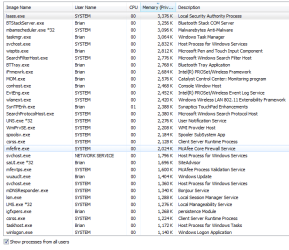
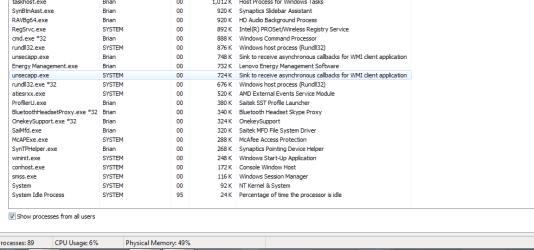
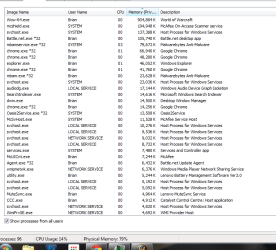
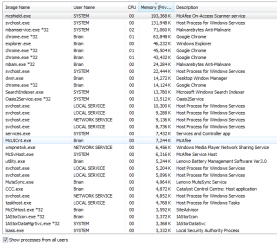
After a clean install, when I first turn on my computer my physical memory is running at 50%+ and I always have 80+ processes. When I play games, such as World of Warcraft, physical memory goes to 80% or more. I've had this laptop for years, and this problem has only started recently. See attached photos, and please let me know if I need to add anything. Appreciate the help :)

Note: When I have no programs running and try to restart or shut down the computer, it prompts me to wait for programs to close, etc. Malwarebytes shows no malware.
 

Attachments
  • Capture1.PNG
    Capture1.PNG
    21.2 KB · Views: 37
  • Capture2.PNG
    Capture2.PNG
    22.4 KB · Views: 2
  • Capture3.PNG
    Capture3.PNG
    19.1 KB · Views: 1
  • Capture4.PNG
    Capture4.PNG
    13.5 KB · Views: 8
  • Capture5.PNG
    Capture5.PNG
    26 KB · Views: 0

My Computer My Computer

At a glance

Windows 7 Home Premium 64bitIntel Core i5 M460 @ 2.53GHz4 GBATI Mobility Radeon HD 5730
Computer type
Laptop
Computer Manufacturer/Model Number
Lenovo IdePad Y560
OS
Windows 7 Home Premium 64bit
CPU
Intel Core i5 M460 @ 2.53GHz
Memory
4 GB
Graphics Card(s)
ATI Mobility Radeon HD 5730
Hard Drives
420 GB
Antivirus
McAfee AntiVirus Plus
Browser
Google Chrome
Run msconfig.

Services tab: how many non-Microsoft services running? I've got 8.

Startup tab: how many items checked? I've got 9. Windows will run fine with none checked.
 

My Computer My Computer

At a glance

Windows 7 Home Premium SP1, 64-bitIntel Skylake i5-6600K, not overclocked8 GB HyperX DDR4-2666 (2 x 4 GB)none; graphics are integrated on CPU
Computer type
PC/Desktop
Computer Manufacturer/Model Number
Ignatz Special; 4 speed manual gearbox; factory air conditioning; one of one
OS
Windows 7 Home Premium SP1, 64-bit
CPU
Intel Skylake i5-6600K, not overclocked
Motherboard
AsRock Z170M Extreme 4, micro ATX
Memory
8 GB HyperX DDR4-2666 (2 x 4 GB)
Graphics Card(s)
none; graphics are integrated on CPU
Sound Card
onboard: Realtek ALC1150; external: USB Behringer UF0-202
Monitor(s) Displays
Dell S2340M 23 inch IPS
Screen Resolution
1600 x 900
Hard Drives
System: Crucial MX100 series SSD, 128 GB;
Data: Samsung Spinpoint 103SJ, 1 TB;
Backup: WD Caviar Green WD30EZRX-00D8PB0, 3 TB
PSU
Rosewill SilentNight 500 watt fanless, semi-modular
Case
Antec Solo II
Cooling
Noctua NH-U12S; Noctua F12 intake, Noctua S12A exhaust
Keyboard
Microsoft 200 6JH-00001 USB
Mouse
Dell or Microsoft optical wired; USB
Antivirus
Microsoft Security Essentials and Malwarebytes Premium
Browser
Pale Moon
Other Info
All fans PWM; speeds at idle: CPU circa 500 rpm; intake circa 600 rpm; exhaust circa 600 rpm; CPU temps 27 idle and 47 C load in a warm room (27 C/81 F) when running Intel Extreme Tuning Utility stress test.
21 services: AMD, apple, intel, mcafee, malwarebytes, and 23 startup. Can i uncheck all the startup?
 

My Computer My Computer

At a glance

Windows 7 Home Premium 64bitIntel Core i5 M460 @ 2.53GHz4 GBATI Mobility Radeon HD 5730
Computer type
Laptop
Computer Manufacturer/Model Number
Lenovo IdePad Y560
OS
Windows 7 Home Premium 64bit
CPU
Intel Core i5 M460 @ 2.53GHz
Memory
4 GB
Graphics Card(s)
ATI Mobility Radeon HD 5730
Hard Drives
420 GB
Antivirus
McAfee AntiVirus Plus
Browser
Google Chrome
If you use Malwarebytes Premium, you should leave it as an startup program so the real time protection can work. Also, is the version of McAfee you have paid or free? If you bought the paid version you should keep it on startup if you want the real time protection for it too. What exactly are the Apple, AMD, and Intel services?
 

My Computer My Computer

At a glance

Windows 7 Professional 32-bit/Windows 8 64-bi...Intel Core 2 Quad Q6600/Intel Core i7 4790/In...2GB/16GB/4GBIntel G33/G31 Express(Vostro)/NVIDIA GeForce ...
Computer type
PC/Desktop
Computer Manufacturer/Model Number
Dell Vostro 400/Dell XPS 8700(Slightly Customized for me by Dell)/Toshiba Satellite T135
OS
Windows 7 Professional 32-bit/Windows 8 64-bit/Win7 Pro64-bit
CPU
Intel Core 2 Quad Q6600/Intel Core i7 4790/Intel Pentium
Memory
2GB/16GB/4GB
Graphics Card(s)
Intel G33/G31 Express(Vostro)/NVIDIA GeForce GTX 745(XPS)
Monitor(s) Displays
HP 2009m(Vostro)/ViewSonic VX2250wm-LED(XPS)
Screen Resolution
1600x900(Vostro)/1920x1080(XPS)
Hard Drives
Seagate ST3160815AS(Vostro)/Western Digital Blue(Satellite)
External:
Western Digital My Passport 0748
Samsung HM121HC
Keyboard
Dell L100)(Vostro)/Dell KB2133p(XPS)
Mouse
Dell M-UAV-DEL8(XPS)
Internet Speed
100 Mbit/s(Only when IPTV is plugged out)
Antivirus
Avast, Malwarebytes PRO
Browser
Internet Explorer 11
Other Info
Note: Names with slashes between two different parts mean that the left is my old desktop and the right is my old laptop and the middle is my new desktop.(Unless specified)
Ping is horrible for servers overseas in US and Europe.
New laptop:LG Gram(Not available in US) Processor:Intel Core i3 4th Gen Ultra Low Power RAM:4GB Hard Drive:SK Hynix OEM MSATA or M.2 Graphics:Intel HD
McAfee and Malwarebytes are both paid programs, which i use every few days.The AMD is referenced to HD audio, Apple is for bonjour maybe?, there is an oasis2service or something that is unknown and I have no idea what it was. For more in depth info I will have to wait until after work to check it out. I will take SS of everything is check and if you have the time could you help me weed out the junk? Love the fast and helpful advice on this forum so far. Thanks a bunch!
 

My Computer My Computer

At a glance

Windows 7 Home Premium 64bitIntel Core i5 M460 @ 2.53GHz4 GBATI Mobility Radeon HD 5730
Computer type
Laptop
Computer Manufacturer/Model Number
Lenovo IdePad Y560
OS
Windows 7 Home Premium 64bit
CPU
Intel Core i5 M460 @ 2.53GHz
Memory
4 GB
Graphics Card(s)
ATI Mobility Radeon HD 5730
Hard Drives
420 GB
Antivirus
McAfee AntiVirus Plus
Browser
Google Chrome
You could do this:

Uncheck everything except anti-virus and Malwarebytes in msconfig startup tab. See if that has a negative or positive impact. If you later have problems, you can always go back and recheck items.

Stop all non-Microsoft services and see if the world remains on its axis and you can do what you need to do when you want to do it with your PC. If you can't, go back and restart some of the services you stopped.

But I'd immediately see if making these changes helps. Maybe it won't.

Your pictures show that you have almost 2 GB of available RAM, so it's not like you are running low.

McAfee isn't the sharpest tool in the drawer for anti-virus and can be difficult to tame or eliminate entirely. If nothing else, I'd look to replace it.

You show 96 processes. I have 55 right now.
 

My Computer My Computer

At a glance

Windows 7 Home Premium SP1, 64-bitIntel Skylake i5-6600K, not overclocked8 GB HyperX DDR4-2666 (2 x 4 GB)none; graphics are integrated on CPU
Computer type
PC/Desktop
Computer Manufacturer/Model Number
Ignatz Special; 4 speed manual gearbox; factory air conditioning; one of one
OS
Windows 7 Home Premium SP1, 64-bit
CPU
Intel Skylake i5-6600K, not overclocked
Motherboard
AsRock Z170M Extreme 4, micro ATX
Memory
8 GB HyperX DDR4-2666 (2 x 4 GB)
Graphics Card(s)
none; graphics are integrated on CPU
Sound Card
onboard: Realtek ALC1150; external: USB Behringer UF0-202
Monitor(s) Displays
Dell S2340M 23 inch IPS
Screen Resolution
1600 x 900
Hard Drives
System: Crucial MX100 series SSD, 128 GB;
Data: Samsung Spinpoint 103SJ, 1 TB;
Backup: WD Caviar Green WD30EZRX-00D8PB0, 3 TB
PSU
Rosewill SilentNight 500 watt fanless, semi-modular
Case
Antec Solo II
Cooling
Noctua NH-U12S; Noctua F12 intake, Noctua S12A exhaust
Keyboard
Microsoft 200 6JH-00001 USB
Mouse
Dell or Microsoft optical wired; USB
Antivirus
Microsoft Security Essentials and Malwarebytes Premium
Browser
Pale Moon
Other Info
All fans PWM; speeds at idle: CPU circa 500 rpm; intake circa 600 rpm; exhaust circa 600 rpm; CPU temps 27 idle and 47 C load in a warm room (27 C/81 F) when running Intel Extreme Tuning Utility stress test.
Yea it's at 40% when I do nothing. If I open a game it shoots to 78% + that's the killer
 

My Computer My Computer

At a glance

Windows 7 Home Premium 64bitIntel Core i5 M460 @ 2.53GHz4 GBATI Mobility Radeon HD 5730
Computer type
Laptop
Computer Manufacturer/Model Number
Lenovo IdePad Y560
OS
Windows 7 Home Premium 64bit
CPU
Intel Core i5 M460 @ 2.53GHz
Memory
4 GB
Graphics Card(s)
ATI Mobility Radeon HD 5730
Hard Drives
420 GB
Antivirus
McAfee AntiVirus Plus
Browser
Google Chrome
What is the best antivirus malware safety net program available?
 

My Computer My Computer

At a glance

Windows 7 Home Premium 64bitIntel Core i5 M460 @ 2.53GHz4 GBATI Mobility Radeon HD 5730
Computer type
Laptop
Computer Manufacturer/Model Number
Lenovo IdePad Y560
OS
Windows 7 Home Premium 64bit
CPU
Intel Core i5 M460 @ 2.53GHz
Memory
4 GB
Graphics Card(s)
ATI Mobility Radeon HD 5730
Hard Drives
420 GB
Antivirus
McAfee AntiVirus Plus
Browser
Google Chrome
There are a few AVs we on SF recommend. Some of us recommend AVAST, some recommend Panda, and others recommend MSE. AVAST is one of the most used AV on the forum. But it is your choice though. You should keep MBAM no matter what AV you get though as MBAM works well with almost any AV.
 

My Computer My Computer

At a glance

Windows 7 Professional 32-bit/Windows 8 64-bi...Intel Core 2 Quad Q6600/Intel Core i7 4790/In...2GB/16GB/4GBIntel G33/G31 Express(Vostro)/NVIDIA GeForce ...
Computer type
PC/Desktop
Computer Manufacturer/Model Number
Dell Vostro 400/Dell XPS 8700(Slightly Customized for me by Dell)/Toshiba Satellite T135
OS
Windows 7 Professional 32-bit/Windows 8 64-bit/Win7 Pro64-bit
CPU
Intel Core 2 Quad Q6600/Intel Core i7 4790/Intel Pentium
Memory
2GB/16GB/4GB
Graphics Card(s)
Intel G33/G31 Express(Vostro)/NVIDIA GeForce GTX 745(XPS)
Monitor(s) Displays
HP 2009m(Vostro)/ViewSonic VX2250wm-LED(XPS)
Screen Resolution
1600x900(Vostro)/1920x1080(XPS)
Hard Drives
Seagate ST3160815AS(Vostro)/Western Digital Blue(Satellite)
External:
Western Digital My Passport 0748
Samsung HM121HC
Keyboard
Dell L100)(Vostro)/Dell KB2133p(XPS)
Mouse
Dell M-UAV-DEL8(XPS)
Internet Speed
100 Mbit/s(Only when IPTV is plugged out)
Antivirus
Avast, Malwarebytes PRO
Browser
Internet Explorer 11
Other Info
Note: Names with slashes between two different parts mean that the left is my old desktop and the right is my old laptop and the middle is my new desktop.(Unless specified)
Ping is horrible for servers overseas in US and Europe.
New laptop:LG Gram(Not available in US) Processor:Intel Core i3 4th Gen Ultra Low Power RAM:4GB Hard Drive:SK Hynix OEM MSATA or M.2 Graphics:Intel HD
since you made a clean installation, you can try re-seating your RAM physically, erase the copper part using a pencil eraser until it shines (p.s be gentle on doing that). This works every time for me.
 

My Computer My Computer

At a glance

Windows 7 Pro 32bitDual Core
Computer type
PC/Desktop
Computer Manufacturer/Model Number
HP
OS
Windows 7 Pro 32bit
CPU
Dual Core
Antivirus
Trend Micro
since you made a clean installation, you can try re-seating your RAM physically, erase the copper part using a pencil eraser until it shines (p.s be gentle on doing that). This works every time for me.

I don't think the OP needs RAM re-seating as the problem is not about the RAM not working, it is about the large amounts of RAM being used by programs. But I guess it can be helpful when nothing else seems to work. Just not yet though.
 

My Computer My Computer

At a glance

Windows 7 Professional 32-bit/Windows 8 64-bi...Intel Core 2 Quad Q6600/Intel Core i7 4790/In...2GB/16GB/4GBIntel G33/G31 Express(Vostro)/NVIDIA GeForce ...
Computer type
PC/Desktop
Computer Manufacturer/Model Number
Dell Vostro 400/Dell XPS 8700(Slightly Customized for me by Dell)/Toshiba Satellite T135
OS
Windows 7 Professional 32-bit/Windows 8 64-bit/Win7 Pro64-bit
CPU
Intel Core 2 Quad Q6600/Intel Core i7 4790/Intel Pentium
Memory
2GB/16GB/4GB
Graphics Card(s)
Intel G33/G31 Express(Vostro)/NVIDIA GeForce GTX 745(XPS)
Monitor(s) Displays
HP 2009m(Vostro)/ViewSonic VX2250wm-LED(XPS)
Screen Resolution
1600x900(Vostro)/1920x1080(XPS)
Hard Drives
Seagate ST3160815AS(Vostro)/Western Digital Blue(Satellite)
External:
Western Digital My Passport 0748
Samsung HM121HC
Keyboard
Dell L100)(Vostro)/Dell KB2133p(XPS)
Mouse
Dell M-UAV-DEL8(XPS)
Internet Speed
100 Mbit/s(Only when IPTV is plugged out)
Antivirus
Avast, Malwarebytes PRO
Browser
Internet Explorer 11
Other Info
Note: Names with slashes between two different parts mean that the left is my old desktop and the right is my old laptop and the middle is my new desktop.(Unless specified)
Ping is horrible for servers overseas in US and Europe.
New laptop:LG Gram(Not available in US) Processor:Intel Core i3 4th Gen Ultra Low Power RAM:4GB Hard Drive:SK Hynix OEM MSATA or M.2 Graphics:Intel HD
I unchecked all that stuff and now its running at 50% max. FPS also went from 13 to 35+
Thanks for the help!

Side note: Geek squad said it was a hard drive error
 

My Computer My Computer

At a glance

Windows 7 Home Premium 64bitIntel Core i5 M460 @ 2.53GHz4 GBATI Mobility Radeon HD 5730
Computer type
Laptop
Computer Manufacturer/Model Number
Lenovo IdePad Y560
OS
Windows 7 Home Premium 64bit
CPU
Intel Core i5 M460 @ 2.53GHz
Memory
4 GB
Graphics Card(s)
ATI Mobility Radeon HD 5730
Hard Drives
420 GB
Antivirus
McAfee AntiVirus Plus
Browser
Google Chrome
Geek Squad isn't the most trustworthy PC repair service though, and this would have nothing to do with your hard drive as it is just RAM being used a lot. Well good thing that your problem has been solved. :)

Edit: Did you uncheck services or programs or both? If any problems with a particular program ever occur, try rechecking any services associated with them. And also disabling auto-startup of any program should not make it run incorrectly.
 

My Computer My Computer

At a glance

Windows 7 Professional 32-bit/Windows 8 64-bi...Intel Core 2 Quad Q6600/Intel Core i7 4790/In...2GB/16GB/4GBIntel G33/G31 Express(Vostro)/NVIDIA GeForce ...
Computer type
PC/Desktop
Computer Manufacturer/Model Number
Dell Vostro 400/Dell XPS 8700(Slightly Customized for me by Dell)/Toshiba Satellite T135
OS
Windows 7 Professional 32-bit/Windows 8 64-bit/Win7 Pro64-bit
CPU
Intel Core 2 Quad Q6600/Intel Core i7 4790/Intel Pentium
Memory
2GB/16GB/4GB
Graphics Card(s)
Intel G33/G31 Express(Vostro)/NVIDIA GeForce GTX 745(XPS)
Monitor(s) Displays
HP 2009m(Vostro)/ViewSonic VX2250wm-LED(XPS)
Screen Resolution
1600x900(Vostro)/1920x1080(XPS)
Hard Drives
Seagate ST3160815AS(Vostro)/Western Digital Blue(Satellite)
External:
Western Digital My Passport 0748
Samsung HM121HC
Keyboard
Dell L100)(Vostro)/Dell KB2133p(XPS)
Mouse
Dell M-UAV-DEL8(XPS)
Internet Speed
100 Mbit/s(Only when IPTV is plugged out)
Antivirus
Avast, Malwarebytes PRO
Browser
Internet Explorer 11
Other Info
Note: Names with slashes between two different parts mean that the left is my old desktop and the right is my old laptop and the middle is my new desktop.(Unless specified)
Ping is horrible for servers overseas in US and Europe.
New laptop:LG Gram(Not available in US) Processor:Intel Core i3 4th Gen Ultra Low Power RAM:4GB Hard Drive:SK Hynix OEM MSATA or M.2 Graphics:Intel HD
Back
Top