Pics Display order

user77777

New member
Local time
2:00 PM
Messages
33
When I open a directory in Win 7 , if I select "details" display , the I can order them according to date , type etc.
When selecting "large/extra large icons" display , it is alphabetical order only . Any way to order this according to date etc. ?
Thanks .
 

My Computer

Computer type
Laptop
Computer Manufacturer/Model Number
ASUS
OS
Windows 7 Home Premium 64 SP1
Memory
16GB
Graphics Card(s)
Nvidia 460M
Antivirus
Avast
Browser
Chrome
You can change to details view and then click on the header of any property to arrange by that property. Alternately click for a sort by option under the menus. I think it's under view but I'm not for sure and I don't run 7 anymore.
 

My Computers

System One System Two

townsbg - thank you - well done !
Yes - found under Menus : View/Sort by/Date .
Your first option also works by right clicking in empty part of display .
Thanks again !
 

My Computer

Computer type
Laptop
Computer Manufacturer/Model Number
ASUS
OS
Windows 7 Home Premium 64 SP1
Memory
16GB
Graphics Card(s)
Nvidia 460M
Antivirus
Avast
Browser
Chrome
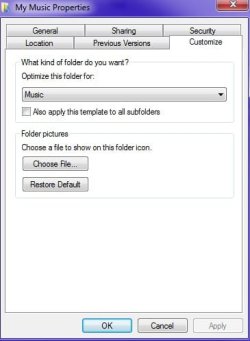
Also note that if you have music or videos in a folder and can't arrange by date or something, you can right click in the folder and chose properties and customize. Now select general items or documents. Now you can arrange by date. Note that this may or may not affect some music playing software. I wouldn't think so. If it does just change back to a folder of music type.
 

Attachments

  • hnmgh.jpg
    hnmgh.jpg
    37 KB · Views: 4

My Computer

Computer type
PC/Desktop
OS
Windows 7 Ultimate x64
Thanks F22 Simpilot - got it .
 

My Computer

Computer type
Laptop
Computer Manufacturer/Model Number
ASUS
OS
Windows 7 Home Premium 64 SP1
Memory
16GB
Graphics Card(s)
Nvidia 460M
Antivirus
Avast
Browser
Chrome
Back
Top