Piecing together from several towers

fatbottoms

New member
Member
Local time
12:45 PM
Messages
54
My HP laptop just fried after only 2 years, so I got several cheap towers from someone to piece together the best computer I can.

They're all older towers:
1. Dell Dimension 2400 - 2.6 ghz, 2mb, 256mb pci graphics card, 250 psu. (no agp or pci-e)
2. Dell Dimension 4500 - 1.8 ghz, 2mb, 256mb pci-e graphics card, 250 psu (pci-e)
3. Not sure of brand name, maybe Gateway, and has se440bx2 motherboard
2.2 ghz with 300 psu. (agp slot)

Since I use my HDTV as my monitor, I want to get a graphics card with a hdmi port.

My question is, considering the specs of the towers, what kind of graphic card should I get - pci, agp, pci-e and which combination would give me the best performance?

I'm thinking of getting a 512mb graphics card with hdmi port...would the upgrade to 512mb from 256mb even make that much of a difference?
 

My Computer

Computer Manufacturer/Model Number
hp pavillion g60-120us
OS
windows 7 ultimate
CPU
amd dual core 64
Memory
3gb
Graphics Card(s)
nvidia g force 8200m
Monitor(s) Displays
samsung hdtv
Screen Resolution
1366x768
Hard Drives
toshiba mk2552gsx (250gb)
Case
notebook
Internet Speed
time warner broad band
Hate to say it but how about none of the above. Specs for both Dells,

2400 - Documentation

4500 - Documentation

Neither has a PCI-E slot, and only the 4500 came with an AGP slot. In either case a video card with a HDMI port on it is worth more than both of those computers combined. You're looking at close to $100.00 for either a PCI or AGP card with HDMI. The best I can suggest would be to make do with the 2400 as it is slightly better than the 4500 until such a time as you can get a new desktop or laptop.

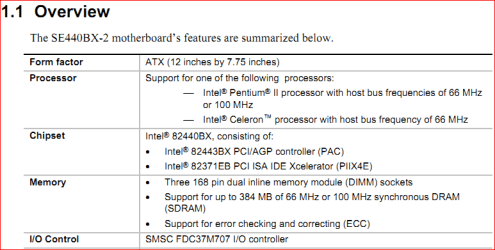
As for that one with the se440bx2 in it, if that number is correct then what is shown here (sorry direct download link),

http://download.intel.com/support/motherboards/desktop/se440bx2/72163201.pdf

440bx.PNG

then that thing is well beyond its best before date.
 

My Computer

Computer type
PC/Desktop
Computer Manufacturer/Model Number
Me
OS
Win 7 Ultimate x64
CPU
FX-8350 @ 4.6 GHz so far
Motherboard
Asus M5A97 EVO
Memory
ADATA XPG V1 Series Black 8GB DDR3 1600
Graphics Card(s)
Sapphire R9 270x Dual-X
Sound Card
Xonar DGX w/ Corsair Vengence 1300
Monitor(s) Displays
Acer S232HL Abid
Screen Resolution
1920x1080
Hard Drives
120 GB OCZ Vertex 3
500 GB Seagate 7200.12
PSU
Antec Earthwatts 650W Green
Case
Antec Three Hundred
Cooling
Cooler Master 212 EVO
Keyboard
Logitech G510
Mouse
Logitech G500s
Internet Speed
35000/3000
Hello Fatbottoms,

That's not an easy question as we don't know what it is you want to do....
But from the info given I'd say the Dimension 2400 is the only one that you could consider if you use these at all. If I'm correct, it's the only one out of the three that can handle 2Gb of RAM, which in my opinion is the minimum you want for W7.... Given that motherboard, the simplest PCI card with hdmi would do... I think... but havent'checked that yet as, again, we need to hear more from you
 

My Computer

Computer Manufacturer/Model Number
custom build
OS
Windows 7 64b Ultimate
CPU
I7-2600 3.40GHz - testing various OC levels..
Motherboard
ASUS Sabretooth
Memory
2x 4Gb DDR3/1333
Graphics Card(s)
GTX570 - testing OC levels
Sound Card
motherboard 7.1 DIG.
Monitor(s) Displays
2x Ilyama 24" E2409HDS-B1 2ms/DVI
Screen Resolution
1920 x 1080
Hard Drives
120 GB Intel Elmcrest SSD
1 TB SATAII 7200RPM/32MB
External 2TB USB3
PSU
Corsair Pro HX850W
Cooling
Coolermaster Hyper V8
Keyboard
Logitech G110
Mouse
Logitech G700
Internet Speed
25Mb
Other Info
CPU: 7,7 RAM: 7,7 GTX: 7,9 GTX 3D : 7,9 SSD 7,6
Overall 7,6 ...... now to speed up the SSD... ;)

Also use a Dell XPS M1710 on Vista 32b
Asus LT on Vista 32
3 older machines still doing fine on Linux/ubuntu but not used much anymore...
According to Dell, A Dimension 4500 is an AGP/PCI system. (No PCI-E.) DDR memory. It supports a maximum of 1GB of RAM (two DIMM slots, max. 512 MB each).

The 2400 is similar, except that it has no AGP graphics slot. It goes to 2GB of RAM (2 slots, 1GB each).

The Intel se440bx2 (Seattle 2) is a Slot I system (Pentium II). It uses 168 pin SDRAM, as much as 384 MB of it. It's not a candidate for Windows 7 at all.

Not to be harsh, but are you quite sure that you wish to buy a Windows 7 license for any one of these?
 

My Computer

Computer Manufacturer/Model Number
homegrown
OS
Windows 7 Pro X64 SP1
CPU
Intel Core I7-3930k
Motherboard
Asus P9X79 Pro
Memory
16 GB Gskill DDR3-2133
Graphics Card(s)
eVGA GTX680
Sound Card
Creative X-Fi Titanium
Monitor(s) Displays
As PA246Q
Screen Resolution
1920 X 1200
Hard Drives
Corsair Force GT, 120 GB
WDC 1.5TB Caviar Black
PSU
PCP&C Silencer 750 Crossfire
Case
Silverstone FT02
Cooling
Noctua NH-D14
Keyboard
cheap Logitech USB
Mouse
Microsoft Intellimouse Explorer (old optical) USB
Internet Speed
6Mb cable
Other Info
Pioneer BDR-205
Samsung SH-203B
Monsoon 5.1 speakers
I guess I'm wrong about Dell 4500, but I thought a green slot on the motherboard indicated a pci-e slot...doesn't the color of the slots indicate type of graphic card - white=pci, brown=agp, green= pci-e?

As for the ram on the Dell 4500, it does support 2gb.

It came with 2gb of ram and the computer recognizes the 2gigs, and I've been running it for the past few days without any problems.

I've already installed Windows 7 Ultimate on both the Dell towers and they both seem to run fine without a problem...had some trouble with some drivers, but got it figured out.

I even ran the tower with se440bx2 with 2gb of ram I took out of one of the Dell's and the tower ran fine, although I didn't put Windows 7 on it... this motherboard has a brown agp slot.

As for the kind of use, I'm not a big gamer, although I'll play Halo 2 occasionally.

I just want something that'll stream and display HD without any problems, and also I do graphic design, so I need something that'll be able to handle graphic apps like Photoshop.

Also, I've found agp, pci, and pci-e cards (512mb) on Amazon for around 50 or less.

Although I paid 100 for all three towers, I think the 50 is worth the investment for the graphic card with the hdmi just for the HD display and audio also...the resolution is horrible with vga I'm using.

I realize these towers are relics archaeologists dug up, but these are basically going to be my back up computers until I get my laptop fixed or get another one.

I'm finding out from my computer repair guy that HP are notorious for running hot, and that the majority of repairs are all HP...even the plastic casing around my laptop started to warp.

Granted, I ran my laptop (HP G60-120US) like a desktop, keeping it on most of the day, but the laptop only lasted 2 years...700 down the drain.
 

My Computer

Computer Manufacturer/Model Number
hp pavillion g60-120us
OS
windows 7 ultimate
CPU
amd dual core 64
Memory
3gb
Graphics Card(s)
nvidia g force 8200m
Monitor(s) Displays
samsung hdtv
Screen Resolution
1366x768
Hard Drives
toshiba mk2552gsx (250gb)
Case
notebook
Internet Speed
time warner broad band
As for the ram on the Dell 4500, it does support 2gb.

(snip)

I even ran the tower with se440bx2 with 2gb of ram I took out of one of the Dell's and the tower ran fine, although I didn't put Windows 7 on it... this motherboard has a brown agp slot.

Officially, the 4500 only supports 512MB DIMMs. It has the same basic chipset as the 2400, so I can believe that 1GB sticks fit.

How'd you manage to get 184 pin DDR to run in an SE440BX-2, which supports 168 pin SDRAM? (I see that you can get 256MB sticks, but if memory serves, they have to be low density.)

If you're quite serious about the graphics card, you may find this worth a look:

Newegg.com - Computer Hardware, Video Cards & Video Devices, Desktop Graphics / Video Cards, AGP 4X/8X, PCI, 1 x HDMI
 

My Computer

Computer Manufacturer/Model Number
homegrown
OS
Windows 7 Pro X64 SP1
CPU
Intel Core I7-3930k
Motherboard
Asus P9X79 Pro
Memory
16 GB Gskill DDR3-2133
Graphics Card(s)
eVGA GTX680
Sound Card
Creative X-Fi Titanium
Monitor(s) Displays
As PA246Q
Screen Resolution
1920 X 1200
Hard Drives
Corsair Force GT, 120 GB
WDC 1.5TB Caviar Black
PSU
PCP&C Silencer 750 Crossfire
Case
Silverstone FT02
Cooling
Noctua NH-D14
Keyboard
cheap Logitech USB
Mouse
Microsoft Intellimouse Explorer (old optical) USB
Internet Speed
6Mb cable
Other Info
Pioneer BDR-205
Samsung SH-203B
Monsoon 5.1 speakers
Next time you run your LT as a DT... consider taking out the battery. It spares it (the battery and the LT) and helps in reducing temps...
 

My Computer

Computer Manufacturer/Model Number
custom build
OS
Windows 7 64b Ultimate
CPU
I7-2600 3.40GHz - testing various OC levels..
Motherboard
ASUS Sabretooth
Memory
2x 4Gb DDR3/1333
Graphics Card(s)
GTX570 - testing OC levels
Sound Card
motherboard 7.1 DIG.
Monitor(s) Displays
2x Ilyama 24" E2409HDS-B1 2ms/DVI
Screen Resolution
1920 x 1080
Hard Drives
120 GB Intel Elmcrest SSD
1 TB SATAII 7200RPM/32MB
External 2TB USB3
PSU
Corsair Pro HX850W
Cooling
Coolermaster Hyper V8
Keyboard
Logitech G110
Mouse
Logitech G700
Internet Speed
25Mb
Other Info
CPU: 7,7 RAM: 7,7 GTX: 7,9 GTX 3D : 7,9 SSD 7,6
Overall 7,6 ...... now to speed up the SSD... ;)

Also use a Dell XPS M1710 on Vista 32b
Asus LT on Vista 32
3 older machines still doing fine on Linux/ubuntu but not used much anymore...
I wouldn't go buy the colors, I've seen blue, green, brown, etc. Also an AGP slot can look very similar to a PCIe slot but one is not compatible with the other. You wouldn't get an AGP card in a PCIe slot or vise versa, not without a hammer anyway. One way to confirm what it is , is to take the video card that is in it and Google it. Sounds like it is AGP though, based on what the system specs say.
 

My Computer

Computer type
PC/Desktop
Computer Manufacturer/Model Number
Home Built
OS
Windows 10 Education 64 bit
CPU
AMD Phenom II X4 980 Black Edition Deneb 3.7GHz
Motherboard
Asus M4N68T-M V2 µATX Motherboard
Memory
8GB 4GBx2 Kingston PC10600 DDR3 1333 Memory
Graphics Card(s)
Zotac NVIDIA Geforce GT640 2 Gig DDR3 PCIe
Sound Card
VIA VT1708s High Definition Audio 8-channel Onboard
Monitor(s) Displays
22" LG E2242 1080p and 2 19" I-INC AG191D
Screen Resolution
1280x1024 - 1920x1080 - 1280x1024
Hard Drives
Crucial M100 256 GB SSD and 500 GB WD Blue SATA
PSU
Thermaltake TR 620
Case
Power Up Black ATX Mid-Tower Case
Cooling
Stock heatsink and fan
Keyboard
Logitech Wireless K350 Wave
Mouse
Logitech Wireless M570 Trackman Wheel
Internet Speed
80 Mbps Down 30 Mbps Up
Antivirus
Windows Defender
Browser
Internet Explorer 11
Other Info
HP DVD1040e Lightscribe - External USB2

My Computer

Computer type
PC/Desktop
Computer Manufacturer/Model Number
A blend of brains, brawn and dumb luck.
OS
Windows 7 Ultimate 64
CPU
i7 3770k OC'd 4.6 @ 1.17v, also FX 8120 & i5 miniITX
Motherboard
MSI P67A-GD80 b3
Memory
32 gb G.Skill Sniper DDR3 10-12-12-31 @ 2133
Graphics Card(s)
XFX Radeon 7870 2GB DDR5
Sound Card
Sound Blaster Z Series Card
Monitor(s) Displays
(2) LG LED 23" 1920 x 1080 2ms Monitors via mini d-port
Screen Resolution
1680 X 1050 p
Hard Drives
Samsung 256 gb 830 SSD sata III
(1) 1 tb WD Black
(2) 1 tb Hitachi deskmates/sata II
(2) 1 tb WD green/sata II
(2) 3 tb Seagate Barracuda
(1) 120 gb OCZ Vertex SS
(1) Drobo 5N w/5 Seagate 3tb
PSU
EVGA modular 1000G2 80% gold rating & APC 1200 RS
Case
CoolerMaster Storm Styker
Cooling
7 case fans 140mm & 120mm, NZXT Kraken X60
Keyboard
(2) Logitech Illuminated Keyboards (1) usb (1) wireless
Mouse
Logitech G700 & T-BC21 - nano nx for the laptop
Internet Speed
Basic 120mbps down
Antivirus
Trend Micro Titanium Max Security & Malwarebytes Premium
Browser
Chrome and IE 10
Other Info
5 Noctua case fans + 3 Noctua in p/p on NZXT cooler
Integrated hot swap drive bays for 2.5" Drives
(2) Lite-on dvd/cd/Blu Ray optical 22X
Integrated fan controller and led on/off
HP Officejet Pro 8630 all-n-one
Hot-swappable 3.5" hard drive bay
Netgear Nighthawk router
Asus USB 3 & sata 6 PCIe card
Vantec IDE to sata adptr./Ultra sata adptr
Lenovo L420 i5 lappy with m sata
Drobo 5N advanced NAS
I wouldn't go buy the colors, I've seen blue, green, brown, etc. Also an AGP slot can look very similar to a PCIe slot but one is not compatible with the other. You wouldn't get an AGP card in a PCIe slot or vise versa, not without a hammer anyway. One way to confirm what it is , is to take the video card that is in it and Google it. Sounds like it is AGP though, based on what the system specs say.

Try hereHow to identify the type of PCI bus? | Excel.nl
 

My Computer

Computer type
PC/Desktop
Computer Manufacturer/Model Number
Custom
OS
windows 10 pro 64 bit
CPU
i5 4690K@4500 COOLER MASTER Seidon 120M water cooler
Motherboard
ASUS SABERTOOTH Z87 LGA 1150 Intel
Memory
16gb Kingston HyperX DDR3 1600
Graphics Card(s)
EVGA GTX 1070 sc
Monitor(s) Displays
BenQ GL2760H Black 27" 2ms HDMI Widescreen LED 1920X1080
Screen Resolution
DSR 2103X1183
Hard Drives
ADATA 256 gig SSD + 4 junk
PSU
EVGA supernova 750
Case
coolermaster
Cooling
many...
Keyboard
z merc
Mouse
Logitech wireless G602
Internet Speed
2.5mbs cable
The reason the tower with the SE440BX-2 can run the 168 pin SDRAM is because that's not the motherboard that is actually in the tower.

I just assumed because of the sticker on the inside of tower case, but upon closer inspection, I see it has been replaced with a ASUS P4B533 motherboard with a agp slot.

And yes, you guys are right, the Dell 4500 has a agp slot, not a pci-e.

The tower with the ASUS motherboard came with a xpert 2000pro ultra 32mb agp card, which I replaced with the 256mb agp from the Dell 4500 and it seems like this tower with ASUS motherboard runs the best.

Is this the best motherboard out of the three I have?

Will I fry my motherboard if I get a graphics card that requires a bigger psu than I have?

I'm considering getting one of these from Amazon, but I only have a 300psu in my ASUS tower:

Amazon.com: GIGABYTE nVidia GeForce 6200 512MB DDR2 VGA/DVI Low Profile AGP Video Card GV-N62-512L: Electronics

Amazon.com: XFX ATI Radeon HD 4650 1 GB DDR2 Graphics Card HD465XZDF2: Electronics

or this for my Dell 2400 250psu:

Amazon.com: PNY GeForce 8400 GS 512 MB PCI Video Graphics Card VCG84512SPPB: Electronics

Also, I'm not familiar with Windows 7 readyboost, but designated a 8gb flash drive that I have to it to try it out...does this really make a difference?
 

My Computer

Computer Manufacturer/Model Number
hp pavillion g60-120us
OS
windows 7 ultimate
CPU
amd dual core 64
Memory
3gb
Graphics Card(s)
nvidia g force 8200m
Monitor(s) Displays
samsung hdtv
Screen Resolution
1366x768
Hard Drives
toshiba mk2552gsx (250gb)
Case
notebook
Internet Speed
time warner broad band
The best card by far is the XFX 4650....and its not that great....

The best motherboard is the ASUS....

No you won't fry the motherboard with a weak PSU...however you might have a no boot, or a boot to a black screen....sudden shutdowns....ect.....A better solution since you plan on getting a card would be to get a decent lower end PSUNewegg.com - Rosewill Green Series RG530-S12 530W Continuous @40°C, 80 PLUS Certified, Single 12V Rail, Active PFC "Compatible with Core i7,i5" Power Supply Not the best psu in the world, but its doing most of the heavy lifting in my system for now....no problems, and the computer will not shutdown if the power "blips"....and it will leave you with a good backup PSU.....

However I would question spending ANY money on the system you would end up with....AGP is dead....P4 systems WILL suddenly die on you...and I speak from experience on this.....A better solution would be to put together the best that you can, with what you have, and save up for a new rig....A cheap Walmart E machine would smoke anything you could make from those systems, and have a PCIe slot...if not the PSU to back up said slot.....

If you plan on using Windows 7 don't use a OEM copy...or you will be calling up Microsoft trying to get activated on a new system.....

Ready boost would help, but those old systems most likely were USB 1.1.....
 

My Computer

Computer type
PC/Desktop
Computer Manufacturer/Model Number
Custom
OS
windows 10 pro 64 bit
CPU
i5 4690K@4500 COOLER MASTER Seidon 120M water cooler
Motherboard
ASUS SABERTOOTH Z87 LGA 1150 Intel
Memory
16gb Kingston HyperX DDR3 1600
Graphics Card(s)
EVGA GTX 1070 sc
Monitor(s) Displays
BenQ GL2760H Black 27" 2ms HDMI Widescreen LED 1920X1080
Screen Resolution
DSR 2103X1183
Hard Drives
ADATA 256 gig SSD + 4 junk
PSU
EVGA supernova 750
Case
coolermaster
Cooling
many...
Keyboard
z merc
Mouse
Logitech wireless G602
Internet Speed
2.5mbs cable
Hi there
My take on this would be why not buy a nice modern MB with a decent CPU as a bundle -- for example you can get some ASUS MB's with a fast 4 Core AMD Phenom II processor thrown in for around 160 - 200 USD.

Most of the later MB's will support HDMI from the built in video -- there's 4 memory slots as well giving you a possibility of 16 GB RAM (memory is chep enough now).

Fit this into one of your towers and use the HDD / DVD drives "cannabilized" from the parts.

The case of any of these towers will be OK for the MB including the PSU. Make sure if you want game playing that the PSU is capable of 250 - 300 Watts as a minimum - especially if you want to add your own graphics / GPU later.


Now you've got a super fast cheap rig. - When moneys up to it get an SSD as well !!!

There's really no point in using some of that really old stuff unless all you want is for file / print serving

Cheers
jimbo
 

My Computer

Computer type
PC/Desktop
Computer Manufacturer/Model Number
Custom built, several laptops HP/ASUS
OS
Linux CENTOS 7 / various Windows OS'es and servers
CPU
Intel i7 Intel i5
Memory
8GB, 16GB
Graphics Card(s)
On Motherboard
Sound Card
Realtek HD audio
Monitor(s) Displays
Apple Cinema display, Samsung LCD
Screen Resolution
1920 X 1080
Hard Drives
4 X 1TB SATA
Mouse
Toshiba wireless laser
Internet Speed
> 20MB up
Kingston HyperX 4GB (2 x 2GB) 240-Pin DDR2 SDRAM DDR2 800 (PC2 6400) Dual Channel Kit Desktop Memory Model KHX6400D2K2/4G

ASUS M4A785-M AM3/AM2+/AM2 AMD 785G HDMI Micro ATX AMD MotherboardAMD Athlon II X3 435 Rana 2.9GHz Socket AM3 95W Triple-Core Desktop Processor ADX435WFGMBOX

In a HP case for $216.00 without a better power supply just put this system together for a client not to long ago blew the caps on the original board used original hard drive and other stuff had to install a reset switch and rewire power plug but it is a nice upgrade and it unlocked the 4 th core i believe on this one.
 

My Computer

Computer Manufacturer/Model Number
Custom Build
OS
Window's 7 Ultimate 64bit
CPU
E8400 Lapped
Motherboard
P5Q Pro Turbo Asus
Memory
Kingston 4 gig
Graphics Card(s)
2=ATI 5670Video Crossfire / HVR2250 TV Tuner Card
Sound Card
HDMI sound
Monitor(s) Displays
Sony 46"
Screen Resolution
1280x720
Hard Drives
1 WD 160gig YS, 1 Black Edition 320gig and one 250gig WD YS Model plus external Caviar Black 640gig Drives
PSU
Antec 550 Modular
Case
Antec Custom 180B
Cooling
X-1283 Lapped Artic Silver 5
Keyboard
Wave Combo Logitech
Mouse
Logitech LX-8
Internet Speed
5mb down 768 up
Other Info
Custom side fan in case, plus moved middle lower fan to the front of hard drives , also installed a second intake fan in lower two optical drive slots. Rear fans are controlled by Fan mate controllers. temps inside case are monitored by probe and temps coming out the top exhaust are also monitored, temps as of right now 20c inside and 22.7 out the exhaust. Front intake fans are controlled by Asu
I understand what everyone's saying.

It seems silly to invest more money on a relic when for a couple of hundred dollars, I could build a desktop that would blow away what I currently have, but the main reason I wanted the graphic card was for the hdmi connection - the onboard sound is horrible.

I was holding off on buying the new laptop because I wanted to see if my old laptop was repairable, but I just found out that I probably need a new motherboard from my repair guy.

I'm debating whether to invest around 200 to see if my laptop can be fixed...there's no guarantee a new motherboard would fix my laptop.

Do you guys think it's worth the 200 to see if the laptop can be repaired with a new motherboard?

As for the towers, I spent a hundred dollars on all 3 towers with the intent of selling one for 50 to a friend who just picked it up today.

So for 50 dollars, I got a couple of antiques that can be used for backup...not a bad deal.

I've always wanted to build my own system, but thought the technical realm was beyond me.

Can most motherboards generally fit into any sort of tower casing?

Would it be less expensive to build your own system to a comparable store bought tower?
 

My Computer

Computer Manufacturer/Model Number
hp pavillion g60-120us
OS
windows 7 ultimate
CPU
amd dual core 64
Memory
3gb
Graphics Card(s)
nvidia g force 8200m
Monitor(s) Displays
samsung hdtv
Screen Resolution
1366x768
Hard Drives
toshiba mk2552gsx (250gb)
Case
notebook
Internet Speed
time warner broad band
Hi there

1) From SCRATCH your gear would be more expensive than a modest low end store bought model but it would be STREETS ahead.

2) However IF you have things like a decent case / old HDD and some memory then buying a new MB with a processor and fitting it into the old case is FAR CHEAPER and still better. Get an ASUS MB with the Phenom II 4 core processor as a bundle - these are available fairly cheaply currently.

The MB referred to in the previous post in this thread is a good one and easy to connect up.

As for laptops - if the MB is broken get a new laptop -- decent ones can be had now for very cheap money since people are for some strange reason all thinking about buying tablets. Even a modest netbook can be had for 200 - 300 USD and most of the newer ones have decent HDMI out that you can feed into a decent monitor / TV screen.

Replacing a desktop MB is fairly simple - you don't need to be a skilled engineer.

The only tricky part is ensuring the power LED and the RESET SW are connected properly to the MB from the case but these leads are marked clearly anyway.

This is the only part that might cause a problem -- this has to be correct or the MB won't boot !!!! but it's quite easy really.

Shouldn't take you more than 2 or 3 hours to dismantle and assemble the new piece of kit.

Note most ATX MB's WILL fit into a tower casing -- actually not a bad idea if you have space as cooling won't be a problem which it can be in smaller footprint cases.

Tower cases also have more space for things like adding more HDD's etc.

What you MUST ensure is that the PSU (Power unit) has the full modern set of connectors --- should be 24. You might depending on the age of your tower(s) have to change the PSU -- this is only 4 screws to undo and a new one is also fairly cheap -- 300 Watts should be more than enough and allow for expansion (more HDD's / memory / video GPU etc.

cheers
jimbo
 

My Computer

Computer type
PC/Desktop
Computer Manufacturer/Model Number
Custom built, several laptops HP/ASUS
OS
Linux CENTOS 7 / various Windows OS'es and servers
CPU
Intel i7 Intel i5
Memory
8GB, 16GB
Graphics Card(s)
On Motherboard
Sound Card
Realtek HD audio
Monitor(s) Displays
Apple Cinema display, Samsung LCD
Screen Resolution
1920 X 1080
Hard Drives
4 X 1TB SATA
Mouse
Toshiba wireless laser
Internet Speed
> 20MB up
NewEgg runs specials all the time on bundles...just go to their site and sign up for the Emails, and the offers will pour in.....

Since DDR3 is due to be replaced soon I would buy a motherboard that uses that instead of DDR2....I got 8gigs of DDR3 1333 for $58 that's two 4gig modules

If you shop around you can find a deal on a laptop....just avoid the Intel graphics....
 

My Computer

Computer type
PC/Desktop
Computer Manufacturer/Model Number
Custom
OS
windows 10 pro 64 bit
CPU
i5 4690K@4500 COOLER MASTER Seidon 120M water cooler
Motherboard
ASUS SABERTOOTH Z87 LGA 1150 Intel
Memory
16gb Kingston HyperX DDR3 1600
Graphics Card(s)
EVGA GTX 1070 sc
Monitor(s) Displays
BenQ GL2760H Black 27" 2ms HDMI Widescreen LED 1920X1080
Screen Resolution
DSR 2103X1183
Hard Drives
ADATA 256 gig SSD + 4 junk
PSU
EVGA supernova 750
Case
coolermaster
Cooling
many...
Keyboard
z merc
Mouse
Logitech wireless G602
Internet Speed
2.5mbs cable
I bough my system as a bare bones kit. I've upgraded some parts along the way from what I started with and reused some of what I had on hand. Some assembly required but at least you know what comes in the box should all be compatible. I had a usable PC with about a day worth of work. The more you spend the better the parts that come in the boxes. I've got burned once by buying parts one at a time over an extended period. By the time I got all parts needed to power it up I found out the first thing I bough was a dud and it was too late to return it. Lesson learned.
 

My Computer

Computer type
PC/Desktop
Computer Manufacturer/Model Number
Home Built
OS
Windows 10 Education 64 bit
CPU
AMD Phenom II X4 980 Black Edition Deneb 3.7GHz
Motherboard
Asus M4N68T-M V2 µATX Motherboard
Memory
8GB 4GBx2 Kingston PC10600 DDR3 1333 Memory
Graphics Card(s)
Zotac NVIDIA Geforce GT640 2 Gig DDR3 PCIe
Sound Card
VIA VT1708s High Definition Audio 8-channel Onboard
Monitor(s) Displays
22" LG E2242 1080p and 2 19" I-INC AG191D
Screen Resolution
1280x1024 - 1920x1080 - 1280x1024
Hard Drives
Crucial M100 256 GB SSD and 500 GB WD Blue SATA
PSU
Thermaltake TR 620
Case
Power Up Black ATX Mid-Tower Case
Cooling
Stock heatsink and fan
Keyboard
Logitech Wireless K350 Wave
Mouse
Logitech Wireless M570 Trackman Wheel
Internet Speed
80 Mbps Down 30 Mbps Up
Antivirus
Windows Defender
Browser
Internet Explorer 11
Other Info
HP DVD1040e Lightscribe - External USB2
Back
Top