
Pinning Issues

Smeg

New member
Local time
8:35 AM
Messages
8
Hi guys,

I did a quick search and looked at the tutorial but I couldn't find my problem anyway, I hope it hasn't been covered already.

Anyway, I just updated my iTunes and for some reason (as always) the shortcut resets itself and my current pinned shortcut is useless. So I deleted it and pinned the new iTunes shortcut back to the taskbar but now when I open iTunes I get two icons on my taskbar: one to start iTunes and one for the iTunes program that is running. Before I replaced the shortcut, and for my other shortcuts, I always only had one icon for both. Here's a screenshot that better illustrates the problem:
 

Attachments
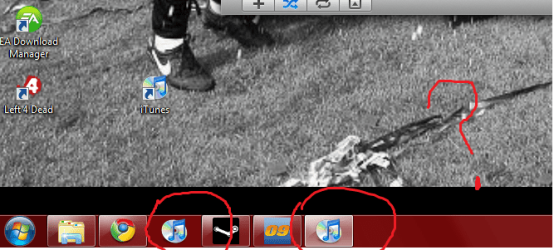
  • windows 7 problem.png
    windows 7 problem.png
    109.2 KB · Views: 25

My Computer

OS
Windows 7
Hello Smeg, and welcome to Seven Forums.

See if this may help. Unpin both iTunes icons on the taskbar. Now open iTunes, and right click on the icon on the taskbar for it and click on "Pin this program to taskbar" instead of from the shortcut.

Hope this helps,
Shawn
 

My Computer

Computer type
PC/Desktop
Computer Manufacturer/Model Number
Self built custom
OS
64-bit Windows 11 Pro for Workstations
CPU
Intel i7-8700K OC'd to 5 GHz
Motherboard
ASUS ROG Maximus XI Formula Z390
Memory
64 GB (4x16GB) G.SKILL TridentZ RGB DDR4 3600 MHz
Graphics Card(s)
ASUS ROG-STRIX-GTX1080TI-O11G-GAMING
Sound Card
Integrated
Monitor(s) Displays
2 x Samsung Odyssey G7 27"
Screen Resolution
2560x1440
Hard Drives
1TB Samsung 990 PRO M.2,
4TB Samsung 990 PRO PRO M.2,
TerraMaster F8 SSD Plus NAS
PSU
Seasonic Prime Titanium 850W
Case
Thermaltake Core P3
Cooling
Corsair Hydro H115i
Keyboard
Logitech wireless K800
Mouse
Logitech MX Master 4
Internet Speed
2 Gb/s Download and 100 Mb/s Upload
Antivirus
Malwarebyte Anti-Malware Premium
Browser
Google Chrome
Other Info
Logitech Z625 speaker system,
Logitech BRIO 4K Pro webcam,
HP Color LaserJet Pro MFP M477fdn,
APC SMART-UPS RT 1000 XL - SURT1000XLI,
Galaxy S23 Plus phone
Hi Shawn,

That didn't work, it just created the same problem. Any other ideas?
 

My Computer

OS
Windows 7
That's strange. Usually, if you have 2 icons of the same program like that, when you open the program and have it running, then right click that running icon to the taskbar, it usually corrects the problem, and you can unpin the older one. And it will just stay with that icon closed or running. :huh:

I guess you could just uninstall itunes, and all folders associated with it in appdata, then reinstall, pin that one to the taskbar. A lot of work for just that but may fix it.
 

My Computer

Computer type
PC/Desktop
Computer Manufacturer/Model Number
Airbot 2.0
OS
Windows 7 Ultimate x64 SP1
CPU
Core i7 920 (D0) @ 4Ghz, *26c idle *65c full load on air
Motherboard
Asus P6X58D Premium - Sata 6Gb/s - USB 3.0
Memory
12GB DDR3 Corsair Dominator -CMD12GX3M6A1600C8 at 1600MHz
Graphics Card(s)
Zotac Geforce GTX 770
Sound Card
ASUS Xonar D2X
Monitor(s) Displays
1 LG 24" Flatron W2453V-PF 1 Samsung 24" P2450H both 2ms RT
Screen Resolution
1920x1080@60hz
Hard Drives
1 Samsung 250GB 840 Evo SSD
1 OCZ Vertex2 180GB SSD
1 TB Samsung Spinpoint F1 7200RPM 32MB cache
2 500GB WD Caviar Blacks 7200RPM 32MB cache (WD5001AALS)

Pioneer DVD Burner DVR-S18M
PSU
Corsair HX1000W
Case
Cooler Master HAF 932
Cooling
Case Fans *3 230mm, *1 140mm/CPU - *Tuniq Tower 120 Extreme
Keyboard
Logitech Wireless MK700
Mouse
Logitech Wireless MK700
Internet Speed
DL 15 Mbps UL 0.98 Mbps
Antivirus
None
Browser
Firefox Nightly
Other Info
Processor-7.7 *RAM- 7.9 *Graphics-7.9 *Gaming Graphics- 7.9 *SSD- 7.8 W.E.I final score= 7.7
*Phone- LG Nexus 5

My Computer

Computer type
PC/Desktop
Computer Manufacturer/Model Number
Self built custom
OS
64-bit Windows 11 Pro for Workstations
CPU
Intel i7-8700K OC'd to 5 GHz
Motherboard
ASUS ROG Maximus XI Formula Z390
Memory
64 GB (4x16GB) G.SKILL TridentZ RGB DDR4 3600 MHz
Graphics Card(s)
ASUS ROG-STRIX-GTX1080TI-O11G-GAMING
Sound Card
Integrated
Monitor(s) Displays
2 x Samsung Odyssey G7 27"
Screen Resolution
2560x1440
Hard Drives
1TB Samsung 990 PRO M.2,
4TB Samsung 990 PRO PRO M.2,
TerraMaster F8 SSD Plus NAS
PSU
Seasonic Prime Titanium 850W
Case
Thermaltake Core P3
Cooling
Corsair Hydro H115i
Keyboard
Logitech wireless K800
Mouse
Logitech MX Master 4
Internet Speed
2 Gb/s Download and 100 Mb/s Upload
Antivirus
Malwarebyte Anti-Malware Premium
Browser
Google Chrome
Other Info
Logitech Z625 speaker system,
Logitech BRIO 4K Pro webcam,
HP Color LaserJet Pro MFP M477fdn,
APC SMART-UPS RT 1000 XL - SURT1000XLI,
Galaxy S23 Plus phone
Brink, I do. I tried disabling and then re enabling that option but that didn't work either.

Airbot, I tried uninstalling iTunes but when I reinstalled it I had the same problem. :(
 

My Computer

OS
Windows 7
Smeg,

You might see if running iTunes in Compatibility Mode with Vista selected may help.
 

My Computer

Computer type
PC/Desktop
Computer Manufacturer/Model Number
Self built custom
OS
64-bit Windows 11 Pro for Workstations
CPU
Intel i7-8700K OC'd to 5 GHz
Motherboard
ASUS ROG Maximus XI Formula Z390
Memory
64 GB (4x16GB) G.SKILL TridentZ RGB DDR4 3600 MHz
Graphics Card(s)
ASUS ROG-STRIX-GTX1080TI-O11G-GAMING
Sound Card
Integrated
Monitor(s) Displays
2 x Samsung Odyssey G7 27"
Screen Resolution
2560x1440
Hard Drives
1TB Samsung 990 PRO M.2,
4TB Samsung 990 PRO PRO M.2,
TerraMaster F8 SSD Plus NAS
PSU
Seasonic Prime Titanium 850W
Case
Thermaltake Core P3
Cooling
Corsair Hydro H115i
Keyboard
Logitech wireless K800
Mouse
Logitech MX Master 4
Internet Speed
2 Gb/s Download and 100 Mb/s Upload
Antivirus
Malwarebyte Anti-Malware Premium
Browser
Google Chrome
Other Info
Logitech Z625 speaker system,
Logitech BRIO 4K Pro webcam,
HP Color LaserJet Pro MFP M477fdn,
APC SMART-UPS RT 1000 XL - SURT1000XLI,
Galaxy S23 Plus phone
Nope, that doesn't work either. I really don't understand why this has suddenly started happening.
 

My Computer

OS
Windows 7
I'm not sure what else you can do other than a repair install to see if it can fix the problem without losing anything.
 

My Computer

Computer type
PC/Desktop
Computer Manufacturer/Model Number
Self built custom
OS
64-bit Windows 11 Pro for Workstations
CPU
Intel i7-8700K OC'd to 5 GHz
Motherboard
ASUS ROG Maximus XI Formula Z390
Memory
64 GB (4x16GB) G.SKILL TridentZ RGB DDR4 3600 MHz
Graphics Card(s)
ASUS ROG-STRIX-GTX1080TI-O11G-GAMING
Sound Card
Integrated
Monitor(s) Displays
2 x Samsung Odyssey G7 27"
Screen Resolution
2560x1440
Hard Drives
1TB Samsung 990 PRO M.2,
4TB Samsung 990 PRO PRO M.2,
TerraMaster F8 SSD Plus NAS
PSU
Seasonic Prime Titanium 850W
Case
Thermaltake Core P3
Cooling
Corsair Hydro H115i
Keyboard
Logitech wireless K800
Mouse
Logitech MX Master 4
Internet Speed
2 Gb/s Download and 100 Mb/s Upload
Antivirus
Malwarebyte Anti-Malware Premium
Browser
Google Chrome
Other Info
Logitech Z625 speaker system,
Logitech BRIO 4K Pro webcam,
HP Color LaserJet Pro MFP M477fdn,
APC SMART-UPS RT 1000 XL - SURT1000XLI,
Galaxy S23 Plus phone
You might try this.

When you have opened itunes you see two similar icons, right?

right click on the active icon (the one that appears when itunes is open)
now chose pin to taskbar.

After that right click the other itunes icon and unpin it.

That's it.
 

My Computer

OS
Win7 Build 7600 x86
CPU
Pentium II 300MHz
Motherboard
Asus
Memory
32mb EDO RAM
Graphics Card(s)
Diamond Viper
Sound Card
Soundblaster 16
Monitor(s) Displays
14" AOC CRT 16K color
Screen Resolution
800x600
Hard Drives
300mb Quantum fireball
PSU
110 Watts
Cooling
Passive
Keyboard
Trust Ergonomic
Mouse
Generic
Internet Speed
256K u 128K d
Squonksc, I have tried that (and about every variation of pinning/unpinning I could think of), and none of them have worked.

Brink, is that a long process?
 

My Computer

OS
Windows 7
It's takes a little bit longer than a normal clean reinstall to do a repair install. I would say give yourself around 40 minutes or so to finish doing it.
 

My Computer

Computer type
PC/Desktop
Computer Manufacturer/Model Number
Self built custom
OS
64-bit Windows 11 Pro for Workstations
CPU
Intel i7-8700K OC'd to 5 GHz
Motherboard
ASUS ROG Maximus XI Formula Z390
Memory
64 GB (4x16GB) G.SKILL TridentZ RGB DDR4 3600 MHz
Graphics Card(s)
ASUS ROG-STRIX-GTX1080TI-O11G-GAMING
Sound Card
Integrated
Monitor(s) Displays
2 x Samsung Odyssey G7 27"
Screen Resolution
2560x1440
Hard Drives
1TB Samsung 990 PRO M.2,
4TB Samsung 990 PRO PRO M.2,
TerraMaster F8 SSD Plus NAS
PSU
Seasonic Prime Titanium 850W
Case
Thermaltake Core P3
Cooling
Corsair Hydro H115i
Keyboard
Logitech wireless K800
Mouse
Logitech MX Master 4
Internet Speed
2 Gb/s Download and 100 Mb/s Upload
Antivirus
Malwarebyte Anti-Malware Premium
Browser
Google Chrome
Other Info
Logitech Z625 speaker system,
Logitech BRIO 4K Pro webcam,
HP Color LaserJet Pro MFP M477fdn,
APC SMART-UPS RT 1000 XL - SURT1000XLI,
Galaxy S23 Plus phone
Ok, I'll try that next weekend and report back.
 

My Computer

OS
Windows 7
Nope, I just decided to live with it and hope it's fixed in the next iTunes update. I never tried the repair install though.
 

My Computer

OS
Windows 7
Just curious

Just out of curiosity, what is the folder path and target location of each itunes icon? (shift and right click on icon and go to properties)
 

My Computer

OS
Windows 7
CPU
Intel Q9550
Motherboard
Gigabyte GA-EP43-UD3L
Memory
8GB Mushkin DDR2 1066
Graphics Card(s)
MSI GeForce 9400 GT 512MB 128-bit GDDR2
Monitor(s) Displays
Samsung Syncmaster 2493HM
Hard Drives
WD Raptor 150GB
WD Caviar Black WD1001FALS 1TB
PSU
Antec earthwatts EA500
Case
HEC
Other Info
LG GGC-H20L
The main icon that I start iTunes from has a properities button, but the one that only appears when the program is running only has Move, Restore, Maximize, Minimize, and Close buttons.
 

My Computer

OS
Windows 7
This may work

I was able to duplicate your problem on 2 computers by installing an older version of itunes, pinned to the taskbar with only 1 icon always displayed, then continued with an update to the most current version of itunes. After this update, I had 2 icons displayed of itunes. I was also able to solve it by following similar directions on SquonkSC's post.

I opened itunes and had 2 icons displayed, I then unpinned the nonactive icon (right click, then unpin) before pinning the active icon (right click, then pin). I closed itunes and then reopened it from the taskbar which produced only 1 icon.

Make sure the location size of the shortcut is not 0 bytes (when you shift and right click on the nonactive icon, then properties and general tab). You may have to add the itunes shortcut to the file path C:\Users\(user name)\AppData\Roaming\Microsoft\Internet Explorer\Quick Launch\User Pinned\TaskBar. If it is already present, rename the itunes shortcut to something like itunes2 and then add a new itunes shortcut in this same file path by right clicking then adding the shortcut by browsing for itunes.exe in the program files folder. Eventually you can delete the itunes2 shortcut.

Good luck.


My Computer

OS
Windows 7
CPU
Intel Q9550
Motherboard
Gigabyte GA-EP43-UD3L
Memory
8GB Mushkin DDR2 1066
Graphics Card(s)
MSI GeForce 9400 GT 512MB 128-bit GDDR2
Monitor(s) Displays
Samsung Syncmaster 2493HM
Hard Drives
WD Raptor 150GB
WD Caviar Black WD1001FALS 1TB
PSU
Antec earthwatts EA500
Case
HEC
Other Info
LG GGC-H20L
the problem you duplicated sounds similar but is different. When I open up itunes, there are 2 icons. when I unpin the inactive icon, it goes away. But when I pin the active icon, the 2nd icon reappears
 

My Computer

OS
Windows 7
Back
Top