Solved Pinning Windows Explorer

wyrman

New member
Local time
11:25 PM
Messages
5
Somehow my Windows Explorer is no longer on my taskbar. Don't even see an option on the right mouse to pin this appz. Sure could use some help please.
 

My Computer

Computer Manufacturer/Model Number
Intel
OS
Windows 7
CPU
3 ghtz
Motherboard
Asus
Memory
2gig
Graphics Card(s)
Nvidea
Sound Card
None
Monitor(s) Displays
Benq
Hi! wyrman, welcome to 7F :)

Start Orb >All Programs >Accessories >Right click Windows Explorer


Half way down the Context Menu there should be a listing "Pin to Taskbar" Click on that.
Then if you want to move it left click-hold, drag an drop to where you want it.
 

My Computer

Computer type
PC/Desktop
Computer Manufacturer/Model Number
Gateway DX4831-01e (Mid-Tower Desktop)
OS
Originally Win 7 Hm Prem x64 Ver 6.1.7600 Build 7601-SP1 | Upgraded to Windows 10 December 14, 2019
CPU
Intel i3 530 2.93GHz, 2933MHz 2 Cores 4 Logical Processors
Motherboard
Gateway H57M01 133 megahertz
Memory
6GB of 1,333MHz DDR3 SDRAM
Graphics Card(s)
32MB Intel Graphics Media Accelerator HD IGChip
Sound Card
Realtek High Definition Audio
Monitor(s) Displays
Gateway HX2000 20inch TFT active matrix TN
Screen Resolution
1600 x 900 x 59 hertz
Hard Drives
WDC WD10EADS-00M2B0 [HDD] (1000.20 GB) -- drive 0,
HL-DT-ST DVDRAM GH41N [CD-ROM dr]
Four card readers, and Four USB 2.0
PSU
300watts.
Case
Mid-Tower Desktop
Cooling
Stock from Gateway
Keyboard
Natural Ergonomic Keyboard 4000, see Other Info
Mouse
Orig. Gateway wore out now using Insignia USB wired optical
Internet Speed
Vz FIOS 10ms png 57.64Mbps down 65.53Mbps up Speedtest.org
Antivirus
Zamana Anti-logger with Anti-malware, MSE, Windows Firewall,
Browser
IE11.0.9600.19399-Upd ver11.0.135, Firefox 68.0.1 x64
Other Info
System Specs by Belarc.

BIOS: American Megatrends Inc. P01-A0 11/17/2009

Replaced the MS 'Natural' Standard PS/2 Enhanced 101-102 Keyboard with a new Natural Ergonomic Keyboard 4000 on August 1st 2014.

Canon Pixma MG3222 Printer.

Updated to IE11 on 12102015 | Fios Quantum Router g1100

Additional AV: SpywareBlaster, manual Mbam, SAS
Hi! wyrman, welcome to 7F :)

Start Orb >All Programs >Accessories >Right click Windows Explorer


Half way down the Context Menu there should be a listing "Pin to Taskbar" Click on that.
Then if you want to move it left click-hold, drag an drop to where you want it.

That's the problem. It's not there. No pin to anything.
 

My Computer

Computer Manufacturer/Model Number
Intel
OS
Windows 7
CPU
3 ghtz
Motherboard
Asus
Memory
2gig
Graphics Card(s)
Nvidea
Sound Card
None
Monitor(s) Displays
Benq

My Computer

OS
Win7U 64 RTM
CPU
Q9550
Motherboard
GA-EP45-UD3R
Memory
8GB Gskill
Graphics Card(s)
ASUS|EAH4850/HTDI/1GD3/A
Sound Card
xfi Plat
Monitor(s) Displays
Dell 2405fpw
Screen Resolution
1920x1200
Hard Drives
Seagate & WD sata Drives
PSU
Antec
Case
Antec
Keyboard
MS Natural Ergonomic 4000
Mouse
Logitech MX610 USB Cordless
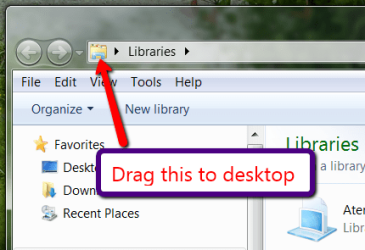
Do this: Press Win+R and paste %windir%\explorer.exe into the Run box. Then click OK. Make the Resulting Explorer window smaller so that you can drag (what's shown in the picture) to the dektop. Then drag that shortcut into the taskbar.
 

Attachments

  • 2011-01-18_1919.png
    2011-01-18_1919.png
    25 KB · Views: 2

My Computer

Computer Manufacturer/Model Number
HP, Dell, Gateway, Toshiba - 4 laptops and 2 desktops
OS
Vista, Windows7, Mint Mate, Zorin, Windows 8
CPU
from 1.6GHz Duo to i7
Monitor(s) Displays
2x HP w2207
Hard Drives
5x HDD, 7x SSD, 12x Externals
Keyboard
with trackball - no mices
Mouse
Trackball mice
Internet Speed
DSL 6000
Thanks. I'll keep that in mind if it happens again. I did a restore and that fixed it for now. Thanks again bud
 

My Computer

Computer Manufacturer/Model Number
Intel
OS
Windows 7
CPU
3 ghtz
Motherboard
Asus
Memory
2gig
Graphics Card(s)
Nvidea
Sound Card
None
Monitor(s) Displays
Benq
Back
Top