Solved Pixel junk everywhere

expo703

New member
Local time
2:07 AM
Messages
31
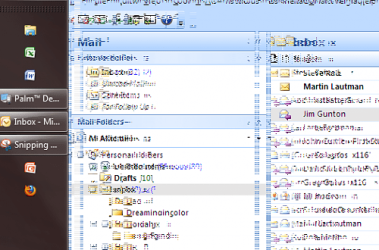
This happend on my Beta 7000 32 bit also RC1 32 AND 64 BIT. I have a BFG 9600GT OCE and the most recent drivers from windows update i have even tried the ones from nvidia.com for windows 7. It looks like this and if i put my mouse over it - it will disapear or if i move something ontop of it will dissapear and be fine again....but it happends every from on my Aol instant messages to browsing the inet. There is also 1 other issue sometimes my displays will flicker/turn on and off kinda like reset because windows 7 turns to performance mode for some reason i dont know why.. than turns back.. i guess another driver issue because i did also get a error saying it recovered the 87.xxx nvidia drivers... anyone else having this issues?:mad:
 

Attachments

  • Capture.PNG
    Capture.PNG
    112 KB · Views: 125

My Computer

OS
Windows 7
Another thing thats pissing me off is i keep losing sound on and off!! and the audiodg.exe explodes to 1.2GIGS +++ memory leak.. i'v read about that common issue but couldn't find a fix...
 

My Computer

OS
Windows 7
Is your videocard running at normal temperatures? Looks like massive artifacts. What soundcard do you have?
 

My Computer

Computer Manufacturer/Model Number
Custom Made
OS
Windows 7 Build 7600|16384- 64bit
CPU
AMD Phenom II X4 810 - 2.61ghz Deneb
Motherboard
Asus M4A79T Deluxe
Memory
4GB DDR3 Mushkin (1600 O.C. Rated)
Graphics Card(s)
ATI HD Radeon 4890 1GB
Sound Card
Realtek HD Onboard Audio
Monitor(s) Displays
AOC 912vwa-1
Screen Resolution
1440x900 (Max Monitor)
Hard Drives
10000RPM 150GB Western Digital Velociraptor
PSU
Corsair TSX750W
Case
Antec Nine Hundred
Cooling
Air Cooled
Keyboard
Logitech Elite
Mouse
Logitech MX518
Internet Speed
Comcast High-Speed (+Powerboost)
Xfi fatality - and yeah its normal temp - it run's games pretty good2...
 

My Computer

OS
Windows 7
Well from what I have read in multiple areas, there are some real problems with creative drivers in Windows 7. Have you tried removing the soundcard and the drivers and seeing if the problems goes away with it?
 

My Computer

Computer Manufacturer/Model Number
Custom Made
OS
Windows 7 Build 7600|16384- 64bit
CPU
AMD Phenom II X4 810 - 2.61ghz Deneb
Motherboard
Asus M4A79T Deluxe
Memory
4GB DDR3 Mushkin (1600 O.C. Rated)
Graphics Card(s)
ATI HD Radeon 4890 1GB
Sound Card
Realtek HD Onboard Audio
Monitor(s) Displays
AOC 912vwa-1
Screen Resolution
1440x900 (Max Monitor)
Hard Drives
10000RPM 150GB Western Digital Velociraptor
PSU
Corsair TSX750W
Case
Antec Nine Hundred
Cooling
Air Cooled
Keyboard
Logitech Elite
Mouse
Logitech MX518
Internet Speed
Comcast High-Speed (+Powerboost)
I dont think its a hardware or temporature issue as I get this ocasionally with a few applications such as mirc (which incidentally looses its aero).
 

My Computer

Computer Manufacturer/Model Number
self built
OS
Windows 7 Professional 64-bit
CPU
Intel E8400 3GHz
Motherboard
Intel DX48BT2
Memory
Kingston PC3-10700H 4Gb
Graphics Card(s)
XFX Radeon HD 5850 BlackEd.
Sound Card
Asus Xonar DG
Monitor(s) Displays
2x Samsung SM-T220HD 22"
Screen Resolution
1680x1050 on two monitors
Hard Drives
OCZ Vertex 2 120gb 3.5" (OS)
Seagate Momentus XT 500gb
Samsung F3 1Tb (games)
2x Samsung F1 1Tb
PSU
Thermaltake ToughPower 850w
Case
Thermaltake Armor
Cooling
Scythe Mugen II
Keyboard
Microsoft Comfort Curve USB
Mouse
Razer Diamondback 3G
Internet Speed
8128/443
Well by having some conflicting driver issues or things of that nature, if you remove the drivers and the card(so windows doesn't reinstall them or bitch) you might be able to see if that was truly the issue. Multiple people report problems with creative drivers, that is why i suggested/asked.
 

My Computer

Computer Manufacturer/Model Number
Custom Made
OS
Windows 7 Build 7600|16384- 64bit
CPU
AMD Phenom II X4 810 - 2.61ghz Deneb
Motherboard
Asus M4A79T Deluxe
Memory
4GB DDR3 Mushkin (1600 O.C. Rated)
Graphics Card(s)
ATI HD Radeon 4890 1GB
Sound Card
Realtek HD Onboard Audio
Monitor(s) Displays
AOC 912vwa-1
Screen Resolution
1440x900 (Max Monitor)
Hard Drives
10000RPM 150GB Western Digital Velociraptor
PSU
Corsair TSX750W
Case
Antec Nine Hundred
Cooling
Air Cooled
Keyboard
Logitech Elite
Mouse
Logitech MX518
Internet Speed
Comcast High-Speed (+Powerboost)
i am having a similar problem. i have pixels out of 'calibration'. eeven though it has got better, when i play civilization IV everything is out of sync and you can't read the text properly also it used to do the same thing your's did: recovered the drivers etc. try checking other forums as i have been doing i havent found a solution ill try and post a picture
 

My Computer

Computer type
Laptop
Computer Manufacturer/Model Number
Dell Latitude XT2 Tablet PC
OS
Windows 7 Professional 32-bit SP1
CPU
Intel Mobile Core 2 Duo SU9600 @ 1.60GHz
Motherboard
Dell Inc. 0M374P (Microprocessor)
Memory
3.00GB Dual-Channel DDR3 @ 398MHz (6-6-6-15)
Graphics Card(s)
Intel Mobile Intel 4 Series Express Chipset Family (Dell)
Sound Card
High Definition Audio Device
Monitor(s) Displays
Generic PnP Monitor (1280x800@60Hz)
Screen Resolution
1280 x 800
Hard Drives
232GB TOSHIBA MK2529GSGF (SATA)
Keyboard
HID Keyboard Device; Standard PS/2 Keyboard
Mouse
HID-compliant mouse; PS/2 Compatible Mouse
Antivirus
Norton 360
Browser
Google Chrome, Mozilla Firefox
Other Info
From Piriform Speccy!
ok here's a picture of microsoft word
pixelated.png
 

My Computer

Computer type
Laptop
Computer Manufacturer/Model Number
Dell Latitude XT2 Tablet PC
OS
Windows 7 Professional 32-bit SP1
CPU
Intel Mobile Core 2 Duo SU9600 @ 1.60GHz
Motherboard
Dell Inc. 0M374P (Microprocessor)
Memory
3.00GB Dual-Channel DDR3 @ 398MHz (6-6-6-15)
Graphics Card(s)
Intel Mobile Intel 4 Series Express Chipset Family (Dell)
Sound Card
High Definition Audio Device
Monitor(s) Displays
Generic PnP Monitor (1280x800@60Hz)
Screen Resolution
1280 x 800
Hard Drives
232GB TOSHIBA MK2529GSGF (SATA)
Keyboard
HID Keyboard Device; Standard PS/2 Keyboard
Mouse
HID-compliant mouse; PS/2 Compatible Mouse
Antivirus
Norton 360
Browser
Google Chrome, Mozilla Firefox
Other Info
From Piriform Speccy!
Same Problem

Windows 7 64 bit after the upgrade we get the same pixel problem

Pixel Problem.PNG
 

My Computer

OS
Mac osx
do the problem stay the same, or go away if your turn off Areo and use W7 Classic Theme?
 

My Computer

Computer Manufacturer/Model Number
Asus V2-M3M8200 Barebones
OS
Windows 7 Professional x64
CPU
AMD Phenom II X4 925
Motherboard
V2-M3M8200 (basically a M3N78-VM)
Memory
4x1024mb Kingston HyperX DDR2-1066 KHX8500D2/1G
Graphics Card(s)
Asus GTS 450 OC
Sound Card
Creative Sound Blaster X-Fi Titanium PCIe
Monitor(s) Displays
Asus 24" LCD VH242H
Screen Resolution
1920x1080
Hard Drives
WDC WD5000AAKS
WDC WD5002ABYS
Seagate ST325062 USB-to-IDE
Fujitsu 160GB Pocket USB HDD
PSU
Antec Earthwatts EA-430D
Case
Asus V2-M3M8200
Cooling
120mm side fan & 80mm front & 92mm rear fan
Keyboard
Dell USB mini Multimedia
Mouse
Logitech MX518
Internet Speed
Comcast Xfinity
Other Info
Logitech Webcam Pro 9000
Accurian 40-1462 Speakers
little dot MKII Headphone Amp
oh sorry guys, it's been so long since i looked at this topic.
Well, it got solved about a few days after my previous post
I contacted dell, did some tests (eg: plug into an external monitor) still had the same problem on both monitors. eventually we came to the solution that it was a hardware problem, and the motherboard with the integrated graphics had to be replaced. once it did, everything looked as clear as ever (that's what's happens after you keep looking at blurry) so for you guys that have problems, it might be a hardware problem, not a software problem. Just try and work out which of the two types of problems your computer has before doing anything, because they require completely different solutions
 

My Computer

Computer type
Laptop
Computer Manufacturer/Model Number
Dell Latitude XT2 Tablet PC
OS
Windows 7 Professional 32-bit SP1
CPU
Intel Mobile Core 2 Duo SU9600 @ 1.60GHz
Motherboard
Dell Inc. 0M374P (Microprocessor)
Memory
3.00GB Dual-Channel DDR3 @ 398MHz (6-6-6-15)
Graphics Card(s)
Intel Mobile Intel 4 Series Express Chipset Family (Dell)
Sound Card
High Definition Audio Device
Monitor(s) Displays
Generic PnP Monitor (1280x800@60Hz)
Screen Resolution
1280 x 800
Hard Drives
232GB TOSHIBA MK2529GSGF (SATA)
Keyboard
HID Keyboard Device; Standard PS/2 Keyboard
Mouse
HID-compliant mouse; PS/2 Compatible Mouse
Antivirus
Norton 360
Browser
Google Chrome, Mozilla Firefox
Other Info
From Piriform Speccy!
Back
Top