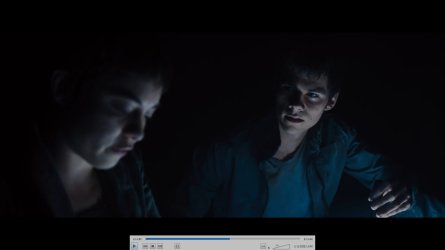
Pixelation and "noise" in dark scenes. Images show up as blocky.

hermanthehermit

New member
Local time
1:31 AM
Messages
13
Pixelation and "noise" in dark scenes. Images show up as blocky.

Hoi guys I really hope you can help me out, this is fifth forum I tried to ask this question but seems that no one wants to help me out.
So my problem is mentioned above, all dark scenes, no matter if it's streamed or local video, are showing this grainy very small noise and pixelation in dark scenes. I tried various video players, scanned my pc, did sfc scannow, checked my hard drive health, updated the drivers, etc. I have tried to search the web but I can't find any answers. So you guys are all my hope now. I would repair pc if there is a problem with monitor, card or PSU, but I just need to know what the problem may be.

I have
Windows 7 64 bit
i7-2600k
intel DP67DE
GTX 980
8 GB Ram
250 GB SSD, 1000 GB HDD
Acer XB271H A
Avast, Malwarebytes


THanks in advance!
 

My Computer My Computer

At a glance

Windows 8 64 bitIntel Core i7 2600K @ 3.40GHz Sandy Bridge 32...8,00 Gt Dual-Channel DDR3 @ 665MHz (9-9-9-24)1024MB GeForce GTX 560 (ASUStek Computer Inc)
OS
Windows 8 64 bit
CPU
Intel Core i7 2600K @ 3.40GHz Sandy Bridge 32nm Techn
Motherboard
Intel Corporation DP67DE (LGA1155)
Memory
8,00 Gt Dual-Channel DDR3 @ 665MHz (9-9-9-24)
Graphics Card(s)
1024MB GeForce GTX 560 (ASUStek Computer Inc)
Sound Card
REALTEK High Definition Audio NVIDIA High Definition Audio
Monitor(s) Displays
BenQ G2220HD (1920x1080@60Hz)
Screen Resolution
1920x1080
Hard Drives
977GB SAMSUNG SAMSUNG HD103SJ ATA Device (SATA)
PSU
CORSAIR CX500
Keyboard
Logitech UltraX premium keyboard
Mouse
Razer Deathadder 3500 dpi
Internet Speed
100/10 mbs optic fibre connection
I have seen this "Pixelation and noise in dark scenes" on my monitor when I bought it new.


It turned out that the pixelation occured in new games calibrated from monitors with very high contrast ratios. I dont think there is much you can do about it, unless your monitor settings have not been set up to use the full dynamic range.


I did a quick search on the Web for you monitor, and currently I am unable to find out what the contrast ratio it supports.


Anyway, that is where I'd start looking, if I were you.
 

My Computer My Computer

At a glance

Windows 7 x64, Vista x64, 8.1 smartphoneIntel E8400 65W 64-bitDDR2 2 x 2GB, 1GB x 2XFX Radeon HD5750
Computer type
PC/Desktop
OS
Windows 7 x64, Vista x64, 8.1 smartphone
CPU
Intel E8400 65W 64-bit
Motherboard
Gigabyte EP45-UD3LR
Memory
DDR2 2 x 2GB, 1GB x 2
Graphics Card(s)
XFX Radeon HD5750
Sound Card
AMD High Definition Audio; Realtek High Definition Audio
Monitor(s) Displays
iiyama prolite X2377HDS
Screen Resolution
1920 x 1080
Hard Drives
500GB 7200 rpm Seagate ST3500413AS 16MB, 500GB 5400 rpm Toshiba MQ02ABF050H 32MB, 200GB 7200 rpm Seagate ST3200820AS 8MB, 2TB 7200 rpm Western Digital WD20EZRX 64MB
PSU
Enermax Liberty Modular
Case
Antec P193 Midi Tower
Keyboard
Mionix ZIBAL 60
Mouse
Razer USB 2.0 Diamondback Mouse or Huion Graphics Tablet
Browser
Internet Explorer, Lunascape, Firefox, Opera, Avast Safezone
Ok, thank you for replying. Tomorrow when I have time I will try to use my previous monitor and graphics card. This picture here shows a little bit of pixelation it will get.
 

Attachments

  • Uusi bittikarttakuva.jpg
    Uusi bittikarttakuva.jpg
    41.2 KB · Views: 3

My Computer My Computer

At a glance

Windows 8 64 bitIntel Core i7 2600K @ 3.40GHz Sandy Bridge 32...8,00 Gt Dual-Channel DDR3 @ 665MHz (9-9-9-24)1024MB GeForce GTX 560 (ASUStek Computer Inc)
OS
Windows 8 64 bit
CPU
Intel Core i7 2600K @ 3.40GHz Sandy Bridge 32nm Techn
Motherboard
Intel Corporation DP67DE (LGA1155)
Memory
8,00 Gt Dual-Channel DDR3 @ 665MHz (9-9-9-24)
Graphics Card(s)
1024MB GeForce GTX 560 (ASUStek Computer Inc)
Sound Card
REALTEK High Definition Audio NVIDIA High Definition Audio
Monitor(s) Displays
BenQ G2220HD (1920x1080@60Hz)
Screen Resolution
1920x1080
Hard Drives
977GB SAMSUNG SAMSUNG HD103SJ ATA Device (SATA)
PSU
CORSAIR CX500
Keyboard
Logitech UltraX premium keyboard
Mouse
Razer Deathadder 3500 dpi
Internet Speed
100/10 mbs optic fibre connection
If you are using a Nvidia graphics card then another setting you might like to check is called OUTPUT DYNAMIC RANGE. This setting is located in the Nvidia Control Panel. The default for output dynamic range is limited. However, if you change this setting to FULL, then maybe you'd get the picture that you are after.
 

My Computer My Computer

At a glance

Windows 7 x64, Vista x64, 8.1 smartphoneIntel E8400 65W 64-bitDDR2 2 x 2GB, 1GB x 2XFX Radeon HD5750
Computer type
PC/Desktop
OS
Windows 7 x64, Vista x64, 8.1 smartphone
CPU
Intel E8400 65W 64-bit
Motherboard
Gigabyte EP45-UD3LR
Memory
DDR2 2 x 2GB, 1GB x 2
Graphics Card(s)
XFX Radeon HD5750
Sound Card
AMD High Definition Audio; Realtek High Definition Audio
Monitor(s) Displays
iiyama prolite X2377HDS
Screen Resolution
1920 x 1080
Hard Drives
500GB 7200 rpm Seagate ST3500413AS 16MB, 500GB 5400 rpm Toshiba MQ02ABF050H 32MB, 200GB 7200 rpm Seagate ST3200820AS 8MB, 2TB 7200 rpm Western Digital WD20EZRX 64MB
PSU
Enermax Liberty Modular
Case
Antec P193 Midi Tower
Keyboard
Mionix ZIBAL 60
Mouse
Razer USB 2.0 Diamondback Mouse or Huion Graphics Tablet
Browser
Internet Explorer, Lunascape, Firefox, Opera, Avast Safezone
Thanks, I have tried that, but it doesn't really help me at all :(
 

My Computer My Computer

At a glance

Windows 8 64 bitIntel Core i7 2600K @ 3.40GHz Sandy Bridge 32...8,00 Gt Dual-Channel DDR3 @ 665MHz (9-9-9-24)1024MB GeForce GTX 560 (ASUStek Computer Inc)
OS
Windows 8 64 bit
CPU
Intel Core i7 2600K @ 3.40GHz Sandy Bridge 32nm Techn
Motherboard
Intel Corporation DP67DE (LGA1155)
Memory
8,00 Gt Dual-Channel DDR3 @ 665MHz (9-9-9-24)
Graphics Card(s)
1024MB GeForce GTX 560 (ASUStek Computer Inc)
Sound Card
REALTEK High Definition Audio NVIDIA High Definition Audio
Monitor(s) Displays
BenQ G2220HD (1920x1080@60Hz)
Screen Resolution
1920x1080
Hard Drives
977GB SAMSUNG SAMSUNG HD103SJ ATA Device (SATA)
PSU
CORSAIR CX500
Keyboard
Logitech UltraX premium keyboard
Mouse
Razer Deathadder 3500 dpi
Internet Speed
100/10 mbs optic fibre connection
No, I did not get help, I tried many forums over the internet but people don't want to help me, so I had to buy a new pc.
 

My Computer My Computer

At a glance

Windows 8 64 bitIntel Core i7 2600K @ 3.40GHz Sandy Bridge 32...8,00 Gt Dual-Channel DDR3 @ 665MHz (9-9-9-24)1024MB GeForce GTX 560 (ASUStek Computer Inc)
OS
Windows 8 64 bit
CPU
Intel Core i7 2600K @ 3.40GHz Sandy Bridge 32nm Techn
Motherboard
Intel Corporation DP67DE (LGA1155)
Memory
8,00 Gt Dual-Channel DDR3 @ 665MHz (9-9-9-24)
Graphics Card(s)
1024MB GeForce GTX 560 (ASUStek Computer Inc)
Sound Card
REALTEK High Definition Audio NVIDIA High Definition Audio
Monitor(s) Displays
BenQ G2220HD (1920x1080@60Hz)
Screen Resolution
1920x1080
Hard Drives
977GB SAMSUNG SAMSUNG HD103SJ ATA Device (SATA)
PSU
CORSAIR CX500
Keyboard
Logitech UltraX premium keyboard
Mouse
Razer Deathadder 3500 dpi
Internet Speed
100/10 mbs optic fibre connection

My Computer My Computer

At a glance

win10
Computer type
PC/Desktop
OS
win10
Back
Top