
Planning on buying SSD for OS - require advise on fresh-installs etc.

jayrap

New member
Member
Local time
12:40 AM
Messages
92
Location
United Kingdom
Hello all

First post, so it would be fitting to introduce myself

My name is Jon, I am an engineering student, I like Formula One, PC gaming and mechanical things such as cars, planes, trains e.t.c

For anyone wondering, my current rig is as follows:
OS: Windows 7 Home Premium 64-bit
CPU: AMD Phenom II x4 955 Black Edition @ stock speeds of 3.2GHz
CPU cooling: CoolerMaster V8 (planned on Overclocking, but didn't have enough knowledge or patience, decided it better I give up for now)
RAM: 4GB Corsair XMS3 DDR3-1333 CL9
Mobo: Gigabyte GA-MA790XT-UD4P
GFX: XFX AMD Radeon HD 6970 2GB @ stock speeds
HDD: 1x500GB (465GB in reality) Western Digital Caviar Blue SATA II 7,200rpm, 16MB Cache (for Windows and program files), 1x250GB (232GB in reality) Western Digital Caviar Blue SATA II 7,200rpm, 16MB Cache (for videos and pictures)
PSU: Corsair TX750W 750W
Case: Lancool PC-K62 Dragonlord
Case cooling: 3x Lian Li Red 140mm fans, 1x Lian Li Red 120mm fan, 1x BitFenix 140mm sicle red fan with Lian Li fan controller
Monitor: Samsung SyncMaster P2250 1920x1080 DVI
Keyboard: Logitech G110
Mouse: Logitech MX518
Wheel: Logitech G27
Speakers: Logitech X-140
Headphones: Creative FATAL1TY stereo
Internet speeds: BT Broadband 6.35-7.03Mbps download (keeps changing), 0.97Mbps upload, Unlimited (well really a 300GB cap but I won't need to worry about that!)
Now to the reason I require advice...

1. I am planning on buying myself an SSD to install my OS onto for a fresh install, while planning to wipe my main 500GB HDD. I only need to back up documents and music onto my other drive.

What I would like advice for is what exact steps I should take to go around it.

These are what I plan to purchase by the way:
Kingston 64GB SSDNOW V100 - SATA-II 2.5" - Read.. | Ebuyer.com

Corsair 8GB (2X4GB) DDR3 1600Mhz Red Vengeance Memory.. | Ebuyer.com
(The RAM is going to replace my current RAM)

Basically, a few instructions on how to go about it would be helpful (i.e. wiping one disk, while installing OS on new SSD e.t.c)

2. Another issue I realised is that I don't know what's going to happen when I try to reactivate my copy of Windows 7 (which I pre-ordered in 2009 from Amazon and got for £36) and my copy of Microsoft Office 2010 Professional (which I bought through Software4Students as a genuine copy, licenced to students and educational faculties for £40). How straight forward is all this? Would I have to make a phone call? What's the number? I live in the UK so does a +44 number exist?

3. Also, would I be correct in assuming that I can just leave my media drive untouched or just unplug it fine when the PC is off and everything will work there properly when Windows is re-installed?

Written and possibly archived help would be appreciated ;)

Cheers

Jon
 

My Computer My Computer

At a glance

Windows 7 Home-Premium 64bitAMD Phenom II x4 955 Black Edition 3.2GHz (st...8GB Corsair Red Vengeance @1333MHz 9-9-9-24 D...XFX AMD Radeon HD 6970 2GB (stock)
Computer Manufacturer/Model Number
Myself
OS
Windows 7 Home-Premium 64bit
CPU
AMD Phenom II x4 955 Black Edition 3.2GHz (stock) with CM V8
Motherboard
Gigabyte GA-MA790XT-UD4P (AM3)
Memory
8GB Corsair Red Vengeance @1333MHz 9-9-9-24 Dual-Channel
Graphics Card(s)
XFX AMD Radeon HD 6970 2GB (stock)
Sound Card
Onboard Realtek Azalea 8.1 Channel
Monitor(s) Displays
Samsung Syncmaster P2250 DVI-D
Screen Resolution
1920x1080@60Hz
Hard Drives
1. 60GB (55.7GiB) Corsair Force 3 SSD (firmware 1.3.3) SATA III (in SATA II mode) - contains OS, drivers and non-game programs
2. 500GB (465GiB) Western Digital Caviar Blue 500GB SATA II 7,200rpm 16MB Cache - contains games
3. 250GB (232GiB) Weste
PSU
Corsair TX750W 750W PSU with 4x PCI-E 6+2-pin connectors
Case
Lancool [Lian Li] PC-K62 Dragonlord (originally w/blue fans)
Cooling
Lian Li: 3x140mm, 1x120mm | Bitfenix: 1x140mm - ALL RED LED
Keyboard
Logitech G110
Mouse
Logitech MX518
Internet Speed
BT Infinity Option 2 ~38Mbps download, ~8Mbps upload
Other Info
Also have a Logitech G27 Racing Wheel, Creative Fatal1ty Stereo headset, Logitech X-140 Stereo Speakers, a disused Xbox 360 USB game controller pad and a CM Storm WoC M4 Mouse mat. The *GB of Corsair Red Vengeance DRAM is the CMZ8GX3M2A1600C9R set which can run at 1600MHz at 9-9-9-24 in Intel's XMP but my AMD board doesn't have this and it's not recommended for AMD Phenom II's anyway.
1. When you install Win7 on the SSD, unplug all other drives. Another option would be to transfer your current OS - see here: http://www.sevenforums.com/tutorials/149969-ssd-install-transfer-operating-system.html

1a. Once you have win7 installed on the SSD, you have to change the boot order in the BIOS to set the SSD as second (CD/DVD reader should always be first)

2. The brand new SSD you may have to initialize - although if you do a new installation from a Win7 installation disk, the installer should take care of all of this.

3. On your old disk you can just delete the partitions (in Disk Management) that you do not want any more.

4. You should not have any problems with the activation of the OS or Office since you stay on the same system.

5. The Kingston SSD would not have been my first choice. But for UK prices it seems to be inexpensive. I would favor a Crucial M4 or an Intel. I also have a few OCZs, but there you have to watch out which model you buy. There are a couple of OCZ models that suck.
 

My Computer My Computer

At a glance

Vista, Windows7, Mint Mate, Zorin, Windows 8from 1.6GHz Duo to i7
Computer Manufacturer/Model Number
HP, Dell, Gateway, Toshiba - 4 laptops and 2 desktops
OS
Vista, Windows7, Mint Mate, Zorin, Windows 8
CPU
from 1.6GHz Duo to i7
Monitor(s) Displays
2x HP w2207
Hard Drives
5x HDD, 7x SSD, 12x Externals
Keyboard
with trackball - no mices
Mouse
Trackball mice
Internet Speed
DSL 6000
1. When you install Win7 on the SSD, unplug all other drives. Another option would be to transfer your current OS - see here: http://www.sevenforums.com/tutorials/149969-ssd-install-transfer-operating-system.html

2. The brand new SSD you may have to initialize - although if you do a new installation from a Win7 installation disk, the installer should take care of all of this.

3. On your old disk you can just delete the partitions (in Disk Management) that you do not want any more.

4. You should not have any problems with the activation of the OS or Office since you stay on the same system.

5. The Kingston SSD would not have been my first choice. But for UK prices it seems to be inexpensive. I would favor a Crucial M4 or an Intel. I also have a few OCZs, but there you have to watch out which model you buy. There are a couple of OCZ models that suck.

Thanks for the reply

I'll go for the fresh install I think

Glad that the whole activation thing shouldn't be too difficult. Am I correct to assume that MS Office looks at your Windows product key and see if it matches what its registered to?

And on the SSD - I've read about the whole issue with the old firmware causing drives to crash and I've heard many bad things about the OCZ drives. One of my friends just recommended this to me a few minutes ago: Corsair 60GB Force 3A SSD - 2.5"" SATA-III 6Gb/s.. | Ebuyer.com
I don't have SATA III at the moment, but he assures me that it is backwards compatible with SATA II, which I hope is correct. If so, I'll consider the Corsair - the speeds look very immpressive, although as a student, my budgets aren't big. I suppose since Christmas is approaching I can try and go for it, providing I know there wouldn't be any issues.
 

My Computer My Computer

At a glance

Windows 7 Home-Premium 64bitAMD Phenom II x4 955 Black Edition 3.2GHz (st...8GB Corsair Red Vengeance @1333MHz 9-9-9-24 D...XFX AMD Radeon HD 6970 2GB (stock)
Computer Manufacturer/Model Number
Myself
OS
Windows 7 Home-Premium 64bit
CPU
AMD Phenom II x4 955 Black Edition 3.2GHz (stock) with CM V8
Motherboard
Gigabyte GA-MA790XT-UD4P (AM3)
Memory
8GB Corsair Red Vengeance @1333MHz 9-9-9-24 Dual-Channel
Graphics Card(s)
XFX AMD Radeon HD 6970 2GB (stock)
Sound Card
Onboard Realtek Azalea 8.1 Channel
Monitor(s) Displays
Samsung Syncmaster P2250 DVI-D
Screen Resolution
1920x1080@60Hz
Hard Drives
1. 60GB (55.7GiB) Corsair Force 3 SSD (firmware 1.3.3) SATA III (in SATA II mode) - contains OS, drivers and non-game programs
2. 500GB (465GiB) Western Digital Caviar Blue 500GB SATA II 7,200rpm 16MB Cache - contains games
3. 250GB (232GiB) Weste
PSU
Corsair TX750W 750W PSU with 4x PCI-E 6+2-pin connectors
Case
Lancool [Lian Li] PC-K62 Dragonlord (originally w/blue fans)
Cooling
Lian Li: 3x140mm, 1x120mm | Bitfenix: 1x140mm - ALL RED LED
Keyboard
Logitech G110
Mouse
Logitech MX518
Internet Speed
BT Infinity Option 2 ~38Mbps download, ~8Mbps upload
Other Info
Also have a Logitech G27 Racing Wheel, Creative Fatal1ty Stereo headset, Logitech X-140 Stereo Speakers, a disused Xbox 360 USB game controller pad and a CM Storm WoC M4 Mouse mat. The *GB of Corsair Red Vengeance DRAM is the CMZ8GX3M2A1600C9R set which can run at 1600MHz at 9-9-9-24 in Intel's XMP but my AMD board doesn't have this and it's not recommended for AMD Phenom II's anyway.
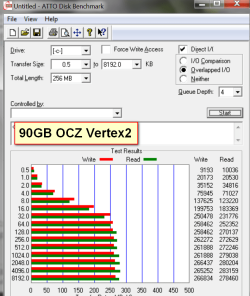
The Corsair is fine but it is an overkill since you do not have Sata III. You will not get those speeds. And anyhow, do not get too excited by data R/W speeds. They mean very little for the OS since the OS reads/writes little data and that in 4K blocks which is considerably slower than the maximum (see pic below9

What makes the SSD fast for the OS is the access time. Most are around 0.1ms and that is 150 times faster than your average HDD.
 

Attachments

  • vertex2.png
    vertex2.png
    38.3 KB · Views: 13

My Computer My Computer

At a glance

Vista, Windows7, Mint Mate, Zorin, Windows 8from 1.6GHz Duo to i7
Computer Manufacturer/Model Number
HP, Dell, Gateway, Toshiba - 4 laptops and 2 desktops
OS
Vista, Windows7, Mint Mate, Zorin, Windows 8
CPU
from 1.6GHz Duo to i7
Monitor(s) Displays
2x HP w2207
Hard Drives
5x HDD, 7x SSD, 12x Externals
Keyboard
with trackball - no mices
Mouse
Trackball mice
Internet Speed
DSL 6000
Overkill maybe, But I may try and install a few light programs on the SSD with Windows 7, including MS Office, MS Security Essentials, Sony Vegas, drivers, and only if it's if it's a good idea, my web browsers. I suppose also, it would be something I could keep for when I do upgrade to a motherboard with a SATA III controller.

I found it at a lower price from Aria.
 

My Computer My Computer

At a glance

Windows 7 Home-Premium 64bitAMD Phenom II x4 955 Black Edition 3.2GHz (st...8GB Corsair Red Vengeance @1333MHz 9-9-9-24 D...XFX AMD Radeon HD 6970 2GB (stock)
Computer Manufacturer/Model Number
Myself
OS
Windows 7 Home-Premium 64bit
CPU
AMD Phenom II x4 955 Black Edition 3.2GHz (stock) with CM V8
Motherboard
Gigabyte GA-MA790XT-UD4P (AM3)
Memory
8GB Corsair Red Vengeance @1333MHz 9-9-9-24 Dual-Channel
Graphics Card(s)
XFX AMD Radeon HD 6970 2GB (stock)
Sound Card
Onboard Realtek Azalea 8.1 Channel
Monitor(s) Displays
Samsung Syncmaster P2250 DVI-D
Screen Resolution
1920x1080@60Hz
Hard Drives
1. 60GB (55.7GiB) Corsair Force 3 SSD (firmware 1.3.3) SATA III (in SATA II mode) - contains OS, drivers and non-game programs
2. 500GB (465GiB) Western Digital Caviar Blue 500GB SATA II 7,200rpm 16MB Cache - contains games
3. 250GB (232GiB) Weste
PSU
Corsair TX750W 750W PSU with 4x PCI-E 6+2-pin connectors
Case
Lancool [Lian Li] PC-K62 Dragonlord (originally w/blue fans)
Cooling
Lian Li: 3x140mm, 1x120mm | Bitfenix: 1x140mm - ALL RED LED
Keyboard
Logitech G110
Mouse
Logitech MX518
Internet Speed
BT Infinity Option 2 ~38Mbps download, ~8Mbps upload
Other Info
Also have a Logitech G27 Racing Wheel, Creative Fatal1ty Stereo headset, Logitech X-140 Stereo Speakers, a disused Xbox 360 USB game controller pad and a CM Storm WoC M4 Mouse mat. The *GB of Corsair Red Vengeance DRAM is the CMZ8GX3M2A1600C9R set which can run at 1600MHz at 9-9-9-24 in Intel's XMP but my AMD board doesn't have this and it's not recommended for AMD Phenom II's anyway.
OK, and as I said, install everything on the SSD. Not need to save the space for a rainy day. I have tons of programs installed and my SSDs hardly ever go above 30GB occupied.

And again, the performance is in the access time, not in the data transfer rates.
 

My Computer My Computer

At a glance

Vista, Windows7, Mint Mate, Zorin, Windows 8from 1.6GHz Duo to i7
Computer Manufacturer/Model Number
HP, Dell, Gateway, Toshiba - 4 laptops and 2 desktops
OS
Vista, Windows7, Mint Mate, Zorin, Windows 8
CPU
from 1.6GHz Duo to i7
Monitor(s) Displays
2x HP w2207
Hard Drives
5x HDD, 7x SSD, 12x Externals
Keyboard
with trackball - no mices
Mouse
Trackball mice
Internet Speed
DSL 6000
OK, and as I said, install everything on the SSD. Not need to save the space for a rainy day. I have tons of programs installed and my SSDs hardly ever go above 30GB occupied.

And again, the performance is in the access time, not in the data transfer rates.
I understand ;) - I suppose data rates would matter most if I were using multiple SSDs and transferring large files from one to another
 

My Computer My Computer

At a glance

Windows 7 Home-Premium 64bitAMD Phenom II x4 955 Black Edition 3.2GHz (st...8GB Corsair Red Vengeance @1333MHz 9-9-9-24 D...XFX AMD Radeon HD 6970 2GB (stock)
Computer Manufacturer/Model Number
Myself
OS
Windows 7 Home-Premium 64bit
CPU
AMD Phenom II x4 955 Black Edition 3.2GHz (stock) with CM V8
Motherboard
Gigabyte GA-MA790XT-UD4P (AM3)
Memory
8GB Corsair Red Vengeance @1333MHz 9-9-9-24 Dual-Channel
Graphics Card(s)
XFX AMD Radeon HD 6970 2GB (stock)
Sound Card
Onboard Realtek Azalea 8.1 Channel
Monitor(s) Displays
Samsung Syncmaster P2250 DVI-D
Screen Resolution
1920x1080@60Hz
Hard Drives
1. 60GB (55.7GiB) Corsair Force 3 SSD (firmware 1.3.3) SATA III (in SATA II mode) - contains OS, drivers and non-game programs
2. 500GB (465GiB) Western Digital Caviar Blue 500GB SATA II 7,200rpm 16MB Cache - contains games
3. 250GB (232GiB) Weste
PSU
Corsair TX750W 750W PSU with 4x PCI-E 6+2-pin connectors
Case
Lancool [Lian Li] PC-K62 Dragonlord (originally w/blue fans)
Cooling
Lian Li: 3x140mm, 1x120mm | Bitfenix: 1x140mm - ALL RED LED
Keyboard
Logitech G110
Mouse
Logitech MX518
Internet Speed
BT Infinity Option 2 ~38Mbps download, ~8Mbps upload
Other Info
Also have a Logitech G27 Racing Wheel, Creative Fatal1ty Stereo headset, Logitech X-140 Stereo Speakers, a disused Xbox 360 USB game controller pad and a CM Storm WoC M4 Mouse mat. The *GB of Corsair Red Vengeance DRAM is the CMZ8GX3M2A1600C9R set which can run at 1600MHz at 9-9-9-24 in Intel's XMP but my AMD board doesn't have this and it's not recommended for AMD Phenom II's anyway.
Right - that will be the day when we can afford 1TB SSDs for large masses of data.
 

My Computer My Computer

At a glance

Vista, Windows7, Mint Mate, Zorin, Windows 8from 1.6GHz Duo to i7
Computer Manufacturer/Model Number
HP, Dell, Gateway, Toshiba - 4 laptops and 2 desktops
OS
Vista, Windows7, Mint Mate, Zorin, Windows 8
CPU
from 1.6GHz Duo to i7
Monitor(s) Displays
2x HP w2207
Hard Drives
5x HDD, 7x SSD, 12x Externals
Keyboard
with trackball - no mices
Mouse
Trackball mice
Internet Speed
DSL 6000
Back
Top