
Planning to Upgrade My Monitors

Local time
2:19 PM
Messages
237
Location
Tucson, AZ
Is it the graphics cards that determine how large a monitor(s) I can get without losing resolution (quality of image).

I saw some 23" and 25" flat screen monitors yesterday that really have me wanting new (larger) monitors.

If I had two new flat screens, I would not only have larger screens but I would regain a lot of table top space too. I have two 17" ViewSonic A90f+ UltraBrites now.
 

My Computer My Computer

At a glance

Windows 7x32 Home Premium & XP SP3 x86Athlon 64FXCorsair CM2X1024-8500C5GeForce 7950X2 (Dual)
Computer Manufacturer/Model Number
Polywell
OS
Windows 7x32 Home Premium & XP SP3 x86
CPU
Athlon 64FX
Motherboard
ASUS M2N32SLI Delux
Memory
Corsair CM2X1024-8500C5
Graphics Card(s)
GeForce 7950X2 (Dual)
Monitor(s) Displays
ViewSonic A90f+ (Two)
Screen Resolution
1280x1024
Hard Drives
WD1500ADFD-00NLR1 (Originally Raid5)

Changed to three individual drives after HD crashed. May return to RAID5 if I locate a suitable HD.
PSU
TurboColl 1KW
Case
Polywell
Cooling
Cool'n'Quiet (Questionable Operation)
Keyboard
Logitech
Mouse
Logitech
Internet Speed
1GHertz (I think)
Other Info
Sony CD-RW CRX320EE

HP DVD Writer 1140d (may need to replace??)
Generally, no.

Really high resolutions like 2560X1600 (available with 30" monitors) may require special cards, but the common 1920x1080 won't.

Performance in 3D gaming is another matter, but you probably don't need a high-end graphics card if that's not your object.
 

My Computer My Computer

At a glance

Windows 7 Pro X64 SP1Intel Core I7-3930k16 GB Gskill DDR3-2133eVGA GTX680
Computer Manufacturer/Model Number
homegrown
OS
Windows 7 Pro X64 SP1
CPU
Intel Core I7-3930k
Motherboard
Asus P9X79 Pro
Memory
16 GB Gskill DDR3-2133
Graphics Card(s)
eVGA GTX680
Sound Card
Creative X-Fi Titanium
Monitor(s) Displays
As PA246Q
Screen Resolution
1920 X 1200
Hard Drives
Corsair Force GT, 120 GB
WDC 1.5TB Caviar Black
PSU
PCP&C Silencer 750 Crossfire
Case
Silverstone FT02
Cooling
Noctua NH-D14
Keyboard
cheap Logitech USB
Mouse
Microsoft Intellimouse Explorer (old optical) USB
Internet Speed
6Mb cable
Other Info
Pioneer BDR-205
Samsung SH-203B
Monsoon 5.1 speakers
The video card itself has the ability to output a certain resolution. And monitors have a native resolution, or max resolution that they run. In the 23-25" category, that's usually either 1920x1080 or 1920x1200.

Many, like this card, can output up to 2560x1600
Newegg.com - ZOTAC AMP! ZT-50402-10L GeForce GTX 550 Ti (Fermi) 1GB 192-bit GDDR5 PCI Express 2.0 x16 HDCP Ready SLI Support Video Card

For basic tasks, like displaying the Windows desktop, or surfing the web...you don't need a powerful video card to hit your monitors native resolution. However, if you are a gamer, the higher the resolution you want to run, the more powerful that your video card must be. Typically, you can run your game at a lower resolution, but unfortunately when the monitors scale back the image, they don't look as sharp. So, you really want to run your monitor at your monitors native resolution.

So, if today, you play games on a 1280x1024 monitor and you want to move to a new 1920x1080 monitor, you must be sure that your video card will be able to handle that increased graphical load from having a larger monitor with a better resolution.

Hopefully that makes sense.
 

My Computer My Computer

At a glance

Windows 7 Ultimate x64Intel Q9550 2.83Ghz OC'd to 3.40Ghz8GB G.Skill PI DDR2-800, 4-4-4-12 timingsEVGA 1280MB Nvidia GeForce GTX570
Computer Manufacturer/Model Number
Self-Built in July 2009
OS
Windows 7 Ultimate x64
CPU
Intel Q9550 2.83Ghz OC'd to 3.40Ghz
Motherboard
Gigabyte GA-EP45-UD3R rev. 1.1, F12 BIOS
Memory
8GB G.Skill PI DDR2-800, 4-4-4-12 timings
Graphics Card(s)
EVGA 1280MB Nvidia GeForce GTX570
Sound Card
Realtek ALC899A 8 channel onboard audio
Monitor(s) Displays
23" Acer x233H
Screen Resolution
1920x1080
Hard Drives
Intel X25-M 80GB Gen 2 SSD
Western Digital 1TB Caviar Black, 32MB cache. WD1001FALS
PSU
Corsair 620HX modular
Case
Antec P182
Cooling
stock
Keyboard
ABS M1 Mechanical
Mouse
Logitech G9 Laser Mouse
Internet Speed
15/2 cable modem
Other Info
Windows and Linux enthusiast. Logitech G35 Headset.
The video card itself has the ability to output a certain resolution. And monitors have a native resolution, or max resolution that they run. In the 23-25" category, that's usually either 1920x1080 or 1920x1200.

Many, like this card, can output up to 2560x1600
Newegg.com - ZOTAC AMP! ZT-50402-10L GeForce GTX 550 Ti (Fermi) 1GB 192-bit GDDR5 PCI Express 2.0 x16 HDCP Ready SLI Support Video Card

For basic tasks, like displaying the Windows desktop, or surfing the web...you don't need a powerful video card to hit your monitors native resolution. However, if you are a gamer, the higher the resolution you want to run, the more powerful that your video card must be. Typically, you can run your game at a lower resolution, but unfortunately when the monitors scale back the image, they don't look as sharp. So, you really want to run your monitor at your monitors native resolution.

So, if today, you play games on a 1280x1024 monitor and you want to move to a new 1920x1080 monitor, you must be sure that your video card will be able to handle that increased graphical load from having a larger monitor with a better resolution.

Hopefully that makes sense.

Thanks for the reply. I don't know why I didn't do a search before I asked but I found this to further substantiate your comments. I'm going for it.

Monitor Upgrade.png
 

My Computer My Computer

At a glance

Windows 7x32 Home Premium & XP SP3 x86Athlon 64FXCorsair CM2X1024-8500C5GeForce 7950X2 (Dual)
Computer Manufacturer/Model Number
Polywell
OS
Windows 7x32 Home Premium & XP SP3 x86
CPU
Athlon 64FX
Motherboard
ASUS M2N32SLI Delux
Memory
Corsair CM2X1024-8500C5
Graphics Card(s)
GeForce 7950X2 (Dual)
Monitor(s) Displays
ViewSonic A90f+ (Two)
Screen Resolution
1280x1024
Hard Drives
WD1500ADFD-00NLR1 (Originally Raid5)

Changed to three individual drives after HD crashed. May return to RAID5 if I locate a suitable HD.
PSU
TurboColl 1KW
Case
Polywell
Cooling
Cool'n'Quiet (Questionable Operation)
Keyboard
Logitech
Mouse
Logitech
Internet Speed
1GHertz (I think)
Other Info
Sony CD-RW CRX320EE

HP DVD Writer 1140d (may need to replace??)
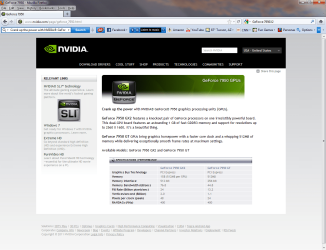
Thanks for the reply. I don't know why I didn't do a search before I asked but I found this to further substantiate your comments. I'm going for it.

The 7950 GX2 is an ancient card, released 5 years ago. I doubt that you'll find one new.

The GTX 590 is the current equivalent (dual graphics processors in package that goes in a single slot), but you may have trouble finding one. There's a third-party card with two GTX 580 processors in a single package, but it's a bit expensive:

Newegg.com - Computer Hardware, Video Cards & Video Devices, Desktop Graphics / Video Cards, GeForce GTX 590 (Fermi), GeForce GTX 580 x2 (Fermi)

If you wish to try single-slot SLI, you could consider a dual GTX 460:

Newegg.com - EVGA 02G-P3-1387-AR GeForce GTX 460 (Fermi) 2Win 2GB 512-bit GDDR5 PCI Express 2.0 x16 HDCP Ready Video Card

($400). I'd recommend a single GTX580 or AMD Radeon 6970. SLI (or Crossfire, the AMD equivalent) works, but is less reliable (IMHO) than a single graphics processor.
 

My Computer My Computer

At a glance

Windows 7 Pro X64 SP1Intel Core I7-3930k16 GB Gskill DDR3-2133eVGA GTX680
Computer Manufacturer/Model Number
homegrown
OS
Windows 7 Pro X64 SP1
CPU
Intel Core I7-3930k
Motherboard
Asus P9X79 Pro
Memory
16 GB Gskill DDR3-2133
Graphics Card(s)
eVGA GTX680
Sound Card
Creative X-Fi Titanium
Monitor(s) Displays
As PA246Q
Screen Resolution
1920 X 1200
Hard Drives
Corsair Force GT, 120 GB
WDC 1.5TB Caviar Black
PSU
PCP&C Silencer 750 Crossfire
Case
Silverstone FT02
Cooling
Noctua NH-D14
Keyboard
cheap Logitech USB
Mouse
Microsoft Intellimouse Explorer (old optical) USB
Internet Speed
6Mb cable
Other Info
Pioneer BDR-205
Samsung SH-203B
Monsoon 5.1 speakers
Thanks for the reply. I don't know why I didn't do a search before I asked but I found this to further substantiate your comments. I'm going for it.

The 7950 GX2 is an ancient card, released 5 years ago. I doubt that you'll find one new.

The GTX 590 is the current equivalent (dual graphics processors in package that goes in a single slot), but you may have trouble finding one. There's a third-party card with two GTX 580 processors in a single package, but it's a bit expensive:

Newegg.com - Computer Hardware, Video Cards & Video Devices, Desktop Graphics / Video Cards, GeForce GTX 590 (Fermi), GeForce GTX 580 x2 (Fermi)

If you wish to try single-slot SLI, you could consider a dual GTX 460:

Newegg.com - EVGA 02G-P3-1387-AR GeForce GTX 460 (Fermi) 2Win 2GB 512-bit GDDR5 PCI Express 2.0 x16 HDCP Ready Video Card

($400). I'd recommend a single GTX580 or AMD Radeon 6970. SLI (or Crossfire, the AMD equivalent) works, but is less reliable (IMHO) than a single graphics processor.

I do appreciate your input but I must ask. If my existing video cards will function properly and provide the level of resolution that I need/want - why should I upgrade? Is it only because my GPUs are of the old (5 years) technology.
 

My Computer My Computer

At a glance

Windows 7x32 Home Premium & XP SP3 x86Athlon 64FXCorsair CM2X1024-8500C5GeForce 7950X2 (Dual)
Computer Manufacturer/Model Number
Polywell
OS
Windows 7x32 Home Premium & XP SP3 x86
CPU
Athlon 64FX
Motherboard
ASUS M2N32SLI Delux
Memory
Corsair CM2X1024-8500C5
Graphics Card(s)
GeForce 7950X2 (Dual)
Monitor(s) Displays
ViewSonic A90f+ (Two)
Screen Resolution
1280x1024
Hard Drives
WD1500ADFD-00NLR1 (Originally Raid5)

Changed to three individual drives after HD crashed. May return to RAID5 if I locate a suitable HD.
PSU
TurboColl 1KW
Case
Polywell
Cooling
Cool'n'Quiet (Questionable Operation)
Keyboard
Logitech
Mouse
Logitech
Internet Speed
1GHertz (I think)
Other Info
Sony CD-RW CRX320EE

HP DVD Writer 1140d (may need to replace??)
why should I upgrade?
My now-ancient 9600GT drives my 30" 2560x1600 HP monitor just fine (Dual-DVI connection).

Get the monitor(s) you want: if your card doesn't handle them, you Newegg (for <$100. You don't really need Enrico Fermi to have designed your card unless you are a big-time gaming fanatic). ;)
 

My Computer My Computer

At a glance

Windows 7 Professional 64bitIntel Core i7 4600M @ 2.90GHz16.0GB Dual-Channel DDR3 @ 797MHz (11-11-11-28)Intel HD Graphics 4600 (Dell) 2048MB ATI AMD ...
Computer type
Laptop
Computer Manufacturer/Model Number
Dell Latitude E6540 Laptop
OS
Windows 7 Professional 64bit
CPU
Intel Core i7 4600M @ 2.90GHz
Motherboard
Dell Inc. 0CYT5F (SOCKET 0)
Memory
16.0GB Dual-Channel DDR3 @ 797MHz (11-11-11-28)
Graphics Card(s)
Intel HD Graphics 4600 (Dell) 2048MB ATI AMD Radeon HD 8790M
Sound Card
Realtek High Definition Audio
Monitor(s) Displays
HP ZR30w (2560x1600@60Hz)
Hard Drives
256GB LITEONIT LMT-256M6M-41 mm SATA (SSD)
1TB Samsung SSD 860 EVO mSATA SATA (SSD)
2TB USB 3.0 USB Device
115GB SanDisk Ultra Fit USB
Other Info
Multiple Dell E-Port Plus II Port Replicator/Docking Stations 0Y72NH USB 3.0 + 130W AC Adapters
The video card itself has the ability to output a certain resolution. And monitors have a native resolution, or max resolution that they run. In the 23-25" category, that's usually either 1920x1080 or 1920x1200.

Many, like this card, can output up to 2560x1600
Newegg.com - ZOTAC AMP! ZT-50402-10L GeForce GTX 550 Ti (Fermi) 1GB 192-bit GDDR5 PCI Express 2.0 x16 HDCP Ready SLI Support Video Card

For basic tasks, like displaying the Windows desktop, or surfing the web...you don't need a powerful video card to hit your monitors native resolution. However, if you are a gamer, the higher the resolution you want to run, the more powerful that your video card must be. Typically, you can run your game at a lower resolution, but unfortunately when the monitors scale back the image, they don't look as sharp. So, you really want to run your monitor at your monitors native resolution.

So, if today, you play games on a 1280x1024 monitor and you want to move to a new 1920x1080 monitor, you must be sure that your video card will be able to handle that increased graphical load from having a larger monitor with a better resolution.

Hopefully that makes sense.
Yes, it does make sense and I thank you for your input. I am not a gamer and I do not NEED improved resolution to utilize my computer. The greatest challenge that I present to my graphics cards is an older version of AutoCad. Other than that and Sketchup, I use my commuter for unexciting things like surfing and (personal) financial management.

Two new slim line flat screens would sure reduce the crowded space on my desk though.:sarc:
 

My Computer My Computer

At a glance

Windows 7x32 Home Premium & XP SP3 x86Athlon 64FXCorsair CM2X1024-8500C5GeForce 7950X2 (Dual)
Computer Manufacturer/Model Number
Polywell
OS
Windows 7x32 Home Premium & XP SP3 x86
CPU
Athlon 64FX
Motherboard
ASUS M2N32SLI Delux
Memory
Corsair CM2X1024-8500C5
Graphics Card(s)
GeForce 7950X2 (Dual)
Monitor(s) Displays
ViewSonic A90f+ (Two)
Screen Resolution
1280x1024
Hard Drives
WD1500ADFD-00NLR1 (Originally Raid5)

Changed to three individual drives after HD crashed. May return to RAID5 if I locate a suitable HD.
PSU
TurboColl 1KW
Case
Polywell
Cooling
Cool'n'Quiet (Questionable Operation)
Keyboard
Logitech
Mouse
Logitech
Internet Speed
1GHertz (I think)
Other Info
Sony CD-RW CRX320EE

HP DVD Writer 1140d (may need to replace??)
I do appreciate your input but I must ask. If my existing video cards will function properly and provide the level of resolution that I need/want - why should I upgrade? Is it only because my GPUs are of the old (5 years) technology.

I didn't look at your specs tab. If you already have the 7950 GX2, I suggest staying with it. It ought to be OK. (I dimly recall some problem with dual monitors and SLI setups, but it seems like you'd laready know about that.) I got the false impression that you intended to buy one.

(Why do you have a card that was mainly aimed at gamers?)
 

My Computer My Computer

At a glance

Windows 7 Pro X64 SP1Intel Core I7-3930k16 GB Gskill DDR3-2133eVGA GTX680
Computer Manufacturer/Model Number
homegrown
OS
Windows 7 Pro X64 SP1
CPU
Intel Core I7-3930k
Motherboard
Asus P9X79 Pro
Memory
16 GB Gskill DDR3-2133
Graphics Card(s)
eVGA GTX680
Sound Card
Creative X-Fi Titanium
Monitor(s) Displays
As PA246Q
Screen Resolution
1920 X 1200
Hard Drives
Corsair Force GT, 120 GB
WDC 1.5TB Caviar Black
PSU
PCP&C Silencer 750 Crossfire
Case
Silverstone FT02
Cooling
Noctua NH-D14
Keyboard
cheap Logitech USB
Mouse
Microsoft Intellimouse Explorer (old optical) USB
Internet Speed
6Mb cable
Other Info
Pioneer BDR-205
Samsung SH-203B
Monsoon 5.1 speakers
Why do you have a card that was mainly aimed at gamers? Good question bobkn.

If you only want to upgrade to save space the I would recomend not to upgrade. If you are not gaming then you don't need all of the flashy new tech that the new monitors have. I think that you would be disapointed if you upgrade. Wait until they die then upgrade. Thats just what I think.
 

My Computer My Computer

At a glance

Windows 7 Pro x64 SP1 and Mac OS X 10.8.3Intel Core i7-3820 Sandy Bridge-E at 4.75 GHz8 x Corsair 8GB DDR3 64 GB Kit @1866 Overcloc...GTX 580 and MSI R6870
Computer Manufacturer/Model Number
Asus
OS
Windows 7 Pro x64 SP1 and Mac OS X 10.8.3
CPU
Intel Core i7-3820 Sandy Bridge-E at 4.75 GHz
Motherboard
ASUS Rampage IV Extreme
Memory
8 x Corsair 8GB DDR3 64 GB Kit @1866 Overclocked @2000
Graphics Card(s)
GTX 580 and MSI R6870
Sound Card
HDMI on GPU and ACL898
Monitor(s) Displays
32" Sony EX-500 120Hz
Screen Resolution
1920x1080P
Hard Drives
1 x Corsair Force Series GT CSSD-F60GBGT-BK (OS)
2 x Western Digital Caviar Black Sata III 750GB (Raid 0)
1 x Western Digital Caviar Black Sata III 1TB (Media)
2 x Western Digital Caviar Black Sata II 640GB (Raid 0)
PSU
Corsair Professional Series Gold AX850
Case
Corsair 800D
Cooling
Corsair H80 High Performance Liquid CPU Cooler
Keyboard
HP Wireless Elite Keyboard
Mouse
HP Wireless Elite Mouse
Internet Speed
Cable, VisionTek Bigfoot Killer 2100 Gaming Network Card
Other Info
4 x GELID Solutions FN-TX12-15 120mm Case Fan with Superior Temperature Control
1 x Corsair 140mm Case Fan
1 x SilverStone FP55B Aluminum front panel 5.25" to a 3.5" bay converter
1 x Ultra Card Reader
1 x Sony Blu-ray Burner BD-5300S-0B
I do appreciate your input but I must ask. If my existing video cards will function properly and provide the level of resolution that I need/want - why should I upgrade? Is it only because my GPUs are of the old (5 years) technology.

I didn't look at your specs tab. If you already have the 7950 GX2, I suggest staying with it. It ought to be OK. (I dimly recall some problem with dual monitors and SLI setups, but it seems like you'd laready know about that.) I got the false impression that you intended to buy one.

(Why do you have a card that was mainly aimed at gamers?)

I have this computer because the gentleman who originally owned it was dissatisfied. He was not a gamer but was big into model railroads and railroad stations. He ran a lot of graphics intensive software. One day he had a failure at a time that really disappointed him and he shut it down. He went out and bought a new custom build (from the same builder) and I ended up with what you see in my specs.

I had trouble loading Windows 7 but I think the problem might have been more me than Windows or hardware. Everything seems to be working great.
 

My Computer My Computer

At a glance

Windows 7x32 Home Premium & XP SP3 x86Athlon 64FXCorsair CM2X1024-8500C5GeForce 7950X2 (Dual)
Computer Manufacturer/Model Number
Polywell
OS
Windows 7x32 Home Premium & XP SP3 x86
CPU
Athlon 64FX
Motherboard
ASUS M2N32SLI Delux
Memory
Corsair CM2X1024-8500C5
Graphics Card(s)
GeForce 7950X2 (Dual)
Monitor(s) Displays
ViewSonic A90f+ (Two)
Screen Resolution
1280x1024
Hard Drives
WD1500ADFD-00NLR1 (Originally Raid5)

Changed to three individual drives after HD crashed. May return to RAID5 if I locate a suitable HD.
PSU
TurboColl 1KW
Case
Polywell
Cooling
Cool'n'Quiet (Questionable Operation)
Keyboard
Logitech
Mouse
Logitech
Internet Speed
1GHertz (I think)
Other Info
Sony CD-RW CRX320EE

HP DVD Writer 1140d (may need to replace??)
Why do you have a card that was mainly aimed at gamers? Good question bobkn.

If you only want to upgrade to save space the I would recomend not to upgrade. If you are not gaming then you don't need all of the flashy new tech that the new monitors have. I think that you would be disapointed if you upgrade. Wait until they die then upgrade. Thats just what I think.
For financial reasons, I will probably do as you recommend but my monitors take up a large portion of my desk space and two flat screens would not. My financial manager will most likely have the final word on that expenditure. She is fair but she is also logical and frugal.:(

I wanted to know what would work however because I never know when the situation may change. If her sewing machine drops a stitch or two, she might decide she needs a new one.:sarc:
 

My Computer My Computer

At a glance

Windows 7x32 Home Premium & XP SP3 x86Athlon 64FXCorsair CM2X1024-8500C5GeForce 7950X2 (Dual)
Computer Manufacturer/Model Number
Polywell
OS
Windows 7x32 Home Premium & XP SP3 x86
CPU
Athlon 64FX
Motherboard
ASUS M2N32SLI Delux
Memory
Corsair CM2X1024-8500C5
Graphics Card(s)
GeForce 7950X2 (Dual)
Monitor(s) Displays
ViewSonic A90f+ (Two)
Screen Resolution
1280x1024
Hard Drives
WD1500ADFD-00NLR1 (Originally Raid5)

Changed to three individual drives after HD crashed. May return to RAID5 if I locate a suitable HD.
PSU
TurboColl 1KW
Case
Polywell
Cooling
Cool'n'Quiet (Questionable Operation)
Keyboard
Logitech
Mouse
Logitech
Internet Speed
1GHertz (I think)
Other Info
Sony CD-RW CRX320EE

HP DVD Writer 1140d (may need to replace??)
The ports on the graphics card also contribute to the resolution.

If you use VGA port you can get a maximum of 2048*1536 and if you use DVI you get 2560*1600.

With HDMI you get you can get 1920*1080.

Most of the graphics card have these ports and support these resolutions but if you go for a very old card in NVIDIA you might not be able to get these resolutions.
 

My Computer My Computer

At a glance

Windows 7 Home Premium 64-bit
OS
Windows 7 Home Premium 64-bit
Back
Top