
Desktop:
Windows 7 Ultimate x64
Creative X-Fi Xtreme-gamer
Logitech Z-5300e
300Mbps Wifi connection with -10dBa signal
Notebook:
Windows 7 Ultimate x64
Realtec audio
Aux wire to stereo
120Mbps Wifi with -58dBA signal in garage
Hi, I'm hosting a party this weekend and want to control, with my notebook, the music playing on the desktop downstairs while simultaneously playing the same audio on the laptop from my garage. In the past, I have used the laptop to control the desktops audio from upstairs using remote desktop and selecting the option, "Play on Remote Computer." Which works well because the Z-5300e audio system is able to be heard through the house. But not the garage..... I was hoping to use this feature this weekend to play the same audio simultaneously in both locations. However I just realized there was no option to, "Play on Both Computers."
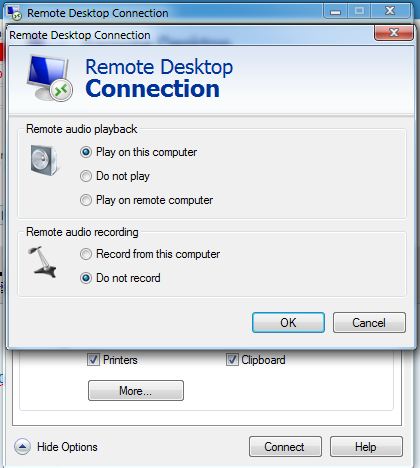
Is there anyway to accomplish this?
Also, it's not required for me to be remotely logged in, it's just how I figured I could somehow do it. I would even prefer if there was no remote connection since I'm sure people will try to play Youtube music videos from the laptop which doesnt work well when the Laptop is remotely connected.
Windows 7 Ultimate x64
Creative X-Fi Xtreme-gamer
Logitech Z-5300e
300Mbps Wifi connection with -10dBa signal
Notebook:
Windows 7 Ultimate x64
Realtec audio
Aux wire to stereo
120Mbps Wifi with -58dBA signal in garage
Hi, I'm hosting a party this weekend and want to control, with my notebook, the music playing on the desktop downstairs while simultaneously playing the same audio on the laptop from my garage. In the past, I have used the laptop to control the desktops audio from upstairs using remote desktop and selecting the option, "Play on Remote Computer." Which works well because the Z-5300e audio system is able to be heard through the house. But not the garage..... I was hoping to use this feature this weekend to play the same audio simultaneously in both locations. However I just realized there was no option to, "Play on Both Computers."
Is there anyway to accomplish this?
Also, it's not required for me to be remotely logged in, it's just how I figured I could somehow do it. I would even prefer if there was no remote connection since I'm sure people will try to play Youtube music videos from the laptop which doesnt work well when the Laptop is remotely connected.
My Computer
At a glance
Windows 7 Pro x64
- OS
- Windows 7 Pro x64