
You are using an out of date browser. It may not display this or other websites correctly.
You should upgrade or use an alternative browser.
You should upgrade or use an alternative browser.
Solved playing files in a folder by specific player
- Thread starter muiacir
- Start date

Try setting it as your default player. Click start orb, default programs tab, set your default program.
My Computer
- Computer Manufacturer/Model Number
- Custom built
- OS
- Windows 7 Ultimate 64 bit
- CPU
- AMD Phenom II X4 965 Black Edition
- Motherboard
- Gigabyte GA-MA790X-DS4
- Memory
- GSkill 4 X 2 GB PC 8500
- Graphics Card(s)
- XFX Radeon HD 6790 D
- Sound Card
- On board RealTek HD
- Monitor(s) Displays
- Dual monitors:Samsung SyncMaster S20B300
- Screen Resolution
- 1600 X 900
- Hard Drives
- Seagate Barracuda 1TB (primary)
Seagate Barracuda 2 X 320 GB
- PSU
- Ultra X4 750 watt fully modular
- Case
- Thermaltake Overseer RX 1 full tower
- Cooling
- Core-Contact 92 mm CPU Cooler
- Keyboard
- Logitech G510
- Mouse
- Razor DeathAdder
- Internet Speed
- 50/5 Mbps UL/DL
- Other Info
- Optical: Super Muliti DVD burner w/lightscribe, Hauppauge WinTV HVR-1800
thank you my friend but i do not want to set kmplayer as my default program.
i just want to play files in a specific folder by km player(without right click on it and open bye kmplayer becausethere is many files and it is boring to me)
i just want to play files in a specific folder by km player(without right click on it and open bye kmplayer becausethere is many files and it is boring to me)
My Computer
- OS
- windows 7 ultimate x64
- Local time
- 4:40 AM
- Messages
- 279
Make a shortcut to kmplayer on the desktop/taskbar. Make a shortcut to the specific music folder on the desktop. When it pleases you, drag the folder shortcut onto the kmplayer shortcut. Voila!
If you prefer a clean desktop, then pin the parent folder of the specific music folder to the taskbar. Rt-click to open explorer/parent folder and drag music folder to kmplayer shortcut.
If you prefer a clean desktop, then pin the parent folder of the specific music folder to the taskbar. Rt-click to open explorer/parent folder and drag music folder to kmplayer shortcut.
My Computer
- OS
- Windows 7 Home Premium x64
thank you my friends.
i have another question , when i want to open a file for exampple with km player.
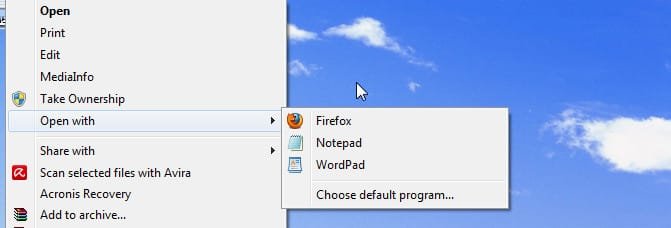
right click on it and in "open with: menu if the km player was not there i should use "choose default program" and when i choose default program all file with that formatt open with kmplayer.
it is a small problem but was my old question that if i want to open a file with a program that is not listed in"open with" menu i always should use "choose default program" like picture below:
i have another question , when i want to open a file for exampple with km player.
right click on it and in "open with: menu if the km player was not there i should use "choose default program" and when i choose default program all file with that formatt open with kmplayer.
it is a small problem but was my old question that if i want to open a file with a program that is not listed in"open with" menu i always should use "choose default program" like picture below:
Attachments
My Computer
- OS
- windows 7 ultimate x64
- Local time
- 4:40 AM
- Messages
- 279
If I understand your followup question correctly, clicking on "choose default program" will present a dialog box from which a program (kmplayer) is searched for and selected to open the particular file.
On the left side of the dialog box is a tick box in which a choice can be made to associate the selected program (kmplayer) to that file's extension/format.
Leave it unticked when using kmplayer and WMP will continue to be associated with that file's format/extension.
On the left side of the dialog box is a tick box in which a choice can be made to associate the selected program (kmplayer) to that file's extension/format.
Leave it unticked when using kmplayer and WMP will continue to be associated with that file's format/extension.
My Computer
- OS
- Windows 7 Home Premium x64