Solved Playing games then comp freezes a few times then BSOD!!

bugeye234

New member
Local time
8:30 AM
Messages
5
This happens when i have itunes on and playing games here is the attached dump file if somone could please help me :) i have already updated all the drivers for my computer drivers and have run memory diagnostic tool also... no problems reported in the completion of that mem test... please help
 

My Computer My Computer

At a glance

windows 7 ultimate 64bitIntel i7 377016gb Corsair VengeanceInvidia Geforce gt-610
Computer type
PC/Desktop
Computer Manufacturer/Model Number
custom build
OS
windows 7 ultimate 64bit
CPU
Intel i7 3770
Motherboard
ASUS P8B75-M
Memory
16gb Corsair Vengeance
Graphics Card(s)
Invidia Geforce gt-610
Browser
google chrome

My Computer My Computer

At a glance

Desk1 7 Home Prem / Desk2 10 Pro / Main lap A...Desk1 i5 3750K / Laptop i7 GTX 860M / Desk2 i...Desk1 8GB (1866) / Desk2 16GB (1333) / Laptop...Desk 1& 2NVidia GTX 650 & Laptops on board Intel
Computer type
PC/Desktop
Computer Manufacturer/Model Number
Own build (new) Desk1 / Asus ROG Win 7 / Desk2 1st build
OS
Desk1 7 Home Prem / Desk2 10 Pro / Main lap Asus ROG 10 Pro 2 laptop Toshiba 7 Pro Asus P2520 7 & 10
CPU
Desk1 i5 3750K / Laptop i7 GTX 860M / Desk2 i5 2500
Motherboard
Desk1 Asus P877-V / Desk2 Gigabyte H67 UD3H / Laptop ?
Memory
Desk1 8GB (1866) / Desk2 16GB (1333) / Laptop 8Gb DDR3
Graphics Card(s)
Desk 1& 2NVidia GTX 650 & Laptops on board Intel
Sound Card
Desk 1 & 2 -XONAR DG Realtek High Def audio Laptop
Monitor(s) Displays
Desk 1 Benq HD 2450 / Desk2 Philips 24" / Laptop 17.5"
Screen Resolution
1920x1080 D1 & D2 & Laptop 1
Hard Drives
Desk1 Samsung 120GB 830 SSD
Asus ROG 256GB 850 Pro SSD
Desk2 Samsung 840 256 SSD
Toshiba 120GB EVO
PSU
Desk 1 Corsair HX 1050/ Laptop ? / Desk 2 Corsair HX 650
Case
Desk 1 Cooler HAF XM ? Toshiba laptop / Desk2 Coolermaster
Cooling
Fans on all Desk1 -2 Desk2 - all Coolermasters 5 Laptop ?
Keyboard
Desk 1 MS Sidewinder X6 Desk 2 MS Sidewinder X 4
Mouse
Desk 1&2 - Gigabyte MS 900 gamer - laptop - Logitec wireless
Internet Speed
ADSL2+
Other Info
One other Desktop (tester) and spare Toshba laptop both with SSD's
Running Kaspersky 2016 ISS on all machines config'd identically
Logitec audio stereo systems on each machine (x3)
Canon MG5250MFC
Router/modem TP-Link running WPA2SK
I ditto the Disk Check suggested by ICit2lol . Do some Disc checks on your 2 TB Western Digital.

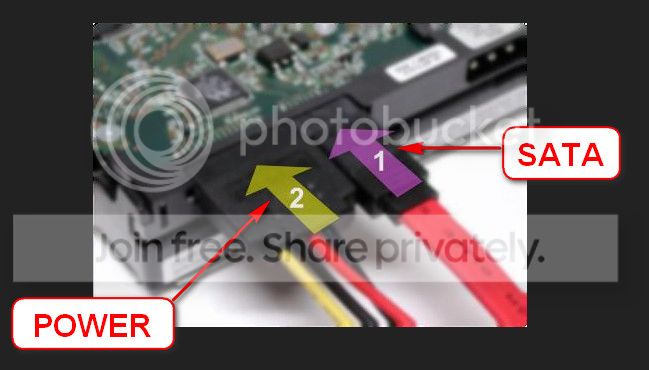
  1. Re-seat the sata and power. If possible, apply new cables.
    72974453_zps85c47d93.jpg
  2. Run chkdsk /f/r, following the option two of the tutorial Disk Check
  3. Seatool for dos: SeaTools | Seagate download
    Burn it in a blank cd. boot from the CD, click on "Accept", wait for it to finish detecting the drives, then in the upper left corner select "Basic Tests", then select "Long Test" and let it run.
If those tests comes free from errors, enable Driver Verifier to monitor the drivers.
Driver Verifier - Enable and Disable
Run Driver Verifier for 24 hours or the occurrence of the next crash, whichever is earlier.

   Information
Why Driver Verifier:
It puts a stress on the drivers, ans so it makes the unstable drivers crash. Hopefully the driver that crashes is recorded in the memory dump.

How Can we know that DV is enabled:
It will make the system bit of slow, laggy.

   Warning
Before enabling DV, make it sure that you have earlier System restore points made in your computer. You can check it easily by using CCleaner looking at Tools > System Restore.

If there is no points, make a System Restore Point manually before enabling DV.

   Tip


Let us know the results, with the subsequent crash dumps, if any. Post it following the Blue Screen of Death (BSOD) Posting Instructions.
____________________________________________________________________________
BSOD ANALYSIS:
Code:
*******************************************************************************
*                                                                             *
*                        Bugcheck Analysis                                    *
*                                                                             *
*******************************************************************************

Use !analyze -v to get detailed debugging information.

[URL="http://carrona.org/bsodindx.html#0x0000006B"]BugCheck 6B[/URL], {ffffffffc000007a, 6, 0, 0}

Probably caused by : ntkrnlmp.exe ( nt!PspInitializeSystemDlls+143 )

Followup: MachineOwner
---------

0: kd> !analyze -v
*******************************************************************************
*                                                                             *
*                        Bugcheck Analysis                                    *
*                                                                             *
*******************************************************************************

[URL="http://carrona.org/bsodindx.html#0x0000006B"]PROCESS1_INITIALIZATION_FAILED (6b)[/URL]
Arguments:
Arg1: ffffffffc000007a, Indicates the NT status code that caused the failure.
Arg2: 0000000000000006, (reserved)
Arg3: 0000000000000000
Arg4: 0000000000000000

Debugging Details:
------------------


CUSTOMER_CRASH_COUNT:  1

DEFAULT_BUCKET_ID:  WIN7_DRIVER_FAULT

BUGCHECK_STR:  0x6B

PROCESS_NAME:  System

CURRENT_IRQL:  0

LAST_CONTROL_TRANSFER:  from fffff800039ccff3 to fffff800034c5b80

STACK_TEXT:  
fffff880`009a9938 fffff800`039ccff3 : 00000000`0000006b ffffffff`c000007a 00000000`00000006 00000000`00000000 : nt!KeBugCheckEx
fffff880`009a9940 fffff800`039e7a92 : 00000000`77aea940 00000000`00000007 fffff800`00818610 fffff800`039ea507 : nt!PspInitializeSystemDlls+0x143
fffff880`009a9990 fffff800`039f5a66 : 00000002`00000000 ffffcc42`00000000 00000000`00000001 00000000`00000000 : nt!PspInitPhase1+0x42
fffff880`009a99c0 fffff800`039fb5a7 : 00000000`00000000 00000000`00000007 fffff800`00818610 fffff800`00818610 : nt!PsInitSystem+0x36
fffff880`009a9a00 fffff800`0394b169 : 00000000`00000000 fffffa80`0caa8040 00000000`00000080 fffffa80`0ca845f0 : nt!Phase1InitializationDiscard+0x1307
fffff880`009a9bd0 fffff800`03763bae : 00000000`00000000 00000000`00000080 00000000`00000000 fffff800`034b68b9 : nt!Phase1Initialization+0x9
fffff880`009a9c00 fffff800`034b68c6 : fffff800`03640e80 fffffa80`0caa8040 fffff800`0364ecc0 00000000`00000000 : nt!PspSystemThreadStartup+0x5a
fffff880`009a9c40 00000000`00000000 : fffff880`009aa000 fffff880`009a4000 fffff880`02e14aa0 00000000`00000000 : nt!KxStartSystemThread+0x16


STACK_COMMAND:  kb

FOLLOWUP_IP: 
nt!PspInitializeSystemDlls+143
fffff800`039ccff3 cc              int     3

SYMBOL_STACK_INDEX:  1

SYMBOL_NAME:  nt!PspInitializeSystemDlls+143

FOLLOWUP_NAME:  MachineOwner

MODULE_NAME: nt

IMAGE_NAME:  ntkrnlmp.exe

DEBUG_FLR_IMAGE_TIMESTAMP:  51db806a

FAILURE_BUCKET_ID:  X64_0x6B_nt!PspInitializeSystemDlls+143

BUCKET_ID:  X64_0x6B_nt!PspInitializeSystemDlls+143

Followup: MachineOwner
---------

 

My Computer My Computer

At a glance

Microsoft Windows 10 Pro Insider Preview 64-bitIntel(R) Core(TM) i3-4130 CPU @ 3.40GHzCorsair Vengence 4GB x2 (8.00GB Dual-Channel ...2047MB GeForce GTS 450 (ZOTAC International)
Computer type
PC/Desktop
Computer Manufacturer/Model Number
Self Assembled
OS
Microsoft Windows 10 Pro Insider Preview 64-bit
CPU
Intel(R) Core(TM) i3-4130 CPU @ 3.40GHz
Motherboard
Gigabyte Technology Co., Ltd. B85M-D3H
Memory
Corsair Vengence 4GB x2 (8.00GB Dual-Channel DDR3 @ 798MHz)
Graphics Card(s)
2047MB GeForce GTS 450 (ZOTAC International)
Sound Card
Onboard (Realtek High Definition Audio)
Monitor(s) Displays
LG Flatron E2040T
Screen Resolution
1600x900
Hard Drives
Western Digital 1 TB
Seagate 500 GB
PSU
Corsair VS550
Case
Cooler Master K380
Cooling
Cooler Master Seidon 120V Plus
Keyboard
Logitech MK260r
Mouse
Logitech MK260r
Internet Speed
PMPL Broadband
Antivirus
Windows Defender + MBAM
Browser
Firefox
Other Info
Dell Studio 15" Laptop
thanks guys im running these tests now will let you know the results :)
 

My Computer My Computer

At a glance

windows 7 ultimate 64bitIntel i7 377016gb Corsair VengeanceInvidia Geforce gt-610
Computer type
PC/Desktop
Computer Manufacturer/Model Number
custom build
OS
windows 7 ultimate 64bit
CPU
Intel i7 3770
Motherboard
ASUS P8B75-M
Memory
16gb Corsair Vengeance
Graphics Card(s)
Invidia Geforce gt-610
Browser
google chrome
Hey guys I ran those tests, sfc scan found no problems, chkdsk ran for about 4 hours and fixed a few things. I also noticed the psu fan is not spinning when the CPU and GPu fans are?? Could this all be my power supply? Would it of damaged my HD?
 

My Computer My Computer

At a glance

windows 7 ultimate 64bitIntel i7 377016gb Corsair VengeanceInvidia Geforce gt-610
Computer type
PC/Desktop
Computer Manufacturer/Model Number
custom build
OS
windows 7 ultimate 64bit
CPU
Intel i7 3770
Motherboard
ASUS P8B75-M
Memory
16gb Corsair Vengeance
Graphics Card(s)
Invidia Geforce gt-610
Browser
google chrome
Hey guys I ran those tests, sfc scan found no problems, chkdsk ran for about 4 hours and fixed a few things. I also noticed the psu fan is not spinning when the CPU and GPu fans are?? Could this all be my power supply? Would it of damaged my HD?
Absolutely Bugeye it should be spinning most of the tie in fact it should be running all of the time.
It is not going to harm the hard drive in fact it is probably a lot of the problems with the machine.

Check out these mate and fairly quickly too as I think the PSU is likely to get far too hot for comfort!!
this
http://www.sevenforums.com/tutorials/86648-psu-jump-start.html

then this
http://www.sevenforums.com/vip/257690-psu-how-test.html#post2130086

Please be careful and DO NOT attempt to open the PSU for anything.
 

My Computer My Computer

At a glance

Desk1 7 Home Prem / Desk2 10 Pro / Main lap A...Desk1 i5 3750K / Laptop i7 GTX 860M / Desk2 i...Desk1 8GB (1866) / Desk2 16GB (1333) / Laptop...Desk 1& 2NVidia GTX 650 & Laptops on board Intel
Computer type
PC/Desktop
Computer Manufacturer/Model Number
Own build (new) Desk1 / Asus ROG Win 7 / Desk2 1st build
OS
Desk1 7 Home Prem / Desk2 10 Pro / Main lap Asus ROG 10 Pro 2 laptop Toshiba 7 Pro Asus P2520 7 & 10
CPU
Desk1 i5 3750K / Laptop i7 GTX 860M / Desk2 i5 2500
Motherboard
Desk1 Asus P877-V / Desk2 Gigabyte H67 UD3H / Laptop ?
Memory
Desk1 8GB (1866) / Desk2 16GB (1333) / Laptop 8Gb DDR3
Graphics Card(s)
Desk 1& 2NVidia GTX 650 & Laptops on board Intel
Sound Card
Desk 1 & 2 -XONAR DG Realtek High Def audio Laptop
Monitor(s) Displays
Desk 1 Benq HD 2450 / Desk2 Philips 24" / Laptop 17.5"
Screen Resolution
1920x1080 D1 & D2 & Laptop 1
Hard Drives
Desk1 Samsung 120GB 830 SSD
Asus ROG 256GB 850 Pro SSD
Desk2 Samsung 840 256 SSD
Toshiba 120GB EVO
PSU
Desk 1 Corsair HX 1050/ Laptop ? / Desk 2 Corsair HX 650
Case
Desk 1 Cooler HAF XM ? Toshiba laptop / Desk2 Coolermaster
Cooling
Fans on all Desk1 -2 Desk2 - all Coolermasters 5 Laptop ?
Keyboard
Desk 1 MS Sidewinder X6 Desk 2 MS Sidewinder X 4
Mouse
Desk 1&2 - Gigabyte MS 900 gamer - laptop - Logitec wireless
Internet Speed
ADSL2+
Other Info
One other Desktop (tester) and spare Toshba laptop both with SSD's
Running Kaspersky 2016 ISS on all machines config'd identically
Logitec audio stereo systems on each machine (x3)
Canon MG5250MFC
Router/modem TP-Link running WPA2SK
Hey guys I ran those tests, sfc scan found no problems, chkdsk ran for about 4 hours and fixed a few things. I also noticed the psu fan is not spinning when the CPU and GPu fans are?? Could this all be my power supply? Would it of damaged my HD?
If the PSU fan is spinning during startup, I think you should not be that worried. Check if the Power Supply Unit (PSU) supplying adequate power to the computer or not.
http://www.extreme.outervision.com/psucalculatorlite.jsp
Also let us know the wattage of the PSU.

If the PSU does not need to supply much more power, it will not use the fan during normal activities of the computer. If the needed power load is much less compared to the PSU's capasity, the fan may not need to turn on.

Waiting to see the results of Seatools test and driver verifier.
 

My Computer My Computer

At a glance

Microsoft Windows 10 Pro Insider Preview 64-bitIntel(R) Core(TM) i3-4130 CPU @ 3.40GHzCorsair Vengence 4GB x2 (8.00GB Dual-Channel ...2047MB GeForce GTS 450 (ZOTAC International)
Computer type
PC/Desktop
Computer Manufacturer/Model Number
Self Assembled
OS
Microsoft Windows 10 Pro Insider Preview 64-bit
CPU
Intel(R) Core(TM) i3-4130 CPU @ 3.40GHz
Motherboard
Gigabyte Technology Co., Ltd. B85M-D3H
Memory
Corsair Vengence 4GB x2 (8.00GB Dual-Channel DDR3 @ 798MHz)
Graphics Card(s)
2047MB GeForce GTS 450 (ZOTAC International)
Sound Card
Onboard (Realtek High Definition Audio)
Monitor(s) Displays
LG Flatron E2040T
Screen Resolution
1600x900
Hard Drives
Western Digital 1 TB
Seagate 500 GB
PSU
Corsair VS550
Case
Cooler Master K380
Cooling
Cooler Master Seidon 120V Plus
Keyboard
Logitech MK260r
Mouse
Logitech MK260r
Internet Speed
PMPL Broadband
Antivirus
Windows Defender + MBAM
Browser
Firefox
Other Info
Dell Studio 15" Laptop
I agree in principle Arc but there seems to be a fair bit of gear on the board that would keep the PSU working unless it is a very high output so it would be nice to know what it is. But I do stand to be corrected though:)

Plus as I mentioned previously correct volts does not mean enough current (amps / watts) there is no easy way to check the current however one needs an ammeter to do that and under shop conditions.
 

My Computer My Computer

At a glance

Desk1 7 Home Prem / Desk2 10 Pro / Main lap A...Desk1 i5 3750K / Laptop i7 GTX 860M / Desk2 i...Desk1 8GB (1866) / Desk2 16GB (1333) / Laptop...Desk 1& 2NVidia GTX 650 & Laptops on board Intel
Computer type
PC/Desktop
Computer Manufacturer/Model Number
Own build (new) Desk1 / Asus ROG Win 7 / Desk2 1st build
OS
Desk1 7 Home Prem / Desk2 10 Pro / Main lap Asus ROG 10 Pro 2 laptop Toshiba 7 Pro Asus P2520 7 & 10
CPU
Desk1 i5 3750K / Laptop i7 GTX 860M / Desk2 i5 2500
Motherboard
Desk1 Asus P877-V / Desk2 Gigabyte H67 UD3H / Laptop ?
Memory
Desk1 8GB (1866) / Desk2 16GB (1333) / Laptop 8Gb DDR3
Graphics Card(s)
Desk 1& 2NVidia GTX 650 & Laptops on board Intel
Sound Card
Desk 1 & 2 -XONAR DG Realtek High Def audio Laptop
Monitor(s) Displays
Desk 1 Benq HD 2450 / Desk2 Philips 24" / Laptop 17.5"
Screen Resolution
1920x1080 D1 & D2 & Laptop 1
Hard Drives
Desk1 Samsung 120GB 830 SSD
Asus ROG 256GB 850 Pro SSD
Desk2 Samsung 840 256 SSD
Toshiba 120GB EVO
PSU
Desk 1 Corsair HX 1050/ Laptop ? / Desk 2 Corsair HX 650
Case
Desk 1 Cooler HAF XM ? Toshiba laptop / Desk2 Coolermaster
Cooling
Fans on all Desk1 -2 Desk2 - all Coolermasters 5 Laptop ?
Keyboard
Desk 1 MS Sidewinder X6 Desk 2 MS Sidewinder X 4
Mouse
Desk 1&2 - Gigabyte MS 900 gamer - laptop - Logitec wireless
Internet Speed
ADSL2+
Other Info
One other Desktop (tester) and spare Toshba laptop both with SSD's
Running Kaspersky 2016 ISS on all machines config'd identically
Logitec audio stereo systems on each machine (x3)
Canon MG5250MFC
Router/modem TP-Link running WPA2SK
Ok I have run the sea tools test but don't know how to see the results through dos...the computer won't even start through windows recovery cd now. It does not even boot. Just goes through the process of trying to boot them BSOD and it recommends me to boot with windows recovery tools....
 

My Computer My Computer

At a glance

windows 7 ultimate 64bitIntel i7 377016gb Corsair VengeanceInvidia Geforce gt-610
Computer type
PC/Desktop
Computer Manufacturer/Model Number
custom build
OS
windows 7 ultimate 64bit
CPU
Intel i7 3770
Motherboard
ASUS P8B75-M
Memory
16gb Corsair Vengeance
Graphics Card(s)
Invidia Geforce gt-610
Browser
google chrome
Woo hoo I replaced the powersupply with a 650watt cougar rs and after a few dramas got it all working again:) thanks for your help everyone..
 

My Computer My Computer

At a glance

windows 7 ultimate 64bitIntel i7 377016gb Corsair VengeanceInvidia Geforce gt-610
Computer type
PC/Desktop
Computer Manufacturer/Model Number
custom build
OS
windows 7 ultimate 64bit
CPU
Intel i7 3770
Motherboard
ASUS P8B75-M
Memory
16gb Corsair Vengeance
Graphics Card(s)
Invidia Geforce gt-610
Browser
google chrome
All is well that ends well :thumbsup:
 

My Computer My Computer

At a glance

Microsoft Windows 10 Pro Insider Preview 64-bitIntel(R) Core(TM) i3-4130 CPU @ 3.40GHzCorsair Vengence 4GB x2 (8.00GB Dual-Channel ...2047MB GeForce GTS 450 (ZOTAC International)
Computer type
PC/Desktop
Computer Manufacturer/Model Number
Self Assembled
OS
Microsoft Windows 10 Pro Insider Preview 64-bit
CPU
Intel(R) Core(TM) i3-4130 CPU @ 3.40GHz
Motherboard
Gigabyte Technology Co., Ltd. B85M-D3H
Memory
Corsair Vengence 4GB x2 (8.00GB Dual-Channel DDR3 @ 798MHz)
Graphics Card(s)
2047MB GeForce GTS 450 (ZOTAC International)
Sound Card
Onboard (Realtek High Definition Audio)
Monitor(s) Displays
LG Flatron E2040T
Screen Resolution
1600x900
Hard Drives
Western Digital 1 TB
Seagate 500 GB
PSU
Corsair VS550
Case
Cooler Master K380
Cooling
Cooler Master Seidon 120V Plus
Keyboard
Logitech MK260r
Mouse
Logitech MK260r
Internet Speed
PMPL Broadband
Antivirus
Windows Defender + MBAM
Browser
Firefox
Other Info
Dell Studio 15" Laptop
Back
Top