
Solved Please help about the icons

seds1234

Banned
Local time
5:51 PM
Messages
6
Guys,i installed alienGUIse which wasn't for windows 7 but for windows vista, i uninstalled because i noticed that is wasn't working.Some of the icons did not return to its normal look instead it remained as alienguise folder look.And another thing the shortcut icons have this weird symbol like the one that you can see on the bottom left of the image.How could i remove that?I cant restore because it happened 3 months ago.I just found out about this forum.Please help me im a total newbie.
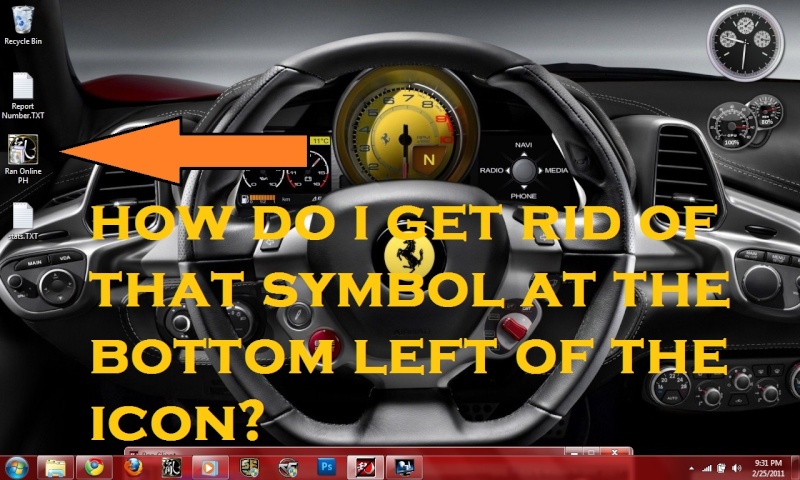
help10.jpg
 
Last edited:

My Computer My Computer

OS
Windows 7 Ultimate x64

My Computer My Computer

Computer type
PC/Desktop
Computer Manufacturer/Model Number
Self built custom
OS
64-bit Windows 11 Pro for Workstations
CPU
Intel i7-8700K OC'd to 5 GHz
Motherboard
ASUS ROG Maximus XI Formula Z390
Memory
64 GB (4x16GB) G.SKILL TridentZ RGB DDR4 3600 MHz
Graphics Card(s)
ASUS ROG-STRIX-GTX1080TI-O11G-GAMING
Sound Card
Integrated
Monitor(s) Displays
2 x Samsung Odyssey G7 27"
Screen Resolution
2560x1440
Hard Drives
1TB Samsung 990 PRO M.2,
4TB Samsung 990 PRO PRO M.2,
TerraMaster F8 SSD Plus NAS
PSU
Seasonic Prime Titanium 850W
Case
Thermaltake Core P3
Cooling
Corsair Hydro H115i
Keyboard
Logitech wireless K800
Mouse
Logitech MX Master 4
Internet Speed
2 Gb/s Download and 100 Mb/s Upload
Antivirus
Malwarebyte Anti-Malware Premium
Browser
Google Chrome
Other Info
Logitech Z625 speaker system,
Logitech BRIO 4K Pro webcam,
HP Color LaserJet Pro MFP M477fdn,
APC SMART-UPS RT 1000 XL - SURT1000XLI,
Galaxy S23 Plus phone
Sir......You are the best!!! thanks a lot!!!:)
 

My Computer My Computer

OS
Windows 7 Ultimate x64
Last question sir...How could i remove or alter the Administrative Security Shield icon overlay without removing the UAC promts?
 

My Computer My Computer

OS
Windows 7 Ultimate x64
Try deleting the program shortcut and create a new shortcut. Does the shield icon still appear?
 

My Computer My Computer

Computer Manufacturer/Model Number
D3f's Customs
OS
Win 7 Ultimate SP1 x64
CPU
Intel Pentium Dual Core E5300 OC'd @ 3GHz
Motherboard
Asus P5G41-M LE
Memory
Kingston 2x2GB DDR2-800 Dual Channel SDRAM
Graphics Card(s)
Integrated Intel GMA X4500
Sound Card
Realtek 5.1 HD Audio (ALC887)
Monitor(s) Displays
LG Flatron W1943S @ 60Hz
Screen Resolution
1360 x 768
Hard Drives
Internal - WD Caviar Blue 500GB, External - WD My Passport Essential 500GB
PSU
Headway 450w PSU
Case
Pixxo Slim Black mATX Case
Cooling
Stock Cpu Fan, 1 x Top Case Fan
Keyboard
Logitech K120
Mouse
Logitech LS1 Laser Mouse
Internet Speed
17.66Mb/s Down, 0.82Mb/s Up
Other Info
Creative SBS A300 2.1 Speaker System, LG GH22NS50 22x Internal Super-Multi DVD-RW, 2Wire 5012NV Wireless Modem Router
Last question sir...How could i remove or alter the Administrative Security Shield icon overlay without removing the UAC promts?

You're most welcome. :)

The shield icon is to indicate that the program will run elevated (run as administrator) when you run it, and will give you a UAC prompt for you to approve or deny it to be allowed to run elevated first. As far as I know, this icon cannot be removed, or will not be easy to. :(
 
Last edited:

My Computer My Computer

Computer type
PC/Desktop
Computer Manufacturer/Model Number
Self built custom
OS
64-bit Windows 11 Pro for Workstations
CPU
Intel i7-8700K OC'd to 5 GHz
Motherboard
ASUS ROG Maximus XI Formula Z390
Memory
64 GB (4x16GB) G.SKILL TridentZ RGB DDR4 3600 MHz
Graphics Card(s)
ASUS ROG-STRIX-GTX1080TI-O11G-GAMING
Sound Card
Integrated
Monitor(s) Displays
2 x Samsung Odyssey G7 27"
Screen Resolution
2560x1440
Hard Drives
1TB Samsung 990 PRO M.2,
4TB Samsung 990 PRO PRO M.2,
TerraMaster F8 SSD Plus NAS
PSU
Seasonic Prime Titanium 850W
Case
Thermaltake Core P3
Cooling
Corsair Hydro H115i
Keyboard
Logitech wireless K800
Mouse
Logitech MX Master 4
Internet Speed
2 Gb/s Download and 100 Mb/s Upload
Antivirus
Malwarebyte Anti-Malware Premium
Browser
Google Chrome
Other Info
Logitech Z625 speaker system,
Logitech BRIO 4K Pro webcam,
HP Color LaserJet Pro MFP M477fdn,
APC SMART-UPS RT 1000 XL - SURT1000XLI,
Galaxy S23 Plus phone
Last question sir...How could i remove or alter the Administrative Security Shield icon overlay without removing the UAC promts?

You're most welcome. :)

The shield icon is to indicate that the program will run elevated (run as administrator) when you run it, and will give you a UAC prompt for you to approve or deny it to be allowed to run elevated first. As far as I know, this icon cannot be removed. :(


how about removing the UAC prompt on the program.How could i do that?:D
 

My Computer My Computer

OS
Windows 7 Ultimate x64
I did a few searches on google. This is what i found > Removing the UAC shield icon Some user says that it's possible to get rid of it by making the shield icon transparent. It can be done by editing imageres.dll. But if you're unfamiliar with resource editing tools. Don't do it.
 

My Computer My Computer

Computer Manufacturer/Model Number
D3f's Customs
OS
Win 7 Ultimate SP1 x64
CPU
Intel Pentium Dual Core E5300 OC'd @ 3GHz
Motherboard
Asus P5G41-M LE
Memory
Kingston 2x2GB DDR2-800 Dual Channel SDRAM
Graphics Card(s)
Integrated Intel GMA X4500
Sound Card
Realtek 5.1 HD Audio (ALC887)
Monitor(s) Displays
LG Flatron W1943S @ 60Hz
Screen Resolution
1360 x 768
Hard Drives
Internal - WD Caviar Blue 500GB, External - WD My Passport Essential 500GB
PSU
Headway 450w PSU
Case
Pixxo Slim Black mATX Case
Cooling
Stock Cpu Fan, 1 x Top Case Fan
Keyboard
Logitech K120
Mouse
Logitech LS1 Laser Mouse
Internet Speed
17.66Mb/s Down, 0.82Mb/s Up
Other Info
Creative SBS A300 2.1 Speaker System, LG GH22NS50 22x Internal Super-Multi DVD-RW, 2Wire 5012NV Wireless Modem Router
I did a few searches on google. This is what i found > Removing the UAC shield icon Some user says that it's possible to get rid of it by making the shield icon transparent. It can be done by editing imageres.dll. But if you're unfamiliar with resource editing tools. Don't do it.

i red about that too but i cant do it because i dont know a thing about it.thanks anyway!:D so helpful community.
 

My Computer My Computer

OS
Windows 7 Ultimate x64
Back
Top