question about the icon changing

thungmail

New member
Local time
6:09 AM
Messages
36
Iam a newbie, I need some help for this trouble: after changing the icon for MS word file and then I opened it, there was an icon on the taskbar with old format.How can I make to change it to the new icon
 

Attachments

  • Untitled.jpg
    Untitled.jpg
    116.2 KB · Views: 31
Last edited:

My Computer

OS
win 7 pro
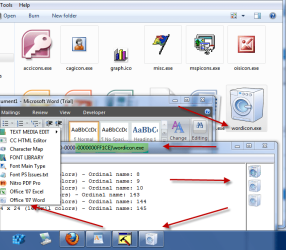
By default the Installer folder is hidden so make sure you can "see" hidden folders before you start :geek:.

Go to this folder. C:/Windows/Installer/Long number ending with -000000FF1CE

Inside you will find Wordicon.exe. Open Wordicon.exe with Resource Hacker (scroll down the page to the pink box) or any other resource viewing software. Change the icon in icongroup #200 (it's the first icongroup in the list) for the icon you want to have. SAVE the modified .exe file, it will automatically create you an un-modified back-up file.
Open Word and you should see your new icon in the toolbar. In this case, a Washing Machine :confused: !!

P.S. You can just see the edge of the "original" Wordicon.exe to the left of the "Washing Machine" one!!
 

Attachments

  • 07-07-2010 08-29-16.png
    07-07-2010 08-29-16.png
    52.1 KB · Views: 22
Last edited:

My Computer

OS
Windows 7 x64
By default the Installer folder is hidden so make sure you can "see" hidden folders before you start :geek:.

Go to this folder. C:/Windows/Installer/Long number ending with -000000FF1CE

Inside you will find Wordicon.exe. Open Wordicon.exe with Resource Hacker (scroll down the page to the pink box) or any other resource viewing software. Change the icon in icongroup #200 (it's the first icongroup in the list) for the icon you want to have. SAVE the modified .exe file, it will automatically create you an un-modified back-up file.
Open Word and you should see your new icon in the toolbar. In this case, a Washing Machine :confused: !!

P.S. You can just see the edge of the "original" Wordicon.exe to the left of the "Washing Machine" one!!
Thanks for your hint. I will follow up.One more thing is I cant not use Resource Hacker because whenever I executed it and then my computer was "out of system resource".Are there any resource viewing softwares I can use. I also tried reshack and restoration but none of them worked
Tuan Tran
 

My Computer

OS
win 7 pro
Thanks for your hint. I will follow up.One more thing is I cant not use Resource Hacker because whenever I executed it and then my computer was "out of system resource".Are there any resource viewing softwares I can use. I also tried reshack and restoration but none of them worked
Tuan Tran
ResHacker 3.5.2 does that quite a lot BUT you just close the warning window, if you then change the icon, when you put the new one in the chances are you'll get the same warning again. Again close the window. Click edit in the main menu bar and click save (not save as, otherwise you have to "search" through the system to find the file you're looking at!!). The transfer will have happened.

I'm guessing here but I think when ResHack says it is out of resources, what it means is that it doesn't have the ability to display icons larger than 48x48 pixels.

To make sure it's changed (if I have doubts) I usually download MicroAngelo Toolset Trial. you can view and change all the icons within the exe (or dll) file you are viewing with this as well but sometimes it throws a wobbly at you but it won't tell you until you try to save the file. Not much fun if you've changed a load of icons :devil:.

Also worth a look at is Bot Productions Icon Viewer, this will add a new tab to a files properties window that you can view all the icons the file contains.

 

My Computer

OS
Windows 7 x64
Thanks for your hint. I will follow up.One more thing is I cant not use Resource Hacker because whenever I executed it and then my computer was "out of system resource".Are there any resource viewing softwares I can use. I also tried reshack and restoration but none of them worked
Tuan Tran
ResHacker 3.5.2 does that quite a lot BUT you just close the warning window, if you then change the icon, when you put the new one in the chances are you'll get the same warning again. Again close the window. Click edit in the main menu bar and click save (not save as, otherwise you have to "search" through the system to find the file you're looking at!!). The transfer will have happened.

I'm guessing here but I think when ResHack says it is out of resources, what it means is that it doesn't have the ability to display icons larger than 48x48 pixels.

To make sure it's changed (if I have doubts) I usually download MicroAngelo Toolset Trial. you can view and change all the icons within the exe (or dll) file you are viewing with this as well but sometimes it throws a wobbly at you but it won't tell you until you try to save the file. Not much fun if you've changed a load of icons :devil:.

Also worth a look at is Bot Productions Icon Viewer, this will add a new tab to a files properties window that you can view all the icons the file contains.

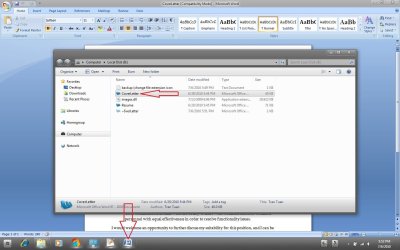
I wish I could use ResHack because my computer was crashed before ( I dont know because of the error or not ). Are there any chances else to do it.
 

My Computer

OS
win 7 pro
Fathther Jack
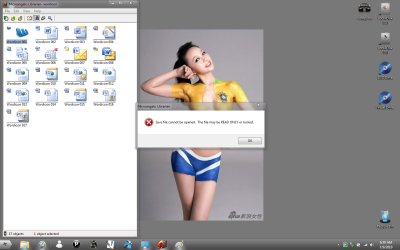
I tried it like you said.
pix1.png
Then when i tried to replaced the old icon i got the message shown below
pix2.png
You have any suggestions. ???
 

My Computer

OS
win 7 pro
You have any suggestions. ???
Yeah. Do not, I repeat, not cover pictures of nubile young ladies with warning boxes or error windows in the future!!.
We're getting there!!
Before you modify the file, right click it and press properties, if the "Read Only" box is ticked, un-tick it, then Apply, then OK. If you still get the "cannot save etc." error, then you will need to take ownership of the wordicon.exe. (I can't remember if I had to or not). See here on how to do it. Might be easier to take ownership anyway. That context entry always comes in handy.
 

My Computer

OS
Windows 7 x64
lol it is not a nude young lady. It is an art called painting body.. Anyway I love brazil but they lost. I got it now.
Thanks a lot.Btw can we use Miroangelo toolset to edit and replace all icons of imageres.dll ?
TVT
 
Last edited:

My Computer

OS
win 7 pro
Back
Top