Solved Please help ,e with this simple question!!

siannie

New member
Local time
4:46 PM
Messages
2
Can anybody help me?! A very simple question I guess ...
When you are surfing the net and you are asked for your email / password / name, whatever, you click with the mouse where you want to type and as soon as you put in one letter, below appears a sort of memory list with all previous words you have entered starting with that letter. How can I get rid of this?? Please? ...
 

My Computer

OS
windows seven home premium
delete the browsing history on exit in explorer
 

Attachments

  • Capture.PNG
    Capture.PNG
    19.4 KB · Views: 0

My Computer

Computer Manufacturer/Model Number
HP dv6519tx
OS
Windows 7 Ultimate x64
CPU
1.80 GHz Intel Core 2 Duo processor T7100
Memory
3 gig ddr2
Graphics Card(s)
NVIDIA GeForce 8400M GS
Sound Card
Realtek High Definition Audio
Monitor(s) Displays
15.4” WXGA High Definition BrightView Widescreen
Screen Resolution
1280 x 800
Hard Drives
Hitachi 320 GB (5400 rpm)
PSU
90 W AC Power Adapter
Cooling
Kitchen plate under the lappy
Keyboard
101 key compatible
Mouse
Touch Pad with On/Off button and dedicated vertical Scroll
Internet Speed
Three Wireless internet prepaid using E160G USB dongle
Hi siannie, welcome to the forums :)

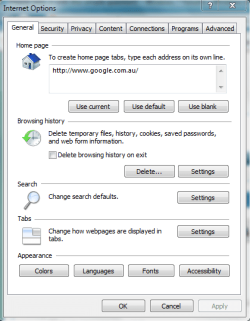
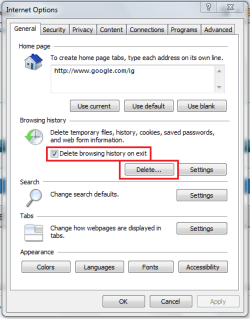
What you are describing is 'form' behavior. If you click 'Tools -> Internet Options' you can set IE to delete this data when you exit.

Delete 1.PNG
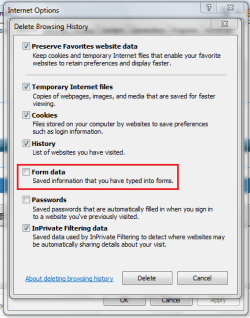
Delete.PNG

By setting the above options you can be sure that 'form' data will not be saved.
   Note
If, however, you have a saved pages that you do not wish to have saved then you need to un-check the 1st option in the second pic[/tip]


OS
 

My Computer

Computer Manufacturer/Model Number
Compaq Desktop
OS
Windows 7 Ultimate x64
CPU
AMD Sempron Dual Core
Memory
3GB
Graphics Card(s)
NVIDIA GeForce 6150SE nForce 430
Screen Resolution
1024x768
Hard Drives
150GB Sata
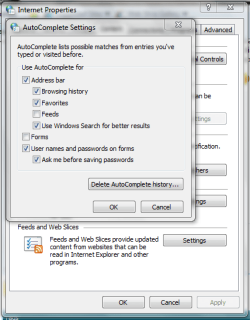
Press start then in the search box type in autocomplete. Touch the link in the list which will open the 'Internet Properties' dialogue box. Towards the bottom you will see Autocomplete settings - in there there are various check boxes.

That should solve your problem. :)
 

My Computer

Computer type
PC/Desktop
Computer Manufacturer/Model Number
Packard Bell
OS
Windows 7 Home Premium 64bit
CPU
Intel(R) Core(TM) i3-2120 CPU @ 3.30GHz
Motherboard
Packard Bell IPISB-AG
Memory
3.00 GB
Graphics Card(s)
(1) Intel(R) HD Graphics (2) VNC Mirror Driver
Sound Card
Realtek High Definition Audio
Monitor(s) Displays
AIO LCD
Screen Resolution
1920 x 1080
Hard Drives
WDC WD10EADX-22TDHB0 ATA Device
Fixed hard disk media
4 partitions
931.51 GB
Keyboard
Wireless
Mouse
Wireless
Antivirus
Microsoft Security Essentials
Browser
IE; Firefox
Other Info
Also:
Samsung N220 Plus Netbook - Windows 7 Home
HP laptop
iPad 5
Press start then in the search box type in autocomplete. Touch the link in the list which will open the 'Internet Properties' dialogue box. Towards the bottom you will see Autocomplete settings - in there there are various check boxes.

That should solve your problem. :)

Good call :)

An just to elaborate a bit ;)

Capture.PNG
 

My Computer

Computer Manufacturer/Model Number
Compaq Desktop
OS
Windows 7 Ultimate x64
CPU
AMD Sempron Dual Core
Memory
3GB
Graphics Card(s)
NVIDIA GeForce 6150SE nForce 430
Screen Resolution
1024x768
Hard Drives
150GB Sata
THANKYOU!!!! Brilliant - can get on with things now ... thank you for your time
 

My Computer

OS
windows seven home premium
You're welcome :)
 

My Computer

Computer Manufacturer/Model Number
Compaq Desktop
OS
Windows 7 Ultimate x64
CPU
AMD Sempron Dual Core
Memory
3GB
Graphics Card(s)
NVIDIA GeForce 6150SE nForce 430
Screen Resolution
1024x768
Hard Drives
150GB Sata
Back
Top