
PLEASE HELP -Freeze Panes Line Colour

roymunoz03

New member
Local time
2:13 PM
Messages
9
Location
Costa Rica
Hi there,

this is a very rare issue, but it's real.

I recently installed Windows 7, and I noticed that when I use the freeze pane in Excel, the line color is grey (instead of black). I know this is caused by the Windows 7 theme because if I select the "Windows Classic" theme the line turns black again. My question is: what can I do to use a Windows 7 theme and still having a black freze pane line? It appears that Excel assigns the line color based on windows theme settings or something but I haven't figured out which property do I need to affect.

Please help me, that would be much appreciated. I want a black line for when I freeze the panes. Grey line is horrible..

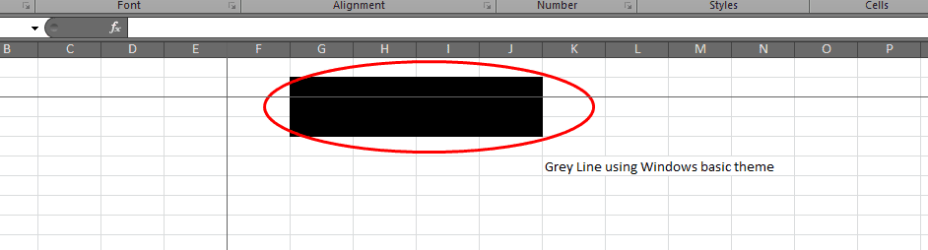
Please see the screen for the 2 ways:

this is the wrong way using windows 7 theme (note that line can be seen over a group of black filled cells.)
Capture1.PNG

this is the good way but it only comes when I select windows classic theme which is ugly (note that line cannot be seen this time because it is black as well as the group of cells)


Capture2.PNG

View attachment Doc1.docx
 
Last edited:

My Computer My Computer

OS
Windows 7
Which version of Excel are you using?
Could post a screenshot of the problem
 

My Computer My Computer

Computer type
PC/Desktop
Computer Manufacturer/Model Number
Custom Build
OS
Windows 10 Pro x64, Arch Linux
CPU
Intel Core 2 Quad Q8200 OC'd 3.08GHz
Motherboard
Asus Rampage formula LGA775
Memory
8GB DDR2 900Mhz
Graphics Card(s)
MSI GT730 2GB GDDR5 (Kepler)
Sound Card
Supreme FX2
Monitor(s) Displays
Samsung LS22F350 LED
Screen Resolution
1080P
Hard Drives
Kingston SSDNow UV400 120GB, 500GB Hitachi, 2TB Samsung, 500GB Seagate FreeAgent, 640GB Samsung, 160GB Toshiba (Arch)
PSU
AeroCool 500W Bronze
Cooling
Cooler Master V6 + 3X fans
Keyboard
Prolink keyboard
Mouse
Logitech M705
Internet Speed
1MiB/s
Browser
Chrome Beta
Thanks, I am using Office 2010 32 bit version.

how do I post a screenshot here?
 

My Computer My Computer

OS
Windows 7
  1. Click on the Start Menu and start typing "snipping" into the search box.
  2. Snipping Tool should show up in the Programs list above the search box, and you can click on it to start it.
  3. The Snipping Tool window will appear on your screen. You may move it to an edge of the screen so it's not in your way, but it will also disappear when you start dragging a selection area.
  4. The Snipping Tool assumes you want to create a new clipping as soon as you open it. Your screen will dim, and you can click and drag your cursor to select an area to copy. As you drag, the selected area will be darker, and surrounded by a red border if you've never changed the Snipping Tool options.
  5. When you release the mouse button, the captured area will open in the Snipping Tool window. If you're not happy with the selection and need to try again, click the "New" button.
  6. When you are happy with your clipping, press the second button to save the screen shot as an image file.
Then upload it by using this method: http://www.sevenforums.com/general-...ed-method-uploading-posting-screen-shots.html
 

My Computer My Computer

Computer type
PC/Desktop
Computer Manufacturer/Model Number
Custom Build
OS
Windows 10 Pro x64, Arch Linux
CPU
Intel Core 2 Quad Q8200 OC'd 3.08GHz
Motherboard
Asus Rampage formula LGA775
Memory
8GB DDR2 900Mhz
Graphics Card(s)
MSI GT730 2GB GDDR5 (Kepler)
Sound Card
Supreme FX2
Monitor(s) Displays
Samsung LS22F350 LED
Screen Resolution
1080P
Hard Drives
Kingston SSDNow UV400 120GB, 500GB Hitachi, 2TB Samsung, 500GB Seagate FreeAgent, 640GB Samsung, 160GB Toshiba (Arch)
PSU
AeroCool 500W Bronze
Cooling
Cooler Master V6 + 3X fans
Keyboard
Prolink keyboard
Mouse
Logitech M705
Internet Speed
1MiB/s
Browser
Chrome Beta

My Computer My Computer

Computer type
PC/Desktop
Computer Manufacturer/Model Number
Custom Build
OS
Windows 10 Pro x64, Arch Linux
CPU
Intel Core 2 Quad Q8200 OC'd 3.08GHz
Motherboard
Asus Rampage formula LGA775
Memory
8GB DDR2 900Mhz
Graphics Card(s)
MSI GT730 2GB GDDR5 (Kepler)
Sound Card
Supreme FX2
Monitor(s) Displays
Samsung LS22F350 LED
Screen Resolution
1080P
Hard Drives
Kingston SSDNow UV400 120GB, 500GB Hitachi, 2TB Samsung, 500GB Seagate FreeAgent, 640GB Samsung, 160GB Toshiba (Arch)
PSU
AeroCool 500W Bronze
Cooling
Cooler Master V6 + 3X fans
Keyboard
Prolink keyboard
Mouse
Logitech M705
Internet Speed
1MiB/s
Browser
Chrome Beta
ok, please check now on my original entry, you should be able to see the doc file and the screenshots, please let me know
 

My Computer My Computer

OS
Windows 7
does someone know how can I communicate this windows-office thing to Microsoft Developers?
 

My Computer My Computer

OS
Windows 7
Back
Top