Please Help: Infuriating Problem

brodie9666

New member
Local time
12:40 PM
Messages
7
Location
Isle of Man
Hello, this is my first post here and I hope i've created it in the correct part of the forum, if i've not and your a mod please feel free to move it.

Ok, the problem, I bought a "Nvidea Gainward 9600 GT PCX 2 Golden Sample 512mb" Graphics Card which has 2 DVI out ports on the back of it, I have 2 working DVI to DVI cables and i now have 2 identical "Acer V223W LCD" Monitors. So being someone naive i connect the cables with the monitors and graphics card and turn my system on and go to "Control Panel > Display > Screen Resolution" and hit Detect quite happily thinking that was all there was too it....

My Primary screen 1 is coming up in the Display dropdown as it should: "1. Acer V223W" yet my secondary display would not appear at all. I attempted to use my Nvidea Control Panel to no avail, I updated all my drivers and still nothing.

Thinking that there maybe a physical problem i swap everything around and sure enough both monitors and cables work, but only if they are in the top (Primary) DVI port on the graphics card, so thinking there may be a problem with the lower (secondary) DVI port and wanting to try everything, I, in a moment of madness, plugged in a DVI to VGA adapter and connected the 2nd monitor with a VGA cable and hey presto, dual monitors!!

The problem i have is one, why the hell isnt windows 7s recognising my 2nd monitor unless its plugged in with a VGA cable and even then still not correctly recognising it (in the Screen Resolution screen the display drop down reads 1. Acer V223W and 2. Display device on: VGA). And two, its not letting me set the 2nd monitor as the same resolution as the first so the quality of the 2nd is out and all the text looks distorted (Monitor 1: 1680 x 1050 (recommended) Monitor 2: 1600 x 1024)

Sorry for the long post but i wanted to get in all the details rather than make you good people respond with answers that I have found through trial and error to be incorrect.

Thanks in advance

Brodie
 

My Computer

OS
Windows 7 32bit
Why do you jump to the conclusion that it is W7's fault that the second monitor isn't being detected. If I understood what you said, there is output on one video card connector, but not the other. Sounds to me that it is a defective video card. Do you have known good card that you could swap out for a check?
 

My Computer

Computer Manufacturer/Model Number
DIY
OS
W7x64 Pro, SuSe 12.1/** W7 x64 Pro, XP MCE
CPU
Phenom II 1090T w/Noctua NH-D14 /**4400+ X2 w/CM Hyper TX 3
Motherboard
ASRock 890FX Deluxe 4/**A8N-SLI
Memory
2 x 2GB Patriot PGS34g1600LLKA/**4x1GB Corsair VS
Graphics Card(s)
EVGA GTX460 SC/**EVGA 8800GTS
Sound Card
Asus Xonar D2X/**Xonar D1
Monitor(s) Displays
Acer X233H, Dell E152FPc /**LG M237-WD
Screen Resolution
1920x1080 & 1024x768/**1980x1080
Hard Drives
WDC 2TB, 1.5TB, 1TB, 500GB,Seagate 500GB , Maxtor 80GB /**500GB Seagate & WDC 1TB Black
PSU
CM RS600 w/ APC BX1000G/**Antec 500 TP w/ APC BX1000
Case
HAF922/**Antec 1040IIB
Cooling
3x200mm, 1x140 and 1x120mm/**5x80mm fans
Keyboard
Logitech Media USB/**Saitek Eclipse
Mouse
Cordless Trackman Wheel/**Ditto
Internet Speed
3.3Mbps
Other Info
SB 560 5.1 w/ Sennheiser RS140/**Creative T20 speakers, Dvico FusionHDTV7 Gold RT, Cisco E3000, HP 5510V AIO, Linksys E3000, Belkin F5U237 hub and **F5D8055 adapter
(** = 2nd rig)
so thinking there may be a problem with the lower (secondary) DVI port and wanting to try everything, I, in a moment of madness, plugged in a DVI to VGA adapter and connected the 2nd monitor with a VGA cable and hey presto, dual monitors!!

Can you try just hooking one monitor up to the lower DVI port and going DVI to DVI to make sure that the lower port is actually working properly.

Edit: also when you test each monitor, do you see the name of the monitor in the drop down list. One of the monitors might not have drivers installed/attached to it.
 

My Computer

Computer type
Laptop
Computer Manufacturer/Model Number
ASUS G60-RBBX05
OS
Win7 Home Premium 64x
CPU
Intel Core 2 Duo P7450 / 2.13 GHz (2.29 with Extreme Turbo)
Memory
4 GB PC-6400 Hyundai (2X2) at 800Mhz
Graphics Card(s)
NVIDIA GeForce GTX 260M 1GB DDR3 VRAM
Monitor(s) Displays
16" LED Backlit
Screen Resolution
1366 x 768 on laptop 1600x1050 max res on 22" external mon
Hard Drives
OCZ Agility 3 60GB SSD / 320 GB - Serial ATA-150 - 7200 rpm
PSU
6-cell Lithium ion { lasts 1.5 hours }
Case
ASUS G60 Laptop
Keyboard
Chicklet type back-lit (white light) keyboard
Mouse
Logitech G9 Laser Mouse 3200dpi and 1000 reports per minute
Internet Speed
Comcast 8.60mb/s up - 3.11mb/s down
Antivirus
MSE
Browser
Firefox
Other Info
General mid-budget gaming Comp. Low batterylife - High FrameRates - currently overheating problems :(

2nd Rig: Case: Rosewill BLACKHAWK Gaming ATX Mid Tower Computer Case

Mobo: GIGABYTE GA-990FXA-UD3
CPU: AMD FX-6200 Zambezi 3.8GHz (4.1GHz Turbo)
Heatsink: COOLER MASTER V8 CPU Cooler
RAM: Patriot Viper 3 8GB (2 x 4GB) 240-Pin DDR3 SDRAM 1866 (PC3 15000)
GPU: SAPPHIRE Radeon HD 6850 1GB 2
Why do you jump to the conclusion that it is W7's fault that the second monitor isn't being detected. If I understood what you said, there is output on one video card connector, but not the other. Sounds to me that it is a defective video card. Do you have known good card that you could swap out for a check?

Im assuming the lower (secondary) DVI port on the graphics card works because when i stick a DVI to VGA converter and connect the 2nd monitor to it using a VGA cable it works, albeit with a lower resolution to the primary DVI connected monitor.
Cheers for the quick reply though
 

My Computer

OS
Windows 7 32bit
And two, its not letting me set the 2nd monitor as the same resolution as the first so the quality of the 2nd is out and all the text looks distorted (Monitor 1: 1680 x 1050 (recommended) Monitor 2: 1600 x 1024)

this is most likely the resolutions that the card can output. VGA output tops out at 1024 for this card and thus looks crappy.
 

My Computer

Computer type
Laptop
Computer Manufacturer/Model Number
ASUS G60-RBBX05
OS
Win7 Home Premium 64x
CPU
Intel Core 2 Duo P7450 / 2.13 GHz (2.29 with Extreme Turbo)
Memory
4 GB PC-6400 Hyundai (2X2) at 800Mhz
Graphics Card(s)
NVIDIA GeForce GTX 260M 1GB DDR3 VRAM
Monitor(s) Displays
16" LED Backlit
Screen Resolution
1366 x 768 on laptop 1600x1050 max res on 22" external mon
Hard Drives
OCZ Agility 3 60GB SSD / 320 GB - Serial ATA-150 - 7200 rpm
PSU
6-cell Lithium ion { lasts 1.5 hours }
Case
ASUS G60 Laptop
Keyboard
Chicklet type back-lit (white light) keyboard
Mouse
Logitech G9 Laser Mouse 3200dpi and 1000 reports per minute
Internet Speed
Comcast 8.60mb/s up - 3.11mb/s down
Antivirus
MSE
Browser
Firefox
Other Info
General mid-budget gaming Comp. Low batterylife - High FrameRates - currently overheating problems :(

2nd Rig: Case: Rosewill BLACKHAWK Gaming ATX Mid Tower Computer Case

Mobo: GIGABYTE GA-990FXA-UD3
CPU: AMD FX-6200 Zambezi 3.8GHz (4.1GHz Turbo)
Heatsink: COOLER MASTER V8 CPU Cooler
RAM: Patriot Viper 3 8GB (2 x 4GB) 240-Pin DDR3 SDRAM 1866 (PC3 15000)
GPU: SAPPHIRE Radeon HD 6850 1GB 2
so thinking there may be a problem with the lower (secondary) DVI port and wanting to try everything, I, in a moment of madness, plugged in a DVI to VGA adapter and connected the 2nd monitor with a VGA cable and hey presto, dual monitors!!
Can you try just hooking one monitor up to the lower DVI port and going DVI to DVI to make sure that the lower port is actually working properly.

Edit: also when you test each monitor, do you see the name of the monitor in the drop down list. One of the monitors might not have drivers installed/attached to it.

When i use the lower DVI port on the Graphics card on its own i get nothing, but this im led to belive it correct, as the top DVI port on the card is the primary one, and plugging anything into the secondary one without a primary connected will not work.

As for the name, no in the win7 display screen it shows:

1. Acer V223W
2. Display device on: VGA

or if I attempt to connect the 2nd monitor via the DVI cable win7 does not see it at all and only provides me with the option to "try to connect anyway on: VGA" when i attempt to detect the 2nd monitor.
 

My Computer

OS
Windows 7 32bit
The problem i have is one, why the hell isnt windows 7s recognising my 2nd monitor unless its plugged in with a VGA cable and even then still not correctly recognising it (in the Screen Resolution screen the display drop down reads 1. Acer V223W and 2. Display device on: VGA). And two, its not letting me set the 2nd monitor as the same resolution as the first so the quality of the 2nd is out and all the text looks distorted (Monitor 1: 1680 x 1050 (recommended) Monitor 2: 1600 x 1024)
The limitation is the actual card and driver.
7 is responding as it should. Update the card driver and use the dual monitor option.
 

My Computer

Computer Manufacturer/Model Number
Custom Build
OS
Windows 7 7600 1 X64
CPU
AMD PHENOM II X 550 PROCESSOR 3.1 ghz
Motherboard
ASUS M4A78-TE
Memory
Corsair 4 gig ddr 3
Graphics Card(s)
ati radeon 3300
Sound Card
ati hd
Monitor(s) Displays
syncmaster 2033sw
Screen Resolution
1600X900 60 hz refresh
Hard Drives
twin_seagates SATA's 1 TB & 500 Gig, hitachi_slimline 160 gig
PSU
antec_550 watt
Case
cooler master GLite
Cooling
stock_heat sink
Internet Speed
20mbs up/ 1.5mbs down
Other Info
favorite child "stewie"
favorite dog "brian"
Ive updated my graphics card driver, im using:

Driver Date: 03/04/2010
Driver Version: 8.17.11.9745

However, and Im not sure if this is an issue, looking at the device manager its showing my Display Adapter as "NVIDEA GeForce 9600 GT"
Doing an image search on Google for that card it brings up a totally different card. The card i have is a: "Gainward BLISS 9600GT Golden Sample"
More info on it here

In that article it states that the "BLISS 9600GT uses the NVIDEA http://www.hardwarezone.com.my/news/view.php?id=10003&cid=6#GeForce 9600GT graphics chip" So can I presume I have the correct display drivers!?

It also states the following:

"The World’s first graphics card supports DisplayPort, HDMI, Dual-Link DVI-I, and CRT outputs
BLISS 9600GT golden sample supports the most advanced DisplayPort and HDMI output whose resolution can be up to 2560*1600 and 1920*1080. Furthermore, the mainstream Dual-Link DVI-I and CRT (via the DVI-to-D-Sub dongle) is supported in BLISS 9600GT golden sample. BLISS 9600GT golden sample is HDCP compliant and supports NVIDIA PureVideo HD and H.264 decode. You can choose either DisplayPort or HDMI output to connect to the monitor, and then you can start to enjoy the ultimate Blu-ray and HD-DVD movie experience."


hope this helps
 

My Computer

OS
Windows 7 32bit
My next post below this one is probably the culprit. Check the DVI cables first
Hope that helps


Gainward

^ is this your card? if so, then the problem could be that the card is no longer being supported. Gainward no longer has them listed as current product Gainward

This is the newest driver from nVidia that supports a 9600GT NVIDIA DRIVERS 197.45 WHQL

or try an older Vista Driver this one is from November for Vista 32x and supports the 9600GT

NVIDIA DRIVERS 195.62 WHQL


Another hardware option is to use one DVI output and one HDMI output with a HDMI-DVI cable
So one starts as first dVI port the second one starts at HDMI port, but both are DVI when they get to monitor.
 

My Computer

Computer type
Laptop
Computer Manufacturer/Model Number
ASUS G60-RBBX05
OS
Win7 Home Premium 64x
CPU
Intel Core 2 Duo P7450 / 2.13 GHz (2.29 with Extreme Turbo)
Memory
4 GB PC-6400 Hyundai (2X2) at 800Mhz
Graphics Card(s)
NVIDIA GeForce GTX 260M 1GB DDR3 VRAM
Monitor(s) Displays
16" LED Backlit
Screen Resolution
1366 x 768 on laptop 1600x1050 max res on 22" external mon
Hard Drives
OCZ Agility 3 60GB SSD / 320 GB - Serial ATA-150 - 7200 rpm
PSU
6-cell Lithium ion { lasts 1.5 hours }
Case
ASUS G60 Laptop
Keyboard
Chicklet type back-lit (white light) keyboard
Mouse
Logitech G9 Laser Mouse 3200dpi and 1000 reports per minute
Internet Speed
Comcast 8.60mb/s up - 3.11mb/s down
Antivirus
MSE
Browser
Firefox
Other Info
General mid-budget gaming Comp. Low batterylife - High FrameRates - currently overheating problems :(

2nd Rig: Case: Rosewill BLACKHAWK Gaming ATX Mid Tower Computer Case

Mobo: GIGABYTE GA-990FXA-UD3
CPU: AMD FX-6200 Zambezi 3.8GHz (4.1GHz Turbo)
Heatsink: COOLER MASTER V8 CPU Cooler
RAM: Patriot Viper 3 8GB (2 x 4GB) 240-Pin DDR3 SDRAM 1866 (PC3 15000)
GPU: SAPPHIRE Radeon HD 6850 1GB 2

My Computer

Computer type
Laptop
Computer Manufacturer/Model Number
ASUS G60-RBBX05
OS
Win7 Home Premium 64x
CPU
Intel Core 2 Duo P7450 / 2.13 GHz (2.29 with Extreme Turbo)
Memory
4 GB PC-6400 Hyundai (2X2) at 800Mhz
Graphics Card(s)
NVIDIA GeForce GTX 260M 1GB DDR3 VRAM
Monitor(s) Displays
16" LED Backlit
Screen Resolution
1366 x 768 on laptop 1600x1050 max res on 22" external mon
Hard Drives
OCZ Agility 3 60GB SSD / 320 GB - Serial ATA-150 - 7200 rpm
PSU
6-cell Lithium ion { lasts 1.5 hours }
Case
ASUS G60 Laptop
Keyboard
Chicklet type back-lit (white light) keyboard
Mouse
Logitech G9 Laser Mouse 3200dpi and 1000 reports per minute
Internet Speed
Comcast 8.60mb/s up - 3.11mb/s down
Antivirus
MSE
Browser
Firefox
Other Info
General mid-budget gaming Comp. Low batterylife - High FrameRates - currently overheating problems :(

2nd Rig: Case: Rosewill BLACKHAWK Gaming ATX Mid Tower Computer Case

Mobo: GIGABYTE GA-990FXA-UD3
CPU: AMD FX-6200 Zambezi 3.8GHz (4.1GHz Turbo)
Heatsink: COOLER MASTER V8 CPU Cooler
RAM: Patriot Viper 3 8GB (2 x 4GB) 240-Pin DDR3 SDRAM 1866 (PC3 15000)
GPU: SAPPHIRE Radeon HD 6850 1GB 2
Digital Visual Interface - Wikipedia, the free encyclopedia

Also look here and make sure that your DVI cables are DVI-I - Dual Link
There is a pic in the "Connector" section....your cables should have pins all the way across if they dont then they are DVI-I - Single Link

Oooh you maybe on to something here, the cable I have connected from the upper (Primary) DVI Out on my graphics card to the first monitor is a "DVI-D (Dual Link)" (According to your wiki link). Where the cable I was attempting to connect the lower (Secondary) DVI Out on my graphics card to the second monitor is a "DVI-D (Single Link)"

Could me using a mixture of these two types really be the cause of all of the above? Using my DVI-D Dual Link and a VGA cable gives me dual displays but as mentioned above, they have different resolutions and dont look any good. Would my buying a second DVI-D Dual Link cable to match the one plugged in to my first monitor enable Win7 to recognise it do you think?

I really hope so, i'll admit I was starting to give up hope, you have given me a ray of light here, I so hope this is the answer, if so i'll owe you many many pints of your favourite alcohol based beverage!!
 

My Computer

OS
Windows 7 32bit
I've just bought a second Dual Link DVI-D Cable and sadly it made no difference. I'm still unable to detect the second monitor. So im back at square one, here again is a list of the facts:


  1. 2 Identical Acer V223W LCD Monitors.
  2. 2 Belkin Dual Link DVI-D Cables.
  3. 1 Gainward BLISS 9600GT Golden Sample Graphics Card with two DVI-I Out ports.*
  4. All Drivers (especially Display and Hardware) are up to date and stable.
  5. Windows 7 Ultimate Operating System: Up to date and stable.
  6. Both Monitors have been tested and are working 100%.
  7. Both Cables have been tested and are working 100%.
  8. Windows Display and Nvidea Control Panel both cannot detect 2nd Monitor.
  9. Dual screens can be displayed when a VGA cable is attached via a DVI-VGA Adapter but due to the resolution mismatch this is not practical.
  10. Second display shows "No Signal" on screen when attached to the PC via the DVI cable, but shows "Cable not attached" when the cable is removed from the back of the PC (and leaving it in the back of the monitor).
*The graphics card states that it has "Dual-Link DVI-I" but the two cables im using are Dual-Link DVI-D) would this make a difference? The primary (top) DVI port on the graphics card has one of the DVI-D cables plugged into it and the picture is coming through perfectly on the first monitor.

I'm completely at a loss here, the only think that i can think of is that maybe there is some hardware issue with the secondary DVI Out port on the graphics card, however as I am able to get a VGA signal from it when using an adapter this would lead me to think otherwise.

Please help if your able, I'm totally baffled by this.

Thanks in advance
 

My Computer

OS
Windows 7 32bit
Have you actually tried the lower port on its own with a DVI connector? Just because it can output VGA doesn't mean to say that it can output DVI if it is faulty.

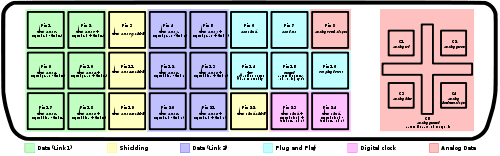
Here is an illustration showing the pin layout. It's not very clear, but that doesn't matter here.

500px-DVI_pinout_svg.png

The VGA outputs are those indicated in PINK, and it is possible that these are working whereas the other DVI outputs aren't.
 

My Computer

Computer type
PC/Desktop
Computer Manufacturer/Model Number
Dwarf Dwf/11/2012 r09/2013
OS
Windows 8.1 Pro RTM x64
CPU
Intel Core-i5-3570K 4-core @ 3.4GHz (Ivy Bridge) (OC 4.4GHz)
Motherboard
ASRock Z77 Extreme4-M
Memory
4 x 4GB DDR3-1600 Corsair Vengeance CMZ8GX3M2A1600C9B (16GB)
Graphics Card(s)
MSI GeForce GTX770 Gaming OC 2GB
Sound Card
Realtek High Definition on board solution (ALC 898)
Monitor(s) Displays
ViewSonic VA1912w Widescreen (VGA)
Screen Resolution
1440x900
Hard Drives
OCZ Agility 3 SSD 120GB SATA III x2 (RAID 0)
Samsung HD501LJ 500GB SATA II x2
Hitachi HDS721010CLA332 1TB SATA II
Iomega 1.5TB Ext USB 2.0
WD 2.0TB Ext USB 3.0
PSU
XFX Pro Series 850W Semi-Modular
Case
Gigabyte IF233
Cooling
1 x 120mm Front Inlet 1 x 120mm Rear Exhaust
Keyboard
Microsoft Comfort Curve Keyboard 3000 (USB)
Mouse
Microsoft Comfort Mouse 3000 for Business (USB)
Internet Speed
NetGear DG834Gv3 ADSL Modem/Router (Ethernet) ~4.0 Mb/s (O2)
Antivirus
Avast! 8.0.1497
Browser
IE 11
Other Info
Optical Drive: HL-DT-ST BD-RE BH10LS30 SATA Bluray
Lexmark S305 Printer/Scanner/Copier (USB)
WEI Score: 8.1/8.1/8.5/8.5/8.25
Asus Eee PC 1011PX Netbook (Windows 7 x86 Starter)
Just tried it and no, nothing. I unplugged the DVI Cable from the top DVI Out on the card and left the bottom one in and got nothing on the monitor.

I did notice something odd though, just out of curiosity I plugged in the VGA cable with the DVI Adapter on the end I need to plug into my Graphics card and again left the top port on the card empty, the screen fired up, so I can confirm that contory to what ive been told, I can run a monitor on the lower DVI Out without something being plugged into the to upper one.

Quick question, if it turns out that the lower DVI port is faulty, am I able to use a Dual-Link DVI-D Splitter (if one exists) in the working DVI Out on the graphics card to run Dual Monitors with Extended Desktop, having a clone of the first screen is of no use to me. Also i would want to be able to run both of these monitors at the same resolution (1680 x 1050 is the recommended resolution for my two monitors)

cheers for your help mate
 

My Computer

OS
Windows 7 32bit
Back
Top