
Please help me improve my wifi range

terrorist96

New member
Member
VIP
Local time
1:46 PM
Messages
221
I'm using my netbook right now, so my computer specs at the bottom don't apply to this post. This is my netbook: Hannspree HannsBook SN10E22BU3221 Netbook - Intel Atom N450 1.66GHz, 1GB DDR2, 250GB HDD, 10 WSVGA, 6-Cell, Windows 7 Starter, Black at TigerDirect.com
(Newegg link: Newegg.com - Hannspree SN10E22BU3221 Pearl Black Intel Atom N450(1.66GHz) 10.1" 1GB Memory 250GB HDD Netbook )

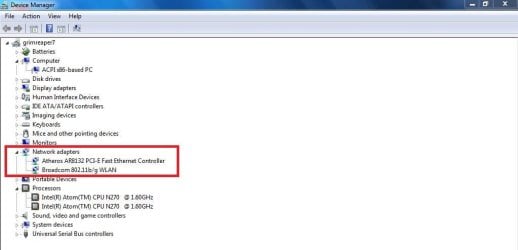
I've attached a cap of my device manager network section.

I've already updated all three of those drivers. Only the third one had an update from right clicking and selecting "update driver software".

Even though it is a netbook, and it's expected to have an inferior WiFi range compared to full laptops, I wanna see if I can boost it a little, because it is very weak. If I'm more than like 30 or so feet away from the router, I can still pick up the signal, but can't connect to it.

I've looked under the options and wanted to see what stuff I could change to improve my range without messing something else up.

Just a side note, I've set all three of my network adapters so that the computer can't turn them off to save power. Is that okay? The only times I would want my WiFi to be off would be when I close the netbook or manually turn off the WiFi (Fn + F9)

Since under Microsoft Virtual WiFi Miniport Adapter I can't tweak anything, I'm gonna focus on the first two.

Under the first one (Atheros AR5B95 Wireless Network Adapter), in the Advanced tab, the following Properties are listed, with their choice of values next to them. I'll list each property and the value selected next to it, with the other value options in parenthesis

802.11b Preamble - Long and Short (Long only)
AdHoc 11n - Disable (Enable)
Dynamic MIMO Power Save - Disable (Enable)
Network Address - Not Present (Manually enter value)
Receive Buffers - 256 (+/-)
Scan Valid Interval - 60 (+/-)
Transmit Buffers - 512 (+/-)

And for the second adapter (Atheros AR8131 PCI-E Gigabit Ethernet Controller (NDIS 6.20) #5), in the Advanced tab, the following Properties are listed, with their choice of values next to them. I'll list them all just like I did above.

FlowControl - Tx & Rx Enabled (Disabled)
Interrupt Moderation - Enabled (Disabled)
IPv4 Checksum Offload - Tx & Rx Enabled (Disabled, Rx Enabled, Tx Enabled)
Jumbo Frame - Disabled (2, 3, 4, 5, 6, 7, 8, and 9KB MTU options)
Large Send Offload (IPv4) - Enabled (Disabled)
Large Send Offload v2 (IPv4) - Disabled (Enabled)
Large Send Offload v2 (IPv6) - Disabled (Enabled)
Max IRQ per Second - 5000 (+/-)
Network Address - Not Present (Manually enter value)
Receive Buffers - 512 (+/-)
Receive Side Scaling - Disabled (Enabled)
Shutdown Wake Up - Disabled (Enabled)
Speed & Duplex - Auto Negotiation (10 Mbps Full Duplex, 10 Mbps Half Duplex, 100 Mbps Full Duplex, 100 Mbps Half Duplex)
TCP Checksum Offload (IPv4) - Tx & Rx Enabled (Disabled, Rx Enabled, Tx Enabled)
TCP Checksum Offload (IPv6) - Tx & Rx Enabled (Disabled, Rx Enabled, Tx Enabled)
Transmit Buffers - 256 (+/-)
UDP Checksum Offload (IPv4) - Tx & Rx Enabled (Disabled, Rx Enabled, Tx Enabled)
UDP Checksum Offload (IPv6) - Tx & Rx Enabled (Disabled, Rx Enabled, Tx Enabled)
Wake Up Capabilities - MagicPacket & PatternMatch (All, Magic Packet, None, Pattern Match)


Please, please, please someone help me understand these properties and values; which ones I should tweak; what they do; etc.
It took a long time to type all of this out so it could be as comprehensive as possible and I'd hate for it to go to waste. My netbook supports up to 802.11n so I thought the wireless card would be pretty good and I would rather improve my current one than have to buy a new one. Thanks so much in advance to anyone who decides to tackle this post. I really really appreciate it. Hope to hear from someone soon.
 

Attachments

  • Network cap.png
    Network cap.png
    3.2 KB · Views: 30

My Computer

Computer type
Laptop
Computer Manufacturer/Model Number
Sager NP2650 (Clevo W650SZ) - Custom Built
OS
Windows 7 Ultimate 64 bit (6.1, Build 7601) Service Pack 1
CPU
Intel Core i7 (4700MQ, 2.4Ghz-3.4Ghz, 6MB Cache - Haswell)
Memory
16GB (DDR3 1600MHz Dual Channel Memory - 2 SODIMMS)
Graphics Card(s)
Intel HD 4600 Graphics
Sound Card
Sound Blaster Compatible 3D Audio
Monitor(s) Displays
15.6” LED IPS, Super Clear Matte
Screen Resolution
1920x1080p
Hard Drives
Crucial m4 128GB SSD [mSATA - 128MB L2 Cache] (CT128M4SSD3) | Samsung 860 EVO 1TB SSD [SATA 6Gb/s] (MZ-76E1T0B/AM) | Seagate Momentus 750GB HDD [SATA 3Gb/s, 7200RPM, 16MB Cache] | Western Digital Caviar Black 1TB HDD [SATA 3Gb/s, 7200RPM, 32MB Cache]
Cooling
Stock OEM Thermal Compound
Keyboard
Standard Sager/Clevo Non Chiclet Keyboard
Mouse
Microsoft Wireless Mobile Mouse 4000
Antivirus
Microsoft Security Essentials
Browser
Google Chrome | Firefox/Waterfox | Opera
Other Info
Built-in 802.11 Wireless B/G/N - Stock Wireless Card + Bluetooth™ 4.0 | Internal 9-in-1 Card Reader (MMC/RSMMC/SD/Mini SD/SDHC/SDXC/MS/MS Pro/MS Duo) | Built in 2.0 Megapixel Camera | Rosewill RX-358-S BLACK 3.5" SATA to eSATA External Enclosure with Internal 80mm fan
well, the ethernet properties won't help your wifi, but other than that I don't really know. I think it might just be a weak adapter. You could try a wireless usb adapter, which supposedly can get better signals, but other than that, i don't think system settings will change anything.
Weak signals will not allow you to connect most of the time.
<edit> you say your card supports wireless N, is your Router an N router?
 

My Computer

Computer Manufacturer/Model Number
Custom Build #2
OS
Windows 7 Ultimate 32-Bit
CPU
Intel Core 2 Duo E6300 O.C.'d to 2.80 GHz (For Now >:) )
Motherboard
Gigabyte P43-ES3G
Memory
4x1GB OCZ Dual Channel RAM
Graphics Card(s)
HIS ATI Radeon HD 5770 1GB
Sound Card
Onboard Sound
Monitor(s) Displays
Asus VH-236
Screen Resolution
1920x1080
Hard Drives
WD Caviar-Blue 250 GB SATA
WD Caviar-Green 1.5 TB SATA
PSU
Raidmax RX-630SS
Case
Apevia X-Dreamer
Cooling
Case: Arctic Cooling CPU:Rosewill RCX Z2
No. It's G, I think. But my dad's laptop can easily pick up signal downstairs but mine can detect it, but cannot connect. I thought that since it supported up to N, it would have to be more high end than ones that don't support N.

And there's really nothing in the settings I can change to improve it? What are all those properties for then?
 

My Computer

Computer type
Laptop
Computer Manufacturer/Model Number
Sager NP2650 (Clevo W650SZ) - Custom Built
OS
Windows 7 Ultimate 64 bit (6.1, Build 7601) Service Pack 1
CPU
Intel Core i7 (4700MQ, 2.4Ghz-3.4Ghz, 6MB Cache - Haswell)
Memory
16GB (DDR3 1600MHz Dual Channel Memory - 2 SODIMMS)
Graphics Card(s)
Intel HD 4600 Graphics
Sound Card
Sound Blaster Compatible 3D Audio
Monitor(s) Displays
15.6” LED IPS, Super Clear Matte
Screen Resolution
1920x1080p
Hard Drives
Crucial m4 128GB SSD [mSATA - 128MB L2 Cache] (CT128M4SSD3) | Samsung 860 EVO 1TB SSD [SATA 6Gb/s] (MZ-76E1T0B/AM) | Seagate Momentus 750GB HDD [SATA 3Gb/s, 7200RPM, 16MB Cache] | Western Digital Caviar Black 1TB HDD [SATA 3Gb/s, 7200RPM, 32MB Cache]
Cooling
Stock OEM Thermal Compound
Keyboard
Standard Sager/Clevo Non Chiclet Keyboard
Mouse
Microsoft Wireless Mobile Mouse 4000
Antivirus
Microsoft Security Essentials
Browser
Google Chrome | Firefox/Waterfox | Opera
Other Info
Built-in 802.11 Wireless B/G/N - Stock Wireless Card + Bluetooth™ 4.0 | Internal 9-in-1 Card Reader (MMC/RSMMC/SD/Mini SD/SDHC/SDXC/MS/MS Pro/MS Duo) | Built in 2.0 Megapixel Camera | Rosewill RX-358-S BLACK 3.5" SATA to eSATA External Enclosure with Internal 80mm fan
Those settings are various other settings, but there is no way to change the strength of the signal. Yes a wireless N card is usually better, but it might be a weak card. Netbook wifi cards can be weak, and i've never heard of the brand of your netbook.
sorry, but I think you might have a weak card. You might want to try a wifi usb adapter to see if that helps.
 

My Computer

Computer Manufacturer/Model Number
Custom Build #2
OS
Windows 7 Ultimate 32-Bit
CPU
Intel Core 2 Duo E6300 O.C.'d to 2.80 GHz (For Now >:) )
Motherboard
Gigabyte P43-ES3G
Memory
4x1GB OCZ Dual Channel RAM
Graphics Card(s)
HIS ATI Radeon HD 5770 1GB
Sound Card
Onboard Sound
Monitor(s) Displays
Asus VH-236
Screen Resolution
1920x1080
Hard Drives
WD Caviar-Blue 250 GB SATA
WD Caviar-Green 1.5 TB SATA
PSU
Raidmax RX-630SS
Case
Apevia X-Dreamer
Cooling
Case: Arctic Cooling CPU:Rosewill RCX Z2
1. Install an external Wi-Fi antenna on the laptop (if possible). For this option to be feasible, the laptop must support add-on antennas. Look for a special jack similar in appearance to a headphone or microphone jack. Sometimes these are called "SMA jacks." Consult the laptop product documentation for details.

Hiro H50193 Wireless USB Network Adapter and External Antenna - High-Gain, OMNI Direction, 2dBi at TigerDirect.com


2. Use a USB wireless network adapter with external antenna. USB Wi-Fi adapters hook onto the back or side of a laptop with a short USB cable. The external antenna on these adapters improves signal range, and the antenna can be adjusted/pointed for fine tuning. To use this option, the laptop must have an open USB port available. Additionally, other network adapter(s) on the laptop should be disabled to prevent interference.

F5D7050 Belkin Wireless G USB Adapter


3. Check transmission power settings. Some network adapters support adjusting their transmission power. If available, this setting can be adjusted through the adapter's driver interface program, along with the other settings for wireless profiles and Wi-Fi channel number. The transmission power should be set to "maximum" or "100%" to ensure the strongest signal possible. Note that if a laptop is being run in a power saving mode, this setting may automatically be lowered and decrease the adapter's range and signal strength.
 

My Computer

Computer Manufacturer/Model Number
Proline
OS
Windows 7 Pro 64 bit
CPU
Intel(R) Core(TM) i7 CPU 870 @ 2.93GHz
Motherboard
H55-G43(MS-7638)
Memory
4GB
Graphics Card(s)
NVIDIA GeForce GTX 470
Sound Card
Onboard
Monitor(s) Displays
Proline LCD 19 inch
Screen Resolution
1280 x 1024
Hard Drives
2 x SATA 250 Gig 1 x External 2TB
PSU
RX 730 SS
Case
Proline
Cooling
Standard
Keyboard
PS2
Mouse
PS2
Internet Speed
To embarrassed to tell lol
Well are there any adjustments anyone would recommend me making to the properties I listed above? I'm not sure what most of them mean and I don't wanna find out the hard way by messing something up.
 

My Computer

Computer type
Laptop
Computer Manufacturer/Model Number
Sager NP2650 (Clevo W650SZ) - Custom Built
OS
Windows 7 Ultimate 64 bit (6.1, Build 7601) Service Pack 1
CPU
Intel Core i7 (4700MQ, 2.4Ghz-3.4Ghz, 6MB Cache - Haswell)
Memory
16GB (DDR3 1600MHz Dual Channel Memory - 2 SODIMMS)
Graphics Card(s)
Intel HD 4600 Graphics
Sound Card
Sound Blaster Compatible 3D Audio
Monitor(s) Displays
15.6” LED IPS, Super Clear Matte
Screen Resolution
1920x1080p
Hard Drives
Crucial m4 128GB SSD [mSATA - 128MB L2 Cache] (CT128M4SSD3) | Samsung 860 EVO 1TB SSD [SATA 6Gb/s] (MZ-76E1T0B/AM) | Seagate Momentus 750GB HDD [SATA 3Gb/s, 7200RPM, 16MB Cache] | Western Digital Caviar Black 1TB HDD [SATA 3Gb/s, 7200RPM, 32MB Cache]
Cooling
Stock OEM Thermal Compound
Keyboard
Standard Sager/Clevo Non Chiclet Keyboard
Mouse
Microsoft Wireless Mobile Mouse 4000
Antivirus
Microsoft Security Essentials
Browser
Google Chrome | Firefox/Waterfox | Opera
Other Info
Built-in 802.11 Wireless B/G/N - Stock Wireless Card + Bluetooth™ 4.0 | Internal 9-in-1 Card Reader (MMC/RSMMC/SD/Mini SD/SDHC/SDXC/MS/MS Pro/MS Duo) | Built in 2.0 Megapixel Camera | Rosewill RX-358-S BLACK 3.5" SATA to eSATA External Enclosure with Internal 80mm fan
Those settings are within the network settings, you can't increase the signal through them, i already said.
Messing with them won't increase the signal. You could do what dirt rider said, and find the interface program for the card, but otherwise you can't do anything. you might just have a weak card.
 

My Computer

Computer Manufacturer/Model Number
Custom Build #2
OS
Windows 7 Ultimate 32-Bit
CPU
Intel Core 2 Duo E6300 O.C.'d to 2.80 GHz (For Now >:) )
Motherboard
Gigabyte P43-ES3G
Memory
4x1GB OCZ Dual Channel RAM
Graphics Card(s)
HIS ATI Radeon HD 5770 1GB
Sound Card
Onboard Sound
Monitor(s) Displays
Asus VH-236
Screen Resolution
1920x1080
Hard Drives
WD Caviar-Blue 250 GB SATA
WD Caviar-Green 1.5 TB SATA
PSU
Raidmax RX-630SS
Case
Apevia X-Dreamer
Cooling
Case: Arctic Cooling CPU:Rosewill RCX Z2
For the sake of knowledge, could you or anyone else explain to me what some, if not all, of those properties mean and how it would effect my computer by changing them? Like Jumbo Frame, for instance. It has the option, but it is set to disabled. I'd like to learn this stuff too. :)
 

My Computer

Computer type
Laptop
Computer Manufacturer/Model Number
Sager NP2650 (Clevo W650SZ) - Custom Built
OS
Windows 7 Ultimate 64 bit (6.1, Build 7601) Service Pack 1
CPU
Intel Core i7 (4700MQ, 2.4Ghz-3.4Ghz, 6MB Cache - Haswell)
Memory
16GB (DDR3 1600MHz Dual Channel Memory - 2 SODIMMS)
Graphics Card(s)
Intel HD 4600 Graphics
Sound Card
Sound Blaster Compatible 3D Audio
Monitor(s) Displays
15.6” LED IPS, Super Clear Matte
Screen Resolution
1920x1080p
Hard Drives
Crucial m4 128GB SSD [mSATA - 128MB L2 Cache] (CT128M4SSD3) | Samsung 860 EVO 1TB SSD [SATA 6Gb/s] (MZ-76E1T0B/AM) | Seagate Momentus 750GB HDD [SATA 3Gb/s, 7200RPM, 16MB Cache] | Western Digital Caviar Black 1TB HDD [SATA 3Gb/s, 7200RPM, 32MB Cache]
Cooling
Stock OEM Thermal Compound
Keyboard
Standard Sager/Clevo Non Chiclet Keyboard
Mouse
Microsoft Wireless Mobile Mouse 4000
Antivirus
Microsoft Security Essentials
Browser
Google Chrome | Firefox/Waterfox | Opera
Other Info
Built-in 802.11 Wireless B/G/N - Stock Wireless Card + Bluetooth™ 4.0 | Internal 9-in-1 Card Reader (MMC/RSMMC/SD/Mini SD/SDHC/SDXC/MS/MS Pro/MS Duo) | Built in 2.0 Megapixel Camera | Rosewill RX-358-S BLACK 3.5" SATA to eSATA External Enclosure with Internal 80mm fan
I don't know exactly what they mean, but what i do know is that those are settings you should only mess with if you know what you're doing. Maybe someone else here can help you with figuring those out.
you could also try your best friend, Google.
 

My Computer

Computer Manufacturer/Model Number
Custom Build #2
OS
Windows 7 Ultimate 32-Bit
CPU
Intel Core 2 Duo E6300 O.C.'d to 2.80 GHz (For Now >:) )
Motherboard
Gigabyte P43-ES3G
Memory
4x1GB OCZ Dual Channel RAM
Graphics Card(s)
HIS ATI Radeon HD 5770 1GB
Sound Card
Onboard Sound
Monitor(s) Displays
Asus VH-236
Screen Resolution
1920x1080
Hard Drives
WD Caviar-Blue 250 GB SATA
WD Caviar-Green 1.5 TB SATA
PSU
Raidmax RX-630SS
Case
Apevia X-Dreamer
Cooling
Case: Arctic Cooling CPU:Rosewill RCX Z2
Hopefully someone will take the time. Probably not though.. And I have tried Google, but it didn't help.
 

My Computer

Computer type
Laptop
Computer Manufacturer/Model Number
Sager NP2650 (Clevo W650SZ) - Custom Built
OS
Windows 7 Ultimate 64 bit (6.1, Build 7601) Service Pack 1
CPU
Intel Core i7 (4700MQ, 2.4Ghz-3.4Ghz, 6MB Cache - Haswell)
Memory
16GB (DDR3 1600MHz Dual Channel Memory - 2 SODIMMS)
Graphics Card(s)
Intel HD 4600 Graphics
Sound Card
Sound Blaster Compatible 3D Audio
Monitor(s) Displays
15.6” LED IPS, Super Clear Matte
Screen Resolution
1920x1080p
Hard Drives
Crucial m4 128GB SSD [mSATA - 128MB L2 Cache] (CT128M4SSD3) | Samsung 860 EVO 1TB SSD [SATA 6Gb/s] (MZ-76E1T0B/AM) | Seagate Momentus 750GB HDD [SATA 3Gb/s, 7200RPM, 16MB Cache] | Western Digital Caviar Black 1TB HDD [SATA 3Gb/s, 7200RPM, 32MB Cache]
Cooling
Stock OEM Thermal Compound
Keyboard
Standard Sager/Clevo Non Chiclet Keyboard
Mouse
Microsoft Wireless Mobile Mouse 4000
Antivirus
Microsoft Security Essentials
Browser
Google Chrome | Firefox/Waterfox | Opera
Other Info
Built-in 802.11 Wireless B/G/N - Stock Wireless Card + Bluetooth™ 4.0 | Internal 9-in-1 Card Reader (MMC/RSMMC/SD/Mini SD/SDHC/SDXC/MS/MS Pro/MS Duo) | Built in 2.0 Megapixel Camera | Rosewill RX-358-S BLACK 3.5" SATA to eSATA External Enclosure with Internal 80mm fan
I'm bumping this one last time, then giving up. Whatever...
 

My Computer

Computer type
Laptop
Computer Manufacturer/Model Number
Sager NP2650 (Clevo W650SZ) - Custom Built
OS
Windows 7 Ultimate 64 bit (6.1, Build 7601) Service Pack 1
CPU
Intel Core i7 (4700MQ, 2.4Ghz-3.4Ghz, 6MB Cache - Haswell)
Memory
16GB (DDR3 1600MHz Dual Channel Memory - 2 SODIMMS)
Graphics Card(s)
Intel HD 4600 Graphics
Sound Card
Sound Blaster Compatible 3D Audio
Monitor(s) Displays
15.6” LED IPS, Super Clear Matte
Screen Resolution
1920x1080p
Hard Drives
Crucial m4 128GB SSD [mSATA - 128MB L2 Cache] (CT128M4SSD3) | Samsung 860 EVO 1TB SSD [SATA 6Gb/s] (MZ-76E1T0B/AM) | Seagate Momentus 750GB HDD [SATA 3Gb/s, 7200RPM, 16MB Cache] | Western Digital Caviar Black 1TB HDD [SATA 3Gb/s, 7200RPM, 32MB Cache]
Cooling
Stock OEM Thermal Compound
Keyboard
Standard Sager/Clevo Non Chiclet Keyboard
Mouse
Microsoft Wireless Mobile Mouse 4000
Antivirus
Microsoft Security Essentials
Browser
Google Chrome | Firefox/Waterfox | Opera
Other Info
Built-in 802.11 Wireless B/G/N - Stock Wireless Card + Bluetooth™ 4.0 | Internal 9-in-1 Card Reader (MMC/RSMMC/SD/Mini SD/SDHC/SDXC/MS/MS Pro/MS Duo) | Built in 2.0 Megapixel Camera | Rosewill RX-358-S BLACK 3.5" SATA to eSATA External Enclosure with Internal 80mm fan
I read all of that and I learned nothing. I am not a computer major. I don't know what half of the terms in that article mean and I don't feel like it's worth it to check every subarticle to try to understand it. I just wanted it in plain English of what it is and how it would affect my connection. But I've lost all interest now. I'll live with it. Thanks anyway.
 

My Computer

Computer type
Laptop
Computer Manufacturer/Model Number
Sager NP2650 (Clevo W650SZ) - Custom Built
OS
Windows 7 Ultimate 64 bit (6.1, Build 7601) Service Pack 1
CPU
Intel Core i7 (4700MQ, 2.4Ghz-3.4Ghz, 6MB Cache - Haswell)
Memory
16GB (DDR3 1600MHz Dual Channel Memory - 2 SODIMMS)
Graphics Card(s)
Intel HD 4600 Graphics
Sound Card
Sound Blaster Compatible 3D Audio
Monitor(s) Displays
15.6” LED IPS, Super Clear Matte
Screen Resolution
1920x1080p
Hard Drives
Crucial m4 128GB SSD [mSATA - 128MB L2 Cache] (CT128M4SSD3) | Samsung 860 EVO 1TB SSD [SATA 6Gb/s] (MZ-76E1T0B/AM) | Seagate Momentus 750GB HDD [SATA 3Gb/s, 7200RPM, 16MB Cache] | Western Digital Caviar Black 1TB HDD [SATA 3Gb/s, 7200RPM, 32MB Cache]
Cooling
Stock OEM Thermal Compound
Keyboard
Standard Sager/Clevo Non Chiclet Keyboard
Mouse
Microsoft Wireless Mobile Mouse 4000
Antivirus
Microsoft Security Essentials
Browser
Google Chrome | Firefox/Waterfox | Opera
Other Info
Built-in 802.11 Wireless B/G/N - Stock Wireless Card + Bluetooth™ 4.0 | Internal 9-in-1 Card Reader (MMC/RSMMC/SD/Mini SD/SDHC/SDXC/MS/MS Pro/MS Duo) | Built in 2.0 Megapixel Camera | Rosewill RX-358-S BLACK 3.5" SATA to eSATA External Enclosure with Internal 80mm fan
Oh well I only noticed now that you still needed help but if you have lost all interest then I suppose nothing more I can add to this thread :D
 

My Computer

Computer Manufacturer/Model Number
Proline
OS
Windows 7 Pro 64 bit
CPU
Intel(R) Core(TM) i7 CPU 870 @ 2.93GHz
Motherboard
H55-G43(MS-7638)
Memory
4GB
Graphics Card(s)
NVIDIA GeForce GTX 470
Sound Card
Onboard
Monitor(s) Displays
Proline LCD 19 inch
Screen Resolution
1280 x 1024
Hard Drives
2 x SATA 250 Gig 1 x External 2TB
PSU
RX 730 SS
Case
Proline
Cooling
Standard
Keyboard
PS2
Mouse
PS2
Internet Speed
To embarrassed to tell lol
For the sake of knowledge, could you or anyone else explain to me what some, if not all, of those properties mean and how it would effect my computer by changing them? Like Jumbo Frame, for instance. It has the option, but it is set to disabled. I'd like to learn this stuff too. :)

Jumbo frame - Wikipedia, the free encyclopedia

EDIT: it seems jumbo frames allow you to have larger data packets on a compatible network, which 'could' increase your throughput.
 

My Computer

Computer Manufacturer/Model Number
HP dv6519tx
OS
Windows 7 Ultimate x64
CPU
1.80 GHz Intel Core 2 Duo processor T7100
Memory
3 gig ddr2
Graphics Card(s)
NVIDIA GeForce 8400M GS
Sound Card
Realtek High Definition Audio
Monitor(s) Displays
15.4” WXGA High Definition BrightView Widescreen
Screen Resolution
1280 x 800
Hard Drives
Hitachi 320 GB (5400 rpm)
PSU
90 W AC Power Adapter
Cooling
Kitchen plate under the lappy
Keyboard
101 key compatible
Mouse
Touch Pad with On/Off button and dedicated vertical Scroll
Internet Speed
Three Wireless internet prepaid using E160G USB dongle
Even though it is a netbook, and it's expected to have an inferior WiFi range compared to full laptops, I wanna see if I can boost it a little, because it is very weak. If I'm more than like 30 or so feet away from the router, I can still pick up the signal, but can't connect to it.

I also have a netbook, which is not as powerful as yours, but I still get an amazing signal (which was only made possible after purchasing a wi-fi extender).

Your netbook's wi-fi is B/G/N, unlike mine B/G (see pic).

I'm willing to bet there is some sort if interference, which is hampering the potential of a decent wi-fi signal.
Hope this helps:)
 

Attachments

  • atomN270_1.60Ghz.JPG
    atomN270_1.60Ghz.JPG
    44 KB · Views: 159

My Computer

Computer Manufacturer/Model Number
custom of course...built by grimreaper
OS
Windows 7 Ultimate X64
CPU
Intel Core 2 Quad Q9650 3.0GHz (3.6GHz 24/7) maxed 4.05GHz
Motherboard
EVGA 790i Ultra SLi Model#132-CK-NF79-A1 BIOS P10
Memory
8GB OCZ DDR3 PC3-14400 @ 1800MHz NVIDIA SLi-Ready
Graphics Card(s)
2XBFG GeForce GTX 280 OC Edition SLi'd
Sound Card
SoundBlaster X-Fi Titanium Fatal1ty Pro Series
Monitor(s) Displays
Samsung 52" 1080P LCD HDTV (LN52B550)
Screen Resolution
1920X1080 @ 60Hz
Hard Drives
3xWestern Digital WD1001FALS Caviar Black 1TB Hard Drive(s) RAID 0 x2 encased in 3xMasscool KuFormula SHF1 HDD Cooler(s)
PSU
ThermalTake ToughPower 1200W P/N:W0133RU Modularized
Case
ThermalTake P/N: VH6000BWS Armor Full-Tower
Cooling
ThermalTake SpinQ P/N: P0466 CPU Cooler
Keyboard
Logitech cordless Y-RAJ56A piece of ****
Mouse
Logitech G7 Laser Cordless mouse black
Internet Speed
10 Mbps DL-1Mbps UL wirelessly DWA-552 extreme N
Other Info
1XSamsung DVD burner SH-S223Q/BEBN SATA
1XSamsung DVD burner SH-S223L/BEBN SATA
1XLG GGW-H20L Blu-Ray burner
4XCooler Master 120mm Blue LED SickleFlow 2000 RPM
1XBelkin UPS F6C1500TWRK) backup power supply
How much are WiFi extenders and what would you recommend?
 

My Computer

Computer type
Laptop
Computer Manufacturer/Model Number
Sager NP2650 (Clevo W650SZ) - Custom Built
OS
Windows 7 Ultimate 64 bit (6.1, Build 7601) Service Pack 1
CPU
Intel Core i7 (4700MQ, 2.4Ghz-3.4Ghz, 6MB Cache - Haswell)
Memory
16GB (DDR3 1600MHz Dual Channel Memory - 2 SODIMMS)
Graphics Card(s)
Intel HD 4600 Graphics
Sound Card
Sound Blaster Compatible 3D Audio
Monitor(s) Displays
15.6” LED IPS, Super Clear Matte
Screen Resolution
1920x1080p
Hard Drives
Crucial m4 128GB SSD [mSATA - 128MB L2 Cache] (CT128M4SSD3) | Samsung 860 EVO 1TB SSD [SATA 6Gb/s] (MZ-76E1T0B/AM) | Seagate Momentus 750GB HDD [SATA 3Gb/s, 7200RPM, 16MB Cache] | Western Digital Caviar Black 1TB HDD [SATA 3Gb/s, 7200RPM, 32MB Cache]
Cooling
Stock OEM Thermal Compound
Keyboard
Standard Sager/Clevo Non Chiclet Keyboard
Mouse
Microsoft Wireless Mobile Mouse 4000
Antivirus
Microsoft Security Essentials
Browser
Google Chrome | Firefox/Waterfox | Opera
Other Info
Built-in 802.11 Wireless B/G/N - Stock Wireless Card + Bluetooth™ 4.0 | Internal 9-in-1 Card Reader (MMC/RSMMC/SD/Mini SD/SDHC/SDXC/MS/MS Pro/MS Duo) | Built in 2.0 Megapixel Camera | Rosewill RX-358-S BLACK 3.5" SATA to eSATA External Enclosure with Internal 80mm fan
How much are WiFi extenders and what would you recommend?

If you have a Linksys, D-Link, etc.. router try to stick with the same brand, and the price range differs everywhere you go (retail store, online, classifieds).
I'd say between $50-$80+

I have a D-Link DIR-655 router and my extender is a D-Link DAP-1360, both works hand in hand great.
 

My Computer

Computer Manufacturer/Model Number
custom of course...built by grimreaper
OS
Windows 7 Ultimate X64
CPU
Intel Core 2 Quad Q9650 3.0GHz (3.6GHz 24/7) maxed 4.05GHz
Motherboard
EVGA 790i Ultra SLi Model#132-CK-NF79-A1 BIOS P10
Memory
8GB OCZ DDR3 PC3-14400 @ 1800MHz NVIDIA SLi-Ready
Graphics Card(s)
2XBFG GeForce GTX 280 OC Edition SLi'd
Sound Card
SoundBlaster X-Fi Titanium Fatal1ty Pro Series
Monitor(s) Displays
Samsung 52" 1080P LCD HDTV (LN52B550)
Screen Resolution
1920X1080 @ 60Hz
Hard Drives
3xWestern Digital WD1001FALS Caviar Black 1TB Hard Drive(s) RAID 0 x2 encased in 3xMasscool KuFormula SHF1 HDD Cooler(s)
PSU
ThermalTake ToughPower 1200W P/N:W0133RU Modularized
Case
ThermalTake P/N: VH6000BWS Armor Full-Tower
Cooling
ThermalTake SpinQ P/N: P0466 CPU Cooler
Keyboard
Logitech cordless Y-RAJ56A piece of ****
Mouse
Logitech G7 Laser Cordless mouse black
Internet Speed
10 Mbps DL-1Mbps UL wirelessly DWA-552 extreme N
Other Info
1XSamsung DVD burner SH-S223Q/BEBN SATA
1XSamsung DVD burner SH-S223L/BEBN SATA
1XLG GGW-H20L Blu-Ray burner
4XCooler Master 120mm Blue LED SickleFlow 2000 RPM
1XBelkin UPS F6C1500TWRK) backup power supply
I may have exacrly what you need, read on.

Of course you should convert to a N router but with yours some of the routers made (depending on the manufacturer and model) and all of the N routers are able to do this (in their configuration system built in to them) will allow you to use two frequencies, switch the configuration to use both but be sure the computers you are using on the router are all set for N routers or just the 2.8 ghz freq. range.
Now that all that is set here is a few things to know,
1) are you using any cordless phones in your home that are in the 2.8 ghz range?
2) are you using any audio video extenders that are in the 2.8 ghz range?
3) are you using any other "Transmitters" that use the 2.8 ghz range (ie: walkie talkie, cordless remote controls {not the infra red type but the RF type as used with newer satellite and cable systems}, network extenders, or anything that transmit any radio frequencies, even a microwave oven can be in that freq. range.)?

Any of these things will affect your router and how well it will perform as well as it's range. Most of the time they may not cause problems but you may want to unplug all of them and try your connection again, and if it improves, then plug each one back in checking each device to see if it affected your routers performance. If you find one that reduces it then stop using that device. Also if you live in town your neighbors might have something that is causing the degradation of your signal. When you have eliminated all causes of interference you will have a great connection. In my case, I had a neighbor who had a cordless phone they got at wal-mart that brought my signal to the 50mbps range so I simply went out and bought them a new nicer phone that was on a much higher freq. and traded it for the one that was causing the problem, they liked the trade and I am now liking my 155mbps connection and almost 2 city blocks of great range, and four of moderate range.
Now after a few weeks with a great working router, my speed and range dropped back to 50mbps and about a half block of shaky range just out of the blue, after tracking that problem down I found that a neighbor discovered that my router had a "guest" channel and when they linked up with G speed cards my speed and range fell, I fixed that by going back to the router and turning off the "guest" feature. (and likely pissed off my neighbor, heh! heh!)
Finally I also discovered that if you are using the hibernate feature on one or more of your computers, some routers (like Belkin and LinkSys) will get your IP addresses confused and you can tell this has happened when one or more of the computers give you an error that says there is a IP address conflict on your network. To fix this problem, both Belkin and LinkSys has a updated firmware download you can apply to your router or you can get arround this problem by not using the hibernate feature and do a complete new boot when you turn your computers on. You really should only use hibernate when you have to save what and where your at in a hurry, because if you use hibernate exclusively, many many problems pop up and multiply every time you shut down using the hibernate feature I always tell my students and clients to only use the hibernate feature when you need to othe wise always shut your computer down completely.
Many network users never think about the interference caused by other non-computer radio devices, not just phones and communications, but wireless remotes, door bells, garage door openers, and microwave ovens, and in my case, my house has a wireless security system with dozens of sensors and several cameras which also caused problems, would you have thought of that one? I didn't at first either, I also heard from a friend who had a problem with his older 55" plasma TV (before the 120mhz newer models) that also caused a problem with his router.
The FCC is going to have to open up a bigger range of frequencies for home electronics because the 2 to 3 ghz band is filling up fast and problems are just now surfacing with it.
Let me know if any of this helps, many times wireless gives most a headache because the stay focused only on the device they are having a problem with, good luck.

Additional information: If you or any friend you may have might have made a printed circuit board (used in electronics like the mother board in your computer) Radio Shack has the materials you need to make one (they are not very hard to make if you would like to try.) I have a vector graphic print of a "antenna" you can use on your router (you need to open and remove the one on the router and solder a coax wire to the router {yes it will void your guarantee} then solder it to the etched board you will make from the print I can supply you, that will triple your range. However you should know that if your home has aluminum siding or foil backed insulation, even metallic coating on your E-windows, this will lower your signal strength outside your home, the antenna you can make with a circuit board etched to this configuration that you can tape to a window will help your signal greatly outside.
 
Last edited:

My Computer

Computer Manufacturer/Model Number
Custom Made
OS
All Os's including commercial and corporate systems
CPU
Intel Transputer (128 bit stacked X3 59.5 ghz)
Motherboard
ATI (6gig mem, 2.56 gig video, 512 bit data path)
Memory
9.6 terrabytes ram, 20 terrabytes raid hard drive stack
Graphics Card(s)
ATI Stream Max pro, four output matrix.
Sound Card
Realtec HD and Sound Blaster pro
Monitor(s) Displays
KDS 32" 1024X800 512 bit 9base pix
Hard Drives
All the drives are either western digital or seagate all are 1.2 terabytes each, in a raid stacked configuration.
PSU
not applicatable
Case
burrows create A27BIN (The Blue Box)
Cooling
N66ba ammona with 3 foot outdoor cooling tower
I read all of that and I learned nothing. I am not a computer major. I don't know what half of the terms in that article mean and I don't feel like it's worth it to check every subarticle to try to understand it. I just wanted it in plain English of what it is and how it would affect my connection. But I've lost all interest now. I'll live with it. Thanks anyway.

Far as I know Google uses plain english. ;)

None of those settings will increase your wireless range so it won't help to adjust them anyway, using jumbo packets would only increasee your wireless speed a bit in some cases.

I would spend more time insuring that you are connecting to the router with wireless N with AES encryption using WPA2 security, rather than the old standard G connection which is much slower.

If the connection still isn't good enough then adding a wireless access point is the next best option.

With wireless N I get nearly 15Mpbs through two walls and accross 65 feet to my garage computer.
 

My Computer

Computer type
PC/Desktop
Computer Manufacturer/Model Number
Home built
OS
Windows 7 Ult, Windows 8.1 Pro,
CPU
Q9650-4.275GHz, E8600 4.5GHz, E6750-3.8GHz
Motherboard
Evga 780i FTW
Memory
G.Skill PC2 9600 1200Mhz 5 5 5 15 2T
Graphics Card(s)
GTX480
Sound Card
Asus Xonar D2
Monitor(s) Displays
HannsG
Screen Resolution
1680X1050
Hard Drives
GSkill Phoenix Pro 120GB SSD
PSU
ThermalTake Toughpower 1000Watt modular
Case
ThermalTake XaserV
Cooling
Xigmatek S1283
Keyboard
Logitech G15
Mouse
Logitech G9
Internet Speed
T1
Thanks a lot guys. All this info has been very useful. :)
 

My Computer

Computer type
Laptop
Computer Manufacturer/Model Number
Sager NP2650 (Clevo W650SZ) - Custom Built
OS
Windows 7 Ultimate 64 bit (6.1, Build 7601) Service Pack 1
CPU
Intel Core i7 (4700MQ, 2.4Ghz-3.4Ghz, 6MB Cache - Haswell)
Memory
16GB (DDR3 1600MHz Dual Channel Memory - 2 SODIMMS)
Graphics Card(s)
Intel HD 4600 Graphics
Sound Card
Sound Blaster Compatible 3D Audio
Monitor(s) Displays
15.6” LED IPS, Super Clear Matte
Screen Resolution
1920x1080p
Hard Drives
Crucial m4 128GB SSD [mSATA - 128MB L2 Cache] (CT128M4SSD3) | Samsung 860 EVO 1TB SSD [SATA 6Gb/s] (MZ-76E1T0B/AM) | Seagate Momentus 750GB HDD [SATA 3Gb/s, 7200RPM, 16MB Cache] | Western Digital Caviar Black 1TB HDD [SATA 3Gb/s, 7200RPM, 32MB Cache]
Cooling
Stock OEM Thermal Compound
Keyboard
Standard Sager/Clevo Non Chiclet Keyboard
Mouse
Microsoft Wireless Mobile Mouse 4000
Antivirus
Microsoft Security Essentials
Browser
Google Chrome | Firefox/Waterfox | Opera
Other Info
Built-in 802.11 Wireless B/G/N - Stock Wireless Card + Bluetooth™ 4.0 | Internal 9-in-1 Card Reader (MMC/RSMMC/SD/Mini SD/SDHC/SDXC/MS/MS Pro/MS Duo) | Built in 2.0 Megapixel Camera | Rosewill RX-358-S BLACK 3.5" SATA to eSATA External Enclosure with Internal 80mm fan
Back
Top