Please help me screen resolution.

Inc0gnito

New member
Local time
11:16 AM
Messages
9
Hi, I have registered just to ask this question since I could not find any threads with my problem, only similar ones.

The problem is that any resolution under 1920x1080, I can not see like an inch around my screen (NOT black bars). I want 1920x1080, but it's shaky. My native resolution is 1650x1050 and it looks perfect, but like I said, I can't see an inch around my screen. Due to this, I wanted to try the scaling in CCC, however the option is greyed out. Scaling is enabled only when Im at 1920x1080, but like I said it's shaky (constantly vibrating). I tried applying scaling in 1920x1080 then reverting back to native *as suggested in some threads* but that also did not work. my driver is also the latest and I have reinstalled it as well.

Info
- connected via HDMI
- Monitor is Proview SF22-uc
- OS is Window 7 ultimate x64
- Graphics card is AMD Radeon HD 6770
 

My Computer

OS
Window 7 Ultimate x64
If the HDMI output is set to digital, it will display the max resolution of it's native mode. You would get more variation of available res. if it were analogue.

Just out of interest why do you want higher resolution than the native?
 

My Computer

Computer Manufacturer/Model Number
DIY
OS
Windows 7 home premium x64
CPU
AMD FX-4100 AM3+ 3.6GHz 12MB Black Edition
Motherboard
Asus M5A97 Pro
Memory
Crsair vengeance 12Gb DDR3 1600MHz CL9
Graphics Card(s)
Asus GTX 560 1GB
Sound Card
Realtek onboard
Monitor(s) Displays
Hanns G 1680x1050 native
Hard Drives
OCZ 128Gb Petrol ssd
2x500 Gb Samsung
PSU
OCZ StealthXstream II 500W
Internet Speed
8Mb or better
its set to digital and I WANT native, but the thing is I cant see like an inch around the screen
This is what I mean.
Untitled.jpg
 

My Computer

OS
Window 7 Ultimate x64
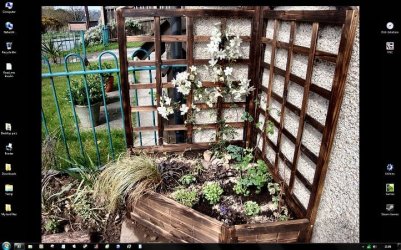
OK that back\blank area of desktop is determined by the size of the picture used. I do exactly that left and right to make the icons clearer.

Like this. My res is 1680x1050.
Image1.jpg

Is this what you mean ?
 

My Computer

Computer Manufacturer/Model Number
DIY
OS
Windows 7 home premium x64
CPU
AMD FX-4100 AM3+ 3.6GHz 12MB Black Edition
Motherboard
Asus M5A97 Pro
Memory
Crsair vengeance 12Gb DDR3 1600MHz CL9
Graphics Card(s)
Asus GTX 560 1GB
Sound Card
Realtek onboard
Monitor(s) Displays
Hanns G 1680x1050 native
Hard Drives
OCZ 128Gb Petrol ssd
2x500 Gb Samsung
PSU
OCZ StealthXstream II 500W
Internet Speed
8Mb or better
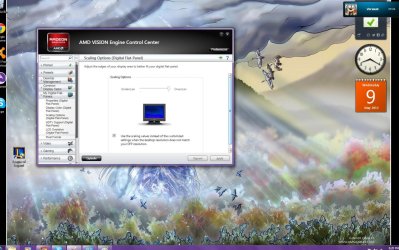
Deselect the Auto tick and move the slider to the left towards underscan.
 

My Computer

Computer Manufacturer/Model Number
Home Made
OS
Windows 7 Home Premium x64
CPU
Intel 2500k @4.5ghz 66deg max P95/IBT
Motherboard
Gigabyte Z68A-D3-B3
Memory
8 Gigs Patriot Viper 2 Extreme @1600
Graphics Card(s)
EVGA GTX 580 3 GIG 35degrees idle
Sound Card
Nvidia HD audio via HDMI to 7.1 Receiver
Monitor(s) Displays
32" Olevia hdtv
Screen Resolution
1080p
Hard Drives
64gig SSD(OS/Apps)
250gig (Files and Dox)
1tb (imaging and backup)
PSU
Corsair vx550w
Case
Thermaltake V3 black
Cooling
CM 212+(push n pull) 4 case fans
Keyboard
Logitech wireless Combo, G13
Mouse
G300
Internet Speed
40mps
Other Info
Two others up and running; C2D E5200/MSI G41M-P26/Corsair XMS3 8gb/GTS 250 1gb and C2D E8200/xFx 750sli/8gb Corsair Dominator/2x EVGA 550ti
Working on; i2600 Build...
HP DV6
@Work I use a Lenovo 5536B8U + Lenovo U300s
The thing is I can't use it even if I deselect it
 

My Computer

OS
Window 7 Ultimate x64
OK that back\blank area of desktop is determined by the size of the picture used. I do exactly that left and right to make the icons clearer.

Like this. My res is 1680x1050.
View attachment 211101

Is this what you mean ?

it's not about the picture. I can't fit my resolution with the screen because for some reason, all resolution for me a bit cut-off around it, like in my screenshot
 

My Computer

OS
Window 7 Ultimate x64
he can only see half of his task bar. as if the pic is too big for the screen. unfortunateley i cant help u tho sorry. its not an issue ive come avross before
 

My Computer

Computer type
PC/Desktop
Computer Manufacturer/Model Number
Custom build
OS
Win7 Home Premium x64 SP1
CPU
i7 4770k
Motherboard
Asus maximus VI Hero
Memory
8Gb Kingston HyperX Beast 2400MHz @2133MHz 11-12-11-30
Graphics Card(s)
MSI GTX 780ti Gaming Oc x2
Sound Card
Onboard ROG SupremeFX
Monitor(s) Displays
Asus VG248QE
Screen Resolution
3840X1080 144Hz
Hard Drives
Samung Evo 256Gb, OCZ Agility4 128Gb
1x1TB hitachi storage
PSU
EVGA Supernova 1000w Platinum
Case
Corsair Air 540
Cooling
Corsair H100i
Keyboard
Coolermaster Quickfire Pro
Mouse
Corsair M65 RGB
Internet Speed
74mb dwn/16up
Antivirus
MSE,Malwarebytes
Browser
Chrome
I don't really understand what you mean, the slider doesn't make a difference or you can't even use the slider? Does your monitor have a DVI port? I would usually just look up hardware specs, but I can't find your monitor. Are you able to set a custom resolution?
 

My Computer

Computer Manufacturer/Model Number
Home Made
OS
Windows 7 Home Premium x64
CPU
Intel 2500k @4.5ghz 66deg max P95/IBT
Motherboard
Gigabyte Z68A-D3-B3
Memory
8 Gigs Patriot Viper 2 Extreme @1600
Graphics Card(s)
EVGA GTX 580 3 GIG 35degrees idle
Sound Card
Nvidia HD audio via HDMI to 7.1 Receiver
Monitor(s) Displays
32" Olevia hdtv
Screen Resolution
1080p
Hard Drives
64gig SSD(OS/Apps)
250gig (Files and Dox)
1tb (imaging and backup)
PSU
Corsair vx550w
Case
Thermaltake V3 black
Cooling
CM 212+(push n pull) 4 case fans
Keyboard
Logitech wireless Combo, G13
Mouse
G300
Internet Speed
40mps
Other Info
Two others up and running; C2D E5200/MSI G41M-P26/Corsair XMS3 8gb/GTS 250 1gb and C2D E8200/xFx 750sli/8gb Corsair Dominator/2x EVGA 550ti
Working on; i2600 Build...
HP DV6
@Work I use a Lenovo 5536B8U + Lenovo U300s
I don't really understand what you mean, the slider doesn't make a difference or you can't even use the slider? Does your monitor have a DVI port? I would usually just look up hardware specs, but I can't find your monitor. Are you able to set a custom resolution?

I cant use the slider, its always greyed out regarded of the tick box. I use HDMI and yes it has a DVI port, but I want to use HDMI. I can set a custom resolution, but still get the same problem.
 

My Computer

OS
Window 7 Ultimate x64
okay, well, I have exhausted my limited knowledge of the catalyst control center. I will see if I can find you some help.
 

My Computer

Computer Manufacturer/Model Number
Home Made
OS
Windows 7 Home Premium x64
CPU
Intel 2500k @4.5ghz 66deg max P95/IBT
Motherboard
Gigabyte Z68A-D3-B3
Memory
8 Gigs Patriot Viper 2 Extreme @1600
Graphics Card(s)
EVGA GTX 580 3 GIG 35degrees idle
Sound Card
Nvidia HD audio via HDMI to 7.1 Receiver
Monitor(s) Displays
32" Olevia hdtv
Screen Resolution
1080p
Hard Drives
64gig SSD(OS/Apps)
250gig (Files and Dox)
1tb (imaging and backup)
PSU
Corsair vx550w
Case
Thermaltake V3 black
Cooling
CM 212+(push n pull) 4 case fans
Keyboard
Logitech wireless Combo, G13
Mouse
G300
Internet Speed
40mps
Other Info
Two others up and running; C2D E5200/MSI G41M-P26/Corsair XMS3 8gb/GTS 250 1gb and C2D E8200/xFx 750sli/8gb Corsair Dominator/2x EVGA 550ti
Working on; i2600 Build...
HP DV6
@Work I use a Lenovo 5536B8U + Lenovo U300s
As a test, connect using DVI and see if the problem still happens.
 

My Computer

Computer Manufacturer/Model Number
Dell XPS 15 L502x
OS
Windows 7 Ultimate x64 SP1
CPU
Core i7-2670QM
Memory
8GB DDR3 PC3-10600
Graphics Card(s)
Intel HD Graphics 3000 + GeForce GT 540M
Screen Resolution
1920x1080
Hard Drives
1TB 5400RPM Seagate
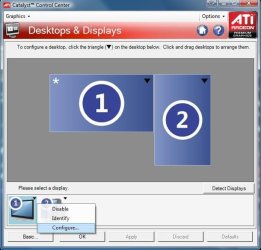
Had a search around. Most people are fixing this with the overscan settings at 1920x1080. They are saying it only works (adjustments available) at 1080P, which 1650x1050 is not. Also saw a tip to configure the monitor 1st, then try:

catalyst98overscan.jpg

I'm afraid I don't have CCC (Nvidia), but This will likely turn out to be an HDMI/1650x1050 issue. Sorry if none of this helps, but if you use DVI, you will loose nothing over HDMI if your monitor does not also have audio. Both are digital signals, but HDMI is more picky where format is involved. A Guy
 

My Computer

Computer type
PC/Desktop
OS
Windows 10 Home x64
CPU
INTEL Core i5-750 Quad-Core 3.37GHz
Motherboard
ASUS P7P55D
Memory
HyperX Fury Black Series 8GB (2 x 4GB) 1866Mhz
Graphics Card(s)
EVGA GeForce GTX 750 Superclocked 1GB 128-Bit GDDR5
Monitor(s) Displays
LG 32MA68HY 32" IPS
Screen Resolution
1920 x 1080
Hard Drives
Samsung 840 Evo 120GB, SEAGATE 500GB Barracuda® 7200.12, SATA 3 Gb/s, 7200 RPM, 16MB cache
PSU
ANTEC TruePower New TP-550, 80 PLUS, 550W
Case
ANTEC Three Hundred Illusion
Cooling
COOLER MASTER Hyper 212 Plus, 4 x 120mm 1 x 140mm Noctua's
Internet Speed
85 + Mbps
Antivirus
Avast
Browser
Vivaldi
The DVI works fine with no problem, but the HDMI looks way better and it only goes up to 1600x1200 with the DVI. So my problem still remains.
 

My Computer

OS
Window 7 Ultimate x64
HDMI and DVI are the same video signal - HDMI just has an audio channel. Your monitor's native resolution is 1650x1050, and HDMI at 1080p looks terrible, so there's no need to go any higher than 1650x1050. If DVI works, why not use it?

You say you have the latest drivers - what version are you running?
 

My Computer

Computer Manufacturer/Model Number
Dell XPS 15 L502x
OS
Windows 7 Ultimate x64 SP1
CPU
Core i7-2670QM
Memory
8GB DDR3 PC3-10600
Graphics Card(s)
Intel HD Graphics 3000 + GeForce GT 540M
Screen Resolution
1920x1080
Hard Drives
1TB 5400RPM Seagate
HDMI and DVI are the same video signal - HDMI just has an audio channel. Your monitor's native resolution is 1650x1050, and HDMI at 1080p looks terrible, so there's no need to go any higher than 1650x1050. If DVI works, why not use it?

You say you have the latest drivers - what version are you running?

My monitor has audio as well and I don't have speakers. I got my updates from here ATI Catalyst
downloaded the latest one.

Im currently using DVI, but if I can use HDMI, I would like to fix the problem and use it.
 

My Computer

OS
Window 7 Ultimate x64
check your monitors direct setting if there is a option "overscan" and set it to off
 

My Computer

Computer Manufacturer/Model Number
custom
OS
Windows 7 Ultimate x64
CPU
amd phenom II x4 940 processor
Motherboard
Gigabyte-GA-MA790x-UD3P
Memory
8gig ddr2
Graphics Card(s)
nvidida geforce 470 gtx
Sound Card
builtin .realteak
Monitor(s) Displays
Benq 2420hd
Solved?
 

My Computer

Computer Manufacturer/Model Number
Home Made
OS
Windows 7 Home Premium x64
CPU
Intel 2500k @4.5ghz 66deg max P95/IBT
Motherboard
Gigabyte Z68A-D3-B3
Memory
8 Gigs Patriot Viper 2 Extreme @1600
Graphics Card(s)
EVGA GTX 580 3 GIG 35degrees idle
Sound Card
Nvidia HD audio via HDMI to 7.1 Receiver
Monitor(s) Displays
32" Olevia hdtv
Screen Resolution
1080p
Hard Drives
64gig SSD(OS/Apps)
250gig (Files and Dox)
1tb (imaging and backup)
PSU
Corsair vx550w
Case
Thermaltake V3 black
Cooling
CM 212+(push n pull) 4 case fans
Keyboard
Logitech wireless Combo, G13
Mouse
G300
Internet Speed
40mps
Other Info
Two others up and running; C2D E5200/MSI G41M-P26/Corsair XMS3 8gb/GTS 250 1gb and C2D E8200/xFx 750sli/8gb Corsair Dominator/2x EVGA 550ti
Working on; i2600 Build...
HP DV6
@Work I use a Lenovo 5536B8U + Lenovo U300s
Back
Top