Solved Please Help ::: Windows 7 notebook -> How format

Pear3

Banned
Local time
7:19 AM
Messages
2
Hello,

Does anyone please know how to fully format a Windows 7 notebook?.
So all files are deleted, and the common folk (repair tech guy at the shop) can't use a quick method to try and restore files.

Example:
Anyone can download some software and do the recovery thing, and while there's more "advanced" ways than that I'm not talking or care about the "advanced" ways, just normal proper formatting so when the hard drive is formatted you the common Recovery tools can't 'recover' anything pretty much.

So its doing a full format on a notebook (no disc drive), but has USB slots.


Any idea please? ,


Thank You very very much.
 

My Computer

Computer type
Laptop
Computer Manufacturer/Model Number
Laptop
OS
Windows 7 x32
Insert a bootable Windows 7 USB installer into the computer as if you were going to install. When the Languages Screen appears, do the following:

1. Type SHIFT+F10 and hit enter - a command window will open.
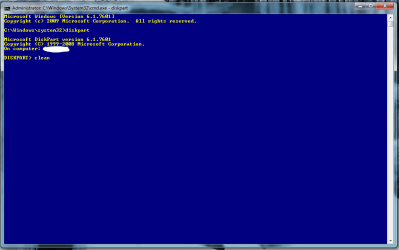
2. Type DISKPART and hit enter - you should see a screen as shown below.
3. Now type CLEAN and hit enter - this will wipe the disk and make the contents unreadable
4. Close the command window and shut-down the computer

You are done.

1.PNG

If you do not have a bootable Windows 7 USB installer, use this tutorial instead:
http://www.sevenforums.com/tutorials/233819-darik-s-boot-nuke-use-secure-wipe-hard-drive.html

Use the "autonuke" option. Make sure all other devices are unplugged first!
 

My Computer

Computer type
PC/Desktop
Computer Manufacturer/Model Number
Golden Mk. I.4
OS
Windows 10 Pro x64 ; Xubuntu x64
CPU
Intel i7 860 @ 2.80 GHz O/C'ed to 4.0GHz
Motherboard
Gigabyte P55A-UD3R Rev.1. Award BIOS F13
Memory
16GB Corsair Vengance DDR3 @ 661 MHz Dual Channel (9-9-9-24)
Graphics Card(s)
EVGA NVidia GTX 560 1024MB
Sound Card
Realtek Integrated
Monitor(s) Displays
Dual Samsung SyncMaster 2494HS
Screen Resolution
1920*1080 and 1920*1080
Hard Drives
1*Samsung 840 EVO 120GB SSD;
1*OCZ Vertex 2 60GB SSD;
2*Samsung F3 SpinPoint 1TB in RAID0;
1*Samsung F1 SpinPoint 1TB;
2*Western Digital 1TB External USB 3.0
1*Western Digital 500GB External USB 3.0
1*Seagate 500GB External USB 2.0
PSU
Thermaltake ToughPower QFan 750W
Case
Thermaltake Element S VK60001W2Z
Cooling
Corsair H60 Water Cooling, 2*230mm and 2*80mm case fans
Keyboard
Logitech G110
Mouse
Logitech MX518
Hello Sir,

THANK YOU VERY VERY MUCH.

Great helpful post, 100%. And thank you very much for the screenshot.
+rep.

Great user you are, thank you again!!!
 

My Computer

Computer type
Laptop
Computer Manufacturer/Model Number
Laptop
OS
Windows 7 x32
:thumbsup:
 

My Computer

Computer type
PC/Desktop
Computer Manufacturer/Model Number
Golden Mk. I.4
OS
Windows 10 Pro x64 ; Xubuntu x64
CPU
Intel i7 860 @ 2.80 GHz O/C'ed to 4.0GHz
Motherboard
Gigabyte P55A-UD3R Rev.1. Award BIOS F13
Memory
16GB Corsair Vengance DDR3 @ 661 MHz Dual Channel (9-9-9-24)
Graphics Card(s)
EVGA NVidia GTX 560 1024MB
Sound Card
Realtek Integrated
Monitor(s) Displays
Dual Samsung SyncMaster 2494HS
Screen Resolution
1920*1080 and 1920*1080
Hard Drives
1*Samsung 840 EVO 120GB SSD;
1*OCZ Vertex 2 60GB SSD;
2*Samsung F3 SpinPoint 1TB in RAID0;
1*Samsung F1 SpinPoint 1TB;
2*Western Digital 1TB External USB 3.0
1*Western Digital 500GB External USB 3.0
1*Seagate 500GB External USB 2.0
PSU
Thermaltake ToughPower QFan 750W
Case
Thermaltake Element S VK60001W2Z
Cooling
Corsair H60 Water Cooling, 2*230mm and 2*80mm case fans
Keyboard
Logitech G110
Mouse
Logitech MX518
Back
Top