please help with privileges i think

eldinv

New member
Guru
Local time
4:21 AM
Messages
560
Location
New Hampshire
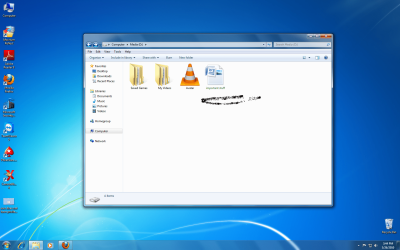
I posted in the wrong section last night. There are two folders that I cant access (media made with convertxtodvd) and a microsoft office .docx file. i dont remember if i did something to the files in utlimate, i messed around with no sharing and maybe blocking those files. but it never worked.

now when i install windows pro, i was able to access some of the files that were on my secondary hard drive except those two folders and one docx. file

i used tutorial that shows you "take ownership". did it in regular windows mode and safe mode nothing, the black box quickly affears and disappears. im getting scared cause that one doc is very important with ssn# and doctors informations and meds, just stuff i kept putting in over the years.. serials numbers to games.. im scrwed..

please look and see if you can help me, before i have a melt down. those other two folders are just media and if there lost 200GB well thats my fault for tryin to mess with them... heres a screeny of what it looks like. :cry::cry::cry:
 

Attachments

  • user does not have privileges.png
    user does not have privileges.png
    64.3 KB · Views: 8
  • green title.png
    green title.png
    315 KB · Views: 6

My Computers

System One System Two

  • Computer type
    PC/Desktop
    Computer Manufacturer/Model Number
    PowerSpec G164
    OS
    WIN10
    CPU
    AMD Ryzen 5 3600 6-Core Processor 3.59 GHz
    Memory
    16.0 GB
    Internet Speed
    VERY FAST>>>!!!
  • Antivirus
    ESET Security Premium
1.try to open it with notepad or wordpad to recover the data
2.check if the file set as read-only
3.rename the file as .txt and try opening it
 

My Computer

OS
window's 7
CPU
core 2 quad
Motherboard
gigabyte
Memory
2gb corsair
Graphics Card(s)
ati hd4850
Monitor(s) Displays
lg
Screen Resolution
1600 X 900
Case
power logic
Other Info
none of the spec above is accurate
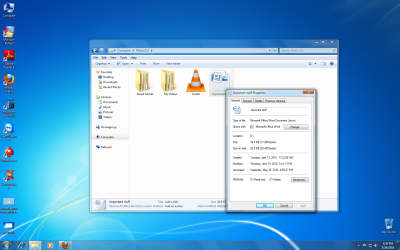
cant open to save as txt, was trying to open with word pad and notepad before i even reinstall micrsoft office, heres where i think the problem is but dont know how to bring the settings back to default


under groups or user names why so many....it just me the administrator
 

Attachments

  • properties general.png
    properties general.png
    340.9 KB · Views: 4
  • properties security.png
    properties security.png
    343.7 KB · Views: 4

My Computers

System One System Two

  • Computer type
    PC/Desktop
    Computer Manufacturer/Model Number
    PowerSpec G164
    OS
    WIN10
    CPU
    AMD Ryzen 5 3600 6-Core Processor 3.59 GHz
    Memory
    16.0 GB
    Internet Speed
    VERY FAST>>>!!!
  • Antivirus
    ESET Security Premium
ive right click properties and went to security and mess around there to try to obtain access to this file.


please help me
 

My Computers

System One System Two

  • Computer type
    PC/Desktop
    Computer Manufacturer/Model Number
    PowerSpec G164
    OS
    WIN10
    CPU
    AMD Ryzen 5 3600 6-Core Processor 3.59 GHz
    Memory
    16.0 GB
    Internet Speed
    VERY FAST>>>!!!
  • Antivirus
    ESET Security Premium
basically this is the problem where you files were encrypted by the previous version of windows.

Try this
Recover encrypted files or folders

or try this elcomsoft software
- Encrypted files retrieval application
 

My Computer

OS
window's 7
CPU
core 2 quad
Motherboard
gigabyte
Memory
2gb corsair
Graphics Card(s)
ati hd4850
Monitor(s) Displays
lg
Screen Resolution
1600 X 900
Case
power logic
Other Info
none of the spec above is accurate
basically this is the problem where you files were encrypted by the previous version of windows.

Try this
Recover encrypted files or folders

or try this elcomsoft software
- Encrypted files retrieval application

You must have a backup copy of your encryption key and related certificate

that wont work dont have it, how about i dual boot with windows utlimate 32 and try and remove those locks?
 

My Computers

System One System Two

  • Computer type
    PC/Desktop
    Computer Manufacturer/Model Number
    PowerSpec G164
    OS
    WIN10
    CPU
    AMD Ryzen 5 3600 6-Core Processor 3.59 GHz
    Memory
    16.0 GB
    Internet Speed
    VERY FAST>>>!!!
  • Antivirus
    ESET Security Premium
if you have your previous windows.you can try to decrypt it from there.copy everything and backup everything
 

My Computer

OS
window's 7
CPU
core 2 quad
Motherboard
gigabyte
Memory
2gb corsair
Graphics Card(s)
ati hd4850
Monitor(s) Displays
lg
Screen Resolution
1600 X 900
Case
power logic
Other Info
none of the spec above is accurate
Back
Top