
Please Help with TV display

xesvuli420

New member
Local time
11:26 PM
Messages
25
Well I had a HP ze4115 hooked to my 56" RCA DVI HDTV (D56W20) with a S-Video cable. It was blurry but it was the best I could do with that laptop.

With the HP, 800x600 was the best looking res. for my TV. Like I said, it was blurry, but it did take up the entire screen.

I decided to buy a new laptop, and since hooking it to my TV was the number 1 priority, this time I picked out a laptop with a VGA, AND HDMI output. (Nothing new has a DVI output) However both the VGA, and the HDMI both have converter cables to DVI.

So I got excited, and bought a HDMI to DVI cable, expecting a HUGE difference over the S-video. Both laptop, and TV are HDCP complient so I got lucky.

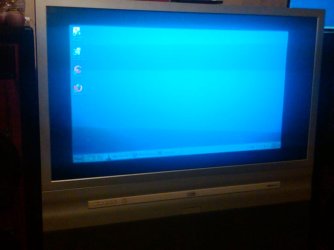
Well, now I got everything hooked up, but there is a problem! For some reason with the HDMI-DVI hookup, my TV display looks like its been zoomed out, and it flickers ALOT (see attachment below)

Someone please help me out, I don't know what to do, at this point, I miss my S-video! but if this laptop isn't going to work, then I need to take it back.

I have this thread set to Instant Email Notification, So I will be standing buy to answer any questions you have. Please help me figure this mess out!

Thanks in advance!
 

Attachments
  • IMG00104-20091203-0006.jpg
    IMG00104-20091203-0006.jpg
    45.5 KB · Views: 107

My Computer

OS
Duh
Updaate

ok, Some how I tricked the computer into going into a 720x480 display that took up the entire screen. Actually it is a little TOO BIG (pictured below).

At first when I went to 720x480 it stayed the same, but I set the display up to "extend" instead of "clone", then went on the display settings and changed it.

Then I put it back to "clone" and it stayed large. If I could just find a way to resize the display a hair, I could live with the HUGE MENUS.

Seriously the display on the TV looks great, just a little to big
 

Attachments

  • IMG00105-20091203-0133.jpg
    IMG00105-20091203-0133.jpg
    68.6 KB · Views: 128

My Computer

OS
Duh
Set the resolution and refresh rate to the max the tv can handle. Then adjust using overscan/underscan setting in the Catalyst Control Center.
 

My Computer

Computer Manufacturer/Model Number
self built
OS
7600.20510 x86
CPU
P4 550 3.4 GHz HT running at 3.5 GHz
Motherboard
MSI PM8M3-V (MS-7211 v1.x) Micro-ATX mainboard
Memory
OCZ 2 GB(2x1GB) DDR400mHz running @ 414 mHz
Graphics Card(s)
HIS Radeon HD 3850 IceQ 3 Turbo HDMI Dual DL-DVI AGP
Sound Card
MOTU Traveler firewire studio interface 192 kHz 24 bit
Monitor(s) Displays
22" widescreen Acer X223W LCD, 17" Compaq P75 CRT
Screen Resolution
1680x1050 and 1280x1024
Hard Drives
SATA I x2 WD, 400 GB and 120 GB, SATA 2 WD Caviar Black 1 TB
PSU
350W generic
Case
Cybertronpc, it glows blue
Cooling
stock cpu fan, Ice-Q 3 gpu and system, many case fans
Keyboard
Logitch Classical Keyboard 200
Mouse
Logitech Mediaplay cordless
Internet Speed
1792/448 kbits/sec
Other Info
SATA II PCI fake RAID adapter, 1 GB Readyboost, original ATI Remote Wonder (even works with WMC perfectly), Logitech Rumblepad 2 game controller x2
Its not a ati card

Its a Dell studio 15
with a Intel card

BTW noticed last night that if I shut the lid, the display on the TV changes back to the zoomed out display like on the first picture. When I re-open the lid, the TV display goes back to the LARGE display

This wont work either because the laptop has to be closed. So I am back where I started with the zoomed out res.

It seems that when I clone the display, I can only have one of the res. settings for both displays.

Any ideas anyone?
 

My Computer

OS
Duh
I don't get why the resolution is so low; both Laptop and TV have 16:9 native, you ought to be able to easily set them to their native res by simple cloning.
 

My Computer

Computer Manufacturer/Model Number
SevenForums
OS
7 Prof
CPU
Q9550
Motherboard
Maximus II Formula
Memory
2x2 Mushkin Ascent 8500
Graphics Card(s)
4870X2
Sound Card
X-Fi Xtreme Gamer
Monitor(s) Displays
LN32A550
Screen Resolution
1920x1080
Hard Drives
Intel G2 80GB
5x1TB
PSU
Corsair 1000
Case
Cosmos
Cooling
Yates^13
Keyboard
G15v1
Mouse
MX518
Internet Speed
6Mbps
I'm with you brotha! I've hooked up a lot of cpu tv combos and never seen this. Any ideas?
 

My Computer

OS
Duh
Check Intel's site for the latest driver. Sorry I can't help much more than that because I'm unfamiliar with their graphic solutions. Maybe it's all you need though.
 

My Computer

Computer Manufacturer/Model Number
self built
OS
7600.20510 x86
CPU
P4 550 3.4 GHz HT running at 3.5 GHz
Motherboard
MSI PM8M3-V (MS-7211 v1.x) Micro-ATX mainboard
Memory
OCZ 2 GB(2x1GB) DDR400mHz running @ 414 mHz
Graphics Card(s)
HIS Radeon HD 3850 IceQ 3 Turbo HDMI Dual DL-DVI AGP
Sound Card
MOTU Traveler firewire studio interface 192 kHz 24 bit
Monitor(s) Displays
22" widescreen Acer X223W LCD, 17" Compaq P75 CRT
Screen Resolution
1680x1050 and 1280x1024
Hard Drives
SATA I x2 WD, 400 GB and 120 GB, SATA 2 WD Caviar Black 1 TB
PSU
350W generic
Case
Cybertronpc, it glows blue
Cooling
stock cpu fan, Ice-Q 3 gpu and system, many case fans
Keyboard
Logitch Classical Keyboard 200
Mouse
Logitech Mediaplay cordless
Internet Speed
1792/448 kbits/sec
Other Info
SATA II PCI fake RAID adapter, 1 GB Readyboost, original ATI Remote Wonder (even works with WMC perfectly), Logitech Rumblepad 2 game controller x2
Check Intel's site for latest driver, Or Windows update will do it for you. Next, fiddle with just the laptop display to set it to the highest resolution, in this case should be the native. Next plug in the TV, use the keyboard shortcut for cloning displays in Win7, I forget what it is off the top my head. Hope that helps.
 

My Computer

Computer Manufacturer/Model Number
SevenForums
OS
7 Prof
CPU
Q9550
Motherboard
Maximus II Formula
Memory
2x2 Mushkin Ascent 8500
Graphics Card(s)
4870X2
Sound Card
X-Fi Xtreme Gamer
Monitor(s) Displays
LN32A550
Screen Resolution
1920x1080
Hard Drives
Intel G2 80GB
5x1TB
PSU
Corsair 1000
Case
Cosmos
Cooling
Yates^13
Keyboard
G15v1
Mouse
MX518
Internet Speed
6Mbps
Windows Update drivers for video are highly recommended to stay away from. They have a weird way of messing up. Always get drivers for video from manufacturer's site(s).
 

My Computer

Computer Manufacturer/Model Number
self built
OS
7600.20510 x86
CPU
P4 550 3.4 GHz HT running at 3.5 GHz
Motherboard
MSI PM8M3-V (MS-7211 v1.x) Micro-ATX mainboard
Memory
OCZ 2 GB(2x1GB) DDR400mHz running @ 414 mHz
Graphics Card(s)
HIS Radeon HD 3850 IceQ 3 Turbo HDMI Dual DL-DVI AGP
Sound Card
MOTU Traveler firewire studio interface 192 kHz 24 bit
Monitor(s) Displays
22" widescreen Acer X223W LCD, 17" Compaq P75 CRT
Screen Resolution
1680x1050 and 1280x1024
Hard Drives
SATA I x2 WD, 400 GB and 120 GB, SATA 2 WD Caviar Black 1 TB
PSU
350W generic
Case
Cybertronpc, it glows blue
Cooling
stock cpu fan, Ice-Q 3 gpu and system, many case fans
Keyboard
Logitch Classical Keyboard 200
Mouse
Logitech Mediaplay cordless
Internet Speed
1792/448 kbits/sec
Other Info
SATA II PCI fake RAID adapter, 1 GB Readyboost, original ATI Remote Wonder (even works with WMC perfectly), Logitech Rumblepad 2 game controller x2
well I did goto device manager for the display driver and click on update. It said it was the most up to date
 

My Computer

OS
Duh
You really need an HDMI connection for the picture carity.

The adapyrer is downgrading the signal giving you poor results.

I have a 8500GT Nvidia with HDMI out and iy looks great.
 

My Computer

Computer Manufacturer/Model Number
Cheap $399.00 E-Machine
OS
Windows 7 Pro & Vista Home Premium
CPU
Athlon 64 3800+ (Orleans) 2.40GHz
Motherboard
Winfast
Memory
2GB DDR2 RAM DIMM
Graphics Card(s)
NVIDIA GeForce 8500 GT 512 MB memory HDMI out
Sound Card
creative X-Fi Exteme 7..1 channel
Monitor(s) Displays
Acer V223W 22" widescreen DVI
Screen Resolution
1680x1050
Hard Drives
WDC WD5 500GB
WDC WD25 250GB
PSU
OCZ 550 watt
Case
Gateway
Cooling
2 fans
Keyboard
Dell
Mouse
Sony Vaio
Internet Speed
18MB/s down - .72MB /s up
Your TV has component input, you can try using a Svideo-Component adapters. Let us know how that turns out. I actually have a few such adapters laying around I think, video card purchases usually come with them.
 

My Computer

Computer Manufacturer/Model Number
SevenForums
OS
7 Prof
CPU
Q9550
Motherboard
Maximus II Formula
Memory
2x2 Mushkin Ascent 8500
Graphics Card(s)
4870X2
Sound Card
X-Fi Xtreme Gamer
Monitor(s) Displays
LN32A550
Screen Resolution
1920x1080
Hard Drives
Intel G2 80GB
5x1TB
PSU
Corsair 1000
Case
Cosmos
Cooling
Yates^13
Keyboard
G15v1
Mouse
MX518
Internet Speed
6Mbps

My Computer

Computer Manufacturer/Model Number
Cheap $399.00 E-Machine
OS
Windows 7 Pro & Vista Home Premium
CPU
Athlon 64 3800+ (Orleans) 2.40GHz
Motherboard
Winfast
Memory
2GB DDR2 RAM DIMM
Graphics Card(s)
NVIDIA GeForce 8500 GT 512 MB memory HDMI out
Sound Card
creative X-Fi Exteme 7..1 channel
Monitor(s) Displays
Acer V223W 22" widescreen DVI
Screen Resolution
1680x1050
Hard Drives
WDC WD5 500GB
WDC WD25 250GB
PSU
OCZ 550 watt
Case
Gateway
Cooling
2 fans
Keyboard
Dell
Mouse
Sony Vaio
Internet Speed
18MB/s down - .72MB /s up

My Computer

Computer Manufacturer/Model Number
SevenForums
OS
7 Prof
CPU
Q9550
Motherboard
Maximus II Formula
Memory
2x2 Mushkin Ascent 8500
Graphics Card(s)
4870X2
Sound Card
X-Fi Xtreme Gamer
Monitor(s) Displays
LN32A550
Screen Resolution
1920x1080
Hard Drives
Intel G2 80GB
5x1TB
PSU
Corsair 1000
Case
Cosmos
Cooling
Yates^13
Keyboard
G15v1
Mouse
MX518
Internet Speed
6Mbps
Problem is,. I don't see anywhere in the post that xesvuli420 has component inputs on the TV
 

My Computer

Computer Manufacturer/Model Number
Cheap $399.00 E-Machine
OS
Windows 7 Pro & Vista Home Premium
CPU
Athlon 64 3800+ (Orleans) 2.40GHz
Motherboard
Winfast
Memory
2GB DDR2 RAM DIMM
Graphics Card(s)
NVIDIA GeForce 8500 GT 512 MB memory HDMI out
Sound Card
creative X-Fi Exteme 7..1 channel
Monitor(s) Displays
Acer V223W 22" widescreen DVI
Screen Resolution
1680x1050
Hard Drives
WDC WD5 500GB
WDC WD25 250GB
PSU
OCZ 550 watt
Case
Gateway
Cooling
2 fans
Keyboard
Dell
Mouse
Sony Vaio
Internet Speed
18MB/s down - .72MB /s up
Your TV has component input, you can try using a Svideo-Component adapters. Let us know how that turns out. I actually have a few such adapters laying around I think, video card purchases usually come with them.

No S-video output on laptop
 

My Computer

OS
Duh
Problem is,. I don't see anywhere in the post that xesvuli420 has component inputs on the TV

lol i guess i need to explain all options

ON LAPTOP
HDMI
VGA

ON TV
S-Video
2xComponent
2xComposite
DVI-D
Co-Axial*


Sorry for the confusion guys!
 

My Computer

OS
Duh
Thanks for the info.

Your beast connection with your options would be use a HDMI adapter to component video.

If they make one.

To you happen to have a home theater receiver?
 

My Computer

Computer Manufacturer/Model Number
Cheap $399.00 E-Machine
OS
Windows 7 Pro & Vista Home Premium
CPU
Athlon 64 3800+ (Orleans) 2.40GHz
Motherboard
Winfast
Memory
2GB DDR2 RAM DIMM
Graphics Card(s)
NVIDIA GeForce 8500 GT 512 MB memory HDMI out
Sound Card
creative X-Fi Exteme 7..1 channel
Monitor(s) Displays
Acer V223W 22" widescreen DVI
Screen Resolution
1680x1050
Hard Drives
WDC WD5 500GB
WDC WD25 250GB
PSU
OCZ 550 watt
Case
Gateway
Cooling
2 fans
Keyboard
Dell
Mouse
Sony Vaio
Internet Speed
18MB/s down - .72MB /s up
Back
Top