Please help

DG8

New member
Member
Local time
12:58 PM
Messages
33
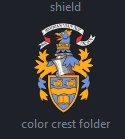
Before I changed to Windows 7 from Vista all my document folders were customised with an icon I made for that particular folder which gave an instant recognition to it's contents. see attachment.

Now with windows 7 in the Documents Library some folders have retained the customised view I created others have not. The way to change the folders that was available in Vista no longer works in Windows 7

Can anyone please point me in the right direction.

Many thanks
 
Last edited:

My Computer

OS
windows 7 ultimate 32 bit

My Computer

Computer Manufacturer/Model Number
The HAFmeister (Custom)
OS
Windows 7 Ultimate x64 RTM + SP1
CPU
Intel Core i7 950 3.06GHZ (OC'd to 3.99Ghz)
Motherboard
Asus Rampage III Extreme x58 SATA 6GB & USB 3.0
Memory
6GB OCZ Reaper HPC Edition PC3-16000 (set 1606Mhz 8-8-8-26)
Graphics Card(s)
EVGA Nvidia Geforce GTX 570
Sound Card
Creative SB X-Fi Titanium Fatal1ty Professional Series
Monitor(s) Displays
Samsung SM2433BW 24" Widescreen Monitor
Screen Resolution
1920x1200
Hard Drives
Western Digital Caviar Black 500GB 32Mb Buffer SATA II
Western Digital Caviar Black 750GB 32Mb Buffer SATA II
Western Digital Caviar Blue 500GB 16Mb Buffer SATA II
Western Digital My Book Essential Edition 750GB USB
Samsung Spinpoint 2TB SATA II
PSU
Thermaltake Toughpower 1200w (Modular)
Case
CoolerMaster HAF-932
Cooling
Zalman Reserator XT and ZM-WB5 Plus - GPU uses Stock coolers
Keyboard
Logitech G510
Mouse
Logitech G9 Gaming Mouse
Internet Speed
3MB Profile - 350-400kbs (Real-Speed)
Other Info
IcyBox Hot-Swap Bay,
Logitech G27 Steering Wheel,
Xbox 360 Wirless Elite Controller with Microsoft Reciever and
Play & Charge Kit,
Belkin USB Wireless Adaptor,
GAME Generic Controller (Playstation Looky-Likey),
Epson SX125 All-in-One.
Thanks for trying to help Luckystar, I looked at your link but to be honest it looked well out of my comfort zone for me to attempt.

Thanks all the same.
 

My Computer

OS
windows 7 ultimate 32 bit
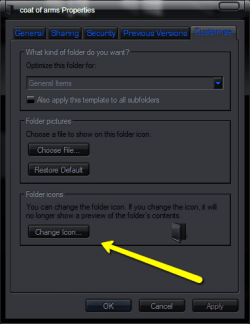
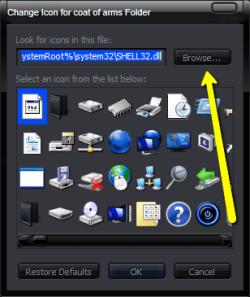
The way to change a folder icon is to click the folder you want to change, select properties / customize then select change icon you will have to browse to the location you have the folder icon stored then apply,
its easy enough just make sure you are using an ico file and not a png
 

My Computer

Computer Manufacturer/Model Number
Hewlett packard/p6512uk
OS
Microsoft Windows 7 Home Premium 64-bit 7600
CPU
IIx4 amd athelon 635 processor
Motherboard
FOXCONN 2AA9
Memory
2x2gb
Graphics Card(s)
ati radeon HD 5450
Sound Card
(1) Realtek High Definition Audio (2) AMD High Definition
Monitor(s) Displays
samsung lcd tv 32"
Screen Resolution
1360x 768
Hard Drives
(1) WDC WD10 01FAES-60Z2A0 SATA Disk Device (2) Maxtor OneTouch USB Device (3) ST310003 33AS USB Device (4) WD My Book 1111 USB Device
PSU
?
Cooling
air!
Keyboard
wireless hp
Mouse
wireless Hp,optical
Internet Speed
1.10mb/s
Antivirus
MSE
Browser
Firefox
When I had Vista I could change my folders the way you described - but the tab is not there in windows7.
 
Last edited:

My Computer

OS
windows 7 ultimate 32 bit
I assure you that is the way to change a folder icon in windows seven

1
2010-09-24_1941.png
2
2010-09-24_1941_001.png
3
2010-09-24_1941_002.png
4
2010-09-24_1946.png
 

My Computer

Computer Manufacturer/Model Number
Hewlett packard/p6512uk
OS
Microsoft Windows 7 Home Premium 64-bit 7600
CPU
IIx4 amd athelon 635 processor
Motherboard
FOXCONN 2AA9
Memory
2x2gb
Graphics Card(s)
ati radeon HD 5450
Sound Card
(1) Realtek High Definition Audio (2) AMD High Definition
Monitor(s) Displays
samsung lcd tv 32"
Screen Resolution
1360x 768
Hard Drives
(1) WDC WD10 01FAES-60Z2A0 SATA Disk Device (2) Maxtor OneTouch USB Device (3) ST310003 33AS USB Device (4) WD My Book 1111 USB Device
PSU
?
Cooling
air!
Keyboard
wireless hp
Mouse
wireless Hp,optical
Internet Speed
1.10mb/s
Antivirus
MSE
Browser
Firefox
Just rename the picture inside the target folder you want shown to "Folder"

It will show just as your snip is above. You can then hide if you want.
 

My Computer

Computer Manufacturer/Model Number
Custom (Self Build)
OS
Windows 7 Home Premium 64bit
CPU
Intel Core i7 2700k
Motherboard
eVGA P67 SLI
Memory
8GB Mushkin Redline Ridgebacks @1866
Graphics Card(s)
EVGA GTX570 SC
Sound Card
XiFi Titanium HD
Monitor(s) Displays
LG W2453V
Screen Resolution
1920x1080
Hard Drives
Intel 320 80GB -- Intel X25-V 40GB --WD Black 1TB x2 -- WD Blue 640GB
PSU
Seasonic x750
Case
Corsair 600T SE White
Cooling
eVGA Superclocked CPU Cooler
Keyboard
Saitek Cyborg
Antivirus
Kaspersky
Browser
IE
Other Info
LG BD/DVD
Boohdah - I do not have a tag for customize - there is for general,sharing and previous version but no customize.

Wishmaster - your advice was productive my folders now appear the way I want them.

Cheers to both of you for taking the time to help me Blessings to you and your families.
 

My Computer

OS
windows 7 ultimate 32 bit
Back
Top