Please Microsoft - Can we get away from Drive Letters

jimbo45

New member
Guru
Gold Member
VIP
Local time
9:25 PM
Messages
5,941
Location
Hafnarfjörður IS
Hi all

Might not be a problem for a lot but I'm beginning to run out of letters for Networking disk drives on Windows systems. Once you start sharing multiple CD / DVD devices and multiple external devices (USB sticks, Ipods etc etc) and have may be 12 - 14 Virtual machines together with a decent TEST Bench set of real machines all up and running in a computer test lab this becomes a real pain.

Isn't it about time to get rid of the C:\ type nomenclenture (originated way back in the 8 bit Intel 8086 MS DOS days or even before).

Even the UNC system is pretty OK (\\name\mount) .

I'm not sure what type of change would be needed to the file system but IMO the change is LONG LONG overdue. Why on earth we are still stuck with this system which has been around "Since Pontius was a Pilot" I can't imagine.

It really wouldn't be a major problem to be compatable with earlier systems -- you could easily have a simple internal map say references to C:\ would be replaced by \\Mountpoint whenever the I/O was requested. Overhead would be very small.

(In any case it's really time to change the NTFS system -- but that's another topic entirely which would be a bit more complex).

Cheers

jimbo
 

My Computer My Computer

Computer type
PC/Desktop
Computer Manufacturer/Model Number
Custom built, several laptops HP/ASUS
OS
Linux CENTOS 7 / various Windows OS'es and servers
CPU
Intel i7 Intel i5
Memory
8GB, 16GB
Graphics Card(s)
On Motherboard
Sound Card
Realtek HD audio
Monitor(s) Displays
Apple Cinema display, Samsung LCD
Screen Resolution
1920 X 1080
Hard Drives
4 X 1TB SATA
Mouse
Toshiba wireless laser
Internet Speed
> 20MB up
I do like the way linux refers to hard disks, its very logical.

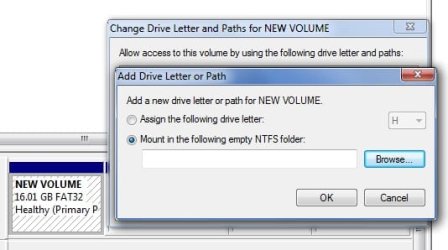
You can sort of get rid of drive letters in windows explorer by unticking show drive letters in options.
 

My Computer My Computer

Computer Manufacturer/Model Number
self built
OS
Windows 7 Professional 64-bit
CPU
Intel E8400 3GHz
Motherboard
Intel DX48BT2
Memory
Kingston PC3-10700H 4Gb
Graphics Card(s)
XFX Radeon HD 5850 BlackEd.
Sound Card
Asus Xonar DG
Monitor(s) Displays
2x Samsung SM-T220HD 22"
Screen Resolution
1680x1050 on two monitors
Hard Drives
OCZ Vertex 2 120gb 3.5" (OS)
Seagate Momentus XT 500gb
Samsung F3 1Tb (games)
2x Samsung F1 1Tb
PSU
Thermaltake ToughPower 850w
Case
Thermaltake Armor
Cooling
Scythe Mugen II
Keyboard
Microsoft Comfort Curve USB
Mouse
Razer Diamondback 3G
Internet Speed
8128/443
Oh my Lord in heaven! It's been there for years and NOBODY USES IT!
 

Attachments

  • 1.jpg
    1.jpg
    23.7 KB · Views: 169

My Computer My Computer

Computer type
Laptop
Computer Manufacturer/Model Number
Apple
OS
El Capitan / Windows 10
CPU
i7-4980HQ
Memory
16GB
Graphics Card(s)
Iris 5200
Some of us like things the way they are. I certainly don't want great long words instead of letters thanks very much.
 

My Computer My Computer

Computer type
PC/Desktop
Computer Manufacturer/Model Number
Alienware® ALX X58
OS
Win 7 Ult SP1/Win 10 Pro (all x64)
CPU
Intel® Core™ i7-975 Extreme O/C to 4.02 GHz, 8MB Cache
Motherboard
Asus® P6T Deluxe V2 X58 LGA1366
Memory
24GB Corsair Vengeance DDR3 SDRAM at 1600MHz - 6 x 4096MB
Graphics Card(s)
1792 MB NVIDIA® GeForce® GTX 295 Dual Core
Sound Card
Onboard Soundmax® High-Definition 7.1 Performance Audio
Monitor(s) Displays
Samsung XL2370 LED backlit 23" W/S 2ms response time
Screen Resolution
1920 X 1080
Hard Drives
2 x 500gb SATA II
1 x 1TB SATA II
1 external eSATA LaCie 3TB
(Non-RAID)
PSU
Alienware® 1200 Watt Multi-GPU
Case
Alienware® P2 ALX Chassis with AlienIce™ 3.0 Video Cooling
Cooling
Alienware® High-Perf. Liquid Cooling + Acoustic Dampening
Keyboard
Microsoft® Wireless Entertainment 8000 + Logitech® G15 Wired
Mouse
Microsoft® Wireless Laser 8000 + Logitech® G9 Wired
Internet Speed
1Gb/s
Antivirus
McAfee LiveSafe
Browser
Firefox - latest
Other Info
Using non-RAID on purpose as I find RAID to be too temperamental.
Now set to AHCI
I can see your point given the amount of stuff you have going, but have to agree with Ex-Brit. The Alpha system still seems to be the simple way to go. Been using it since the advent of d. . 1.0.
 

My Computer My Computer

Computer Manufacturer/Model Number
HP Pavilion a4302f
OS
Win 7 Pro x64, VM Win XP, Win7 Pro Sandbox, Kubuntu 11
CPU
AMD Athlon(tm) II X4 640 @ 3.0 Gbz
Memory
12GB 1066MHz DDR3 SDRAM - 2x4GB, 2x2GB
Graphics Card(s)
ATI Radeon HD 4350 HD Graphics/Audio with 512MB
Sound Card
Realtek High Definition Audio
Monitor(s) Displays
1. Dell 23" SP2307, 2. Mitsublishi 40" HDTV, Hannspree 25"
Screen Resolution
1. 2048x1152, 2. 1920-1080, 3. 1920x1200
Hard Drives
Int: 1 120 Gig SSD i
1 - 2.5" 500 USB External HDD
1 -1 Tb USB External HDD
Case
Mid Tower
Cooling
Standard Fans - 5 fans (very quiet)
Keyboard
Microsoft Wireless 2000
Mouse
Microsoft Wireless Mouse 5000
Internet Speed
10 Mbit (realistically 500 Kbit - 1.2 Mbit)
Other Info
Speakers - Bose Desktop (Excellent Sound)
1 external CD|DVD\Blue-ray Recorders/Players (Sony)
Plus we can rename drives anyway.
 

My Computer My Computer

Computer type
PC/Desktop
Computer Manufacturer/Model Number
Alienware® ALX X58
OS
Win 7 Ult SP1/Win 10 Pro (all x64)
CPU
Intel® Core™ i7-975 Extreme O/C to 4.02 GHz, 8MB Cache
Motherboard
Asus® P6T Deluxe V2 X58 LGA1366
Memory
24GB Corsair Vengeance DDR3 SDRAM at 1600MHz - 6 x 4096MB
Graphics Card(s)
1792 MB NVIDIA® GeForce® GTX 295 Dual Core
Sound Card
Onboard Soundmax® High-Definition 7.1 Performance Audio
Monitor(s) Displays
Samsung XL2370 LED backlit 23" W/S 2ms response time
Screen Resolution
1920 X 1080
Hard Drives
2 x 500gb SATA II
1 x 1TB SATA II
1 external eSATA LaCie 3TB
(Non-RAID)
PSU
Alienware® 1200 Watt Multi-GPU
Case
Alienware® P2 ALX Chassis with AlienIce™ 3.0 Video Cooling
Cooling
Alienware® High-Perf. Liquid Cooling + Acoustic Dampening
Keyboard
Microsoft® Wireless Entertainment 8000 + Logitech® G15 Wired
Mouse
Microsoft® Wireless Laser 8000 + Logitech® G9 Wired
Internet Speed
1Gb/s
Antivirus
McAfee LiveSafe
Browser
Firefox - latest
Other Info
Using non-RAID on purpose as I find RAID to be too temperamental.
Now set to AHCI
Over the years, I have used that technique to eliminate drive letters. It has one disadvantage, however. When you look to see how much free space there is, the drives that are mounted in folders are not reported. That may have changed since I haven't used it in Vista or Windows 7.

Bye. :cool:

Oh my Lord in heaven! It's been there for years and NOBODY USES IT!
 

My Computer My Computer

Computer Manufacturer/Model Number
Home Brew
OS
Windows 7 Ultimate x64
CPU
i7 970
Motherboard
ASUS Rampage III GENE
Memory
9 GB
Graphics Card(s)
9600GT
Monitor(s) Displays
dual 24" Samsung
Screen Resolution
1920x1200
Hard Drives
VelociRaptor and 4TB of Hitachi RAID 0
PSU
Thermaltake toughpower W0104RU 650W
Case
Thermaltake LANBOX Lite
Internet Speed
30 Mbps Download 1 Mbps Upload (Speedtest.com)
umm... aa: bb: cc: xx: yy: zz: ?
 

My Computer My Computer

Computer Manufacturer/Model Number
CUSTOM
OS
XP/win7 x86 build 7127
CPU
Athlon64 X2 DUAL 4200+ 2.21ghz
Motherboard
ASUS K8 PRO SLI
Memory
2GB Dual Chan DDR2 Corsair
Graphics Card(s)
Nvidia 6800GT
Sound Card
nvidia
Monitor(s) Displays
19' LCD
Screen Resolution
1280x1024
Hard Drives
WD 250, 2x500, 2x1TB IDE/USB
WD 250 SATA (system)
SEAGATE 120 Sata
PSU
coolermaster 450
Case
SUPERFLOWER
Cooling
1 HDD bay fan, 5x80mm Case Fans, AEROGATE II Fan/Temp
Keyboard
MS wireless
Mouse
MS Wireless
Internet Speed
fassssssssst
Hi all
Even if you do this there's a limit to the number of Partitions (Disks) you can connect.

After 13 it just refuses to show any more disks -- since when you ADD one it will try and assign a letter anyway even changing the explorer option.

("13" in this case because 12 other devices are already allocated - Card reader - 7 devices - MULTI card reader considers each slot as a device, Floppy drive (although not used for years), 4 DVD devices.

maybe now is the time to consider "Stand alone" Network drives -- it works for printers and some "Multi-media" drives - this would also make the motherboards much simpler and sharing would also be easier as you wouldn't have to have the Host computer running.

Network throoughput would need to be improved however.

Cheers
jimbo
 

My Computer My Computer

Computer type
PC/Desktop
Computer Manufacturer/Model Number
Custom built, several laptops HP/ASUS
OS
Linux CENTOS 7 / various Windows OS'es and servers
CPU
Intel i7 Intel i5
Memory
8GB, 16GB
Graphics Card(s)
On Motherboard
Sound Card
Realtek HD audio
Monitor(s) Displays
Apple Cinema display, Samsung LCD
Screen Resolution
1920 X 1080
Hard Drives
4 X 1TB SATA
Mouse
Toshiba wireless laser
Internet Speed
> 20MB up
Hi all
Even if you do this there's a limit to the number of Partitions (Disks) you can connect.

After 13 it just refuses to show any more disks -- since when you ADD one it will try and assign a letter anyway even changing the explorer option.

("13" in this case because 12 other devices are already allocated - Card reader - 7 devices - MULTI card reader considers each slot as a device, Floppy drive (although not used for years), 4 DVD devices.

maybe now is the time to consider "Stand alone" Network drives -- it works for printers and some "Multi-media" drives - this would also make the motherboards much simpler and sharing would also be easier as you wouldn't have to have the Host computer running.

Network throoughput would need to be improved however.

Cheers
jimbo

Are you talking about running out of IRQ's? and also locally or networked "13"? I used to have this rig hosting everything on the network jim, have had well over "13" connected if you count optical drives, floppy, card reader etc.

I have now setup the network like you have mentioned, stand-alone network drives, on a network usb hub... just on that hub i can have up to 16 devices plugged into that, which like i said, was plugged into this rig. Only 1 device, printer/scanner/copier, was not a drive.

As far as thoroughput or feasability.... its pretty good. I did just for the simple task of softening the load on the primary host rig. The only down side to doing the network this way is that only 1 user at a time can have access to a particular drive. Another user can then "request" the use of the drive. So if i am listening to my music drive, no one else on the network can listen to or use the music drive while i'm listening/using it.
 

My Computer My Computer

Computer Manufacturer/Model Number
CUSTOM
OS
XP/win7 x86 build 7127
CPU
Athlon64 X2 DUAL 4200+ 2.21ghz
Motherboard
ASUS K8 PRO SLI
Memory
2GB Dual Chan DDR2 Corsair
Graphics Card(s)
Nvidia 6800GT
Sound Card
nvidia
Monitor(s) Displays
19' LCD
Screen Resolution
1280x1024
Hard Drives
WD 250, 2x500, 2x1TB IDE/USB
WD 250 SATA (system)
SEAGATE 120 Sata
PSU
coolermaster 450
Case
SUPERFLOWER
Cooling
1 HDD bay fan, 5x80mm Case Fans, AEROGATE II Fan/Temp
Keyboard
MS wireless
Mouse
MS Wireless
Internet Speed
fassssssssst
No. I love the Drive Letters. So, I won't be asking for a change.
 

My Computer My Computer

Computer type
PC/Desktop
Computer Manufacturer/Model Number
Custom build
OS
Windows 10 Professional 64-bit
CPU
Ryzen 9 5900X
Motherboard
Gigabyte X570 Aorus Master
Memory
G.Skill 3600Mhz CL16 16GB × 4
Graphics Card(s)
EVGA GeForce RTX 3070 Ti FTW3 Ultra Gaming
Sound Card
On-board
Monitor(s) Displays
Dell Alienware AW3418DW
Screen Resolution
3440x1440
Hard Drives
1×Sabrent Rocket 4 Plus 2TB nvme SSD (System, internal)
2x4TB Western Digital Blue (Internal)
1x4TB HDST 7200RPM (Internal)
PSU
Seasonic Focus Plus 850W Platinum
Case
Corsair 680X
Cooling
Stock fans + 3× Corsair QL120, Corsair H100i Platinum
Keyboard
Logitech K350
Mouse
Logitech M510
Internet Speed
120Mbits dl - 20Mbits up
Antivirus
ESET NOD32 Antivirus
Browser
Firefox (latest version)
Other Info
Headphones : Audio-Technica ATH-M50x
Scanner : Canon Canoscan LiDE 220 + Plustek OptiBook 4800
C:/Program Files/Internet Explorer/iexplore.exe

That's an example, but I would die if cmd commands looked any different. Lovin' the drive letters.
 

My Computer My Computer

Computer Manufacturer/Model Number
Acer Aspire 5610
OS
Windows 7 Professional, Windows Longhorn 4074
CPU
Intel Centrino Duo T2350 @ 1.87 GHz
Motherboard
Acer Grapevine
Memory
1GB (2x 512MB DDR2 400Mz)
Graphics Card(s)
Intel Integrated 945GM Chipset
Sound Card
On-Board RealTek HD Audio
Monitor(s) Displays
Generic PnP Monitor
Screen Resolution
1280x800
Hard Drives
160GB SATA HD
PSU
Generic PSU
Case
Acer Aspire 5610 Standard Case (U.S. Version)
Cooling
Air
Keyboard
Built-In / Random Logitech wireless keyboard
Mouse
Synaptics Touchpad / Logitech Click! optical mouse.
Internet Speed
2.57 Mbps Download / 0.29 Mbps Upload / 57ms Ping
Other Info
I call it the craptop.
Back
Top