Solved please please help dears....

NRT

New member
Power User
Local time
2:07 PM
Messages
375
Location
Kerala, India
"please wait for the system event notification service" on windows 7

hi dears,

Im having a very strange problem... when i insert a cd/dvd in my dvd drive or mount an image in daemon tools, my system hangs and 'wait' symbol comes up (This problem is not appearing everytime) ... so i planned to restart my system, while shutting down im getting this message as "please wait for the system event notification service" ... so i waited over 2 minutes.... (as my system seems hanged)... so i resetted my system by reset button... Im doing the same procedure (resetting by reset button) when i get this error... how can i fix this ??? any help ??? :cry:
 

My Computer

Computer Manufacturer/Model Number
Assembled
OS
Windows 7 Ultimate 64-bit SP1
CPU
AMD Athlon II X2 260 @ 3.2 Ghz
Motherboard
Gigabyte Technology Co., Ltd. M68MT-S2 (Socket M2)
Memory
Kingston 8.0GB Dual-Channel DDR3 @ 669MHz (9-9-9-24)
Graphics Card(s)
ASUS EAH 5450 - 1 GB
Sound Card
Realtek HD Audio
Monitor(s) Displays
23 Inch - DELL SP2309W
Screen Resolution
2048 x 1152
Hard Drives
488GB Seagate ST3500418AS ATA Device (SATA)
PSU
450W
Case
Iball - Standard Form - i8190
Cooling
Stock Cooling
Keyboard
Logitech
Mouse
Logitech
Internet Speed
1 MB/Sec
Other Info
Creative Inspire 2.1 Speakers, LITEON 24x DVD Writer
hi dears,

Im having a very strange problem... when i insert a cd/dvd in my dvd drive or mount an image in daemon tools, my system hangs and 'wait' symbol comes up (This problem is not appearing everytime) ... so i planned to restart my system, while shutting down im getting this message as "please wait for the system event notification service" ... so i waited over 2 minutes.... (as my system seems hanged)... so i resetted my system by reset button... Im doing the same procedure (resetting by reset button) when i get this error... how can i fix this ??? any help ??? :cry:

remove daemon tools as it has a file sptd.sys that causes all sorts of trouble

Please remove any CD virtualization programs such as Daemon Tools and Alcohol 120%.

They use a driver, found in your dmp,sptd.sys, that is notorious for causing BSODs.

Use this SPTD uninstaller DuplexSecure - Downloads

when you're done you can use this Freeware MagicISO Virtual CD/DVD-ROM(MagicDisc) in its place.
 

My Computer

Computer Manufacturer/Model Number
HP Pavillion dv-7 1005 Tx
OS
Win 8 Release candidate 8400
CPU
[email protected]
Memory
4 gigs
Graphics Card(s)
Nvidia 9600M
Sound Card
HD built-in
Monitor(s) Displays
17" Wxga
Screen Resolution
1440x900
Cooling
none
Internet Speed
45Mb down 5Mb up
  • Like
Reactions: JMH
thank u 4 ur kind reply....


dears,

will c u when the problem comes again..... :)
 
Last edited:

My Computer

Computer Manufacturer/Model Number
Assembled
OS
Windows 7 Ultimate 64-bit SP1
CPU
AMD Athlon II X2 260 @ 3.2 Ghz
Motherboard
Gigabyte Technology Co., Ltd. M68MT-S2 (Socket M2)
Memory
Kingston 8.0GB Dual-Channel DDR3 @ 669MHz (9-9-9-24)
Graphics Card(s)
ASUS EAH 5450 - 1 GB
Sound Card
Realtek HD Audio
Monitor(s) Displays
23 Inch - DELL SP2309W
Screen Resolution
2048 x 1152
Hard Drives
488GB Seagate ST3500418AS ATA Device (SATA)
PSU
450W
Case
Iball - Standard Form - i8190
Cooling
Stock Cooling
Keyboard
Logitech
Mouse
Logitech
Internet Speed
1 MB/Sec
Other Info
Creative Inspire 2.1 Speakers, LITEON 24x DVD Writer
Desktop or laptop? How old is the drive? What part of the world are you in?

There are three major causes:
1) Defectice drive or connection
2) Defective disks
3) Defective motherboard

Optical drives may not last as long as you think. I have had drives go bad in as little as two or three years. My experience has shown the head/drive goes out of calibration so it doesn't track/lock onto tracks - sometimes this is slow to drift out of alignment. That is, is problem shows up occassionally and gets progressively worse. Other times it just stops working (locking to a track).

Cable connections can also be a cause but if the cable has securely attached to begin with then this cause is unlikely.

Defective disks happen, such as scratched, contaminants on the surface, failure of the reflective material (can be related to humidity levels), old age (tests show degradation in as little as seven to ten years depending on material and environment). If the disk used to work (especially a purchased pressed disk) but now doesn't read, defective drive is my suspect.

Defective motherboard where the controller fails - not very likely compared to the first two listed above.

Regards,
GEWB
 

My Computer

Computer type
PC/Desktop
Computer Manufacturer/Model Number
(7 different computers booting up to 10 systems)
OS
Linux Mint / XP / Win7 Home, Pro, Ultimate / Win8.1 / Win10
Other Info
Four desktops, two laptops, one notebook and one tablet
Please make sure the cd/dvd is removed before restart or booting.
 

My Computer

Computer type
PC/Desktop
Computer Manufacturer/Model Number
Home made Desktop
OS
Windows 10 Pro. 64/ version 1709 Windows 7 Pro/64
CPU
Intel i7-6800K @ 4.3
Motherboard
ASUS X-99 Deluxe II
Memory
Corsair Platinum 16 gig @2400
Graphics Card(s)
EVGA GTX 1070 OC
Monitor(s) Displays
Asus 27" LED LCD/VE278Q
Screen Resolution
1920-1080 or 1280-720 HDMI
Hard Drives
INTEL SSD 730-240 Gb Sata 3.0/
PSU
EVGA Platium 1200W
Case
Phanteks Luxe Tempered Glass 8 fans/ one radiator
Cooling
XSPC/ Water Cooled CPU
Keyboard
Das 4 Professional
Mouse
Logitech M705/MX Anywhere 2-S
Internet Speed
100 mbits
Antivirus
Microsoft Security Essentials/ Malwarebytes Premium 3.0/ SAS
Browser
I.E. 11 default/Firefox/ ISP Time Warner Cable/Spectrum
Other Info
LG BluRay Burner/
Sound system-KLipsch-THX/
Icy Dock ssd Hot Swap bays.
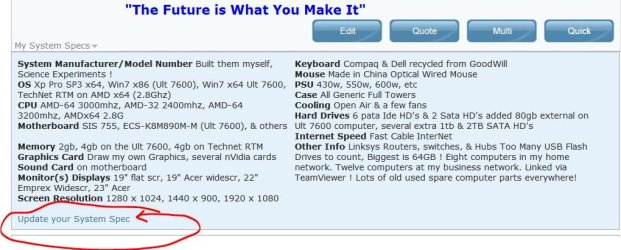
More info on all your computer hardware would greatly help us analyze your problem :)
 

Attachments

  • User_Control_Panel_Arrow.JPG
    User_Control_Panel_Arrow.JPG
    12.3 KB · Views: 1,330
  • System_Specs_Update.JPG
    System_Specs_Update.JPG
    83.7 KB · Views: 38

My Computer

Computer type
PC/Desktop
Computer Manufacturer/Model Number
Built them myself, Science Experiments !
OS
Win7 Enterprise, Win7 x86 (Ult 7600), Win7 x64 Ult 7600, TechNet RTM on AMD x64 (2.8Ghz)
CPU
AMD fx8350 4ghz, AMD-32 2400mhz, AMD-64 3200mhz, AMDx64 2.8G
Motherboard
SIS 755, ECS-K8M890M-M (Ult 7600), GigaByte & others
Memory
2gb, 4gb on the Ult 7600, 4gb on Technet RTM, 32gb on FX8350
Graphics Card(s)
Draw my own Graphics, several nVidia cards
Sound Card
on motherboard
Monitor(s) Displays
19" flat scr, 28" I-Inc widescr,22" Emprex Widescr, 23" Acer
Screen Resolution
1280 x 1024, 1440 x 900, 1920 x 1080
Hard Drives
6 pata Ide HD's & 2 Sata HD's
added 80gb external on Ult 7600 computer,
numerous extra 1tb, 2TB, 3Tb SATA HD's
A collection of ext HD Docks w/ HDs
PSU
430w, 550w, 600w, 700, 800, etc
Case
All Generic Full Towers
Cooling
Open Air & a few fans, some w/ colored LEDs
Keyboard
Compaq & Dell recycled from GoodWill
Mouse
Made in China Optical Wired Mouse
Internet Speed
Fast Cable InterNet
Antivirus
AVG Free on 24 different Desktops, NO Problems!
Browser
IE 8 is preferred, but use FireFox sometimes
Other Info
Linksys Routers, switches, & Hubs
Too Many USB Flash Drives to count, Biggest is 64GB !
Eight computers in my home network.
Sixteen computers at my business network.
Linked via TeamViewer !
Lots of old used spare computer parts everywhere!
thank u 4 replying.....


system: desktop
my MB is 1 year old....
dvd drive is 2 months old...


thanks.... any help ??
 

My Computer

Computer Manufacturer/Model Number
Assembled
OS
Windows 7 Ultimate 64-bit SP1
CPU
AMD Athlon II X2 260 @ 3.2 Ghz
Motherboard
Gigabyte Technology Co., Ltd. M68MT-S2 (Socket M2)
Memory
Kingston 8.0GB Dual-Channel DDR3 @ 669MHz (9-9-9-24)
Graphics Card(s)
ASUS EAH 5450 - 1 GB
Sound Card
Realtek HD Audio
Monitor(s) Displays
23 Inch - DELL SP2309W
Screen Resolution
2048 x 1152
Hard Drives
488GB Seagate ST3500418AS ATA Device (SATA)
PSU
450W
Case
Iball - Standard Form - i8190
Cooling
Stock Cooling
Keyboard
Logitech
Mouse
Logitech
Internet Speed
1 MB/Sec
Other Info
Creative Inspire 2.1 Speakers, LITEON 24x DVD Writer
system specs updated.... now expecting ur help......... :cry:
 

My Computer

Computer Manufacturer/Model Number
Assembled
OS
Windows 7 Ultimate 64-bit SP1
CPU
AMD Athlon II X2 260 @ 3.2 Ghz
Motherboard
Gigabyte Technology Co., Ltd. M68MT-S2 (Socket M2)
Memory
Kingston 8.0GB Dual-Channel DDR3 @ 669MHz (9-9-9-24)
Graphics Card(s)
ASUS EAH 5450 - 1 GB
Sound Card
Realtek HD Audio
Monitor(s) Displays
23 Inch - DELL SP2309W
Screen Resolution
2048 x 1152
Hard Drives
488GB Seagate ST3500418AS ATA Device (SATA)
PSU
450W
Case
Iball - Standard Form - i8190
Cooling
Stock Cooling
Keyboard
Logitech
Mouse
Logitech
Internet Speed
1 MB/Sec
Other Info
Creative Inspire 2.1 Speakers, LITEON 24x DVD Writer
Hi NRT. Let's start with some very basic questions first.

1. With NO DVD/CD in the subject drive, will your system boot Windows ok?

2. From your post, it looks as though you replaced the DVD player 2 month's ago.
Was it a new or used unit? Did it work when it was installed 2 month's ago?

Let us know

Regards
JohnnyA
 

My Computer

Computer Manufacturer/Model Number
Toshiba C650
OS
Windows Home Premium 64bit
CPU
T61-- 2.0ghz
Motherboard
Toshiba
Memory
4 GB
Graphics Card(s)
On board
Sound Card
On board
Monitor(s) Displays
15.6"
Hard Drives
500 GB
Hi NRT. Let's start with some very basic questions first.

1. With NO DVD/CD in the subject drive, will your system boot Windows ok?

2. From your post, it looks as though you replaced the DVD player 2 month's ago.
Was it a new or used unit? Did it work when it was installed 2 month's ago?

Let us know

Regards
JohnnyA


thank u 4 replyin dear....
1. my system is booting clearly with/without CD/DVD... no problem in that...
2. DVD drive is 2 months old and its a new one of LG

NB: the above mentioned problem is not appearing every time... ie.. once in a week....
 

My Computer

Computer Manufacturer/Model Number
Assembled
OS
Windows 7 Ultimate 64-bit SP1
CPU
AMD Athlon II X2 260 @ 3.2 Ghz
Motherboard
Gigabyte Technology Co., Ltd. M68MT-S2 (Socket M2)
Memory
Kingston 8.0GB Dual-Channel DDR3 @ 669MHz (9-9-9-24)
Graphics Card(s)
ASUS EAH 5450 - 1 GB
Sound Card
Realtek HD Audio
Monitor(s) Displays
23 Inch - DELL SP2309W
Screen Resolution
2048 x 1152
Hard Drives
488GB Seagate ST3500418AS ATA Device (SATA)
PSU
450W
Case
Iball - Standard Form - i8190
Cooling
Stock Cooling
Keyboard
Logitech
Mouse
Logitech
Internet Speed
1 MB/Sec
Other Info
Creative Inspire 2.1 Speakers, LITEON 24x DVD Writer
The good news is that your Windows seems to be working ok, except for this DVD problem.:)


You said "NB: the above mentioned problem is not appearing every time... ie.. once in a week.... ". Exactly when does this occur - when you insert a DVD/cd? Does it sometimes work when you insert a DVD/CD? Is it the same DVD/Cd that causes the problem?

Regards
JohnnyA
 

My Computer

Computer Manufacturer/Model Number
Toshiba C650
OS
Windows Home Premium 64bit
CPU
T61-- 2.0ghz
Motherboard
Toshiba
Memory
4 GB
Graphics Card(s)
On board
Sound Card
On board
Monitor(s) Displays
15.6"
Hard Drives
500 GB
The good news is that your Windows seems to be working ok, except for this DVD problem.:)


You said "NB: the above mentioned problem is not appearing every time... ie.. once in a week.... ". Exactly when does this occur - when you insert a DVD/cd? Does it sometimes work when you insert a DVD/CD? Is it the same DVD/Cd that causes the problem?

Regards
JohnnyA

ya..... when i insert a blank disk (i tried many blank discs and found this problem twice...)

NB: i had daemon tools earlier and i've uninstalled it and also SPTD by recommending frm this forum as it has SPTD causing BSODs... in the past i found the above mentioned problem is there while mounting an image in daemon tools also......
 

My Computer

Computer Manufacturer/Model Number
Assembled
OS
Windows 7 Ultimate 64-bit SP1
CPU
AMD Athlon II X2 260 @ 3.2 Ghz
Motherboard
Gigabyte Technology Co., Ltd. M68MT-S2 (Socket M2)
Memory
Kingston 8.0GB Dual-Channel DDR3 @ 669MHz (9-9-9-24)
Graphics Card(s)
ASUS EAH 5450 - 1 GB
Sound Card
Realtek HD Audio
Monitor(s) Displays
23 Inch - DELL SP2309W
Screen Resolution
2048 x 1152
Hard Drives
488GB Seagate ST3500418AS ATA Device (SATA)
PSU
450W
Case
Iball - Standard Form - i8190
Cooling
Stock Cooling
Keyboard
Logitech
Mouse
Logitech
Internet Speed
1 MB/Sec
Other Info
Creative Inspire 2.1 Speakers, LITEON 24x DVD Writer

You said "i had daemon tools earlier and i've uninstalled it and also SPTD".

1. Is it possible that you did not totally remove SPTD? It is used in part for
cd drive emulation. This seems to be very related to you problem.

2. Does this only happen with blank CD's? Can you for instance play Music
CD's and load software cd'S?

Regards
JohnnyA
 

My Computer

Computer Manufacturer/Model Number
Toshiba C650
OS
Windows Home Premium 64bit
CPU
T61-- 2.0ghz
Motherboard
Toshiba
Memory
4 GB
Graphics Card(s)
On board
Sound Card
On board
Monitor(s) Displays
15.6"
Hard Drives
500 GB
You said "i had daemon tools earlier and i've uninstalled it and also SPTD".

1. Is it possible that you did not totally remove SPTD? It is used in part for
cd drive emulation. This seems to be very related to you problem.

2. Does this only happen with blank CD's? Can you for instance play Music
CD's and load software cd'S?

Regards
JohnnyA


ya with blank cds.... and while mounting an image (that's in the past) now my system is SPTD free.... im sure dear....
 

My Computer

Computer Manufacturer/Model Number
Assembled
OS
Windows 7 Ultimate 64-bit SP1
CPU
AMD Athlon II X2 260 @ 3.2 Ghz
Motherboard
Gigabyte Technology Co., Ltd. M68MT-S2 (Socket M2)
Memory
Kingston 8.0GB Dual-Channel DDR3 @ 669MHz (9-9-9-24)
Graphics Card(s)
ASUS EAH 5450 - 1 GB
Sound Card
Realtek HD Audio
Monitor(s) Displays
23 Inch - DELL SP2309W
Screen Resolution
2048 x 1152
Hard Drives
488GB Seagate ST3500418AS ATA Device (SATA)
PSU
450W
Case
Iball - Standard Form - i8190
Cooling
Stock Cooling
Keyboard
Logitech
Mouse
Logitech
Internet Speed
1 MB/Sec
Other Info
Creative Inspire 2.1 Speakers, LITEON 24x DVD Writer
So, only with blank cd's. All others - music, software etc work fine - is this correct?

Not sure what you mean when you say "and while mounting an image ". What image are you trying to mount?

You might also try going into Device Manager, uninstall the DVD/CD device drivers,
then re-boot and let Windows re-install them.

Other than that I am out of idea's.
Regards
JohnnyA
 

My Computer

Computer Manufacturer/Model Number
Toshiba C650
OS
Windows Home Premium 64bit
CPU
T61-- 2.0ghz
Motherboard
Toshiba
Memory
4 GB
Graphics Card(s)
On board
Sound Card
On board
Monitor(s) Displays
15.6"
Hard Drives
500 GB
may b because i've tried blank cds..... yes dear.... now i've inserted a software disc and the problem found... :cry: what shud i do ??
 

My Computer

Computer Manufacturer/Model Number
Assembled
OS
Windows 7 Ultimate 64-bit SP1
CPU
AMD Athlon II X2 260 @ 3.2 Ghz
Motherboard
Gigabyte Technology Co., Ltd. M68MT-S2 (Socket M2)
Memory
Kingston 8.0GB Dual-Channel DDR3 @ 669MHz (9-9-9-24)
Graphics Card(s)
ASUS EAH 5450 - 1 GB
Sound Card
Realtek HD Audio
Monitor(s) Displays
23 Inch - DELL SP2309W
Screen Resolution
2048 x 1152
Hard Drives
488GB Seagate ST3500418AS ATA Device (SATA)
PSU
450W
Case
Iball - Standard Form - i8190
Cooling
Stock Cooling
Keyboard
Logitech
Mouse
Logitech
Internet Speed
1 MB/Sec
Other Info
Creative Inspire 2.1 Speakers, LITEON 24x DVD Writer
I have bought dvd's from places like Dollar Store, Big lots and my dvd player couldn't see them when installed. I went and got Sony and have not had a problem. I didn't spend a lot of time trying to figure it out. I was just happy things worked. The old ones that don't work made good targets at the shooting range so no lost money.
 

My Computer

Computer type
PC/Desktop
Computer Manufacturer/Model Number
Home made Desktop
OS
Windows 10 Pro. 64/ version 1709 Windows 7 Pro/64
CPU
Intel i7-6800K @ 4.3
Motherboard
ASUS X-99 Deluxe II
Memory
Corsair Platinum 16 gig @2400
Graphics Card(s)
EVGA GTX 1070 OC
Monitor(s) Displays
Asus 27" LED LCD/VE278Q
Screen Resolution
1920-1080 or 1280-720 HDMI
Hard Drives
INTEL SSD 730-240 Gb Sata 3.0/
PSU
EVGA Platium 1200W
Case
Phanteks Luxe Tempered Glass 8 fans/ one radiator
Cooling
XSPC/ Water Cooled CPU
Keyboard
Das 4 Professional
Mouse
Logitech M705/MX Anywhere 2-S
Internet Speed
100 mbits
Antivirus
Microsoft Security Essentials/ Malwarebytes Premium 3.0/ SAS
Browser
I.E. 11 default/Firefox/ ISP Time Warner Cable/Spectrum
Other Info
LG BluRay Burner/
Sound system-KLipsch-THX/
Icy Dock ssd Hot Swap bays.
Did you try the last suggestion?

"You might also try going into Device Manager, uninstall the DVD/CD device drivers,
then re-boot and let Windows re-install them."

JohnnyA
 

My Computer

Computer Manufacturer/Model Number
Toshiba C650
OS
Windows Home Premium 64bit
CPU
T61-- 2.0ghz
Motherboard
Toshiba
Memory
4 GB
Graphics Card(s)
On board
Sound Card
On board
Monitor(s) Displays
15.6"
Hard Drives
500 GB
Go to the control panel and then choose Auto play, scroll down and check what your auto play settings are for DVDs / CDs. Line of thought is: If your system is crashing when you put in a disc, then which ever program is set as your auto play for discs might be corrupted / such. (See attachment.)

You could temporarily un-tick auto play and see how your system reacts when you put in a blank disc. But more importantly, post back a screenshot showing your CD/DVD/BLURAY auto play settings like I did.

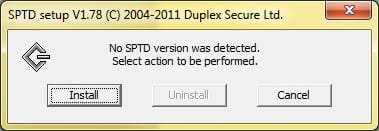
Also, are you 100% certain that you removed SPTD? Just removing daemon tools is not enough-- as it leaves SPTD installed. Double check by going to: DuplexSecure - Downloads and download the 32 or 64 bit (depending on if you have a 32 bit or 64 bit OS) Run it, it will tell you if you have SPTD installed already or not.
 

Attachments

  • controlpanel.jpg
    controlpanel.jpg
    51 KB · Views: 6
  • SPTD.jpg
    SPTD.jpg
    10.6 KB · Views: 1

My Computer

Computer Manufacturer/Model Number
HP DV6 1330sa
OS
Windows 7 Professional 64 Bit SP1
CPU
INTEL DUAL CORE 2.1Ghz
Motherboard
N/A
Memory
4GB DDR3
Graphics Card(s)
INTEL
Sound Card
LAPTOP
Monitor(s) Displays
2
Screen Resolution
3200x1080
Hard Drives
250GB
PSU
LAPTOP
Case
LAPTOP
Cooling
LAPTOP
Keyboard
SOLID YEAR 260U
Mouse
USB
Internet Speed
20 MB/S
Good advice Falya. Thanks for jumping on board.
Regards
JohnnyA
 

My Computer

Computer Manufacturer/Model Number
Toshiba C650
OS
Windows Home Premium 64bit
CPU
T61-- 2.0ghz
Motherboard
Toshiba
Memory
4 GB
Graphics Card(s)
On board
Sound Card
On board
Monitor(s) Displays
15.6"
Hard Drives
500 GB
Back
Top