please read updated intel graphics device through...

StealthyBoss

Banned
Local time
10:39 PM
Messages
183
i decided to see if there was any updates in device manager for my intel graphics card as i had not updated it, then as it found an update it installed it then it asked me to restart my computer, i didnt click it yet as i was finishing off a nearly finished download, just as i was about to click it the screen goes black theres nothing at all on the screen i waited 5 mins but nothing happend i tried pressing buttons to get it to work.. still nothing, then i decided to press the restart button on my laptop, i pressed it STILL nothing, so then i gave in and force shutdowned it. i started it back up but it just stayed froze on the windows logo loading screen, so i had todo a system restore to get it back to health...

do you guys have any idea why it done this?

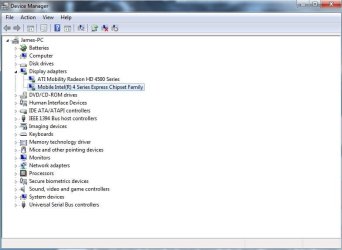
screenshot of the device i was trying to update:
 

Attachments
  • Capture.JPG
    Capture.JPG
    45.9 KB · Views: 31

My Computer

Computer Manufacturer/Model Number
Acer Aspire 5935G
OS
Windows 7 Ultimate 32 Bit and 64 bit
CPU
intel core 2 duo
Memory
3.00GB
Graphics Card(s)
Intel powersaving gpu, ATI RADEON HD 4570
Screen Resolution
15.6" HD LED LCD
Hard Drives
320 GB
Blah.
 
Last edited:

My Computer

Computer Manufacturer/Model Number
Sony Vaio FZ21Z
OS
Windows 7 Ultimate x64 ®™
CPU
Intel Core 2 Duo (2.2 GHz)
Motherboard
Sony (Intel Chipset)
Memory
2x 2GB Corsair (667 MHz)
Graphics Card(s)
NVIDIA 8600M GS (256MB)
Sound Card
Sigmatel
Monitor(s) Displays
15.4" TFT X-Black
Screen Resolution
1280x800
Hard Drives
Western Digital 300GB Scorpio Black (7200rpm)
Mouse
Logitech Anywhere MX
Internet Speed
Sky 5MB
Shouldn't that be disabled in the bios anyway? Do you need two different cards running?
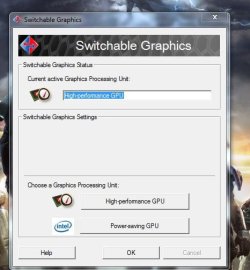
no there switchable, ati is for gaming then when im not gaming i use power saver
 

Attachments

  • Capture.JPG
    Capture.JPG
    37.4 KB · Views: 7

My Computer

Computer Manufacturer/Model Number
Acer Aspire 5935G
OS
Windows 7 Ultimate 32 Bit and 64 bit
CPU
intel core 2 duo
Memory
3.00GB
Graphics Card(s)
Intel powersaving gpu, ATI RADEON HD 4570
Screen Resolution
15.6" HD LED LCD
Hard Drives
320 GB

My Computer

Computer Manufacturer/Model Number
Acer Aspire 5935G
OS
Windows 7 Ultimate 32 Bit and 64 bit
CPU
intel core 2 duo
Memory
3.00GB
Graphics Card(s)
Intel powersaving gpu, ATI RADEON HD 4570
Screen Resolution
15.6" HD LED LCD
Hard Drives
320 GB

My Computer

Computer Manufacturer/Model Number
Sony Vaio FZ21Z
OS
Windows 7 Ultimate x64 ®™
CPU
Intel Core 2 Duo (2.2 GHz)
Motherboard
Sony (Intel Chipset)
Memory
2x 2GB Corsair (667 MHz)
Graphics Card(s)
NVIDIA 8600M GS (256MB)
Sound Card
Sigmatel
Monitor(s) Displays
15.4" TFT X-Black
Screen Resolution
1280x800
Hard Drives
Western Digital 300GB Scorpio Black (7200rpm)
Mouse
Logitech Anywhere MX
Internet Speed
Sky 5MB
Ok. So the problem is... ? :sarc:
 

My Computer

Computer type
PC/Desktop
Computer Manufacturer/Model Number
DELL VOSTRO 3650
OS
Windows 8.1 PRO
CPU
3rd Generation Intel Core i7‐3612QM CPU @ 2.10GHZ
Memory
8GB DDR3
Graphics Card(s)
NVIDIA GeForce GT 525M (128 bit), 1GB Grpahics
Screen Resolution
1920X1080
Hard Drives
750GB 5400RPM
Ok. So the problem is... ? :sarc:
when i update my intel graphic card i just get a blank screen

i guess theres no point updating drivers if they work in the first place huh?(d)
 

My Computer

Computer Manufacturer/Model Number
Acer Aspire 5935G
OS
Windows 7 Ultimate 32 Bit and 64 bit
CPU
intel core 2 duo
Memory
3.00GB
Graphics Card(s)
Intel powersaving gpu, ATI RADEON HD 4570
Screen Resolution
15.6" HD LED LCD
Hard Drives
320 GB
From windows updates or intel.com?
 

My Computer

Computer type
PC/Desktop
Computer Manufacturer/Model Number
DELL VOSTRO 3650
OS
Windows 8.1 PRO
CPU
3rd Generation Intel Core i7‐3612QM CPU @ 2.10GHZ
Memory
8GB DDR3
Graphics Card(s)
NVIDIA GeForce GT 525M (128 bit), 1GB Grpahics
Screen Resolution
1920X1080
Hard Drives
750GB 5400RPM

My Computer

Computer Manufacturer/Model Number
Acer Aspire 5935G
OS
Windows 7 Ultimate 32 Bit and 64 bit
CPU
intel core 2 duo
Memory
3.00GB
Graphics Card(s)
Intel powersaving gpu, ATI RADEON HD 4570
Screen Resolution
15.6" HD LED LCD
Hard Drives
320 GB
Uninstall the device from device manager and isntall these.

Confirm Download
 

My Computer

Computer type
PC/Desktop
Computer Manufacturer/Model Number
DELL VOSTRO 3650
OS
Windows 8.1 PRO
CPU
3rd Generation Intel Core i7‐3612QM CPU @ 2.10GHZ
Memory
8GB DDR3
Graphics Card(s)
NVIDIA GeForce GT 525M (128 bit), 1GB Grpahics
Screen Resolution
1920X1080
Hard Drives
750GB 5400RPM
are you 100% sure itl be ok on my laptop? becuase i uninstalled a graphics card before and the screen just turns blank
 

My Computer

Computer Manufacturer/Model Number
Acer Aspire 5935G
OS
Windows 7 Ultimate 32 Bit and 64 bit
CPU
intel core 2 duo
Memory
3.00GB
Graphics Card(s)
Intel powersaving gpu, ATI RADEON HD 4570
Screen Resolution
15.6" HD LED LCD
Hard Drives
320 GB
are you 100% sure itl be ok on my laptop?
I would imagine so if that's what it was designed to do in the first place, but if you experience any more issues just roll it back.
 

My Computer

Computer Manufacturer/Model Number
Sony Vaio FZ21Z
OS
Windows 7 Ultimate x64 ®™
CPU
Intel Core 2 Duo (2.2 GHz)
Motherboard
Sony (Intel Chipset)
Memory
2x 2GB Corsair (667 MHz)
Graphics Card(s)
NVIDIA 8600M GS (256MB)
Sound Card
Sigmatel
Monitor(s) Displays
15.4" TFT X-Black
Screen Resolution
1280x800
Hard Drives
Western Digital 300GB Scorpio Black (7200rpm)
Mouse
Logitech Anywhere MX
Internet Speed
Sky 5MB
kk thanks
 

My Computer

Computer Manufacturer/Model Number
Acer Aspire 5935G
OS
Windows 7 Ultimate 32 Bit and 64 bit
CPU
intel core 2 duo
Memory
3.00GB
Graphics Card(s)
Intel powersaving gpu, ATI RADEON HD 4570
Screen Resolution
15.6" HD LED LCD
Hard Drives
320 GB
Back
Top