Please save my computer from the hammer!

jdweberg

New member
Local time
4:59 AM
Messages
7
I am using a fresh install of 7 and basically anything I download from the web is not working. I did manage to download Chrome and through Chrome downloaded and can use Gtalk (which would not download using Explorer) but that's it.

Most exe files end up giving me an NSIS error. I could not run the exe for rhapsody, but I was able to run a copy of it from my old system. But when I got rhapsody installed I got endless scripting errors and had to shut it down from the taskbar.

I had World of Warcraft installed and I can log into the game. When I've logged in my friends can see that I'm online and I can move around just fine - but my system is getting no info back from the server so I cannot see anyone else moving around the world and cannot interact within the game.

I successfully downloaded EasyCleaner and installed it. But, alas, I double-click the file, click yes to allowing it to make changes to my computer, and then watch it shut itself down after having done nothing.

I installed 7 over the top of the pre-release. I have reinstalled it on a blank partition. No matter. Same problems. I did not have these problems with the pre-release.

Oh - I also completely disabled Windows firewall as well as tried using the NCRC command line switch to bypass the download issues but to no avail

Sorry to vomit out all my system's issues, but I figured these problems are all related, I can't find my Vista discs and I am ready to toss my computer out the window.

Oh... and this is a double post, posted as a reply elsewhere. Sorry about that, too.

Can anyone help???? :cry:

Thanks in advance.
 

My Computer

Computer Manufacturer/Model Number
Gateway GT5408
OS
windows 7 32 bit
CPU
Intel Core2 4300 @1.80 GHz
Graphics Card(s)
ATI Radeon HD 4870
seems llike you got a lot going on there, i would recommend formatting and doing a clean install. But seeing as you've done that i have no idea
 

My Computer

Computer Manufacturer/Model Number
Sony
OS
Main OS: Windows 7 64 bit, Secondary: Vista 32 bit
CPU
Intel Core 2 Duo P8400 @ 2.26 Ghz
Motherboard
Intel PM45
Memory
4GB DDR2
Graphics Card(s)
ATI Radeon Mobility HD3470
Sound Card
Integrated Realtek
Monitor(s) Displays
Integrated (Laptop) 16.4 inch
Screen Resolution
1600x900
Hard Drives
320 GB
Mouse
Logitech
Internet Speed
1 Mb/s
Is it possible I got a bad copy of Windows 7?
 

My Computer

Computer Manufacturer/Model Number
Gateway GT5408
OS
windows 7 32 bit
CPU
Intel Core2 4300 @1.80 GHz
Graphics Card(s)
ATI Radeon HD 4870
That would be my thought too. Where did you get your version Of W 7 and what version is it?
 

My Computer

Computer type
PC/Desktop
Computer Manufacturer/Model Number
Bruce ... somewhere in his 40's
OS
Windows 7 Ultimate 32bit SP1
CPU
Intel(R) Core(TM)2 Quad CPU @ 2.40GHz, 2400 MHz
Motherboard
INTEL/D975XBX2
Memory
4 GB
Graphics Card(s)
ATI Radeon HD 2600 Pro
Monitor(s) Displays
Samsung SyncMaster 914v
Screen Resolution
1280 x 1024
Hard Drives
2/500GB each ... ST3500630AS ATA Device.
One is not connected
PSU
Rocketfish 700 W
Case
G.Skill Gigabyte Chassis
Keyboard
Standard PS/2 Keyboard
Mouse
Microsoft PS/2 Mouse
Internet Speed
DSL
Antivirus
Avira Internet Security
Browser
IE 11
Other Info
ATI HDMI Audio
I havent heard anything like this before are you sure your copy isnt bad. I would recommend giving your store you bought it from see if they could replace it if your copy is legit
 

My Computer

OS
Windows 7 Ultimate
Screen Resolution
1920x1200
Before you started 'downloading stuff from the web' and throwing it onboard perhaps you should have taken the time to ensure Windows7 was properly loaded, and to have ensure you'd got all the correct drivers onboard...
 

My Computer

Computer Manufacturer/Model Number
Custom built machine
OS
W7 x64
CPU
Intel Q9300 2.5Ghz Quad LGA775 (Would like Q9650)
Motherboard
Gigabyte GA-EP45T-UD3R (F6 Bios)
Memory
4Gb OCZ Gold 1,333Mhz
Graphics Card(s)
Palit HD4850 O/C Sonic 512Mb DDR3, Dual DViD's
Sound Card
Azalia to twin Samson 50w Studio Monitors
Monitor(s) Displays
Twin Dell (E-IPS) U2311H 23.6" Screens
Screen Resolution
1920 x 1080 @ 60Hz
Hard Drives
Crucial M4 SSD, archives on twin Western Digital Caviar Black WD2002FAEX, 2TB, 7200rpm HDD's, Samsung Ritemaster CD/DVD Burner...
PSU
OCZ 600w
Case
Lian-Li PC8 acoustifoamed' aluminium tower
Cooling
Scythe 140mm Zipang
Keyboard
Cherry PS/2 custom model
Mouse
Lenovo USB laser "Thinkpad" Mouse
Internet Speed
ADSL2+ @14Mbps downstream & Cat6 Gigabit Ethernet
Antivirus
NOD32
Browser
Opera
Other Info
Silicon Dust HD Homerun Dual FTA (Ethernet) TV Tuners, Dray Tek Vigor 2850Vn router and 8x HP Gigabit Switch. Lian-Li CR26 Card Reader, Canon MF4430 iSensys laser printer/scanner.
It's Windows7 Home Premium and I purchased it last week from Staples.

Qdos - can you give me more instruction there? I'm not sure what you mean by "properly loaded." I installed it. I followed the install instructions. I have in the past also installed XP, Vista, Ubuntu, and the pre-release of Windows7 and have no idea what you mean by "properly loaded." Also - which drivers might cause this problem? I can certainly try to install drivers, I'm just not sure which possibly-out-of-date drivers might be causing the issues I'm having.

Thanks.
 

My Computer

Computer Manufacturer/Model Number
Gateway GT5408
OS
windows 7 32 bit
CPU
Intel Core2 4300 @1.80 GHz
Graphics Card(s)
ATI Radeon HD 4870
Check in Devcice Mgr and is if you have any yellow triangles. Also fill out your system specs so we know something about your system.
 

My Computer

Computer Manufacturer/Model Number
Dell Optiplex 980
OS
Win7 x64 Ultimate SP1
CPU
Intel i7-2600
Memory
8 Gig
Graphics Card(s)
Geforce gt 520
Monitor(s) Displays
LG & Acer
Screen Resolution
1920x1080
Internet Speed
Fios 45/35
Other Info
Windows Home Server
It's important to get a clean setup (and preferably make a backup) which includes all your drivers and any important W7 updates before adding programs etc. You can roll back to that 'bare metal' state in the event of problems if you do this - but, as things stand, you don't know what's in play and may end up having to do a clean install for a second time...
 

My Computer

Computer Manufacturer/Model Number
Custom built machine
OS
W7 x64
CPU
Intel Q9300 2.5Ghz Quad LGA775 (Would like Q9650)
Motherboard
Gigabyte GA-EP45T-UD3R (F6 Bios)
Memory
4Gb OCZ Gold 1,333Mhz
Graphics Card(s)
Palit HD4850 O/C Sonic 512Mb DDR3, Dual DViD's
Sound Card
Azalia to twin Samson 50w Studio Monitors
Monitor(s) Displays
Twin Dell (E-IPS) U2311H 23.6" Screens
Screen Resolution
1920 x 1080 @ 60Hz
Hard Drives
Crucial M4 SSD, archives on twin Western Digital Caviar Black WD2002FAEX, 2TB, 7200rpm HDD's, Samsung Ritemaster CD/DVD Burner...
PSU
OCZ 600w
Case
Lian-Li PC8 acoustifoamed' aluminium tower
Cooling
Scythe 140mm Zipang
Keyboard
Cherry PS/2 custom model
Mouse
Lenovo USB laser "Thinkpad" Mouse
Internet Speed
ADSL2+ @14Mbps downstream & Cat6 Gigabit Ethernet
Antivirus
NOD32
Browser
Opera
Other Info
Silicon Dust HD Homerun Dual FTA (Ethernet) TV Tuners, Dray Tek Vigor 2850Vn router and 8x HP Gigabit Switch. Lian-Li CR26 Card Reader, Canon MF4430 iSensys laser printer/scanner.
No yellow triangles. Filled out a little bit of my system info. Pretty much stock stuff on the Gateway. My onboard ethernet card went down a few months ago. Currently I'm using a Trendnet TU2-ET100 to connect to the internet, which actually has no current Windows7 driver, but worked like a charm on the pre-release and still lets me cruise around the web just fine.
 

My Computer

Computer Manufacturer/Model Number
Gateway GT5408
OS
windows 7 32 bit
CPU
Intel Core2 4300 @1.80 GHz
Graphics Card(s)
ATI Radeon HD 4870
What MOBO, GPU and chipset do you have on this computer?
 

My Computer

Computer type
PC/Desktop
Computer Manufacturer/Model Number
Self Built
OS
Windows 7 Home Premium x32 SP1
CPU
x2 2.6 GHz
Motherboard
Asus
Memory
A-Data 2GB DDR2-800
Graphics Card(s)
ATI X1250
Sound Card
SB 5.1 Live!
Hard Drives
WD and Seagate FAP
PSU
Tagan TG-480-U01
Keyboard
BTC 6300
Mouse
Logitech VX Nano
Antivirus
None
BTW do you have the nVidia firewall installed?
 

My Computer

Computer type
PC/Desktop
Computer Manufacturer/Model Number
Self Built
OS
Windows 7 Home Premium x32 SP1
CPU
x2 2.6 GHz
Motherboard
Asus
Memory
A-Data 2GB DDR2-800
Graphics Card(s)
ATI X1250
Sound Card
SB 5.1 Live!
Hard Drives
WD and Seagate FAP
PSU
Tagan TG-480-U01
Keyboard
BTC 6300
Mouse
Logitech VX Nano
Antivirus
None
It's the motherboard that comes with the Gateway - so I'm not sure. The chipset is Intel 945G. And I don't have any security installed at all after disabling the windows firewall.

Prior to installing Win7 Home, I had been having some blue screen of death issues. I'm beginning to believe it's a hardware issue - it's just strange that so many new problems came with the installation of 7.
 

My Computer

Computer Manufacturer/Model Number
Gateway GT5408
OS
windows 7 32 bit
CPU
Intel Core2 4300 @1.80 GHz
Graphics Card(s)
ATI Radeon HD 4870
It's the motherboard that comes with the Gateway - so I'm not sure. The chipset is Intel 945G. And I don't have any security installed at all after disabling the windows firewall.

Prior to installing Win7 Home, I had been having some blue screen of death issues. I'm beginning to believe it's a hardware issue - it's just strange that so many new problems came with the installation of 7.

Have you read this?

Also if you can please do memory test using Memtest86

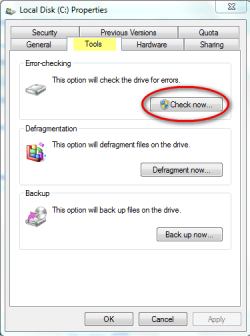
Also check your hard drive for errors (Computer>right click on C: drive and choose Tools Tab):
hdd.png
 

My Computer

Computer type
PC/Desktop
Computer Manufacturer/Model Number
Self Built
OS
Windows 7 Home Premium x32 SP1
CPU
x2 2.6 GHz
Motherboard
Asus
Memory
A-Data 2GB DDR2-800
Graphics Card(s)
ATI X1250
Sound Card
SB 5.1 Live!
Hard Drives
WD and Seagate FAP
PSU
Tagan TG-480-U01
Keyboard
BTC 6300
Mouse
Logitech VX Nano
Antivirus
None
Just a little tip.

When you are formatting and installing Windows freshly, once you've hit the desktop, always install those drivers :
- Chipset
- Video card
- Audio card
- Network card
- *insert additional USB Hardware here*

Habitually, Windows 7 will install a Network card driver by default so you just go and get your drivers as you need them.

Beside that I'm clueless what's going on... :\
 

My Computer

Computer type
PC/Desktop
Computer Manufacturer/Model Number
Custom build
OS
Windows 10 Professional 64-bit
CPU
Ryzen 9 5900X
Motherboard
Gigabyte X570 Aorus Master
Memory
G.Skill 3600Mhz CL16 16GB × 4
Graphics Card(s)
EVGA GeForce RTX 3070 Ti FTW3 Ultra Gaming
Sound Card
On-board
Monitor(s) Displays
Dell Alienware AW3418DW
Screen Resolution
3440x1440
Hard Drives
1×Sabrent Rocket 4 Plus 2TB nvme SSD (System, internal)
2x4TB Western Digital Blue (Internal)
1x4TB HDST 7200RPM (Internal)
PSU
Seasonic Focus Plus 850W Platinum
Case
Corsair 680X
Cooling
Stock fans + 3× Corsair QL120, Corsair H100i Platinum
Keyboard
Logitech K350
Mouse
Logitech M510
Internet Speed
120Mbits dl - 20Mbits up
Antivirus
ESET NOD32 Antivirus
Browser
Firefox (latest version)
Other Info
Headphones : Audio-Technica ATH-M50x
Scanner : Canon Canoscan LiDE 220 + Plustek OptiBook 4800
Did you get a bigger PSU for that system, or are you using the stock 300watt that came with it?
Your video card requirements: 500 Watt or greater power supply with two 75W 6-pin PCI Express® power connectors recommended (600 Watt and four 6-pin connectors for ATI CrossFireX™ technology in dual mode).

If your PSU is not pushing enough power, you could have all kinds of errors, including hardware issues.
 

My Computer

OS
XP Pro, XP Pro x64, Win7 x64
CPU
AMD 64 x2 5600+
Motherboard
ASUS M3N72-D
Memory
4Gig PC2-6400 Corsair
Graphics Card(s)
ASUS 9800GT 512MB(x2) SLI
Sound Card
Onboard Realtek HD Audio
Monitor(s) Displays
19" KDS CRT
Hard Drives
5 assorted HD
PSU
Antec NeoPower 550
Case
24" SOHO Server Case
Cooling
3 Panaflo 80mm fans & Retail HS/F
Keyboard
Logitech Internet Navigator
Mouse
Logitech MX-700
Thanks, everyone, so much for all the help. Toxic - I installed a graphics card shortly after I bought the pc and it fried the power supply in about 30 seconds, so yes - I do have an upgraded PSU as well. :D

Lebon and Qdos - I can't run the exe for the chipset driver because it gives me the NSIS error. I did update my ethernet and modem drivers, though, and that seemed to fix the problem with World of Warcraft. I never thought of this since I am using a trendnet usb device to connect to the internet - but WoW has run fine on a couple different tests. All the other problems persist, though, and my drivers are up to date.

Creer - I followed all the NSIS instructions on that link prior to posting here. I used the Memtest and ran the hard drive check thanks to your suggestion. I came up with no errors, but am glad to have two more troubleshooting tools in my arsenal, so thanks for that. :)
 

My Computer

Computer Manufacturer/Model Number
Gateway GT5408
OS
windows 7 32 bit
CPU
Intel Core2 4300 @1.80 GHz
Graphics Card(s)
ATI Radeon HD 4870
Back
Top