Solved Plugged in, not charging

noddy90

New member
Local time
8:09 AM
Messages
48
Location
Mission BC
Hi there,

I have been having multiple problems with my laptop, even after doing clean re-instal twice.

When ever I plug in the charger, it says-plugged in, not charging. I googled the problem and read about the following advice in a thread here, it advised me to shutdown the laptop, take out the battery, restart, go to device manager, under batteries, uninstall Microsoft ACPI- Complaint Control Method battery, shut down, replece battery and it will work. Well, it does work, till such time it is on and its back to square one after it is restarted.

I had read about this here in this thread
http://www.sevenforums.com/hardware-devices/233747-dell-laptop-battery-not-charging.html

in the link given, which is Plugged in, not charging Windows 7 solution : Jeffrey Palermo (.com)

The other problem I'm facing is that while typing, the cursor jumps on its own to the previous column.

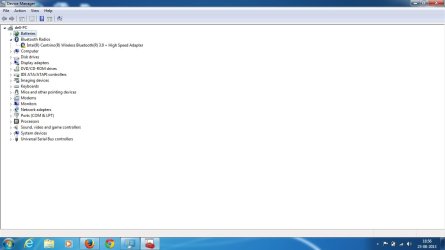
the third issue is that I'm unable to understand how to reolve the issue about Intel(R) Centrino(R) Wireless Bluetooth(R) 3.0 + High Speed Adapter, see the screen shot of the device manager.

I hope I've posted the thread in the right section:o
 

Attachments

  • Screen shot.jpg
    Screen shot.jpg
    47.8 KB · Views: 7

My Computer My Computer

Computer type
Laptop
Computer Manufacturer/Model Number
Dell Inspiron N5110
OS
Windows 7 Home Premium
Browser
Fire Fox, Chrome and IE
Hi there,

I have been having multiple problems with my laptop, even after doing clean re-instal twice.

When ever I plug in the charger, it says-plugged in, not charging. I googled the problem and read about the following advice in a thread here, it advised me to shutdown the laptop, take out the battery, restart, go to device manager, under batteries, uninstall Microsoft ACPI- Complaint Control Method battery, shut down, replece battery and it will work. Well, it does work, till such time it is on and its back to square one after it is restarted.

I had read about this here in this thread
http://www.sevenforums.com/hardware-devices/233747-dell-laptop-battery-not-charging.html

in the link given, which is Plugged in, not charging Windows 7 solution : Jeffrey Palermo (.com)

The other problem I'm facing is that while typing, the cursor jumps on its own to the previous column.

the third issue is that I'm unable to understand how to reolve the issue about Intel(R) Centrino(R) Wireless Bluetooth(R) 3.0 + High Speed Adapter, see the screen shot of the device manager.

I hope I've posted the thread in the right section:o

Hi noddy90,

We truly regret the inconvenience that has been caused to you and assure you that we would try our best to resolve this issue to your satisfaction.

Please let me know if the AC adapter gets power and stays on even when you connect the AC adapter. Check the link below for battery issue with the system:

http://dell.to/116Q4mq

http://dell.to/11x7iiZ

If you have a different AC adapter then check the system with it and let us know the results it could be an issue with the adapter itself.

Regarding touchpad issue please check this article and perform the required troubleshooting:

http://dell.to/17ZE0tb

Lastly let me know which wireless card is installed on the system so we can provide the exact driver or you can download them from here:

http://dell.to/17SLFcA]

Keep us posted with the results so we can advise you further.
 

My Computer My Computer

Computer type
PC/Desktop
OS
Winndows 7 32 bit
Thanks Sandeep for the quick reply.

I've the original charger and I went through the link u had given, the solution was very simple, I had to reinsert the charger in the socket and it worked:o

I'll go through the steps given for erratic cursor and will give feedback.

How do I find which wireless card my laptop is using?

Thanks
 

My Computer My Computer

Computer type
Laptop
Computer Manufacturer/Model Number
Dell Inspiron N5110
OS
Windows 7 Home Premium
Browser
Fire Fox, Chrome and IE
Thanks Sandeep for the quick reply.

I've the original charger and I went through the link u had given, the solution was very simple, I had to reinsert the charger in the socket and it worked:o

I'll go through the steps given for erratic cursor and will give feedback.

How do I find which wireless card my laptop is using?

Thanks

Hi noddy90,

Its great to hear that it worked fine for you. Please check for erratic cursor and let us know the results so we can advise you further if required.

Also, in the same link given for drivers for your system you have an option for system configuration kindly enter the service tag of the system and you can find the Intel wireless card model number.

Do not share the service tag on the open forum if required we would ask the same only in private message.

Keep us posted with the results so we can advise you further.
 

My Computer My Computer

Computer type
PC/Desktop
OS
Winndows 7 32 bit
Hi Sandeep,

An update about the charging; its not working, I tried everything as suggested by you and still am getting the same message - plugged in, not charging.

I even did the battery diagnostic test on Dell support, the result is attached.

Please help!!

Thnx
 
Last edited:

My Computer My Computer

Computer type
Laptop
Computer Manufacturer/Model Number
Dell Inspiron N5110
OS
Windows 7 Home Premium
Browser
Fire Fox, Chrome and IE
Hi Sandeep,

An update about the charging; its not working, I tried everything as suggested by you and still am getting the same message - plugged in, not charging.

I even did the battery diagnostic test on Dell support, the result is attached.

Please help!!

Thnx

Hi noddy90,

I appreciate the time and effort that you took to troubleshoot the issue.

It seems to be an issue with the AC adapter or the power port on the system. It would be better if you check the system with a different AC adapter to isolate the issue.

If the system is under warranty then please contact me through a private message and provide me your service tag and contact information so I may access your system records.

And, if the system is out of warranty then you contact our Expired Warranty Support at the link below:

http://dell.to/12LmNBq

If you have any further queries please feel free to contact us.
 

My Computer My Computer

Computer type
PC/Desktop
OS
Winndows 7 32 bit
Back
Top