Solved Plugging the pc all the time will broke it ?

baxxter

New member
Member
VIP
Local time
12:44 AM
Messages
266
My friend s laptop broke ,the reparator said it was cause he always plug it to the power and motherboard broken !
I dont think its a true ! Will the laptop broke if I didnt unplug it from the power ( more than 16 /24 hours plug to the power ) ?
 

My Computer My Computer

At a glance

Windows 7 Ultimate SP1 64 BitIntel Core i7-2630QM 2.00GHz4 Gb ddr3Nvidia 520 1G
Computer Manufacturer/Model Number
Dell Insporon N7110
OS
Windows 7 Ultimate SP1 64 Bit
CPU
Intel Core i7-2630QM 2.00GHz
Memory
4 Gb ddr3
Graphics Card(s)
Nvidia 520 1G
Monitor(s) Displays
1600 X 900
Screen Resolution
1440*900
Hard Drives
500 GB + 500 GB
Internet Speed
1 mb
No.

Depending on how your battery charging is set up you may gradually experience shorter battery life (over a long period), but the motherboard doesn't break just because you leave the laptop plugged in all the time.
 

My Computer My Computer

At a glance

Win7 Pro x64Koa i5-2550K8 GBSapphire ATI 6870 1GB GDDR5
Computer Manufacturer/Model Number
Self-built rig
OS
Win7 Pro x64
CPU
Koa i5-2550K
Memory
8 GB
Graphics Card(s)
Sapphire ATI 6870 1GB GDDR5
Sound Card
RealTek HD Audio / ATI HDMI Audio
Monitor(s) Displays
Samsung HDTV Monitor T23A350
Screen Resolution
1920 x 1080
Hard Drives
- SSD (C:)
- HDD (D:)
- BD-ROM (E:)
Keyboard
Logitech G110
Internet Speed
Unifi home (5mbps)
Well,one of mine is always plugged in and it hasn't broken for a few years, about 6 years. Just set the battery to not fully charge and it will extend the life of the battery. But, it has nothing at all to do with the motherboard.
 

My Computers My Computers

  • At a glance

    Windows 11 ProRyzen 9 5900X32GB G Skill DDR4-3600EVGA RTX 3080 FTW 3 Ultra
    Computer type
    PC/Desktop
    Computer Manufacturer/Model Number
    ALWAYS UNDER CONSTRUCTION
    OS
    Windows 11 Pro
    CPU
    Ryzen 9 5900X
    Motherboard
    Asus X570 Crosshair Viii Hero
    Memory
    32GB G Skill DDR4-3600
    Graphics Card(s)
    EVGA RTX 3080 FTW 3 Ultra
    Sound Card
    On Board/Sennheiser PC37X Headset
    Monitor(s) Displays
    3 X Asus 27"
    Screen Resolution
    2560x1440
    Hard Drives
    2 X 1 TB NVME drives
    PSU
    EVGA 850
    Case
    Phanteks Eclipse P400A
    Cooling
    EVGA 280 AIO
    Keyboard
    Logitech G510s/ Logitech G13
    Mouse
    Logitech G502
    Internet Speed
    24/1
    Antivirus
    ESET/MBAM Pro/SAS Pro
    Browser
    Chrome/ Firefox/ Edge
  • At a glance

    Windows 11 ProIntel Ultra 9 288V32 GB LPDDR5X 8533
    Computer type
    Laptop
    System Manufacturer/Model Number
    Dell 16 Plus
    OS
    Windows 11 Pro
    CPU
    Intel Ultra 9 288V
    Memory
    32 GB LPDDR5X 8533
    Monitor(s) Displays
    16" Mini-LED HDR600 Touch 90 Hz
    Screen Resolution
    2560X1600
    Hard Drives
    1 TB NVME
I tought so ,I tought the reparator lied and he wanted only the money.Mine always plugged in too but some times when unplug it untill notice me that it will die then plug it again :D .thanks guys :)
 
Last edited:

My Computer My Computer

At a glance

Windows 7 Ultimate SP1 64 BitIntel Core i7-2630QM 2.00GHz4 Gb ddr3Nvidia 520 1G
Computer Manufacturer/Model Number
Dell Insporon N7110
OS
Windows 7 Ultimate SP1 64 Bit
CPU
Intel Core i7-2630QM 2.00GHz
Memory
4 Gb ddr3
Graphics Card(s)
Nvidia 520 1G
Monitor(s) Displays
1600 X 900
Screen Resolution
1440*900
Hard Drives
500 GB + 500 GB
Internet Speed
1 mb
I tought so ,I tought the reparator lied and he wanted only the money.Mine always plugged in too but some times when unplug it untill will die then plug it again :D .thanks guys :)

I would not let that battery die too many times. That's hard on the battery. Plug it back in before it dies for longest battery lifetime.
 

My Computer My Computer

At a glance

Windows 7 Ultimate x64
OS
Windows 7 Ultimate x64
I tought so ,I tought the reparator lied and he wanted only the money.Mine always plugged in too but some times when unplug it untill will die then plug it again :D .thanks guys :)

I would not let that battery die too many times. That's hard on the battery. Plug it back in before it dies for longest battery lifetime.


Sorry i meant before it shut off by itself :D
 

My Computer My Computer

At a glance

Windows 7 Ultimate SP1 64 BitIntel Core i7-2630QM 2.00GHz4 Gb ddr3Nvidia 520 1G
Computer Manufacturer/Model Number
Dell Insporon N7110
OS
Windows 7 Ultimate SP1 64 Bit
CPU
Intel Core i7-2630QM 2.00GHz
Memory
4 Gb ddr3
Graphics Card(s)
Nvidia 520 1G
Monitor(s) Displays
1600 X 900
Screen Resolution
1440*900
Hard Drives
500 GB + 500 GB
Internet Speed
1 mb
Gotcha!
 

My Computer My Computer

At a glance

Windows 7 Ultimate x64
OS
Windows 7 Ultimate x64
Well,one of mine is always plugged in and it hasn't broken for a few years, about 6 years. Just set the battery to not fully charge and it will extend the life of the battery. But, it has nothing at all to do with the motherboard.

i never knew this... how do you set the battery to not fully charge???
 

My Computer My Computer

At a glance

MS Windows 7 Ultimate 64-bit SP1i3 350M 2.27ghz8.00 GB Dual-Channel DDR3 @ 532MHz (7-7-7-20)Intel HD Graphics
Computer Manufacturer/Model Number
hp g62-450sa Laptop
OS
MS Windows 7 Ultimate 64-bit SP1
CPU
i3 350M 2.27ghz
Motherboard
hp 1425
Memory
8.00 GB Dual-Channel DDR3 @ 532MHz (7-7-7-20)
Graphics Card(s)
Intel HD Graphics
Sound Card
Realtek High Definition Audio
Screen Resolution
1366x768@60hz
Hard Drives
59GB OCZ Vertex Plus
488gb Western Digital WDC WD5000BEVT-60AORTO
PSU
laptop
Case
laptop
Cooling
laptop
Keyboard
Standard PS/2 Keyboard
Mouse
Synaptics PS/2 Port TouchPad
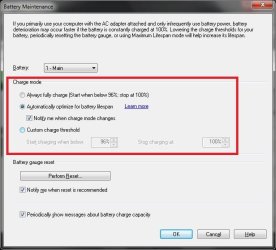
You can tell windows not to fully charge your battery (i.e. optimize for "maximum battery life"). I only have Thinkpad laptops around here and they've co-opted it with a custom app, but there should be a similar one in default installations.

win7--battery_charge.jpg

Win -> "Power Options", then explore the various settings there.
 

My Computer My Computer

At a glance

Win7 Pro x64Koa i5-2550K8 GBSapphire ATI 6870 1GB GDDR5
Computer Manufacturer/Model Number
Self-built rig
OS
Win7 Pro x64
CPU
Koa i5-2550K
Memory
8 GB
Graphics Card(s)
Sapphire ATI 6870 1GB GDDR5
Sound Card
RealTek HD Audio / ATI HDMI Audio
Monitor(s) Displays
Samsung HDTV Monitor T23A350
Screen Resolution
1920 x 1080
Hard Drives
- SSD (C:)
- HDD (D:)
- BD-ROM (E:)
Keyboard
Logitech G110
Internet Speed
Unifi home (5mbps)
You should have to change anything on your computer to optimize the battery, if it is plugged in all the time. My company has 25 laptops, and the majority never leave a desk (always docked). The only way you will shorten battery life is if you use a little of the battery and recharge. If you are using the battery, it is a good idea to occasionally, once a month, once a quarter, drain down the battery and let it fully recharge. There's no need to worry about runing battery life if you run plugged in all the time.
 

My Computer My Computer

At a glance

Windows 7 Ultimate x64 SP1Intel Core i7-260012 GB Patriot Extreme DDR3-1333Nvidia GTX 470
OS
Windows 7 Ultimate x64 SP1
CPU
Intel Core i7-2600
Motherboard
Gigabyte GA-P67A-UD3P-B3
Memory
12 GB Patriot Extreme DDR3-1333
Graphics Card(s)
Nvidia GTX 470
Monitor(s) Displays
Dell UltraSharp 2209WA
Hard Drives
OCZ Agility3 240 GB, WD5001AALS, WD7501AALS
PSU
OCZ ModStream 700W
Case
CoolerMaster HAF 912 Advanced
Cooling
CoolerMaster Hyper 212 Plus
If you want to maximize the usable life of your laptop battery, or most any Lithium Ion battery follow guidelines here:

How to Prolong Lithium-based Batteries - Battery University

What essesnbe stated about clipping the high end of the charge will help to maximize life. Battery management circuits/logic in devices have improved over the years but the capability he mentioned is not available in all devices. If it's not there then you can do the same manually but it's more of a pain.

I've got a laptop from 2005 and a handheld device from 2001 which are both still usable with the original batteries. They don't stay powered as long as they used to but I would estimate they still have well over half the capacity they originally had.

Lithium Ion is not like the old NiCd or NiMH rechargables. The only time you would ever need to discharge is when the "remaining charge" indicator is out of whack. Even then you don't want to discharge fully. If you can live without the accurate "remaining charge" indicator all the better, because each time you recalibrate it reduces remaining life a little more. They don't tolerate either low or high voltages very well.
 

My Computer My Computer

At a glance

Windows 7 Ultimate x64
OS
Windows 7 Ultimate x64
so if I plug it always to the power and unplug it sometimes untill will be 20 to 10 % then plug it for along time wont be bad for the batterie !.
 

My Computer My Computer

At a glance

Windows 7 Ultimate SP1 64 BitIntel Core i7-2630QM 2.00GHz4 Gb ddr3Nvidia 520 1G
Computer Manufacturer/Model Number
Dell Insporon N7110
OS
Windows 7 Ultimate SP1 64 Bit
CPU
Intel Core i7-2630QM 2.00GHz
Memory
4 Gb ddr3
Graphics Card(s)
Nvidia 520 1G
Monitor(s) Displays
1600 X 900
Screen Resolution
1440*900
Hard Drives
500 GB + 500 GB
Internet Speed
1 mb
so if I plug it always to the power and unplug it sometimes untill will be 20 to 10 % then plug it for along time wont be bad for the batterie !.

Sorry, I don't understand what you're saying.
 

My Computer My Computer

At a glance

Windows 7 Ultimate x64
OS
Windows 7 Ultimate x64
so if I plug always the laptop to the power and unplug it sometimes untill will be 20 to 10 % ,then plug it to the power again for along time,it wont be bad for the batterie !.
 

My Computer My Computer

At a glance

Windows 7 Ultimate SP1 64 BitIntel Core i7-2630QM 2.00GHz4 Gb ddr3Nvidia 520 1G
Computer Manufacturer/Model Number
Dell Insporon N7110
OS
Windows 7 Ultimate SP1 64 Bit
CPU
Intel Core i7-2630QM 2.00GHz
Memory
4 Gb ddr3
Graphics Card(s)
Nvidia 520 1G
Monitor(s) Displays
1600 X 900
Screen Resolution
1440*900
Hard Drives
500 GB + 500 GB
Internet Speed
1 mb
Back
Top