
Pointer - Show location with CTRL Key - Enable or Disable

How to Enable or Disable Show Pointer Location with CTRL Key

   Information
This will show you how to enable or disable to show the pointer location using the CTRL key. This is useful to help find the mouse pointer by putting a circle around the area your mouse pointer is at and animate inwards when you press the CTRL key. This is especially helpful if you use more than one monitor and/or large monitor(s).

This only affects the user account that you are currently logged on to.

   Tip
If you hold the key down, it will not show until you release.
   Warning
If you use keyboard shortcuts commonly like CTRL+R, CTRL+S, CTRL+O, etc. This may affect them if pressed before the letter. For example if I press CTRL on a URL and let go when the URL is open in a new tab, I still see the Location Circle.



CTRL.png


Here's How:

1. Open the Control Panel (icons view), and click on the Mouse icon.
Mouse.png
2. Click on the Pointer Options tab, and do either step 3 or 4 below.
Show Location.png
3. To Enable Show Location of Pointer
A) Check the Show location of pointer when I press the CTRL key box, and click on OK.
NOTE: You could also press Alt+S.
4. To Disable Show Location of Pointer
A) Uncheck the Show location of pointer when I press the CTRL key box, and click on OK.
NOTE: You could also press Alt+S.
 

Attachments
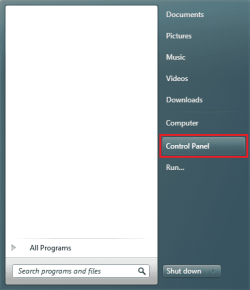
  • Start Menu.png
    Start Menu.png
    13 KB · Views: 3
Last edited by a moderator:
I always enable this option, makes finding the pointer easier on a 24 inch monitor.

Also I click on 'move pointer to default location'. When I repair a PC, I change this and most owners comment favorably.
 

My Computer

Computer Manufacturer/Model Number
HP p6370t
OS
Windows 7 Home Premium 64bit
CPU
i3-530
Motherboard
MSI - IONA
Memory
8 Gb
Graphics Card(s)
onboard
Sound Card
onboard
Monitor(s) Displays
Dell ST2400
Screen Resolution
1920x1080
Hard Drives
Intell 520 SSD 120Gb, WD6400AAKS, 640Gb & WD USB MyBook 1Tb
Internet Speed
1.5 Mmbps, Hughes Satellite
  • Like
Reactions: JMH
useful for me - i always lose my cursor!
 

My Computer

Computer Manufacturer/Model Number
Amilo M3438g
OS
Windows 7 Home Premium 32bit
CPU
?
Motherboard
?
Memory
2GB Ram
Graphics Card(s)
nVidia GeForce 6800
Sound Card
Realtek
Monitor(s) Displays
Laptop Screen
Screen Resolution
1440x900
Hard Drives
2 - HDD
PSU
?
Case
Laptop
Cooling
?
Keyboard
UK Layout - into laptop
Mouse
Microsoft Wireless Mobile Mouse 1000
Internet Speed
30mbps (VirginMedia)
Other Info
Fujitsu Siemens Computers Amilo M3438G with 2GHz Processor
  • Like
Reactions: JMH
Bumpkin said:
Also I click on 'move pointer to default location'. When I repair a PC, I change this and most owners comment favorably.

I don't have the move pointer to default location option on my Win-7 32-bit Home Premium.

How else could I modify that "setting" ?
 

My Computer

Computer type
PC/Desktop
Computer Manufacturer/Model Number
Toshiba, Lenovo (laptops) + 4 rigs
OS
XP Pro (x86) | 7 HP (x86) & (x64) | 7 Pro (x64)

My Computer

Computer type
PC/Desktop
Computer Manufacturer/Model Number
Self built custom
OS
64-bit Windows 11 Pro for Workstations
CPU
Intel i7-8700K OC'd to 5 GHz
Motherboard
ASUS ROG Maximus XI Formula Z390
Memory
64 GB (4x16GB) G.SKILL TridentZ RGB DDR4 3600 MHz
Graphics Card(s)
ASUS ROG-STRIX-GTX1080TI-O11G-GAMING
Sound Card
Integrated
Monitor(s) Displays
2 x Samsung Odyssey G7 27"
Screen Resolution
2560x1440
Hard Drives
1TB Samsung 990 PRO M.2,
4TB Samsung 990 PRO PRO M.2,
TerraMaster F8 SSD Plus NAS
PSU
Seasonic Prime Titanium 850W
Case
Thermaltake Core P3
Cooling
Corsair Hydro H115i
Keyboard
Logitech wireless K800
Mouse
Logitech MX Master 4
Internet Speed
2 Gb/s Download and 100 Mb/s Upload
Antivirus
Malwarebyte Anti-Malware Premium
Browser
Google Chrome
Other Info
Logitech Z625 speaker system,
Logitech BRIO 4K Pro webcam,
HP Color LaserJet Pro MFP M477fdn,
APC SMART-UPS RT 1000 XL - SURT1000XLI,
Galaxy S23 Plus phone
Thank you Shawn for clearing up my misunderstanding :o

I assumed the pointer could be "Parked" in a specified corner of the screen.
As soon as I read your tutorial it all fell into place.
A Homer moment :drool:
Thank you for bringing me up to speed.

The registry code will be used to create a script file to toggle the registry value.
- love those scripts :cool:

Regards
Russell :)
 

My Computer

Computer type
PC/Desktop
Computer Manufacturer/Model Number
Toshiba, Lenovo (laptops) + 4 rigs
OS
XP Pro (x86) | 7 HP (x86) & (x64) | 7 Pro (x64)
You're most welcome Russell. :)
 

My Computer

Computer type
PC/Desktop
Computer Manufacturer/Model Number
Self built custom
OS
64-bit Windows 11 Pro for Workstations
CPU
Intel i7-8700K OC'd to 5 GHz
Motherboard
ASUS ROG Maximus XI Formula Z390
Memory
64 GB (4x16GB) G.SKILL TridentZ RGB DDR4 3600 MHz
Graphics Card(s)
ASUS ROG-STRIX-GTX1080TI-O11G-GAMING
Sound Card
Integrated
Monitor(s) Displays
2 x Samsung Odyssey G7 27"
Screen Resolution
2560x1440
Hard Drives
1TB Samsung 990 PRO M.2,
4TB Samsung 990 PRO PRO M.2,
TerraMaster F8 SSD Plus NAS
PSU
Seasonic Prime Titanium 850W
Case
Thermaltake Core P3
Cooling
Corsair Hydro H115i
Keyboard
Logitech wireless K800
Mouse
Logitech MX Master 4
Internet Speed
2 Gb/s Download and 100 Mb/s Upload
Antivirus
Malwarebyte Anti-Malware Premium
Browser
Google Chrome
Other Info
Logitech Z625 speaker system,
Logitech BRIO 4K Pro webcam,
HP Color LaserJet Pro MFP M477fdn,
APC SMART-UPS RT 1000 XL - SURT1000XLI,
Galaxy S23 Plus phone
Back
Top