Poor video playback performace on win 7 & GeFoce 6200

magoood

Banned
Local time
9:16 PM
Messages
42
Hi
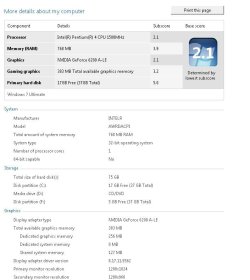
I have a machine which has the specs below and I recently decided to go for Windows 7 because of the need for the taskbar improvements and some other nice features I missed in old XP.

My main problem is with video playback because they consume almost all CPU processing and they tend to be non smooth (I'm speaking about virtually all video formats and not just a particular format but this problem is maximum with avi files). Also the problem is persistent with any video player (I tried WMP12 / RealPlayer). I never got this problem on XP using the same hardware and software. I feel like Windows 7 is not optimized for my old hardware. Any thing I can do to have an optimum performance??? I'm really stuck with this machine and do not have the time/money to go for a new hardware for many months to come :(. This PC is OK for almost all my needs except that video playback performance issue which I'm suffering from.

P.S.
1) I already tweaked various aspects of windows 7 which I do not need like transparency and some other stuff I do not need.
2) I use k-lite codec pack and RealPlayer 1.0.5 as my main video player.
3) I already downloaded and installed the NF123LR1.0 package.
4) I have the latest Geforce driver installed 195.62_desktop_win7_winvista_32bit_english_whql
5) The "Windows Experience Index" gives me a 3.0 score on desktop performance for windows aero.

What else I do need to do???
'll appreciate all your kind feedback
 

My Computer My Computer

At a glance

Windows 7 x64Core i54 GB DDR3 memoryATI Radeon HD5450
Computer Manufacturer/Model Number
Assembled
OS
Windows 7 x64
CPU
Core i5
Motherboard
Gigabyte P55A-UD3P
Memory
4 GB DDR3 memory
Graphics Card(s)
ATI Radeon HD5450
Monitor(s) Displays
LG Flatron 19in wide screen
Hard Drives
500 GB WD x 1
I have a 6200A-LE (lesser than yours) in another machine than my specs.

It does not do HD stuff at all but as far as DVD and lesser video, all formats and players, it's excellent. No tweaking needed and full Aero with full settings possible in Windows.

Please type msinfo32 into the start menu. Hit enter. Ctrl+s on the screen that opens. Zip or rar the saved file and attach to a post using the paperclip.

I can have a look for you and make some suggestions. My first one is to completely ditch Real Player and use PowerDVD, WMP, VLC, MediaPlayer Home Cinema or any combination of, to play your videos instead.
 

Attachments

  • Capture.JPG
    Capture.JPG
    53.1 KB · Views: 76

My Computer My Computer

At a glance

7600.20510 x86P4 550 3.4 GHz HT running at 3.5 GHzOCZ 2 GB(2x1GB) DDR400mHz running @ 414 mHzHIS Radeon HD 3850 IceQ 3 Turbo HDMI Dual DL-...
Computer Manufacturer/Model Number
self built
OS
7600.20510 x86
CPU
P4 550 3.4 GHz HT running at 3.5 GHz
Motherboard
MSI PM8M3-V (MS-7211 v1.x) Micro-ATX mainboard
Memory
OCZ 2 GB(2x1GB) DDR400mHz running @ 414 mHz
Graphics Card(s)
HIS Radeon HD 3850 IceQ 3 Turbo HDMI Dual DL-DVI AGP
Sound Card
MOTU Traveler firewire studio interface 192 kHz 24 bit
Monitor(s) Displays
22" widescreen Acer X223W LCD, 17" Compaq P75 CRT
Screen Resolution
1680x1050 and 1280x1024
Hard Drives
SATA I x2 WD, 400 GB and 120 GB, SATA 2 WD Caviar Black 1 TB
PSU
350W generic
Case
Cybertronpc, it glows blue
Cooling
stock cpu fan, Ice-Q 3 gpu and system, many case fans
Keyboard
Logitch Classical Keyboard 200
Mouse
Logitech Mediaplay cordless
Internet Speed
1792/448 kbits/sec
Other Info
SATA II PCI fake RAID adapter, 1 GB Readyboost, original ATI Remote Wonder (even works with WMC perfectly), Logitech Rumblepad 2 game controller x2
Here you are the info you required. I tried these media players but same issue :(
OS Name Microsoft Windows 7 Ultimate
Version 6.1.7600 Build 7600
Other OS Description Not Available
OS Manufacturer Microsoft Corporation
System Name WORKSTATION
System Manufacturer ASUSTeK Computer INC.
System Model A7N8X-E
System Type X86-based PC
Processor AMD Athlon(tm) XP 2600+, 1921 Mhz, 1 Core(s), 1 Logical Processor(s)
BIOS Version/Date Phoenix Technologies, LTD ASUS A7N8X-E Deluxe ACPI BIOS Rev 1009, 04-Feb-04
SMBIOS Version 2.2
Windows Directory C:\Windows
System Directory C:\Windows\system32
Boot Device \Device\HarddiskVolume1
Locale Australia
Hardware Abstraction Layer Version = "6.1.7600.16385"
User Name workstation\Magmag
Time Zone Perth Standard Time
Installed Physical Memory (RAM) 1.50 GB
Total Physical Memory 1.50 GB
Available Physical Memory 729 MB
Total Virtual Memory 2.96 GB
Available Virtual Memory 1.79 GB
Page File Space 1.46 GB
Page File C:\pagefile.sys
 

My Computer My Computer

At a glance

Windows 7 x64Core i54 GB DDR3 memoryATI Radeon HD5450
Computer Manufacturer/Model Number
Assembled
OS
Windows 7 x64
CPU
Core i5
Motherboard
Gigabyte P55A-UD3P
Memory
4 GB DDR3 memory
Graphics Card(s)
ATI Radeon HD5450
Monitor(s) Displays
LG Flatron 19in wide screen
Hard Drives
500 GB WD x 1
If you check my post again, it will tell you how to attach the zip or rar file.

That's not the info I requested, unfortunately. I can help you tweak your machine to get the best performance.
 

My Computer My Computer

At a glance

7600.20510 x86P4 550 3.4 GHz HT running at 3.5 GHzOCZ 2 GB(2x1GB) DDR400mHz running @ 414 mHzHIS Radeon HD 3850 IceQ 3 Turbo HDMI Dual DL-...
Computer Manufacturer/Model Number
self built
OS
7600.20510 x86
CPU
P4 550 3.4 GHz HT running at 3.5 GHz
Motherboard
MSI PM8M3-V (MS-7211 v1.x) Micro-ATX mainboard
Memory
OCZ 2 GB(2x1GB) DDR400mHz running @ 414 mHz
Graphics Card(s)
HIS Radeon HD 3850 IceQ 3 Turbo HDMI Dual DL-DVI AGP
Sound Card
MOTU Traveler firewire studio interface 192 kHz 24 bit
Monitor(s) Displays
22" widescreen Acer X223W LCD, 17" Compaq P75 CRT
Screen Resolution
1680x1050 and 1280x1024
Hard Drives
SATA I x2 WD, 400 GB and 120 GB, SATA 2 WD Caviar Black 1 TB
PSU
350W generic
Case
Cybertronpc, it glows blue
Cooling
stock cpu fan, Ice-Q 3 gpu and system, many case fans
Keyboard
Logitch Classical Keyboard 200
Mouse
Logitech Mediaplay cordless
Internet Speed
1792/448 kbits/sec
Other Info
SATA II PCI fake RAID adapter, 1 GB Readyboost, original ATI Remote Wonder (even works with WMC perfectly), Logitech Rumblepad 2 game controller x2
Sorry, Here your are the file. It took a lot of time to be saved!
 

Attachments

My Computer My Computer

At a glance

Windows 7 x64Core i54 GB DDR3 memoryATI Radeon HD5450
Computer Manufacturer/Model Number
Assembled
OS
Windows 7 x64
CPU
Core i5
Motherboard
Gigabyte P55A-UD3P
Memory
4 GB DDR3 memory
Graphics Card(s)
ATI Radeon HD5450
Monitor(s) Displays
LG Flatron 19in wide screen
Hard Drives
500 GB WD x 1
In the start menu, type regedit and hit enter. Navigate to:

HKEY_LOCAL MACHINE\SOFTWARE\Microsoft\Windows\CurrentVersion\Run

and delete these:


TkBellExe
S2kCtl
Babylon Client
TrueImageMonitor.exe
Acronis Scheduler2

I'd uninstall Winsnap since that sounds like an Aero replacement and no need. May actually be causing poor perfermance.

You have a few unnecessary services that you should disable but I'll leave that up to you to decide which. Google them if unsure. Type services.msc in the start menu and hit enter to see them.
 

My Computer My Computer

At a glance

7600.20510 x86P4 550 3.4 GHz HT running at 3.5 GHzOCZ 2 GB(2x1GB) DDR400mHz running @ 414 mHzHIS Radeon HD 3850 IceQ 3 Turbo HDMI Dual DL-...
Computer Manufacturer/Model Number
self built
OS
7600.20510 x86
CPU
P4 550 3.4 GHz HT running at 3.5 GHz
Motherboard
MSI PM8M3-V (MS-7211 v1.x) Micro-ATX mainboard
Memory
OCZ 2 GB(2x1GB) DDR400mHz running @ 414 mHz
Graphics Card(s)
HIS Radeon HD 3850 IceQ 3 Turbo HDMI Dual DL-DVI AGP
Sound Card
MOTU Traveler firewire studio interface 192 kHz 24 bit
Monitor(s) Displays
22" widescreen Acer X223W LCD, 17" Compaq P75 CRT
Screen Resolution
1680x1050 and 1280x1024
Hard Drives
SATA I x2 WD, 400 GB and 120 GB, SATA 2 WD Caviar Black 1 TB
PSU
350W generic
Case
Cybertronpc, it glows blue
Cooling
stock cpu fan, Ice-Q 3 gpu and system, many case fans
Keyboard
Logitch Classical Keyboard 200
Mouse
Logitech Mediaplay cordless
Internet Speed
1792/448 kbits/sec
Other Info
SATA II PCI fake RAID adapter, 1 GB Readyboost, original ATI Remote Wonder (even works with WMC perfectly), Logitech Rumblepad 2 game controller x2
It would help if you set your media player to use the video card for play back.
 

My Computer My Computer

At a glance

7 ProfQ95502x2 Mushkin Ascent 85004870X2
Computer Manufacturer/Model Number
SevenForums
OS
7 Prof
CPU
Q9550
Motherboard
Maximus II Formula
Memory
2x2 Mushkin Ascent 8500
Graphics Card(s)
4870X2
Sound Card
X-Fi Xtreme Gamer
Monitor(s) Displays
LN32A550
Screen Resolution
1920x1080
Hard Drives
Intel G2 80GB
5x1TB
PSU
Corsair 1000
Case
Cosmos
Cooling
Yates^13
Keyboard
G15v1
Mouse
MX518
Internet Speed
6Mbps
Also codec priority can help playback I remember back when I had to do that. =)
 

My Computer My Computer

At a glance

Windows 7, LinuxAMD Phemon II x2 3@37501G Crucial 16668800GT OC (custom OC)
Computer Manufacturer/Model Number
Custom
OS
Windows 7, Linux
CPU
AMD Phemon II x2 3@3750
Motherboard
ASRock M3A770DE
Memory
1G Crucial 1666
Graphics Card(s)
8800GT OC (custom OC)
Sound Card
Sound Blaster Live! (never changes!)
Monitor(s) Displays
Vivitron 22"
Screen Resolution
1600x1200
Hard Drives
Western Digital 120G/160G SATA
Maxtor 80G IDE
PSU
450w
Case
Unknown
Cooling
Custom Air cooled
Keyboard
Logitech
Mouse
Logitech M-BZ15A Laser
Internet Speed
Cable 10mbit
try gom player its pretty lightweight and directs you to direct downloads of any codec you might need
 

My Computer My Computer

At a glance

Windows 7 Build 7600Intel(R) Core 2 Duo2GBIntel(R) 4 Series Express Chipset Family
Computer Manufacturer/Model Number
Dell Inspiron 1545
OS
Windows 7 Build 7600
CPU
Intel(R) Core 2 Duo
Motherboard
Intel Centrino Duo
Memory
2GB
Graphics Card(s)
Intel(R) 4 Series Express Chipset Family
Sound Card
IDT High Definition Audio?
Screen Resolution
1366*768
Back
Top