Popup Window Issue

GlobalArchitect

New member
Local time
11:50 PM
Messages
12
So I have several programs - Google AdWords, QuickBooks, Excel 2007, etc... - that utilize popup windows to perform extra work. It could be posting to the Internet or performing a search/replace...you get the idea.

The problem is that these windows grow increasingly taller every time they open up. They soon become so large that the top and bottom cut off of the screen. This never happened in these programs in any prior OS so this must be a Windows 7 bug.

Does anybody know how to correct this issue?!?
 

My Computer

Computer type
PC/Desktop
Computer Manufacturer/Model Number
Puget Systems
OS
Windows 7 Ultimate 64-Bit SP 1
CPU
4 - Intel Core i7-3970X @3.50GHz
Motherboard
ASUS X79 Deluxe
Memory
Kingston 128GB DDR3-1600 (16x8GB)
Graphics Card(s)
NVIDIA GeForce GTX 770 2GB
Sound Card
Onboard Sound
Monitor(s) Displays
2 - Dell UltraSharp 2208FP
Hard Drives
LSI MegaRAID SAS 9271-8i Controller

3 x Samsung 840 EVO 1TB SATA 6Gb/s 2.5inch SSD
PSU
Seasonic X-1050 1050W Power Supply
Case
Antec P193 V3 (Gunmetal Grey) w/ USB 3.0
Cooling
Gelid GX-7 and Arctic Cooling MX-2 Thermal Compound Upgrade
Keyboard
Microsoft POS Keyboard
Mouse
Microsoft POS Mouse
Internet Speed
FIOS 50/10
Antivirus
AVG and Malwarebytes
Browser
Firefox 28, IE 10
Other Info
Around 200 applications - including almost every MS development tool around, AdWords Editor, Photoshop suite, Acrobat Professional, QuickBooks 2012, Microsoft Security Essentials, Malwarebytes (not automatically running), etc...
I don't know if this will solve the problem or not, but perhaps try setting those apps to run in compatibility mode for Vista or a prior OS. To do this, right click on the .exe for each app in question, select properties, compatibility tab, and click "run this app in compatibility mode" and try selecting different OS modes and seeing if any of them solve the problem. I would start with Vista and work backwards to older versions.
 

My Computer

Computer Manufacturer/Model Number
HP DV8t quad
OS
Windows 7 Ultimate x64 (Retail)
CPU
i7-Q 720
Motherboard
Motherboard Chipset Intel Ibex Peak-M PM55, Intel Lynnfield
Memory
6 GB
Graphics Card(s)
nVidia GeForce GT 230M (1GB)
Sound Card
IDT High Definition Audio CODEC
Monitor(s) Displays
18.4 inch HP Infinity FHD (Samsung 184HT03-001)
Screen Resolution
1920 x 1080
Hard Drives
Hitachi 500GB 7200 rpm (x2)
Seagate FreeAgent 1.5 TB External USB (x2)
Thermaltake BlacX eSATA/USB 2.0 3.5/2.5 HD dock
Cooling
Zalman NC-2000 notebook cooling pad
Keyboard
laptop
Mouse
Logitech VX Revolution
Other Info
Backup Unit: Lenovo T61p
I tried that and there were other issues. Seriously - Excel 2007 does not work properly on Microsoft's own OS?!?
 

My Computer

Computer type
PC/Desktop
Computer Manufacturer/Model Number
Puget Systems
OS
Windows 7 Ultimate 64-Bit SP 1
CPU
4 - Intel Core i7-3970X @3.50GHz
Motherboard
ASUS X79 Deluxe
Memory
Kingston 128GB DDR3-1600 (16x8GB)
Graphics Card(s)
NVIDIA GeForce GTX 770 2GB
Sound Card
Onboard Sound
Monitor(s) Displays
2 - Dell UltraSharp 2208FP
Hard Drives
LSI MegaRAID SAS 9271-8i Controller

3 x Samsung 840 EVO 1TB SATA 6Gb/s 2.5inch SSD
PSU
Seasonic X-1050 1050W Power Supply
Case
Antec P193 V3 (Gunmetal Grey) w/ USB 3.0
Cooling
Gelid GX-7 and Arctic Cooling MX-2 Thermal Compound Upgrade
Keyboard
Microsoft POS Keyboard
Mouse
Microsoft POS Mouse
Internet Speed
FIOS 50/10
Antivirus
AVG and Malwarebytes
Browser
Firefox 28, IE 10
Other Info
Around 200 applications - including almost every MS development tool around, AdWords Editor, Photoshop suite, Acrobat Professional, QuickBooks 2012, Microsoft Security Essentials, Malwarebytes (not automatically running), etc...
I haven't seen this problem on any of my Windows 7 computers. I don't suppose you did an in-place upgrade, did you?
 

My Computer

Computer Manufacturer/Model Number
Dell XPS 15 L502x
OS
Windows 7 Ultimate x64 SP1
CPU
Core i7-2670QM
Memory
8GB DDR3 PC3-10600
Graphics Card(s)
Intel HD Graphics 3000 + GeForce GT 540M
Screen Resolution
1920x1080
Hard Drives
1TB 5400RPM Seagate
My "upgrade" was from Windows XP - both OS's are 64-bit - maybe that makes a difference? I am using Windows 7 Ultimate 64-bit now
 

My Computer

Computer type
PC/Desktop
Computer Manufacturer/Model Number
Puget Systems
OS
Windows 7 Ultimate 64-Bit SP 1
CPU
4 - Intel Core i7-3970X @3.50GHz
Motherboard
ASUS X79 Deluxe
Memory
Kingston 128GB DDR3-1600 (16x8GB)
Graphics Card(s)
NVIDIA GeForce GTX 770 2GB
Sound Card
Onboard Sound
Monitor(s) Displays
2 - Dell UltraSharp 2208FP
Hard Drives
LSI MegaRAID SAS 9271-8i Controller

3 x Samsung 840 EVO 1TB SATA 6Gb/s 2.5inch SSD
PSU
Seasonic X-1050 1050W Power Supply
Case
Antec P193 V3 (Gunmetal Grey) w/ USB 3.0
Cooling
Gelid GX-7 and Arctic Cooling MX-2 Thermal Compound Upgrade
Keyboard
Microsoft POS Keyboard
Mouse
Microsoft POS Mouse
Internet Speed
FIOS 50/10
Antivirus
AVG and Malwarebytes
Browser
Firefox 28, IE 10
Other Info
Around 200 applications - including almost every MS development tool around, AdWords Editor, Photoshop suite, Acrobat Professional, QuickBooks 2012, Microsoft Security Essentials, Malwarebytes (not automatically running), etc...
No, there is no in-place upgrade for XP to 7. Did you install the drivers yourself, or did you let Windows find them? Does all of your hardware have Windows 7 drivers?

What about all of your applications and various plug-ins that support those applications? Are they all compatible with Windows 7? It's possible that one of your many applications screwed something up that caused this problem.
 

My Computer

Computer Manufacturer/Model Number
Dell XPS 15 L502x
OS
Windows 7 Ultimate x64 SP1
CPU
Core i7-2670QM
Memory
8GB DDR3 PC3-10600
Graphics Card(s)
Intel HD Graphics 3000 + GeForce GT 540M
Screen Resolution
1920x1080
Hard Drives
1TB 5400RPM Seagate
I know there is no in place upgrade. Windows 7 discovered all of the hardware drivers without too many issues and, as for compatability, everything - including Excel 2007 - isupposedly compatible.

This is a Windows 7 bug - I know other people with the same issue.
 

My Computer

Computer type
PC/Desktop
Computer Manufacturer/Model Number
Puget Systems
OS
Windows 7 Ultimate 64-Bit SP 1
CPU
4 - Intel Core i7-3970X @3.50GHz
Motherboard
ASUS X79 Deluxe
Memory
Kingston 128GB DDR3-1600 (16x8GB)
Graphics Card(s)
NVIDIA GeForce GTX 770 2GB
Sound Card
Onboard Sound
Monitor(s) Displays
2 - Dell UltraSharp 2208FP
Hard Drives
LSI MegaRAID SAS 9271-8i Controller

3 x Samsung 840 EVO 1TB SATA 6Gb/s 2.5inch SSD
PSU
Seasonic X-1050 1050W Power Supply
Case
Antec P193 V3 (Gunmetal Grey) w/ USB 3.0
Cooling
Gelid GX-7 and Arctic Cooling MX-2 Thermal Compound Upgrade
Keyboard
Microsoft POS Keyboard
Mouse
Microsoft POS Mouse
Internet Speed
FIOS 50/10
Antivirus
AVG and Malwarebytes
Browser
Firefox 28, IE 10
Other Info
Around 200 applications - including almost every MS development tool around, AdWords Editor, Photoshop suite, Acrobat Professional, QuickBooks 2012, Microsoft Security Essentials, Malwarebytes (not automatically running), etc...
Can you provide a link to other threads where this is discussed?

This is how I would find the problem - I'd do a clean install, install the drivers (making sure to check the manufacturer websites for any Windows 7 drivers and install those if they are newer than the MS versions), and then install one application at a time, making sure to test for the popup problem after each install, until I found the application that created the problem.
 

My Computer

Computer Manufacturer/Model Number
Dell XPS 15 L502x
OS
Windows 7 Ultimate x64 SP1
CPU
Core i7-2670QM
Memory
8GB DDR3 PC3-10600
Graphics Card(s)
Intel HD Graphics 3000 + GeForce GT 540M
Screen Resolution
1920x1080
Hard Drives
1TB 5400RPM Seagate
I am having the same problem and did a clean install and the problem still existss. Please help!!!
 

My Computer

Computer Manufacturer/Model Number
Lenovo
OS
Windows 7
CPU
Thinkpad T61p
Memory
4GB
Graphics Card(s)
NVision

My Computer

Computer Manufacturer/Model Number
Self Build 64bit
OS
Vista Ult64, Win7600
CPU
Intel Core 2 Quad Q6600 @ 2400 MHz 64bit OS
Motherboard
Asus P5E3 Deluxe WiFi @p 64 bit OS
Memory
4096 MB DDR3-SDRAM
Graphics Card(s)
ATI Radeon HD 3870 Series x2 Crossfired
Sound Card
Realtek on board
Monitor(s) Displays
Samsung SyncMaster - 23 inches
Screen Resolution
1680x1050 pixels at 60 Hz in True Colors
Hard Drives
Hitachi (250 GB)/Samsung 750 GB. /Barracuda 160 GB.
My Book 1 TB external..
PSU
Cooler Master 1000w
Case
Cooler Master Cosmos 1000.
Cooling
Fans and fresh air,
Keyboard
Wireless
Mouse
Wireless
Internet Speed
Never fast enough
Other Info
I use a Magnum.
Picture of growing popup attached.
 

Attachments

  • Windows 7 Popup Grrowing Bug.jpg
    Windows 7 Popup Grrowing Bug.jpg
    128.4 KB · Views: 24

My Computer

Computer Manufacturer/Model Number
Lenovo
OS
Windows 7
CPU
Thinkpad T61p
Memory
4GB
Graphics Card(s)
NVision
I am waiting for some assistance. The popup in my prior post (jpeg picture above) is of the sort popup in Excel. Every time I sort, the popup grows bigger and without resizing, it grows to big to type the OK to submit. Please help.
 

My Computer

Computer Manufacturer/Model Number
Lenovo
OS
Windows 7
CPU
Thinkpad T61p
Memory
4GB
Graphics Card(s)
NVision
I'm having the same problem. This is happening on a clean installed Win7 Home Premium 64-bit system.

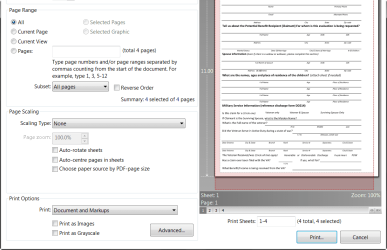
When I attempt to print a document, the pop-up print options window is too large to fit on the screen so the top and/or bottom of the displayed window is "chopped-off". Thus, I cannot click on various buttons to select the printer, etc.

This is just one example (in this case, only the top is "chopped"). I've seen the same problem with other apps.

My screen resolution is set to 1366 x 768 (recommended).

Please see the attached image.

Any ideas or suggestions? Surely this problem has been encountered by probably millions of other Win7 users before me!

Thanks, Rob
 

Attachments

  • 2011-05-12_120604.png
    2011-05-12_120604.png
    37.3 KB · Views: 12
Last edited:

My Computer

Computer Manufacturer/Model Number
HP dv6t-2100
OS
Windows 7 Home Premium 64bit.
CPU
Intel Core i5 CPU M 430 @ 2.27GHz, 2261 MHz
Memory
4GB
Hard Drives
Toshiba MK5056GSY
Back
Top