Port 9000 not available: no idea what software is using it

givolini

New member
Member
Local time
11:49 PM
Messages
41
Hi,

When trying to install a software named "New World Studio" (wife's software), I receive an error mesage stating that "Port 9000 reserved to OpenSim 3D world server is not available. Please check another instance is not already running".

I've done my research, and found out that the culprit appears to be the "System" service (description "NT Kernel & System"), which causes the port 9000 to be in constant "Listening" mode.

Now, I have no idea which software is actually keeping the port in question busy. Could anybody help me find out, so that I might decide whether to uninstall it and solve the problem?

I'm enclosing the SF Diagnostic tool file.
Thanks a lot,
Giorgio
 

Attachments

My Computer My Computer

At a glance

Microsoft Windows 7 Professional 64 bit 7601 ...Intel(R) Core(TM)2 Quad CPU Q9550 @ 2.83GHz8,00 GBNVIDIA GeForce GTX 560 SE
Computer type
PC/Desktop
OS
Microsoft Windows 7 Professional 64 bit 7601 Multiprocessor Free Service Pack 1
CPU
Intel(R) Core(TM)2 Quad CPU Q9550 @ 2.83GHz
Motherboard
Shuttle FX38
Memory
8,00 GB
Graphics Card(s)
NVIDIA GeForce GTX 560 SE
Sound Card
(1) Realtek High Definition Audio (2) NVIDIA Virtual Audio
Screen Resolution
1680 x 1050 x 32 bits (4294967296 colors) @ 59 Hz
Hard Drives
(1) SAMSUNG HD103UJ ATA Device (2) WDC WD10EADS-00L5B1 ATA Device (3) Generic USB CF Reader USB Device (4) Generic USB MS Reader USB Device (5) Generic USB SD Reader USB Device (6) Generic USB SM Reader USB Device
Hi there ... Seems there is a bug in the Software when running in 64 Bit OS ... Read the Link below ....


Configuration - OpenSim
 

My Computer My Computer

At a glance

windows 7 home 64bitINTEL-CORE I716GB
Computer Manufacturer/Model Number
W530-3630QM1
OS
windows 7 home 64bit
CPU
INTEL-CORE I7
Memory
16GB
Hard Drives
750GB
Browser
Chrome
Not sure that is the problem.

I checked all ports in use, and the "System" service (description "NT Kernel & System") is always "listening" on port 9000. That prevents me from installing the "New World Studio" software.

I'd need to identify precisely which software is listening on that port and, possibly, uninstall it (given that I cannot terminate the System process for obvious reasons).
 

My Computer My Computer

At a glance

Microsoft Windows 7 Professional 64 bit 7601 ...Intel(R) Core(TM)2 Quad CPU Q9550 @ 2.83GHz8,00 GBNVIDIA GeForce GTX 560 SE
Computer type
PC/Desktop
OS
Microsoft Windows 7 Professional 64 bit 7601 Multiprocessor Free Service Pack 1
CPU
Intel(R) Core(TM)2 Quad CPU Q9550 @ 2.83GHz
Motherboard
Shuttle FX38
Memory
8,00 GB
Graphics Card(s)
NVIDIA GeForce GTX 560 SE
Sound Card
(1) Realtek High Definition Audio (2) NVIDIA Virtual Audio
Screen Resolution
1680 x 1050 x 32 bits (4294967296 colors) @ 59 Hz
Hard Drives
(1) SAMSUNG HD103UJ ATA Device (2) WDC WD10EADS-00L5B1 ATA Device (3) Generic USB CF Reader USB Device (4) Generic USB MS Reader USB Device (5) Generic USB SD Reader USB Device (6) Generic USB SM Reader USB Device
I have used process explorer to see what process is running . Using the lower pane you can see exactly what it is. Has options to stop that if needed. Process Explorer Download Read the bleeping computer review and see if this is what you need .. Hope this helps .
 

My Computer My Computer

At a glance

Win 7 Home Premium SP1 32 bitAMD Athlon 64 X2 5000B4.00 GB Dual-Channel DDR2 @ 370MHz (6-6-6-18)Acer E181H (1366x768@60Hz) 64MB GeForce 6150 ...
Computer type
PC/Desktop
Computer Manufacturer/Model Number
Dell optiplex 740
OS
Win 7 Home Premium SP1 32 bit
CPU
AMD Athlon 64 X2 5000B
Motherboard
Dell Inc. 0YP696 (Socket M2 )
Memory
4.00 GB Dual-Channel DDR2 @ 370MHz (6-6-6-18)
Graphics Card(s)
Acer E181H (1366x768@60Hz) 64MB GeForce 6150 LE (Dell)
Sound Card
SigmaTel High Definition Audio CODEC
Monitor(s) Displays
Acer E181H (1366x768@60Hz) 64MB GeForce 6150 LE (Dell)
Hard Drives
699GB Seagate ST375064 0NS SCSI Disk Device (ATA)
Case
Mini tower
Internet Speed
Ping 36 ms, Download 57.71 mbps , Upload 11.79mbps
Antivirus
Free Avast. Pro paid Mbam , Free Sas
Browser
Palemoon .
Thanks, I've tried the software but the lower panel shows an endless list, pages and pages, for the process "System" at PID 4 (the process that keeps port 9000 busy).
 

My Computer My Computer

At a glance

Microsoft Windows 7 Professional 64 bit 7601 ...Intel(R) Core(TM)2 Quad CPU Q9550 @ 2.83GHz8,00 GBNVIDIA GeForce GTX 560 SE
Computer type
PC/Desktop
OS
Microsoft Windows 7 Professional 64 bit 7601 Multiprocessor Free Service Pack 1
CPU
Intel(R) Core(TM)2 Quad CPU Q9550 @ 2.83GHz
Motherboard
Shuttle FX38
Memory
8,00 GB
Graphics Card(s)
NVIDIA GeForce GTX 560 SE
Sound Card
(1) Realtek High Definition Audio (2) NVIDIA Virtual Audio
Screen Resolution
1680 x 1050 x 32 bits (4294967296 colors) @ 59 Hz
Hard Drives
(1) SAMSUNG HD103UJ ATA Device (2) WDC WD10EADS-00L5B1 ATA Device (3) Generic USB CF Reader USB Device (4) Generic USB MS Reader USB Device (5) Generic USB SD Reader USB Device (6) Generic USB SM Reader USB Device
Suggestion

Here's something to try but I'm not sure if it will be of any use.

If you download and run CrowdInspect:

About CrowdInspect

Download CrowdInspect

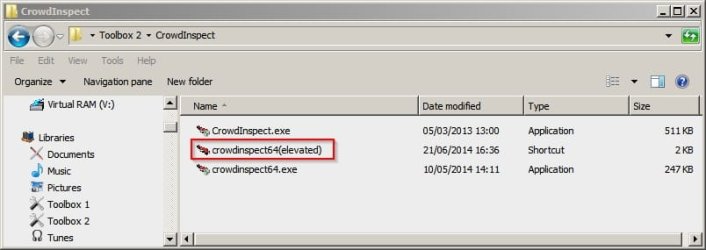
Run as adminstrator or from an elevated shortcut.

CrowdInspect2.jpg

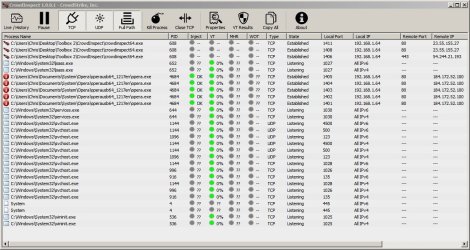
If you click the buttons to display TCP and UDP and use the Live/ History button along with selecting the Full Path button - if you're lucky you'll get a process path for port 9000. I somehow doubt in but you never know unless you try!

CrowdInspect.jpg
 

My Computer My Computer

At a glance

Microsoft Windows 7 Home Premium 64-bit 7601 ...AMD C-60 APU with Radeon(tm) HD Graphics4.00 GBAMD Radeon HD 6290 Graphics
Computer type
Laptop
Computer Manufacturer/Model Number
ASUS
OS
Microsoft Windows 7 Home Premium 64-bit 7601 Multiprocessor Free Service Pack 1
CPU
AMD C-60 APU with Radeon(tm) HD Graphics
Motherboard
ASUSTeK COMPUTER INC. X501U
Memory
4.00 GB
Graphics Card(s)
AMD Radeon HD 6290 Graphics
Sound Card
(1) AMD High Definition Audio Device (2) Realtek High Defi
Screen Resolution
1366 x 768 x 32 bits (4294967296 colors) @ 60 Hz
Hard Drives
Hitachi HTS545050A7E380 SATA Disk Device
Antivirus
Comodo CIS & FW, SecureAplus App Whitelisting, Threatfire
Browser
Cyberfox 64bit, Opera 64bit, Airfox
Other Info
Spy-The-Spy, HitmanPro.Alert, Norton Connect Safe, MJRegWatcher, BitDefender TrafficLight, Voodoo Shield, Zemana AntiMalware
Back
Top