
Port forwarding to Multiple computers on a LAN

jimbo45

New member
Guru
Gold Member
VIP
Local time
4:21 AM
Messages
5,941
Location
Hafnarfjörður IS
Hi all
I want to be able to RDP to maybe 3 or 4 different machines on a Remote LAN (OK I'm not THAT well off to be able to afford a large number of machines -- these will be Virtual machines).

On a LAN with Bridged networking these machines behave just like REAL physical machines with their own IP addresses.

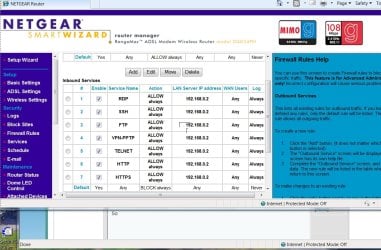
Now in my router I can only see a way of Port forwarding to a specific IP address on the Lan

So anyway round this.

Cheers
jimbo
 

Attachments
  • ports.jpg
    ports.jpg
    143.5 KB · Views: 555

My Computer

Computer type
PC/Desktop
Computer Manufacturer/Model Number
Custom built, several laptops HP/ASUS
OS
Linux CENTOS 7 / various Windows OS'es and servers
CPU
Intel i7 Intel i5
Memory
8GB, 16GB
Graphics Card(s)
On Motherboard
Sound Card
Realtek HD audio
Monitor(s) Displays
Apple Cinema display, Samsung LCD
Screen Resolution
1920 X 1080
Hard Drives
4 X 1TB SATA
Mouse
Toshiba wireless laser
Internet Speed
> 20MB up
Hi all
I want to be able to RDP to maybe 3 or 4 different machines on a Remote LAN (OK I'm not THAT well off to be able to afford a large number of machines -- these will be Virtual machines).

On a LAN with Bridged networking these machines behave just like REAL physical machines with their own IP addresses.

Now in my router I can only see a way of Port forwarding to a specific IP address on the Lan

So anyway round this.

Cheers
jimbo

Nope. Nature of the beast I'm afraid. TCP needs two distinct endpoint addresses. NAT routers get around this by assigning LAN addresses to machines behind them and then keeping a NAT translation table to map that traffic by MAC address. When port forwarding is enabled it statically links one internet port to one lan IP/port. You are right about bridging though. I can get multiple IPs assigned by my ISP if my router is set into bridge mode. That way there's no need for NAT and all machines get real internet addresses so no need for port forwarding either. Only problem is that it's ISP specific and most will charge you for extra IPs...
 

My Computer

Computer type
Laptop
Computer Manufacturer/Model Number
Apple
OS
El Capitan / Windows 10
CPU
i7-4980HQ
Memory
16GB
Graphics Card(s)
Iris 5200
ok, not quite sure what you mean by their "own ip addresses", do you mean those ip adresses are assigned from the router or somekind of pc ICS DHCP?

second thing, and not quite sure, just throwing this out. I notice you dont have a place for port range forwarding. Wondering if, and depending on setup and if this is possible. In theory yes, but it would have to pass at NAT level then your adapter (like i said depending on setup). And you would have to modify the reg on the other pcs a different port, "1 up" from each other. Theoretically this seems plausible. Given some work on it, and how you go about assigning the ips to the VM question.

you are ahead of me jimbo, am way behind in testing things here myself due to this adapter of mine. Very intersting journey you are taking. Leave a trail of breadcrumbs will you? :)
 

My Computer

Computer Manufacturer/Model Number
CUSTOM
OS
XP/win7 x86 build 7127
CPU
Athlon64 X2 DUAL 4200+ 2.21ghz
Motherboard
ASUS K8 PRO SLI
Memory
2GB Dual Chan DDR2 Corsair
Graphics Card(s)
Nvidia 6800GT
Sound Card
nvidia
Monitor(s) Displays
19' LCD
Screen Resolution
1280x1024
Hard Drives
WD 250, 2x500, 2x1TB IDE/USB
WD 250 SATA (system)
SEAGATE 120 Sata
PSU
coolermaster 450
Case
SUPERFLOWER
Cooling
1 HDD bay fan, 5x80mm Case Fans, AEROGATE II Fan/Temp
Keyboard
MS wireless
Mouse
MS Wireless
Internet Speed
fassssssssst
Hi Digger

By "Own IP addresseses" I mean that these have their own IP address on your LAN BEHIND your router.

e.g 10.2.x.1, 10.2.x.2 etc or 192.168.x.x ===> 192.168.x.z

As far as the external Internet sees you it's just (for a normal home ISP) a single external IP address such as for example the CIA at 198.81.129.136 have fun with that one if you can get in :D

This means that to access your own network you need something that splits up the request AFTER it passes through your router since all external incoming requests go via the single address you get from your ISP.

Cheers

jimbo
 

My Computer

Computer type
PC/Desktop
Computer Manufacturer/Model Number
Custom built, several laptops HP/ASUS
OS
Linux CENTOS 7 / various Windows OS'es and servers
CPU
Intel i7 Intel i5
Memory
8GB, 16GB
Graphics Card(s)
On Motherboard
Sound Card
Realtek HD audio
Monitor(s) Displays
Apple Cinema display, Samsung LCD
Screen Resolution
1920 X 1080
Hard Drives
4 X 1TB SATA
Mouse
Toshiba wireless laser
Internet Speed
> 20MB up
In theory jimbo, this should work. The only hurdle that causes concern is all inet traffic that would be routed to the VM would first have to pass MAC, then NAT, then the local physical pc adapter, then VM. In thought and theory again, brainstorming a little here, the adapter at local pc level would have to again act as a NAT, a traffic cop for all that traffic. This is why the question and thought i had in my head about the ICS DHCP.

If you setup an ftp server on a VM, can you get outside access? can you pasv transfer, inside and out? havent had time to lookup any real info reguarding this, just trying to use my wits and a lil network common sense.
 

My Computer

Computer Manufacturer/Model Number
CUSTOM
OS
XP/win7 x86 build 7127
CPU
Athlon64 X2 DUAL 4200+ 2.21ghz
Motherboard
ASUS K8 PRO SLI
Memory
2GB Dual Chan DDR2 Corsair
Graphics Card(s)
Nvidia 6800GT
Sound Card
nvidia
Monitor(s) Displays
19' LCD
Screen Resolution
1280x1024
Hard Drives
WD 250, 2x500, 2x1TB IDE/USB
WD 250 SATA (system)
SEAGATE 120 Sata
PSU
coolermaster 450
Case
SUPERFLOWER
Cooling
1 HDD bay fan, 5x80mm Case Fans, AEROGATE II Fan/Temp
Keyboard
MS wireless
Mouse
MS Wireless
Internet Speed
fassssssssst
have you tried to telnet in to the machine? telnet VM-IP 3389

from what i read its very possible. the VM adapter and itself should be like a physical machine/address/server. Like you stated, therefore forwarding either 3389 to each VM-IP on the router should work, but only allow one connection. So, you would have to 1+up a port or down, for each VM machine in the registry. Shouldnt have any problems, or have to enter any arp or routing table entries, i wouldnt think.

in depth techie read: Using the VMRC client to access virtual machines

can you mtsc / console [VM-IP]? i also take it that you have RD enable for administration?

[edit] of course you would also have to edit the router's forwarding for each VM adapter address for its specified RD/TS port
 

My Computer

Computer Manufacturer/Model Number
CUSTOM
OS
XP/win7 x86 build 7127
CPU
Athlon64 X2 DUAL 4200+ 2.21ghz
Motherboard
ASUS K8 PRO SLI
Memory
2GB Dual Chan DDR2 Corsair
Graphics Card(s)
Nvidia 6800GT
Sound Card
nvidia
Monitor(s) Displays
19' LCD
Screen Resolution
1280x1024
Hard Drives
WD 250, 2x500, 2x1TB IDE/USB
WD 250 SATA (system)
SEAGATE 120 Sata
PSU
coolermaster 450
Case
SUPERFLOWER
Cooling
1 HDD bay fan, 5x80mm Case Fans, AEROGATE II Fan/Temp
Keyboard
MS wireless
Mouse
MS Wireless
Internet Speed
fassssssssst
Back
Top