Port is unreachable even when the Firewall is off . need to open it

subwoffer13

New member
Member
Local time
8:16 PM
Messages
39
how should i do it ?
i have level one router if its matter .

(this is for utorrent, recently im not able to upload properly )
 

My Computer My Computer

At a glance

Win 7 X64Phenom II X6 (3.33)Kingston DDR3 1333 MHz , 16 GB , 4 sticksGTX 580 overclocked version , 1536 MB
OS
Win 7 X64
CPU
Phenom II X6 (3.33)
Motherboard
M4A88T-M
Memory
Kingston DDR3 1333 MHz , 16 GB , 4 sticks
Graphics Card(s)
GTX 580 overclocked version , 1536 MB
Sound Card
built in
Monitor(s) Displays
benq 21.5
Screen Resolution
1920 X 1080
Hard Drives
WD 500
transcend 1 tb
PSU
1010 W
Case
big
Cooling
corsair H50 (CPU)
Keyboard
logitech simple
Mouse
R.A.T 3
Internet Speed
12mb
Check that the port is forwarded to your local IP on the router web setup. You need your PC to have static local IP and the firewall needs to allow incoming connection on that port. uTorrent must be configured to use a fixed port (any number will do).
 

My Computer My Computer

At a glance

Windows 7 Ultimate x64Intel Core i7-740QM8 GB DDR3NVIDIA GeForce 330GT
Computer type
Laptop
Computer Manufacturer/Model Number
Toshiba Sattelite A665-S6092
OS
Windows 7 Ultimate x64
CPU
Intel Core i7-740QM
Memory
8 GB DDR3
Graphics Card(s)
NVIDIA GeForce 330GT
Screen Resolution
1366x768
Hard Drives
Samsung 840 SSD 500GB
1TB USB3 external HD
Cooling
Coolermaster Notepal U3 notebook cooling pad
Internet Speed
3mbps ASDL
Antivirus
ClamWin 0.98.7
Browser
Opera 12.17 x86 (main), Firefox 38 (sec), IE11 (last resort)
Check that the port is forwarded to your local IP on the router web setup. You need your PC to have static local IP and the firewall needs to allow incoming connection on that port. uTorrent must be configured to use a fixed port (any number will do).


i cant have a static ip ( my provider charging for this option )
 

My Computer My Computer

At a glance

Win 7 X64Phenom II X6 (3.33)Kingston DDR3 1333 MHz , 16 GB , 4 sticksGTX 580 overclocked version , 1536 MB
OS
Win 7 X64
CPU
Phenom II X6 (3.33)
Motherboard
M4A88T-M
Memory
Kingston DDR3 1333 MHz , 16 GB , 4 sticks
Graphics Card(s)
GTX 580 overclocked version , 1536 MB
Sound Card
built in
Monitor(s) Displays
benq 21.5
Screen Resolution
1920 X 1080
Hard Drives
WD 500
transcend 1 tb
PSU
1010 W
Case
big
Cooling
corsair H50 (CPU)
Keyboard
logitech simple
Mouse
R.A.T 3
Internet Speed
12mb
It's your LOCAL IP what needs to be fixed, the one you set in control panel at your complete decision.
Your ISP will provide your public IP, which here doesn't matters, dynamic will do too.
 

My Computer My Computer

At a glance

Windows 7 Ultimate x64Intel Core i7-740QM8 GB DDR3NVIDIA GeForce 330GT
Computer type
Laptop
Computer Manufacturer/Model Number
Toshiba Sattelite A665-S6092
OS
Windows 7 Ultimate x64
CPU
Intel Core i7-740QM
Memory
8 GB DDR3
Graphics Card(s)
NVIDIA GeForce 330GT
Screen Resolution
1366x768
Hard Drives
Samsung 840 SSD 500GB
1TB USB3 external HD
Cooling
Coolermaster Notepal U3 notebook cooling pad
Internet Speed
3mbps ASDL
Antivirus
ClamWin 0.98.7
Browser
Opera 12.17 x86 (main), Firefox 38 (sec), IE11 (last resort)
can you just point me a little more to the direction with the local IP settings?
 

My Computer My Computer

At a glance

Win 7 X64Phenom II X6 (3.33)Kingston DDR3 1333 MHz , 16 GB , 4 sticksGTX 580 overclocked version , 1536 MB
OS
Win 7 X64
CPU
Phenom II X6 (3.33)
Motherboard
M4A88T-M
Memory
Kingston DDR3 1333 MHz , 16 GB , 4 sticks
Graphics Card(s)
GTX 580 overclocked version , 1536 MB
Sound Card
built in
Monitor(s) Displays
benq 21.5
Screen Resolution
1920 X 1080
Hard Drives
WD 500
transcend 1 tb
PSU
1010 W
Case
big
Cooling
corsair H50 (CPU)
Keyboard
logitech simple
Mouse
R.A.T 3
Internet Speed
12mb
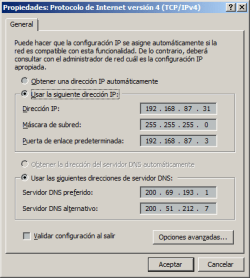
No problem. You have to go to Control Panel => Network and sharing center => On the left click change adapter configuration => Select your network card, right click, properties (UAC will prompt here) => Select TCP/IPv4 and click properties.

Here you'll see the screen where you can change your local IP for that machine, select use this IP address and enter a number in the same range as your router and fill the other fields.
With that fixed address you can then, on the router, forward the uTorrent port to your PC to have full connectivity.
 

Attachments

  • Network.png
    Network.png
    9.3 KB · Views: 8

My Computer My Computer

At a glance

Windows 7 Ultimate x64Intel Core i7-740QM8 GB DDR3NVIDIA GeForce 330GT
Computer type
Laptop
Computer Manufacturer/Model Number
Toshiba Sattelite A665-S6092
OS
Windows 7 Ultimate x64
CPU
Intel Core i7-740QM
Memory
8 GB DDR3
Graphics Card(s)
NVIDIA GeForce 330GT
Screen Resolution
1366x768
Hard Drives
Samsung 840 SSD 500GB
1TB USB3 external HD
Cooling
Coolermaster Notepal U3 notebook cooling pad
Internet Speed
3mbps ASDL
Antivirus
ClamWin 0.98.7
Browser
Opera 12.17 x86 (main), Firefox 38 (sec), IE11 (last resort)
but how should i know what ip settings i should insert there?
 

My Computer My Computer

At a glance

Win 7 X64Phenom II X6 (3.33)Kingston DDR3 1333 MHz , 16 GB , 4 sticksGTX 580 overclocked version , 1536 MB
OS
Win 7 X64
CPU
Phenom II X6 (3.33)
Motherboard
M4A88T-M
Memory
Kingston DDR3 1333 MHz , 16 GB , 4 sticks
Graphics Card(s)
GTX 580 overclocked version , 1536 MB
Sound Card
built in
Monitor(s) Displays
benq 21.5
Screen Resolution
1920 X 1080
Hard Drives
WD 500
transcend 1 tb
PSU
1010 W
Case
big
Cooling
corsair H50 (CPU)
Keyboard
logitech simple
Mouse
R.A.T 3
Internet Speed
12mb
???
 

My Computer My Computer

At a glance

Win 7 X64Phenom II X6 (3.33)Kingston DDR3 1333 MHz , 16 GB , 4 sticksGTX 580 overclocked version , 1536 MB
OS
Win 7 X64
CPU
Phenom II X6 (3.33)
Motherboard
M4A88T-M
Memory
Kingston DDR3 1333 MHz , 16 GB , 4 sticks
Graphics Card(s)
GTX 580 overclocked version , 1536 MB
Sound Card
built in
Monitor(s) Displays
benq 21.5
Screen Resolution
1920 X 1080
Hard Drives
WD 500
transcend 1 tb
PSU
1010 W
Case
big
Cooling
corsair H50 (CPU)
Keyboard
logitech simple
Mouse
R.A.T 3
Internet Speed
12mb
???
 

My Computer My Computer

At a glance

Win 7 X64Phenom II X6 (3.33)Kingston DDR3 1333 MHz , 16 GB , 4 sticksGTX 580 overclocked version , 1536 MB
OS
Win 7 X64
CPU
Phenom II X6 (3.33)
Motherboard
M4A88T-M
Memory
Kingston DDR3 1333 MHz , 16 GB , 4 sticks
Graphics Card(s)
GTX 580 overclocked version , 1536 MB
Sound Card
built in
Monitor(s) Displays
benq 21.5
Screen Resolution
1920 X 1080
Hard Drives
WD 500
transcend 1 tb
PSU
1010 W
Case
big
Cooling
corsair H50 (CPU)
Keyboard
logitech simple
Mouse
R.A.T 3
Internet Speed
12mb
Hello,

You're trying to forward a port on your router. First thing you need to know is your local IP address as stated above.

You can get this information using the ipconfig /all command.

You should set you PC to have a static address or a dhcp reservation. Let me see your IPconfig /all output and i can assist you with this.

You also should have a dhcp page on your router configuration please post a screenshot.

Then you need to go into your router configuration page and forward the port to the local IP address of your PC. I can help you further if you let me know the router you have.
 

My Computer My Computer

At a glance

Windows 7 Ultimate x64
OS
Windows 7 Ultimate x64

My Computer My Computer

At a glance

Win 7 X64Phenom II X6 (3.33)Kingston DDR3 1333 MHz , 16 GB , 4 sticksGTX 580 overclocked version , 1536 MB
OS
Win 7 X64
CPU
Phenom II X6 (3.33)
Motherboard
M4A88T-M
Memory
Kingston DDR3 1333 MHz , 16 GB , 4 sticks
Graphics Card(s)
GTX 580 overclocked version , 1536 MB
Sound Card
built in
Monitor(s) Displays
benq 21.5
Screen Resolution
1920 X 1080
Hard Drives
WD 500
transcend 1 tb
PSU
1010 W
Case
big
Cooling
corsair H50 (CPU)
Keyboard
logitech simple
Mouse
R.A.T 3
Internet Speed
12mb
I cant access the links.
 

My Computer My Computer

At a glance

Windows 7 Ultimate x64
OS
Windows 7 Ultimate x64
Back
Top