
You are using an out of date browser. It may not display this or other websites correctly.
You should upgrade or use an alternative browser.
You should upgrade or use an alternative browser.
Port tree missing in Device Manager
- Thread starter Mim
- Start date

zigzag3143
New member
- Local time
- 5:35 PM
- Messages
- 27,140
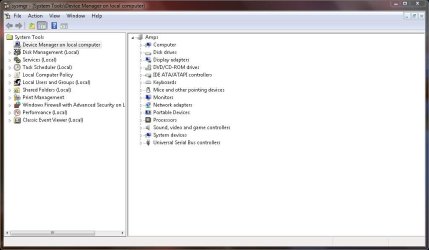
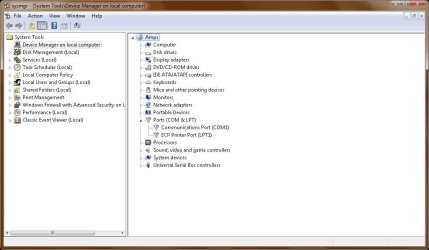
When I open my device manager, there is no Ports tree. I am sure it was there before. I am using a HP Pavilion Entertainment PC laptop running Windows 7 Professional. Can you tell me how to be able to see my ports again?
Ports in device manager? see pic. Can you be more specific?
Last edited:
My Computer
- Computer Manufacturer/Model Number
- HP Pavillion dv-7 1005 Tx
- OS
- Win 8 Release candidate 8400
- Memory
- 4 gigs
- Graphics Card(s)
- Nvidia 9600M
- Sound Card
- HD built-in
- Monitor(s) Displays
- 17" Wxga
- Screen Resolution
- 1440x900
- Cooling
- none
- Internet Speed
- 45Mb down 5Mb up
Your device manager looks like mine. But I thought there would be a tab that showed the com ports and which devices are using which ports. Am I looking in the wrong place? I have a vinyl cutting machine attached to my laptop with a usb connection and I need to be sure the software for the device is set to the same com port that my machine is using. But I am not finding a list of the com ports on my computer.
My Computer
- OS
- Windows 7
Do you know how you fixed it, incase someone else has this problem.
My Computer
- Computer type
- PC/Desktop
- Computer Manufacturer/Model Number
- Self Built
- OS
- Win 10 Pro x64
- CPU
- Intel I5-2500K @3.3GHz
- Motherboard
- Asrock P67 Extreme4
- Memory
- 16GB G.Skill Ripjaws X (4x4GB)
- Graphics Card(s)
- EVGA GeForce 750 Ti SC 2GB
- Sound Card
- ASUS Xonar DG 5.1 Channels 24-bit 96KHz PCI Interface Sound
- Monitor(s) Displays
- auria eq2367
- Screen Resolution
- 1920 x 1080
- Hard Drives
- 250GB Samsung 850 EVO SSD
1TB WD Blue
1TB Hitachi
- PSU
- SeaSonic X 650W 80 Plus Gold
- Case
- Corsair Obsidian 750D
- Cooling
- Corsair H60, Three 140mm case fans
- Keyboard
- Logitech Wireless Keyboard K520
- Mouse
- Logitech Wireless Mouse M310
- Internet Speed
- Wave Broadband ~ 100 dn 5 up
- Antivirus
- Windows Defender, Malwarebytes Premium
- Browser
- Edge, IE11, Chrome
- Other Info
- Laptop specs: HP g7-1365dx /
CPU: AMD A6-3420M APU with Radeon(tm) HD Graphics /
RAM: Crucial 8Gb (2x4Gb) /
SSD: Crucial M4-CT128M4SSD2 ATA Device/ FW 000F /
GFX: AMD Radeon HD 6520G /
OS: Windows 10 Pro x64

The only way that I'm aware of that the Ports listing would be missing in the DM, is if they were disabled in the BIOS.
My Computer
- Computer Manufacturer/Model Number
- DIY
- OS
- W7x64 Pro, SuSe 12.1/** W7 x64 Pro, XP MCE
- CPU
- Phenom II 1090T w/Noctua NH-D14 /**4400+ X2 w/CM Hyper TX 3
- Motherboard
- ASRock 890FX Deluxe 4/**A8N-SLI
- Memory
- 2 x 2GB Patriot PGS34g1600LLKA/**4x1GB Corsair VS
- Graphics Card(s)
- EVGA GTX460 SC/**EVGA 8800GTS
- Sound Card
- Asus Xonar D2X/**Xonar D1
- Monitor(s) Displays
- Acer X233H, Dell E152FPc /**LG M237-WD
- Screen Resolution
- 1920x1080 & 1024x768/**1980x1080
- Hard Drives
- WDC 2TB, 1.5TB, 1TB, 500GB,Seagate 500GB , Maxtor 80GB /**500GB Seagate & WDC 1TB Black
- PSU
- CM RS600 w/ APC BX1000G/**Antec 500 TP w/ APC BX1000
- Case
- HAF922/**Antec 1040IIB
- Cooling
- 3x200mm, 1x140 and 1x120mm/**5x80mm fans
- Keyboard
- Logitech Media USB/**Saitek Eclipse
- Mouse
- Cordless Trackman Wheel/**Ditto
- Internet Speed
- 3.3Mbps
- Other Info
- SB 560 5.1 w/ Sennheiser RS140/**Creative T20 speakers, Dvico FusionHDTV7 Gold RT, Cisco E3000, HP 5510V AIO, Linksys E3000, Belkin F5U237 hub and **F5D8055 adapter
(** = 2nd rig)

CommonTater
New member
When I open my device manager, there is no Ports tree. I am sure it was there before. I am using a HP Pavilion Entertainment PC laptop running Windows 7 Professional. Can you tell me how to be able to see my ports again?
Ports Disabled in BIOS...
Ports Enabled in BIOS...
My Computer
- Computer Manufacturer/Model Number
- Homebrew
- OS
- XP Pro SP3 X86 / Win7 Pro X86
- CPU
- Amd 64 x2 4200 (2.4ghz)
- Motherboard
- Asus M2N-MX SE Plus
- Memory
- Kingston DDR2 800 2gb
- Graphics Card(s)
- Nvidia GF-8400
- Sound Card
- Realtek on Motherboard
- Monitor(s) Displays
- Acer x-193bw
- Screen Resolution
- 1440 x 900
- Hard Drives
- Western Digital 500g
- PSU
- 350watt In-Win
- Case
- In-Win
- Cooling
- Air
- Keyboard
- yes
- Mouse
- yes
- Internet Speed
- 5mpbs
- Other Info
- Also ASRock ION 330 as HTPC (on XP).
Acer Aspire as GP netbook (on XP).