Portable 1TB WD Elements SE Un-allocated, Not Initialized & Unknown

aby452

New member
Local time
2:34 PM
Messages
11
Portable 1TB WD Elements SE Un-allocated, Not Initialized & Unknown

Hello,

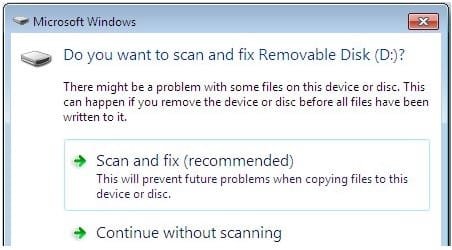
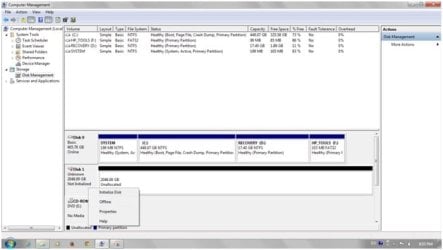
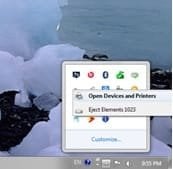
My laptop's OS is 64 bit Win 7 Home Premium. I've been usng my Portable 1TB WD Elements SE external HDD for over 2 years. One fine day Win 7 displayed "Do you want to scan & fix removable drive G:" prompt. I check marked both subsequent boxes on the prompt and clicked Scan & Fix. After complete execution of the Scan & Fix (after 12 hrs approx) my Portable 1TB WD Elements SE was shown as Unallocated, Not Initialized & Unknown in the Disk Management and clicking on it windows explorer My Computer window showed the HDD with a Letter but on clicking it an error pop-up with text "Drive G: is inaccessible. Access Denied." was displayed. However, I can still see a "Safely Remove Hardware" icon that gives me a successfully removed hardware message.

I need to recover the data present on the Portable 1TB WD Elements SE external HDD.

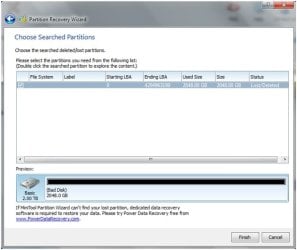
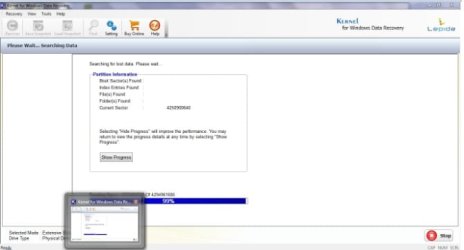
So far I've tried Free Trial versions of RecoverMyFiles(Extended Scan), Stellar Phoenix Data Recovery(Extended Scan), Kernell Data Recovery (Extended Scan), Partition Wizard MiniTools (Quick Scan). All of them have scanned the HDD for 12 hours approximately without locating any files for recovery. Partition Wizard MiniTools detected the HDD as a Bad Disk.

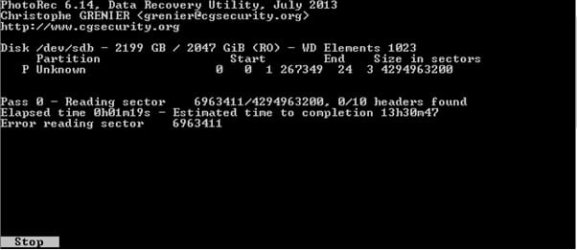
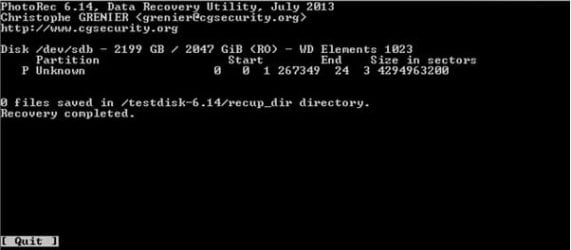
Subsequently I tried PhotoRec. It scanned the HDD for 24 hours without any positive result. During pass 0 & pass 1, scanning it kept displaying error reading sector "so and so". But the files didn't populate in the recovery folder.

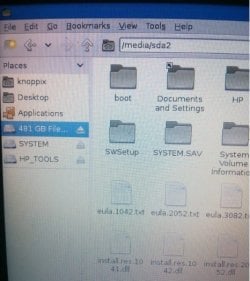
After this I tried to boot using Knoppix 7.2 LiveCD. The HDD was connected to USB before booting up with Knoppix 7.2 LiveCD. Later, I connected the HDD to USB after booting up with Knoppix 7.2 LiveCD. The HDD was not detected.

I plan to do the following now.
1. Take create a copy using ddrescue in Ubuntu Rescue Remix and work on the copy.
2. If rescue remix fails then try TestDisk on the copy
3. If TestDisk fails then open up the external HDD & try connecting the HDD to laptop using SATA to USB cable

Please let me know if there are any better data recovery alternatives left or any change required in the above sequence of recovery steps

Thank you
 

Attachments

  • Scan & Fix.jpg
    Scan & Fix.jpg
    19.9 KB · Views: 20
  • Disk Mgmt - 1.jpg
    Disk Mgmt - 1.jpg
    22.1 KB · Views: 20
  • Disk Mgmt - 2.jpg
    Disk Mgmt - 2.jpg
    22.7 KB · Views: 20
  • Safely Remove Hardware.jpg
    Safely Remove Hardware.jpg
    5.5 KB · Views: 20
  • PW Before.jpg
    PW Before.jpg
    29 KB · Views: 20
  • PW After.jpg
    PW After.jpg
    31.9 KB · Views: 20
  • PhotoRec - 1.jpg
    PhotoRec - 1.jpg
    16.3 KB · Views: 20
  • PhotoRec - 2.jpg
    PhotoRec - 2.jpg
    13.6 KB · Views: 20
  • Knoppix.jpg
    Knoppix.jpg
    38.1 KB · Views: 20
  • Kernell.jpg
    Kernell.jpg
    17.4 KB · Views: 20

My Computer My Computer

At a glance

Microsoft Windows 7 Home Premium 64-bit 7601 ...Intel(R) Core(TM) i7-2670QM CPU @ 2.20GHz8 GB(1) Mobile Intel(R) HD Graphics (2) Radeon (T...
Computer type
Laptop
Computer Manufacturer/Model Number
HP ENVY 14t-2000 CTO Notebook PC
OS
Microsoft Windows 7 Home Premium 64-bit 7601 Multiprocessor Free Service Pack 1
CPU
Intel(R) Core(TM) i7-2670QM CPU @ 2.20GHz
Motherboard
Hewlett-Packard 3385
Memory
8 GB
Graphics Card(s)
(1) Mobile Intel(R) HD Graphics (2) Radeon (TM) HD 6630M
Sound Card
(1) IDT High Definition Audio CODEC (2) Intel Display Audio
Monitor(s) Displays
Generic PnP Monitor
Screen Resolution
1366 x 768
Hard Drives
ST9500420AS
Browser
Mozilla Firefox operational | IE & Google Chrome cause BSOD
Other Info
https://support.hp.com/us-en/product/HP-ENVY-14-2000-Notebook-PC-series/5091481/model/5118491?sku=LR254AV
Hi

The symptoms you posted clearly indicates a hardware issue.

Subsequently I tried PhotoRec. It scanned the HDD for 24 hours without any positive result. During pass 0 & pass 1, scanning it kept displaying error reading sector "so and so".


It means the disk surface is severely damaged (has developed pretty huge number of bad sectors ). At this point, Imaging the disk and working on the copy is the best step you can do. I would suggest ;

- Create a RAW disk image using "ddrescue". Since your HDD is a 2TB one, you need a larger capacity drive like 3TB one to store the image.

- Try the trial versions of "GetDataBack" and "R-Studio" on the RAW image. Both supports working with disk images created by "dd" and "ddrescue".


GetDataBack for NTFS Tutorial on scanning an image - YouTube
 

My Computer My Computer

At a glance

Windows 7 Ultimate x64
Computer type
PC/Desktop
OS
Windows 7 Ultimate x64
Hello Anshad,

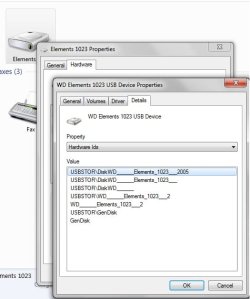
Thank you for your reply. Will I really need 3TB HDD for disk image? For disk image, I've ordered online a new 2TB already since I definitely know I had bought 1TB HDD and while it worked it showed 1TB size. Screenshot also reads Elements 1023. I was confused when PhotRec, PW & Disk Mgmt displayed 2048 GB (2TB) size. Is there any reason why these softwares detect it as 2TB when it should be 1TB?

Regards
 

Attachments

  • WD 1023.jpg
    WD 1023.jpg
    24.7 KB · Views: 0
  • WD 1023 - 2.jpg
    WD 1023 - 2.jpg
    33.9 KB · Views: 18

My Computer My Computer

At a glance

Microsoft Windows 7 Home Premium 64-bit 7601 ...Intel(R) Core(TM) i7-2670QM CPU @ 2.20GHz8 GB(1) Mobile Intel(R) HD Graphics (2) Radeon (T...
Computer type
Laptop
Computer Manufacturer/Model Number
HP ENVY 14t-2000 CTO Notebook PC
OS
Microsoft Windows 7 Home Premium 64-bit 7601 Multiprocessor Free Service Pack 1
CPU
Intel(R) Core(TM) i7-2670QM CPU @ 2.20GHz
Motherboard
Hewlett-Packard 3385
Memory
8 GB
Graphics Card(s)
(1) Mobile Intel(R) HD Graphics (2) Radeon (TM) HD 6630M
Sound Card
(1) IDT High Definition Audio CODEC (2) Intel Display Audio
Monitor(s) Displays
Generic PnP Monitor
Screen Resolution
1366 x 768
Hard Drives
ST9500420AS
Browser
Mozilla Firefox operational | IE & Google Chrome cause BSOD
Other Info
https://support.hp.com/us-en/product/HP-ENVY-14-2000-Notebook-PC-series/5091481/model/5118491?sku=LR254AV
I definitely know I had bought 1TB HDD and while it worked it showed 1TB size.


That is very strange. All the softwares and the "DIsk Management" itself detects the HDD as a 2 TB one. At this point i see two possibilities. It could be either ;

a) Your HDD is really a 1 TB one but the unit is faulty so reporting incorrect size.

b) The HDD is actually a 2 TB one but only used 1 TB for the partition and the rest of the space remained "Unallocated" - you where unaware about this.


We should clarify the doubt about the size first. Please post the exact model number of your HDD with next reply. If possible, also post a clear screenshot of the disk.
 

My Computer My Computer

At a glance

Windows 7 Ultimate x64
Computer type
PC/Desktop
OS
Windows 7 Ultimate x64
Hello Anshad,

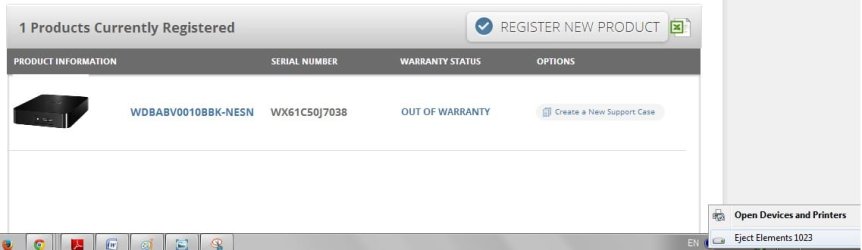
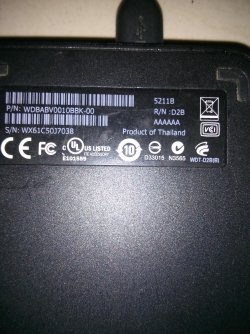
Following is mentioned on the back of the HDD.
P/N: WDBABV0010BBK-00
S/N: WX61C50J7038

It is referred to as 1TB WD Elements SE

I hope this is the info you were looking for

Regards
 

Attachments

  • IMG_20140823_174138.jpg
    IMG_20140823_174138.jpg
    1,008.1 KB · Views: 0
  • IMG_20140823_174255.jpg
    IMG_20140823_174255.jpg
    256.4 KB · Views: 1

My Computer My Computer

At a glance

Microsoft Windows 7 Home Premium 64-bit 7601 ...Intel(R) Core(TM) i7-2670QM CPU @ 2.20GHz8 GB(1) Mobile Intel(R) HD Graphics (2) Radeon (T...
Computer type
Laptop
Computer Manufacturer/Model Number
HP ENVY 14t-2000 CTO Notebook PC
OS
Microsoft Windows 7 Home Premium 64-bit 7601 Multiprocessor Free Service Pack 1
CPU
Intel(R) Core(TM) i7-2670QM CPU @ 2.20GHz
Motherboard
Hewlett-Packard 3385
Memory
8 GB
Graphics Card(s)
(1) Mobile Intel(R) HD Graphics (2) Radeon (TM) HD 6630M
Sound Card
(1) IDT High Definition Audio CODEC (2) Intel Display Audio
Monitor(s) Displays
Generic PnP Monitor
Screen Resolution
1366 x 768
Hard Drives
ST9500420AS
Browser
Mozilla Firefox operational | IE & Google Chrome cause BSOD
Other Info
https://support.hp.com/us-en/product/HP-ENVY-14-2000-Notebook-PC-series/5091481/model/5118491?sku=LR254AV
Hi

Yes, the disk seems to be a 1 TB model.

WD Elements SE Specs - CNET


I have seen several hard drives showing reduced capacity due to firmware issues but never one with double capacity issue. To my understanding, the issue might be caused by either one of the following reasons.

1. Issues with disk firmware.

2. USB to SATA bridge gone bad.


Either way, there is no point in trying to clone or image the disk.If you take an image in this condition, it will be nothing but pure garbage. There is no wonder in data recovery software's failure to find a single file on your drive.

I would suggest disassembling the drive and check whether it is possible to connect the disk directly to a SATA port. If yes, check and report the capacity detected by Windows "Disk Management". Make sure to not running CHKDSK or any data recovery software against the drive.

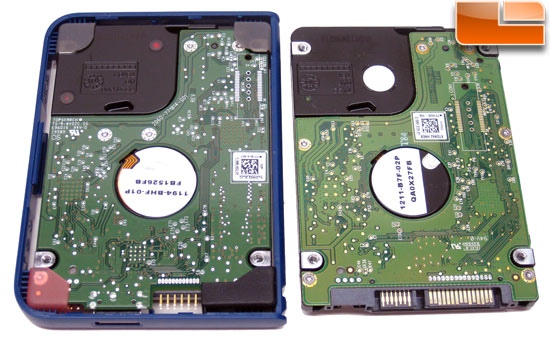
Most modern WD disks came with USB-SATA bridge integrated. Below picture will show the difference between a normal 2.5 inch HDD and a WD own USB integrated disk.

usb-connector.jpg


If you found that your HDD is WD OEM one, you may need help from a data recovery professional.
 

My Computer My Computer

At a glance

Windows 7 Ultimate x64
Computer type
PC/Desktop
OS
Windows 7 Ultimate x64
Hello Anshad,

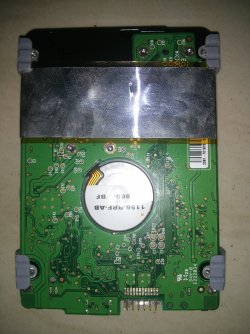
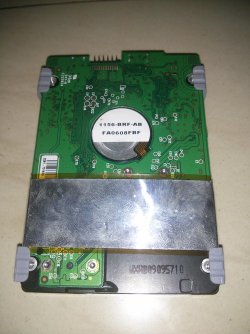
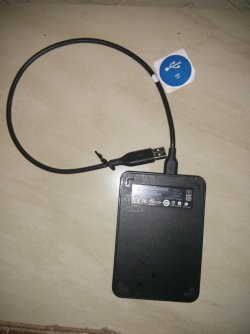
I dissembled my 1TB HDD. Attached is its screenshot. Please let me how to I proceed ahead?

Are there any reputed data recovery professionals in Mumbai, who can assist me further?

Regards
 

Attachments

  • IMG_20140823_193145.jpg
    IMG_20140823_193145.jpg
    984.4 KB · Views: 0
  • IMG_20140823_193022.jpg
    IMG_20140823_193022.jpg
    959.5 KB · Views: 0

My Computer My Computer

At a glance

Microsoft Windows 7 Home Premium 64-bit 7601 ...Intel(R) Core(TM) i7-2670QM CPU @ 2.20GHz8 GB(1) Mobile Intel(R) HD Graphics (2) Radeon (T...
Computer type
Laptop
Computer Manufacturer/Model Number
HP ENVY 14t-2000 CTO Notebook PC
OS
Microsoft Windows 7 Home Premium 64-bit 7601 Multiprocessor Free Service Pack 1
CPU
Intel(R) Core(TM) i7-2670QM CPU @ 2.20GHz
Motherboard
Hewlett-Packard 3385
Memory
8 GB
Graphics Card(s)
(1) Mobile Intel(R) HD Graphics (2) Radeon (TM) HD 6630M
Sound Card
(1) IDT High Definition Audio CODEC (2) Intel Display Audio
Monitor(s) Displays
Generic PnP Monitor
Screen Resolution
1366 x 768
Hard Drives
ST9500420AS
Browser
Mozilla Firefox operational | IE & Google Chrome cause BSOD
Other Info
https://support.hp.com/us-en/product/HP-ENVY-14-2000-Notebook-PC-series/5091481/model/5118491?sku=LR254AV
Hi

As i suspected, the disk seems to be WD propitiatory one. Unfortunately, you definitely need help from a DR pro - this issue is a beyond DIY. Usually DR will cost around 3000 or more so do this only if the data is really important.

I personally don't know any DR center in Mumbai but a Google search shows lot of them. Among them, "Stellarinfo" is a well known DR company with very good reputation. They are one of the oldest DR company in India with branches in almost all major cities. You can submit the disk to them and ask for a quote before doing the actual DR work.

Mumbai Data Recovery Services from RAID, Hard Disk, Laptop - Stellar Information Technology Pvt. Ltd.
 

My Computer My Computer

At a glance

Windows 7 Ultimate x64
Computer type
PC/Desktop
OS
Windows 7 Ultimate x64
Hello Anshad,

I sincerely THANK YOU for your prompt replies and guiding me throughout the thread. I hope you continue soothing nerves of distressed individuals like me. I'll update further based on what DR professionals inform me. When you mentioned 3000 or more, were you referring to INR or USD?

Is there a guide or strategy for an individual to really safeguard their data considering that HDD manufacturer's will continue making USB-SATA integrated HDD in future and these modern HDD's could just hang up on their owners like mine did.

Regards
 

My Computer My Computer

At a glance

Microsoft Windows 7 Home Premium 64-bit 7601 ...Intel(R) Core(TM) i7-2670QM CPU @ 2.20GHz8 GB(1) Mobile Intel(R) HD Graphics (2) Radeon (T...
Computer type
Laptop
Computer Manufacturer/Model Number
HP ENVY 14t-2000 CTO Notebook PC
OS
Microsoft Windows 7 Home Premium 64-bit 7601 Multiprocessor Free Service Pack 1
CPU
Intel(R) Core(TM) i7-2670QM CPU @ 2.20GHz
Motherboard
Hewlett-Packard 3385
Memory
8 GB
Graphics Card(s)
(1) Mobile Intel(R) HD Graphics (2) Radeon (TM) HD 6630M
Sound Card
(1) IDT High Definition Audio CODEC (2) Intel Display Audio
Monitor(s) Displays
Generic PnP Monitor
Screen Resolution
1366 x 768
Hard Drives
ST9500420AS
Browser
Mozilla Firefox operational | IE & Google Chrome cause BSOD
Other Info
https://support.hp.com/us-en/product/HP-ENVY-14-2000-Notebook-PC-series/5091481/model/5118491?sku=LR254AV
Is there a guide or strategy for an individual to really safeguard their data considering that HDD manufacturer's will continue making USB-SATA integrated HDD in future and these modern HDD's could just hang up on their owners like mine did.

There is only one thing which guarantees the safety of your data - regular backup. Make sure to keep a copy on the internal disk of Desktop/laptop and another one on an external USB HDD/flash drive. Also i would strongly recommend keep a copy of the most important data on optical discs like DVDs. If keep air sealed, a DVD is said to be last long for 100 years.

Keep in mind that " any data without a backup copy is considered as non important ". But most uses are unaware about the unpredictable life time of storage mediums ( HDD/SSD/ Pen Drive ) and that makes the income of DR firms.

Anyway i hope you won't face such a situation never again :).
 

My Computer My Computer

At a glance

Windows 7 Ultimate x64
Computer type
PC/Desktop
OS
Windows 7 Ultimate x64
Back
Top