Possible "bit-flip" in COMPONENTS hive, with random BSOD

Hi whither 2,

When executing Dism /Online /Cleanup-Image /CheckHealth I get:
Code:
Herramienta Administración y mantenimiento de imágenes de implementación
Versión: 6.1.7601.24499

Versión de imagen: 6.1.7601.24499

Error: 87

La opción checkhealth no se reconoce en este contexto.
Consulte la ayuda para obtener más información.

El archivo de registro de DISM se encuentra en C:\Windows\Logs\DISM\dism.log

I'm attaching dsim.log file.

I guess this is because I have Windows 7 instead of Windows 10. The other option is using SURT again.
 

Attachments

My Computer My Computer

At a glance

Windows 7 Home Premium x64 SP1Intel Core i7-720QMKingston 8Gb PC3-10600 DDR3 SDRAM SO-DIMM (2 ...nVIDIA GeForce GTX 260M (G92-890)
Computer type
Laptop
Computer Manufacturer/Model Number
Alienware M15X
OS
Windows 7 Home Premium x64 SP1
CPU
Intel Core i7-720QM
Motherboard
Alienware Intel PM55 (IbexPeak-M)
Memory
Kingston 8Gb PC3-10600 DDR3 SDRAM SO-DIMM (2 x 4Gb)
Graphics Card(s)
nVIDIA GeForce GTX 260M (G92-890)
Hard Drives
SSD 240Gb (WDS240G2G0A-00JH30)
Antivirus
Microsoft Security Essentials
Browser
Edge
In that link, there is a section on Win 7 SP1. If you select the correct SURT KB and run it, does it install?
 

My Computer My Computer

At a glance

Windows 7 Pro SP1 64 bit8 GB
Computer type
Laptop
Computer Manufacturer/Model Number
Dell M6500 Precision Work Station
OS
Windows 7 Pro SP1 64 bit
Memory
8 GB
Screen Resolution
1920x
Internet Speed
30 Mbps
Antivirus
Norton Security
Browser
IE 11
Hi wither 2,

Since my last post, I've tried SURT, SFC, and Windows Update several times, with multiple reboots and also 3 BSOD:
  • SYSTEM_SERVICE_EXCEPTION (0x0000003b) ntoskrnl.exe
  • MEMORY_MANAGEMENT (0x0000001a) ntoskrnl.exe
  • NTFS_FILE_SYSTEM (0x00000024) Ntfs.sys

I was using windows6.1-kb947821-v33-x64, but now I've downloaded Windows6.1-KB947821-v34-x64 from that link you gave me.

With the new SURT v34, I obtained:
Code:
Seconds executed: 601
 Found 1473 errors
  CSI Unexpected Failure Total count: 15
  CBS Watchlist contains unexpected data Total count: 1
  CSI Missing Winning Component Key Total count: 1457

This is an example error line in CheckSUR.log:
Code:
(f)     CSI Unexpected Failure  0x00000002      7.5.7601.17514  amd64_microsoft-windows-w..ient-core.resources_31bf3856ad364e35_7.5.7601.17514_pt-br_7644b7bb679abe2b   Error deleting wi
nners map value.

And this one from CBS.log:
Code:
2021-02-16 14:26:18, Info                  CBS    Session: 30868616_3593601322 initialized by client WindowsUpdateAgent.
2021-02-16 14:26:18, Info                  CBS    Failed to internally open package. [HRESULT = 0x800f0805 - CBS_E_INVALID_PACKAGE]
 

My Computer My Computer

At a glance

Windows 7 Home Premium x64 SP1Intel Core i7-720QMKingston 8Gb PC3-10600 DDR3 SDRAM SO-DIMM (2 ...nVIDIA GeForce GTX 260M (G92-890)
Computer type
Laptop
Computer Manufacturer/Model Number
Alienware M15X
OS
Windows 7 Home Premium x64 SP1
CPU
Intel Core i7-720QM
Motherboard
Alienware Intel PM55 (IbexPeak-M)
Memory
Kingston 8Gb PC3-10600 DDR3 SDRAM SO-DIMM (2 x 4Gb)
Graphics Card(s)
nVIDIA GeForce GTX 260M (G92-890)
Hard Drives
SSD 240Gb (WDS240G2G0A-00JH30)
Antivirus
Microsoft Security Essentials
Browser
Edge
Would you post the checksur.log?

Also, would you run chkdsk /f /r from a command prompt set to "run as administrator?"
 

My Computer My Computer

At a glance

Windows 7 Pro SP1 64 bit8 GB
Computer type
Laptop
Computer Manufacturer/Model Number
Dell M6500 Precision Work Station
OS
Windows 7 Pro SP1 64 bit
Memory
8 GB
Screen Resolution
1920x
Internet Speed
30 Mbps
Antivirus
Norton Security
Browser
IE 11
Hi wither 2, I'm attaching CheckSUR.log
Meanwhile, I will run chkdsk...
 

My Computer My Computer

At a glance

Windows 7 Home Premium x64 SP1Intel Core i7-720QMKingston 8Gb PC3-10600 DDR3 SDRAM SO-DIMM (2 ...nVIDIA GeForce GTX 260M (G92-890)
Computer type
Laptop
Computer Manufacturer/Model Number
Alienware M15X
OS
Windows 7 Home Premium x64 SP1
CPU
Intel Core i7-720QM
Motherboard
Alienware Intel PM55 (IbexPeak-M)
Memory
Kingston 8Gb PC3-10600 DDR3 SDRAM SO-DIMM (2 x 4Gb)
Graphics Card(s)
nVIDIA GeForce GTX 260M (G92-890)
Hard Drives
SSD 240Gb (WDS240G2G0A-00JH30)
Antivirus
Microsoft Security Essentials
Browser
Edge
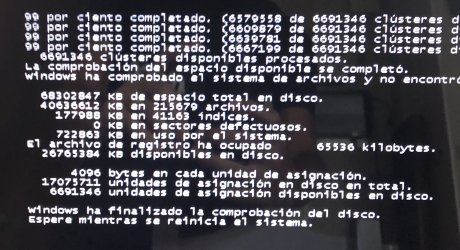
I ran chkdsk and this is the output: no errors.
 

Attachments

  • chkdsk.jpg
    chkdsk.jpg
    591.4 KB · Views: 0

My Computer My Computer

At a glance

Windows 7 Home Premium x64 SP1Intel Core i7-720QMKingston 8Gb PC3-10600 DDR3 SDRAM SO-DIMM (2 ...nVIDIA GeForce GTX 260M (G92-890)
Computer type
Laptop
Computer Manufacturer/Model Number
Alienware M15X
OS
Windows 7 Home Premium x64 SP1
CPU
Intel Core i7-720QM
Motherboard
Alienware Intel PM55 (IbexPeak-M)
Memory
Kingston 8Gb PC3-10600 DDR3 SDRAM SO-DIMM (2 x 4Gb)
Graphics Card(s)
nVIDIA GeForce GTX 260M (G92-890)
Hard Drives
SSD 240Gb (WDS240G2G0A-00JH30)
Antivirus
Microsoft Security Essentials
Browser
Edge
I'm far from being an expert in interpreting the CheckSUR. log. However, the 15 errors seem to be from running DISM and SURT. The only thing I could find on this is here-

Winners Map Value Error after running DISM - Microsoft Community

I fail to see how they relate to your memory problem.

The 1457 Missing Component keys are all over the place. Some seem to be related to .net framework, especially the msil_system ones. Every one of them has the 0x0 bug check code but I don't see a stop code. This is all complicated because you're not seeing any problems with SFC or Chkdsk. I'm certainly not qualified to interpret what it's saying.

Would you provide a new .nfo file?
 

My Computer My Computer

At a glance

Windows 7 Pro SP1 64 bit8 GB
Computer type
Laptop
Computer Manufacturer/Model Number
Dell M6500 Precision Work Station
OS
Windows 7 Pro SP1 64 bit
Memory
8 GB
Screen Resolution
1920x
Internet Speed
30 Mbps
Antivirus
Norton Security
Browser
IE 11
Hi wither 2,
DISM does not seem to work on my system.
I generated a new NFO, and when I closed msinfo32, I got another BSOD. This time 0x4E PFN_LIST_CORRUPT (by ntoskrnl.exe). Strange one...
 

Attachments

My Computer My Computer

At a glance

Windows 7 Home Premium x64 SP1Intel Core i7-720QMKingston 8Gb PC3-10600 DDR3 SDRAM SO-DIMM (2 ...nVIDIA GeForce GTX 260M (G92-890)
Computer type
Laptop
Computer Manufacturer/Model Number
Alienware M15X
OS
Windows 7 Home Premium x64 SP1
CPU
Intel Core i7-720QM
Motherboard
Alienware Intel PM55 (IbexPeak-M)
Memory
Kingston 8Gb PC3-10600 DDR3 SDRAM SO-DIMM (2 x 4Gb)
Graphics Card(s)
nVIDIA GeForce GTX 260M (G92-890)
Hard Drives
SSD 240Gb (WDS240G2G0A-00JH30)
Antivirus
Microsoft Security Essentials
Browser
Edge
Hi,
Finally, I did a Repair Install with this image: "W7SP1_HOMEPREMIUM.ISO" that I downloaded specially for Alienware.

I'm running sfc /scannow, because Windows Update is not working...
Attached new CBS.log
 

My Computer My Computer

At a glance

Windows 7 Home Premium x64 SP1Intel Core i7-720QMKingston 8Gb PC3-10600 DDR3 SDRAM SO-DIMM (2 ...nVIDIA GeForce GTX 260M (G92-890)
Computer type
Laptop
Computer Manufacturer/Model Number
Alienware M15X
OS
Windows 7 Home Premium x64 SP1
CPU
Intel Core i7-720QM
Motherboard
Alienware Intel PM55 (IbexPeak-M)
Memory
Kingston 8Gb PC3-10600 DDR3 SDRAM SO-DIMM (2 x 4Gb)
Graphics Card(s)
nVIDIA GeForce GTX 260M (G92-890)
Hard Drives
SSD 240Gb (WDS240G2G0A-00JH30)
Antivirus
Microsoft Security Essentials
Browser
Edge
I also ran SURT:

Code:
Checking System Update Readiness.
Binary Version 6.1.7601.22471
Package Version 25.0
2021-02-19 11:25
Checking Windows Servicing Packages
Checking Package Manifests and Catalogs
Checking Package Watchlist
Checking Component Watchlist
Checking Packages
Checking Component Store
Summary:
Seconds executed: 135
 No errors detected
 

My Computer My Computer

At a glance

Windows 7 Home Premium x64 SP1Intel Core i7-720QMKingston 8Gb PC3-10600 DDR3 SDRAM SO-DIMM (2 ...nVIDIA GeForce GTX 260M (G92-890)
Computer type
Laptop
Computer Manufacturer/Model Number
Alienware M15X
OS
Windows 7 Home Premium x64 SP1
CPU
Intel Core i7-720QM
Motherboard
Alienware Intel PM55 (IbexPeak-M)
Memory
Kingston 8Gb PC3-10600 DDR3 SDRAM SO-DIMM (2 x 4Gb)
Graphics Card(s)
nVIDIA GeForce GTX 260M (G92-890)
Hard Drives
SSD 240Gb (WDS240G2G0A-00JH30)
Antivirus
Microsoft Security Essentials
Browser
Edge
This is in the log file- Verify and Repair Transaction completed. All files and registry keys listed in this transaction have been successfully repaired

I'm assuming the blue screen you got was before you did the repair.
 

My Computer My Computer

At a glance

Windows 7 Pro SP1 64 bit8 GB
Computer type
Laptop
Computer Manufacturer/Model Number
Dell M6500 Precision Work Station
OS
Windows 7 Pro SP1 64 bit
Memory
8 GB
Screen Resolution
1920x
Internet Speed
30 Mbps
Antivirus
Norton Security
Browser
IE 11
Well whither 2, it is. But, after that and trying Windows Update, SFC, and SURT again, I got another MEMORY_MANAGEMENT BSOD.
There is no way of making Windows Update to work.
I ran out of ideas...
 

My Computer My Computer

At a glance

Windows 7 Home Premium x64 SP1Intel Core i7-720QMKingston 8Gb PC3-10600 DDR3 SDRAM SO-DIMM (2 ...nVIDIA GeForce GTX 260M (G92-890)
Computer type
Laptop
Computer Manufacturer/Model Number
Alienware M15X
OS
Windows 7 Home Premium x64 SP1
CPU
Intel Core i7-720QM
Motherboard
Alienware Intel PM55 (IbexPeak-M)
Memory
Kingston 8Gb PC3-10600 DDR3 SDRAM SO-DIMM (2 x 4Gb)
Graphics Card(s)
nVIDIA GeForce GTX 260M (G92-890)
Hard Drives
SSD 240Gb (WDS240G2G0A-00JH30)
Antivirus
Microsoft Security Essentials
Browser
Edge
Go to Control Panel and select Administrative Tools. Look for Memory Diagnostic Tool. Run it. Any problems found?
 

My Computer My Computer

At a glance

Windows 7 Pro SP1 64 bit8 GB
Computer type
Laptop
Computer Manufacturer/Model Number
Dell M6500 Precision Work Station
OS
Windows 7 Pro SP1 64 bit
Memory
8 GB
Screen Resolution
1920x
Internet Speed
30 Mbps
Antivirus
Norton Security
Browser
IE 11
Hi wither 2,
I did that yesterday. It finished without errors.
 

My Computer My Computer

At a glance

Windows 7 Home Premium x64 SP1Intel Core i7-720QMKingston 8Gb PC3-10600 DDR3 SDRAM SO-DIMM (2 ...nVIDIA GeForce GTX 260M (G92-890)
Computer type
Laptop
Computer Manufacturer/Model Number
Alienware M15X
OS
Windows 7 Home Premium x64 SP1
CPU
Intel Core i7-720QM
Motherboard
Alienware Intel PM55 (IbexPeak-M)
Memory
Kingston 8Gb PC3-10600 DDR3 SDRAM SO-DIMM (2 x 4Gb)
Graphics Card(s)
nVIDIA GeForce GTX 260M (G92-890)
Hard Drives
SSD 240Gb (WDS240G2G0A-00JH30)
Antivirus
Microsoft Security Essentials
Browser
Edge
Have you run- memtest 86+? If not, I suggest running it. As I understand it, it can take a while. This is in lieu of doing something like pulling your RAM sticks one at a time to see if the problem goes away.
 

My Computer My Computer

At a glance

Windows 7 Pro SP1 64 bit8 GB
Computer type
Laptop
Computer Manufacturer/Model Number
Dell M6500 Precision Work Station
OS
Windows 7 Pro SP1 64 bit
Memory
8 GB
Screen Resolution
1920x
Internet Speed
30 Mbps
Antivirus
Norton Security
Browser
IE 11
Hi wither 2,
I have formatted C:, reinstalled Windows, updated... but still have this strange BSOD's with different codes.
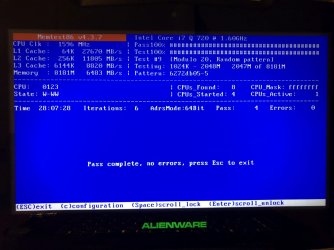
And now I'm running Memtest86 for 28 hours now, with zero errors. (Screenshot attached)
 

Attachments

  • memtest86.JPG
    memtest86.JPG
    145.3 KB · Views: 0

My Computer My Computer

At a glance

Windows 7 Home Premium x64 SP1Intel Core i7-720QMKingston 8Gb PC3-10600 DDR3 SDRAM SO-DIMM (2 ...nVIDIA GeForce GTX 260M (G92-890)
Computer type
Laptop
Computer Manufacturer/Model Number
Alienware M15X
OS
Windows 7 Home Premium x64 SP1
CPU
Intel Core i7-720QM
Motherboard
Alienware Intel PM55 (IbexPeak-M)
Memory
Kingston 8Gb PC3-10600 DDR3 SDRAM SO-DIMM (2 x 4Gb)
Graphics Card(s)
nVIDIA GeForce GTX 260M (G92-890)
Hard Drives
SSD 240Gb (WDS240G2G0A-00JH30)
Antivirus
Microsoft Security Essentials
Browser
Edge
Would you go to your display adapter in device manager, either roll back the driver or disable it? The first is preferrable.
 

My Computer My Computer

At a glance

Windows 7 Pro SP1 64 bit8 GB
Computer type
Laptop
Computer Manufacturer/Model Number
Dell M6500 Precision Work Station
OS
Windows 7 Pro SP1 64 bit
Memory
8 GB
Screen Resolution
1920x
Internet Speed
30 Mbps
Antivirus
Norton Security
Browser
IE 11
The "rollback driver" option was greyed out, so I disabled it.
Shoud I use the notebook and simply wait until the next BSOD (if it happens)? I had 5 BSOD's in the last 2 days since I rebooted from Memtest86.
 

My Computer My Computer

At a glance

Windows 7 Home Premium x64 SP1Intel Core i7-720QMKingston 8Gb PC3-10600 DDR3 SDRAM SO-DIMM (2 ...nVIDIA GeForce GTX 260M (G92-890)
Computer type
Laptop
Computer Manufacturer/Model Number
Alienware M15X
OS
Windows 7 Home Premium x64 SP1
CPU
Intel Core i7-720QM
Motherboard
Alienware Intel PM55 (IbexPeak-M)
Memory
Kingston 8Gb PC3-10600 DDR3 SDRAM SO-DIMM (2 x 4Gb)
Graphics Card(s)
nVIDIA GeForce GTX 260M (G92-890)
Hard Drives
SSD 240Gb (WDS240G2G0A-00JH30)
Antivirus
Microsoft Security Essentials
Browser
Edge
Yes. The intent is to see if the driver is causing the BSODs.
 

My Computer My Computer

At a glance

Windows 7 Pro SP1 64 bit8 GB
Computer type
Laptop
Computer Manufacturer/Model Number
Dell M6500 Precision Work Station
OS
Windows 7 Pro SP1 64 bit
Memory
8 GB
Screen Resolution
1920x
Internet Speed
30 Mbps
Antivirus
Norton Security
Browser
IE 11
Well, I just had another BSOD (this time IRQL_NOT_LESS_OR_EQUAL) with the display driver disabled... (and I was not using the computer, it was idle, with only one Windows Explorer opened)

EDIT: With your course of action in mind, I've disabled half of CPU cores from MsConfig and now it's working well. We'll see tomorrow...
 
Last edited:

My Computer My Computer

At a glance

Windows 7 Home Premium x64 SP1Intel Core i7-720QMKingston 8Gb PC3-10600 DDR3 SDRAM SO-DIMM (2 ...nVIDIA GeForce GTX 260M (G92-890)
Computer type
Laptop
Computer Manufacturer/Model Number
Alienware M15X
OS
Windows 7 Home Premium x64 SP1
CPU
Intel Core i7-720QM
Motherboard
Alienware Intel PM55 (IbexPeak-M)
Memory
Kingston 8Gb PC3-10600 DDR3 SDRAM SO-DIMM (2 x 4Gb)
Graphics Card(s)
nVIDIA GeForce GTX 260M (G92-890)
Hard Drives
SSD 240Gb (WDS240G2G0A-00JH30)
Antivirus
Microsoft Security Essentials
Browser
Edge
Back
Top