Thanks for doing everything I told you to do. Looking at your uploads and at this point it looks to be just that, a false positive. Another tool worth mentioning is TDsskiller. But I doubt it will find anything.
Alright cool thanks!
So the next time I either get a false positive or an actual genuine one, I should run those five in that order and then the usual anti-virus and anti-malware programs I have to clean the rest up, yeah?
Just to let you know, Autoruns produces a log file too. Go to File and save the ARN file. In Autoruns you can in fact right click and entry and scan it over at Virus Total. But you have to accept the terms first. Once you do that you can scan entries.
Oh yeah there is too! I've attached a copy for your viewing pleasures...looks like there must be some false positives, because even Kaspersky stuff are being flagged....
I see a lot of Kaspersky crap all over your computer including a toolbar in IE and several modules in Firefox. I'm not a fan of Russian made products, but you might want to have a look at Bitdefender Free. This is a Romanian made anti-virus. I have put it on all the computers I work with and on my family's computers. It's light weight and cloud-based. Cloud-based is good so that any new virus definition out there can be used right away to minimize polymorphic attacks.
Free Antivirus Software - Download Bitdefender Antivirus Free Also, Bitdefender Free messes with debugging which is good in terms of anti-virus protection, but not so good with game hacks and what have you. So there you go.
Is it because you're paranoid about them *possibly* spying on you? I've read a few articles on this when the USA decided to ban Kaspersky products all across their military computers and devices....dunno what they're using now, probably a USA company designed anti-virus and malware program....
Yeah, I once had a look at BitDefender a while back when I was choosing which brand to go with, according to various reviews and tests, Kaspersky top the most and so I naturally went with them.....there was one test I did myself - the eicar one, where I remember reading, if an antivirus program doesn't stop you right before saving the file, you should seek a new one; well it saved but Kaspersky immediately took action and quarrantined the file; that's probably not as proactive or fast enough as denying you the ability to save the file onto the drive though - basically stopping it at the roots......I've been meaning to get on their forums and query about that but kinda forgot about it.....until now.....
But yeah, I used to run a Linux build - Puppy Linux was the OS I believe and used BitDefender on that, because at the time there was no other antivirus programs for Linux, besides ClamAV which I was a bit skeptical on as I've not heard those guys before.....
I stopped running Linux after much frustration of using it as a daily beater and the fact that I couldn't play any (decent) games on it save for native built linux games...

So if I was running a program or game and wanted to debug it to find out causes for problematic issues, BitDefender would give me issues, huh? hmmm...
NoScrip was great in its day, but with so many websites using JS, it's become a burden. I stopped using it my self and just depend on Sandboxie. I see you use Sandboxie yourself, so if NoScript is too cumbersome you can probably uninstall it.
Yeah fair enough I guess - it does take a bit of work to find which scripts you need for the website to be functional and which you don't need that are junk, ads or whatever that's only there to slow your page loads down - I once seen a page where there was an endless amount of scripts and the scripts needed to function were so obscure that I had to temporarily enable each one to see if a certain function worked or not...eventually I gave up because I was overwhelmed by the amount of scripts to enable and disable.... hahaha

But the thing is I run Opera with Sandboxie rather than Firefox, because I use that as my main browser.....which itself isn't sandboxed as I would run opera if I had to visit a dodgy looking url link i guess...also the fact that firefox shares the same tabs I use on the unsandbox browser, so say if I was logged into my gmail account on my main browser, if I were to run a separate instance of firefox under sandboxie, it would pick that up and load that up too, granting possibly the hackers of reading my gmails....unless there's a way to isolate this in which case I could just use firefox alone altogether, sandboxed or not....?

My opinion about Faronics anti-executable is that it's pretty decent. I have about 500 MB of malware and I threw several viruses at it including ransomware and Anti-executable alerted me as to whether I should run it or not.
Nice, so it's like a program guard similar to how Online Armor used to function, minus the firewall aspect of it, and Kaspersky's Trusted Applications Mode - which isn't really all that great because it doesn't seem to remember the ones I explicitly let through and which I explicitly not let through...?
Shadow Defender is probably even better. If there is a virus on your computer, all you have to do is reboot and it's gone. I also tossed a bunch of malware at it and nothing stuck. The only issue with a virtualized OS is that you have to create several folder exclusions. Like the downloads folder, pictures folder, videos folder, music folder, even the recycle bin and your browser app data path. If you need to install a program or update a program, you need to turn off Shadow Defender and reboot not once but twice. I found this to be true with my testing.
Hmm...yeah having exclusions would reduce the protection, because what if a virus or malware got saved or stuck in those excluded zones?
To be honest, if you want total virus and security protection while surfing the net, you might want to check out Qubes.
Qubes OS: A reasonably secure operating system
Oh is there another OS besides Linux, OSX and Windows, that's more virus/malware proof than all three combined?!
Edit-
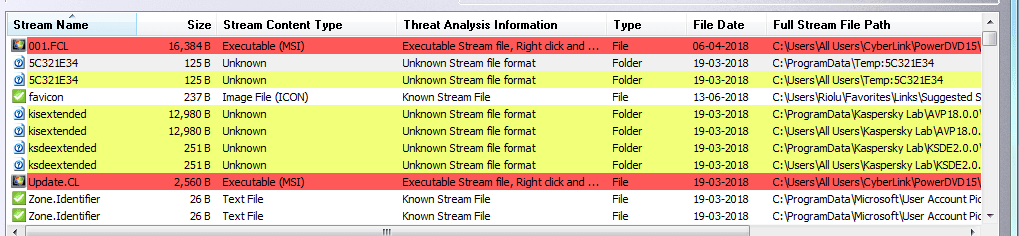
Oh! I wouldn't worry about those multiple streams you found with Stream Armor. False positives more than likely. And like I said, they are a PITA to remove. I have found a tool to remove such things, but it too failed. Basically, consider Stream Armor as a tripwire that lets you know you've been compromised in which case you pull out your clone and clone your OS back. You do clone the machine every once in a while?
erm......no I don't really clone my machine once in a while.....or ever....I just move/copy stuff I wanna keep onto offline archival backup RAID1 system drives...is that enough...? I should probably setup a home server where I host these archival backups (of course keeping the originals offline still) but in read only so that no virus or malware can attach themselves to these accessible files and folders...so that I don't have to keep plugging them in if I wanna grab something out which may lead to possible infection since it'll be a direct connection to the drives themselves...



 a msata adapter as well as I have no other computer who uses that connecter type....
 ��������