Possible solution(s) to my RAM problems?

In the screenshot you posted of Performance tab, I noticed the "Up Time" is ~3.5 days. I've never had the misfortune of encountering anything like this, but sounds a lot like a memory leak. I'd suggest restarting (no hibernate/standby/etc) and monitoring memory usage regularly until it gets up there again. You could monitor manually, but IMO you should look for a way to automate the monitoring and log to file. This should be possible with built-in tools*, but there are probably 3rd party utilities as well.

Once you get back into the range of 80%, close programs one-by-one, wait a minute, and see if the memory usage drops. Repeat with any non-MS services.

If that doesn't bear fruit... IDK. Wikipedia suggests a memory leak can be caused by device drivers. Are all your drivers up to date? Do you use any no-name or legacy hardware with old or otherwise suspect drivers?

* If nothing else, run this in PowerShell (and leave it running until usage gets high):

Code:
Get-Counter -Continuous -SampleInterval 300 '\Memory\% Committed Bytes In Use' >>~/Documents/memory_log.txt
Disclaimer: That's probably not the 'best practice' way of redirecting output in Powershell... I'm a Linux guy with limited PS experience.
 

My Computer

Computer type
PC/Desktop
OS
Windows 7 Professional x64, Arch Linux
You do realize, don't you, that there are a G'zillion Services and TSR's running in the background that you never see. Right?

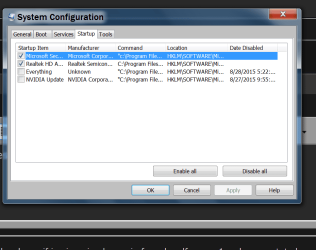
In task manager, have you looked under the Startup tab, to see what programs are starting up when you boot up your PC? You can right click and Disable the ones you don't need starting.

A total and correct setup of Windows takes a while, because there are so many things that can effect the performance of any PC running Windows xx. I do this for a living, so I know of which I speak. Right out of the box, MS Windows is a real DOG!,
with all its SAFE Defaults, etc.

Good Luck!
TechnoMage :cool:
 

My Computer

Computer type
PC/Desktop
Computer Manufacturer/Model Number
Various
OS
Win 7 Pro, SP1, x86, Win-11/Pro/64
CPU
AMD
Motherboard
Various
Memory
8GB Crucial
Graphics Card(s)
Various
Sound Card
OnBoard
Monitor(s) Displays
Acer 21.5"
Hard Drives
Crucial SSD, 500 GB
PSU
OEM
Case
SFF Slim Line Case
Cooling
OEM
Keyboard
eMachines
Mouse
Logitech Wireless
Internet Speed
varies
Antivirus
Windows Defender/Super Anti-Spyware
Browser
Firefox
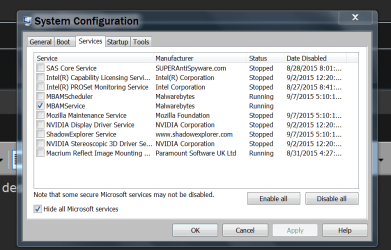
Of course one can do as one pleases with one's computer. These pictures show how I run my systems.


msconfig SERVECES.PNG

msconfig STARTUP.PNG
 

My Computer

Computer type
PC/Desktop
Computer Manufacturer/Model Number
Home made Desktop
OS
Windows 10 Pro. 64/ version 1709 Windows 7 Pro/64
CPU
Intel i7-6800K @ 4.3
Motherboard
ASUS X-99 Deluxe II
Memory
Corsair Platinum 16 gig @2400
Graphics Card(s)
EVGA GTX 1070 OC
Monitor(s) Displays
Asus 27" LED LCD/VE278Q
Screen Resolution
1920-1080 or 1280-720 HDMI
Hard Drives
INTEL SSD 730-240 Gb Sata 3.0/
PSU
EVGA Platium 1200W
Case
Phanteks Luxe Tempered Glass 8 fans/ one radiator
Cooling
XSPC/ Water Cooled CPU
Keyboard
Das 4 Professional
Mouse
Logitech M705/MX Anywhere 2-S
Internet Speed
100 mbits
Antivirus
Microsoft Security Essentials/ Malwarebytes Premium 3.0/ SAS
Browser
I.E. 11 default/Firefox/ ISP Time Warner Cable/Spectrum
Other Info
LG BluRay Burner/
Sound system-KLipsch-THX/
Icy Dock ssd Hot Swap bays.
Hi,
You can also use Resource monitor to see if any M$ services like svchost.exe is acting up
Click Start and type that in the search box
Then you should open to the Overview section on the top left and expand all entries to see what is really going on.
 

My Computer

Computer type
PC/Desktop
Computer Manufacturer/Model Number
Custom assembled by me :}
OS
Win-7-Pro64bit 7-H-Prem-64bit
CPU
i7-5930K 2nd i9-9940x both water blocked VRM's too
Motherboard
ASUS SABERTOOTH X99 2nd ASUS x299 Apex
Memory
Trident-z 3200C14 2nd Trident-z 3600C16
Graphics Card(s)
EVGA 1080ti ftw3 2nd Titan Xp both water blocked
Sound Card
Built-in Realtek
Monitor(s) Displays
1-AOC G2460PG 24"G-Sync 144Hz/ 2nd 1-ASUS VG248QE 24" 144Hz
Screen Resolution
1920 x 1080 144Hz
Hard Drives
2-Samsung M.2 Evo & Evo Plus
2-Samsung 850 EVO 500GB SSD's/ 3-2.5 W.D. Black 1tb-&3-1tb/3-3.5 WD Black 1tb hdd's
PSU
EVGA SuperNOVA 1000-P2 2nd 1200-P2
Case
2-Corsair Obsidian Series 450D Black ATX Mid Tower
Cooling
Custom water loops
Keyboard
Logitech G710+/ 2nd Logitech G910
Mouse
2-RedDragon M901 Perdition 16400 dpi Gaming mouse = wired
Internet Speed
Comcast Ping 19ms 89.31mbps download speed 6.12mbps upload
Antivirus
Malwarebytes Pro/ Superantispyware Pro
Browser
FireFox & Pale moon
Other Info
2nd ASUS X299 Apex/Intel i9-9940x with Custom water loop/7H-Prem-x64/Corsair 450D case/Ram Trident-z 3600C16 4x8gb / Samsung970Evo plus 500gb SSD/Dual ssd EZ swap evo/PSU EVGA SuperNova 1200w-P2 80+Platinum/GPU Titan Xp /8-ML-140 on push-pull on 2-280GTX rads
Back
Top